

Back in 2021, Instagram launched a feature called “Joint Post,” also known as a collaboration post. If you’ve ever wondered how to do a joint post on Instagram to boost engagement and reach, this feature makes it easier than ever.
Instagram Collabs are available for both public and private accounts, although private profiles can only invite collaborators who already follow them. Since its introduction, joint posts have helped businesses, creators, and everyday users increase engagement and connect with wider audiences.
Instagram’s collaboration posts are not just limited to brands or creators; friends (regular users) can also use it to share their moments in one post on their feeds.
Buy an Established Instagram Account
Skip starting from zero. Browse Instagram/TikTok accounts with audiences across many niches.
See Available AccountsBy allowing two accounts to co-author a single post or Reel, Instagram collab posts automatically appear on both profiles, combining likes, comments, and views.
You may have already seen a joint post on your Instagram feed or even in the Reel section, but what is this feature? How does it work? How to create such a post, and how to use it to get the most out of it?
Here, we’ll walk you through everything you need to know about creating a successful Instagram joint post, from sending and accepting collab invitations to maximizing engagement, measuring results, and using proven content ideas.
What is an Instagram Collab (Joint Post)?
An Instagram Collab, also referred to as a collab post on Instagram, is a feature that promotes the co-creation of a post by two different accounts on Instagram.
Once the post is published, both profiles benefit from this collab post, enabling the owners of accounts to reach a wider audience without having to duplicate their postings, as their collab post will appear on their profiles.
Collab posts are flexible: you can use them for Reels, carousels, or standard feed posts. A collab post can be made when the actual poster sends a collab invitation to another account. Once accepted, the post appears automatically on both accounts, with the same engagement insights.
This feature isn’t limited to influencers, businesses, but also friends and hobbyists, as Instagram Collabs lets anyone co-create an Instagram post, tag their collaborators, and even increase their reach with shared audiences.
Whether it’s a tutorial, announcement, giveaway, or an entertaining Reel, co-writing an Instagram post using Instagram joint posts has never been easier.
Why Joint Posts Boost Views on Instagram?
Instagram Collab posts, or joint posts, are more than just a fun way to share content; they are a powerful strategy to increase engagement, reach, and overall visibility.

Here’s why collaborating on Instagram can help your posts get more views:
- Access to a Larger Audience: By co-authoring a post, your content appears on both your profile and your collaborator’s profile. This exposes your post to followers who may not have discovered you yet, and that’s one of the most important benefits of this feature.
- Combined Engagement Signals: Likes, comments, and shares from both accounts are aggregated on a single post. The engagement metrics are quickly detected by the Instagram algorithm, which enhances the prospects of displaying that post in more users’ feeds, Explore, or Reels.
- Increased Discoverability: Using your collab reels or feed posts reaches your content to various audience groups. This has a positive ripple effect as the followers of your collaborators can like, save, and share your content.
- Social Proof and Credibility: The fact that two accounts are contributing to a post establishes credibility with the audience. People are more likely to watch, interact, or follow a video that has a known partner.
- Effective Content Strategy: Instead of having to publish posts on separate accounts, a joint post is a great way to increase reach with less time invested.
Instagram is constantly evolving, so staying updated with the latest features is key. Learn more in our article Top Instagram Updates in 2025: A Simple Guide for Social Media Managers to keep your joint posts ahead of the curve.
When to Use a Joint Post vs. Other Collaboration Types on Instagram?
Instagram provides several collaboration options. Not all collaboration options on Instagram are, however, the same. Knowing the distinction between a joint posting (Instagram Collab), as compared to other means of collaboration such as tagging, can assist in making the right choice.
Instagram Joint Posts (Collabs)
- Co-authored content: A joint post allows two accounts to co-author a single feed post or Reel, which then appears on both profiles.
- Shared engagement: Likes, comments, and views are combined on one post, giving both accounts enhanced visibility and stronger collab post engagement.
- When to use: Ideal for collaborations where both creators contribute content or when you want to maximize reach to both audiences. Examples: co-hosted tutorials, dual product launches, or giveaway announcements.
Tagging Another Account
- Simple mention: Tagging involves adding another account to a post without giving them co-author status. The post only counts as yours, and engagement metrics do not transfer to the tagged account.
- Limited reach: The posted content is available to the user tag, who can see it in notifications but not on their feed.
- When to use: When posting a shout-out, reference, or shout-out with acknowledgment of collaboration is necessary. e.g., when tagging a friend in a photograph, posting a reference to a brand, citing a location, etc.
Key Differences Between Collab Posts and Tagging
| Feature | Instagram Collab (Joint Post) | Tagging Another Account |
| Appears on both profiles | Yes. | No. |
| Engagement shared | Yes (likes, comments, views). | No. |
| Ideal for | Equal contributors, co-created content. | Mentions, credits, references. |
| Impact on reach | High; both audiences see the post. | Moderate; only notifications or mentions. |
Step-by-Step: How to Create a Joint Post on Instagram (feed and Reels)
Creating a joint post on Instagram, also known as an Instagram Collab, is simpler than you think, whether it’s a feed post or a Reel. This is how you can co-create a post with another account to increase engagement.
Step 1: Create Your Post or Reel
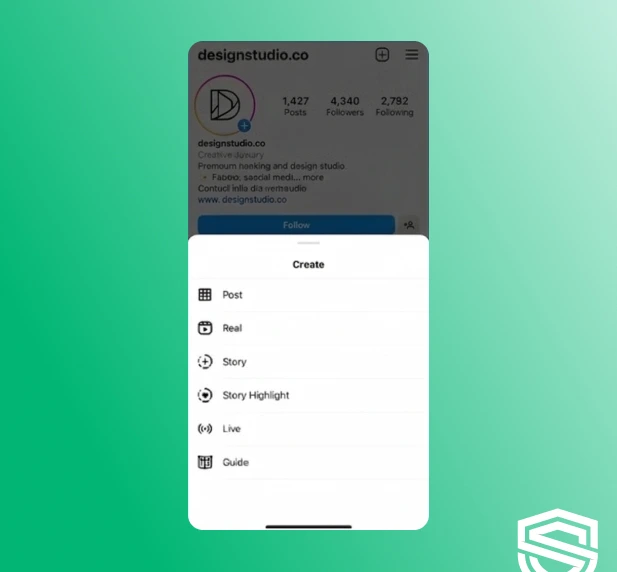
- Open Instagram, go to your profile, and tap on the (+) icon in the top left corner (above your profile picture.
- Choose the type of your content: Reel or Post.
- Adjust necessary changes, add a caption, use hashtags, or location.
Step 2: Tag Your Collaborator
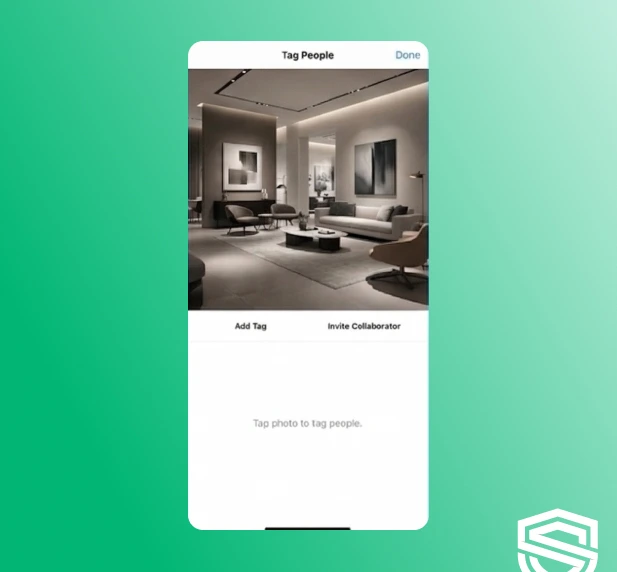
- Before sharing your post, tap on the “Tag people” option.
- On the “Tag People” screen, tap “Invite Collaborators.”
- Search for the account you want to collaborate with and select it.
- Instagram will send a collab invitation to that account.
Step 3: Wait for the Collaborator to Accept
- The collaborator will receive a notification to accept the joint post invite.
- Once they accept, the post will automatically appear on both accounts’ feeds.
- All likes, comments, and views will be shared between both accounts, boosting engagement.
Step 4: Optimize for Feed or Reels
- Feed posts: Use eye-catching images, carousel posts, and descriptive captions.
- Reels: Keep it short, entertaining, and relevant; use trending audio or effects to increase discoverability.
- Make sure your collaborator tags or mentions relevant accounts to extend reach.
Step 5: Share and Promote
- After publishing, encourage both accounts to share the post in Stories for extra visibility.
- Pin the post on your profile if it’s a key collaboration or campaign.
- Monitor interactions and respond to comments on the post together so that interactions can remain high.
How to Accept an Instagram Collab Post Invitation
Once someone invites you to collaborate on a post or Reel, accepting the invitation is simple, but it’s an essential step to ensure your Instagram Collab appears on both profiles and shares engagement.
Here’s a step-by-step guide:
Step 1: Check Your Notifications
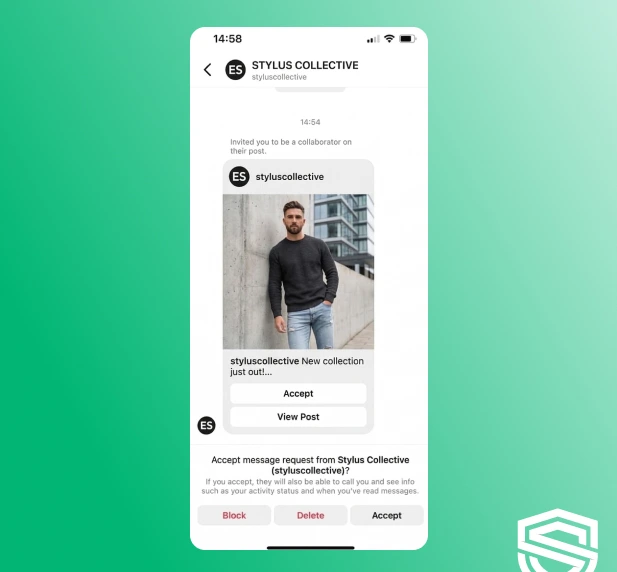
When a collaborator invites you to collaborate on a post, the invitation notification appears in your Activity feed. The notification appears in this way: “[Username] invited you to collaborate on a post.”
If the invite came via direct message, you can look for it by accessing the post draft. Make sure that your notifications are checked on a timely basis to avoid missing a chance to work together.
Step 2: Review the Post
Tap the notification to preview the post or Reel. Take a moment to ensure that the content, caption, tags, and hashtags align with your personal style or brand.
Confirm that this is a post you want to co-author, because once you accept the invitation, it will appear on both your profile and the collaborator’s profile.
Step 3: Accept the Collaboration Invite
- Tap “Accept” on the invitation.
- Once accepted, the post automatically shows on your Instagram profile alongside the original poster’s profile.
- All engagement (likes, comments, and views) now counts toward both accounts.
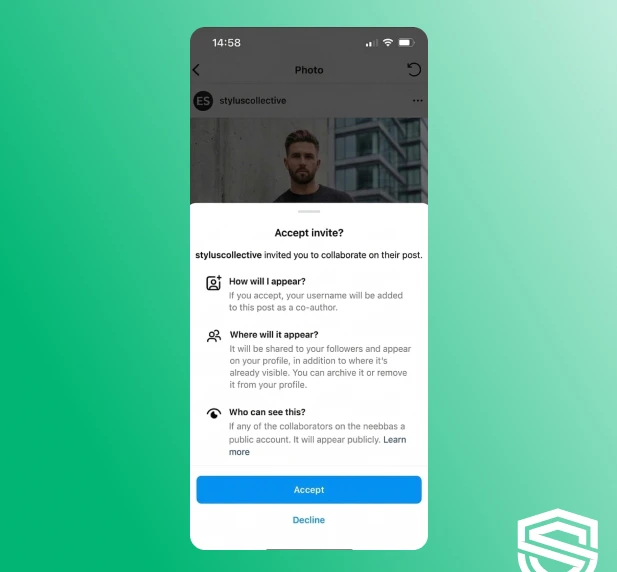
Step 4: Optimize Engagement
After the post is live, share it to your Stories to increase its visibility. Encourage your audience to interact by liking, commenting, and sharing, as this helps expand the post’s reach.
To maintain high engagement, respond to comments alongside your collaborator, creating a dynamic and interactive experience for viewers.
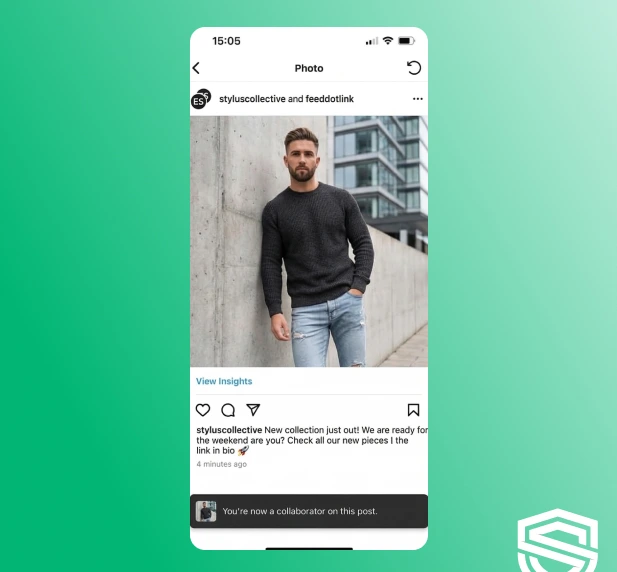
Pro Tips for Accepting Collabs
- Respond promptly: The sooner you accept, the quicker the post appears on both feeds.
- Coordinate timing: Align posting times with your collaborator for maximum impact.
- Double-check tags and mentions: Ensure all accounts and hashtags are correct before publishing.
Best 7 Tips for Running a Successful Instagram Collaboration
An effective Instagram collaboration is more than a single post on Instagram. For a collaboration on Instagram to yield result-oriented, high engagement, reach, and growth, a common goal, content, and implementation are necessary.
If you follow the following tips, your collaboration Instagram post will be the best that it can be:
Choose the Right Collaborator
Work with accounts that share a similar audience, niche, or content style. A smaller but highly relevant collaborator often delivers better results than a larger account with an unrelated audience.
Set Clear Goals From the Start
Before publishing the joint posting, it is necessary to consider what success means. Are there goals that are desired, such as wanting more views, followers, sales, or awareness?
Align on Content and Messaging
Make sure both collaborators agree on the post format, caption tone, hashtags, and call-to-action. Consistent messaging makes the collaboration feel authentic and professional rather than forced.
Pick the Right Format
Reels work best when it comes to reach, but carousels are best for saving and commenting. So, choose what is best for your collaboration goal. You can also discuss this with your partner/s on how to make the best choice.
Coordinate Timing and Promotion
The posting should occur when both communities are active, maximizing visibility. Once posted, the responsibility of sharing the post on Stories, as well as engagement, is shared by both parties in the collaboration.
Engage Together
Responding to comments from both accounts signals activity to the Instagram algorithm and keeps the conversation going. Joint engagement often leads to higher visibility and stronger social proof.
Track Results and Learn
Review insights such as reach, engagement, profile visits, and follower growth. Use these learnings to refine future Instagram collaborations and improve performance over time.
Successful Instagram collaborations start long before the post goes live. Reaching out professionally and coordinating efficiently ensures both parties are aligned, content is high-quality, and engagement is maximized. Here’s a step-by-step approach with templates and workflow tips.
How to Reach Out and Coordinate a Joint Post: Templates and Workflow
Step 1: Identify the Right Collaborators
- Look for accounts that share a similar niche, audience, or content style.
- Evaluate engagement rates, not just follower counts, to ensure the collaboration will reach an active audience.
Step 2: Craft a Clear and Professional Outreach Message
When contacting a potential collaborator, clarity and professionalism increase the likelihood of a positive response.
Here’s a template you can use:
Hi [Name], I love your content on [topic/niche] and think our audiences would really benefit from a collaboration. I’d love to co-create a joint Instagram post or Reel with you.
Would you be interested? We can discuss content ideas, posting times, and promotion strategies.
Looking forward to hearing your thoughts!
Step 3: Align on Goals and Content
Before creating the post, discuss:
- The type of content (Reel, carousel, single image)
- Caption style and call-to-action
- Hashtags and tagging strategy
- Posting date and time
This ensures the joint post feels cohesive and reaches both audiences effectively.
Step 4: Set Up a Workflow
A smooth workflow prevents miscommunication and missed deadlines:
- Draft content: One collaborator creates a draft of the post or Reel.
- Collaborator review: The other collaborator checks captions, visuals, and tags.
- Approval: Confirm both parties are happy with the content before posting.
- Schedule or post: Use Instagram’s native tools or third-party scheduling platforms to publish at the agreed time.
- Promote and engage: Share the post to Stories, encourage comments, and respond together to maximize reach.
Step 5: Track and Debrief
After the post is live, review engagement and reach metrics together. Note what worked and what didn’t to improve future collaborations. Documenting this workflow makes your next joint post even more efficient.
To ensure smooth collaboration and avoid common pitfalls, see our detailed guide on How to Invite a Collaborator and Post Together on Instagram for a seamless co-authoring experience.
Best Practices to Maximize Views Using a Joint Post on Instagram
Once your Instagram Collab goes live, there are several optimization techniques that you can use to improve its visibility and viewership. The following best practices will key into visibility, watch time, and distribution-everything crucial to determining Instagram’s algorithmic priority of a video.
- Prioritize Strong Hooks in the First Few Seconds: This means that Reels and carousel posts are about what appears in that opening frame. Add movement, a text overlay, or something visually striking right off the bat to make the user pause their scrolling and eat into that watch time.
- Optimize Captions for Engagement Signals: Immediately, within two lines of the caption, ask a clear question or prompt interaction. Comments, saves, and shares help push joint posts to more feeds and increase overall reach.
- Use Relevant (Not Overloaded) Hashtags: Choose hashtags that are specific to the content and niche, rather than broad or trending-only tags. A focused set of hashtags helps Instagram understand who to show the joint post to.
- Leverage Both Audiences Immediately: Encourage both collaborators to engage with the post within the first hour. Early likes, comments, and shares send strong quality signals to the algorithm and improve distribution.
- Share the Joint Post to Stories: Instead of a simple repost, add context in Stories, such as a teaser, poll, or question sticker. This drives viewers back to the collab post and increases interaction.
- Pin High-Performing Collab Posts: If a joint post performs well, pin it to the top of your profile. This keeps the content visible longer and helps convert profile visitors into followers.
- Optimize Posting Time for Overlap: Post when both audiences are most active, not just your own. Overlapping peak hours can significantly increase initial reach and views.
- Encourage Saves and Shares: Content that provides value, including tips, tutorials, or relatable moments, is more likely to be saved and shared. These actions carry more weight than likes when it comes to long-term visibility.
You can further amplify your collab posts by following our expert advice in Boosting Instagram Posts: Tips for Maximum Engagement to capture more eyes and interactions.
Instagram Collab Ideas to Boost Engagement and ROI
The right collaboration idea can turn a joint post into a high-performing asset that drives engagement, followers, and even sales. These Instagram Collab ideas are designed to work across niches while delivering measurable results.
Co-Created Educational Content
Create a Reel or carousel where both collaborators share expertise on a single topic. Educational content is more likely to be saved and shared, which increases long-term reach and visibility.
- Best for: Coaches, creators, service-based brands.
- ROI impact: Saves, shares, authority building.
Joint Giveaways or Contests
Run a giveaway where users must follow both accounts, like the post, and comment to enter. This approach drives rapid engagement and follower growth for both collaborators.
- Best for: Brands, creators, product launches.
- ROI impact: Follower growth, engagement spikes, email signups.
Before-and-After or Transformation Posts
Show a transformation that involves both collaborators, such as a styling change, content makeover, or results-based outcome. These posts naturally attract attention and comments.
- Best for: Beauty, fitness, design, and marketing niches.
- ROI impact: High views, strong social proof.
Behind-the-Scenes Collaborations
Share behind-the-scenes moments from a project, event, or collaboration. This type of content feels authentic and encourages meaningful engagement.
- Best for: Creators, freelancers, event-based brands.
- ROI impact: Trust-building, deeper audience connection.
Product or Service Bundles
Collaborate on a joint offer, bundle, or limited-time promotion and announce it through a collab post. This is one of the most direct ways to generate revenue from Instagram collaborations.
- Best for: E-commerce, digital products, service providers.
- ROI impact: Conversions, sales, lead generation.
Reactions or Duet-Style Reels
Create a Reel where one collaborator reacts to or builds upon the other’s content. This format works well for trending topics and keeps viewers watching longer.
- Best for: Entertainment, commentary, educational niches.
- ROI impact: Watch time, discoverability, shares.
Community Q&A or Mini-Series
Host a short collab series, answering audience questions or covering a topic across multiple posts or Reels. Series-style content encourages repeat engagement and profiles visits.
- Best for: Educators, consultants, niche creators.
- ROI impact: Retention, authority, follower loyalty.
Scheduling & Tools: How to Plan and Publish Joint Posts Efficiently
Maximizing the impact of your Instagram Collab posts requires more than just creating great content; it’s about planning, timing, and using the right tools to streamline the process.
A well-organized workflow ensures that both collaborators are aligned, posts go live at optimal times, and engagement is maximized.
Plan with a Shared Content Calendar
Start by creating a shared content calendar with your collaborator. Outline post types, captions, hashtags, and deadlines for approvals. Planning prevents last-minute edits and ensures both accounts are ready to publish at the same time, which is critical for boosting reach and engagement.
A well-structured posting schedule ensures that your joint posts go live at the right time and reach the maximum audience. Check out our Social Media Calendar Guide to plan, organize, and coordinate your Instagram content efficiently with your collaborators.
Schedule for Maximum Reach
Joint posts perform best when published during peak activity hours for both audiences. Use Instagram Insights to determine when followers are most active. Align your posting time with these windows to increase early engagement and signal value to the Instagram algorithm.
Use the Right Tools
Several tools make scheduling and collaboration seamless:
Meta Business Suite: Free official tool to schedule feed posts, Reels, and Stories for multiple accounts.
Later: Visual calendar with post previews, hashtag suggestions, and collaborator approval workflows.
Buffer: Simple scheduling with team collaboration features and analytics tracking.
Hootsuite: Advanced platform for managing multiple accounts, engagement monitoring, and automated publishing.
Planoly: Visual Instagram planner that supports draft sharing, hashtag management, and team collaboration.
Preview and Optimize
Before publishing, preview the post or Reel to ensure captions, tags, and hashtags are correct. Use scheduling tools to set reminders for collaborator approvals and double-check visual consistency.
Posting at the right time can make a huge difference in engagement. Discover the optimal posting windows in our guide, Good Times to Post on IG: Maximize Engagement and Reach in 2025 to boost your joint post’s reach.
Once the joint post is live, both collaborators should monitor insights to track reach, engagement, and audience growth. Use this data to refine future joint posts, adjust posting times, and optimize your workflow.
How to Measure the Success of Your Joint Instagram Posts
Creating a joint post on Instagram is only part of the equation. To truly understand its impact and improve future collaborations, you need to track the right metrics and analyze performance. Here’s how to measure the success of your Instagram Collab posts.
Track Engagement Metrics
Engagement is the most immediate indicator of success. Look at:
- Likes and Reactions: Shows how well the post resonates visually and emotionally.
- Comments: Indicates meaningful interaction and audience connection.
- Shares and Saves: High numbers signal valuable content that audiences want to revisit or recommend, which Instagram rewards algorithmically.
Monitor Reach and Impressions
- Reach: The total number of unique accounts that saw your collab post. A high reach indicates the post successfully tapped into both collaborators’ audiences.
- Impressions: The total number of times the post was displayed. Comparing reach vs. impressions helps understand how often users engage multiple times with the content.
Check Follower Growth
- Analyze whether the collab drove new followers for both accounts.
- A successful collab often results in an increase in followers from the other collaborator’s audience.
Evaluate Story and Reel Performance
- If you promoted the joint post through Stories or Reels, monitor views, taps forward/back, and interactions.
- Engagement on these formats helps gauge interest beyond the main feed post.
Use Instagram Insights and Analytics Tools
- Instagram’s native Insights provides most of the metrics above.
- For more detailed tracking, consider tools like Later, Hootsuite, or Buffer to consolidate performance data and compare results across multiple collabs.
Analyze Qualitative Feedback
- Read through comments to identify recurring questions, compliments, or suggestions.
- Pay attention to how the audience reacts to the collaboration itself, as this can guide future joint content ideas.
Troubleshooting Common Issues with Instagram Collab Posts
Even though Instagram Collab posts are simple to use, you may run into issues. Here are the most common problems users face, and how to fix them quickly.
Problem: The “Invite Collaborator” option doesn’t appear
Solution: Both accounts must be public for the collab feature to work. If either account is private, the “Invite collaborator” option will not show. Switch both profiles to public, update the app, and try again.
Problem: The collaborator didn’t receive the invitation
Solution: Ask the collaborator to check their Activity notifications and message requests. If they still can’t find the invite, try removing the collaborator and sending a new invitation before publishing the post.
Problem: The collab invite expired or was ignored
Solution: If the invitation isn’t accepted, the post will remain live only on the original creator’s profile. You can resend the invitation by editing the post and inviting the collaborator again.
Problem: The joint post isn’t showing on both profiles
Solution: The collaborator must accept the invitation for the post to appear on both profiles. Until it’s accepted, the post will only be visible on the original poster’s account.
Problem: You can’t boost or promote a collab post
Solution: Only the original post creator can boost the collab post as an ad. If you’re the collaborator, ask the original poster to handle promotion or grant ad access via Meta Business tools.
Problem: The post performed worse than expected
Solution: Low performance may be due to poor timing, weak content alignment, or mismatched audiences. Try posting at peak hours, using stronger hooks, and collaborating with accounts that share a similar target audience.
Finally, remember that most Instagram Collab issues are related to privacy settings, delayed acceptance, or app updates. Keeping both accounts public, communicating with collaborators, and using the latest app version usually prevents problems altogether.
Conclusion
Learning how to do a joint post on Instagram can be a game-changer for anyone looking to increase views, engagement, and reach without doubling their content effort.
Instagram Collab posts make it easier than ever to co-create content, attract new audiences, and build meaningful partnerships.
The key to success lies in choosing the right collaborators, aligning on content goals, and promoting the post together. When done correctly, Instagram joint posts don’t just boost views; they help you grow faster, build trust, and create content that feels authentic and valuable to both audiences.
Now that you know how Instagram Collabs work and how to use them effectively, it’s time to put these tips into action. Start experimenting with joint posts, track your results, and refine your strategy to turn collaborations into long-term growth opportunities on Instagram.
FAQs
How do you do a joint Instagram post?
To create a joint post on Instagram, start by creating a post or Reel, then tap “Tag people” and select “Invite collaborator.” Choose the account you want to collaborate with and publish the post. Once the collaborator accepts the invite, the post will appear on both profiles with shared likes, comments, and views.
Can anyone do a joint post on Instagram?
Yes, anyone can do a joint post on Instagram as long as both accounts are public and allow collaboration. Instagram Collab posts are not limited to brands or influencers; regular users, friends, and creators can also co-author feed posts or Reels by sending and accepting a collab invitation.
Do collab posts reach more people on Instagram?
Yes, collab posts reach more people because they appear on both collaborators’ profiles and are shown to both audiences. Combined engagement signals (likes, comments, shares, and views) also increase the chances of the post being pushed by the Instagram algorithm to Explore and Reels feeds.
What is the 5-3-1 rule on Instagram?
The 5-3-1 rule on Instagram is an engagement strategy where you like or comment on 5 posts, leave meaningful comments on 3 posts, and follow 1 new account consistently. The goal is to build genuine engagement, increase visibility, and attract organic followers without spammy behavior.
How do you boost a collab post on Instagram?
You can boost a collab post on Instagram by promoting it as an ad from the original creator’s account. Both accounts should also share the post to Stories, engage with comments early, post at optimal times, and use relevant hashtags to improve reach and performance.
Can you remove a collaborator from an Instagram joint post?
Yes, you can remove a collaborator from an Instagram joint post at any time. The original post creator can edit the post, remove the collaborator, and the post will no longer appear on the collaborator’s profile. After removal, engagement will no longer be shared between both accounts.

Lina Stewart
Buy an Established Instagram Account
Skip starting from zero. Browse Instagram/TikTok accounts with audiences across many niches.
See Available AccountsRelated articles
-

How to Clear Instagram Cache on iPhone, Android & Desktop
Instagram can quietly build up a lot of temporary files while you scroll through Reels, watch Stories, save posts, and upload your own content. You may not…
12 min readEmi Daniel
-

How to See Who Reposted Your Instagram Post (2026 Guide)
Someone reposted your Instagram post, but you have no idea who it was. You check notifications, search through your profile, and still cannot find a clear answer. …
18 min read -

How to Reset Instagram Algorithm in 2026
Instagram can start showing too much of the same type of content. Your Explore page may no longer match your interests, Reels may feel repetitive, or suggested…
12 min read