

As a business owner on Instagram, you should know that connecting with other brands on this platform is a great way to reach more target audience and increase your engagement.
Instagram’s “Invite Collaborator” feature is an absolute game-changer for those looking to increase their loyal followers.
Note that if you want to use this tool on Instagram, you should be creative and collaborate with a brand or influencer in the same category as you.
Buy an Established Instagram Account
Skip starting from zero. Browse Instagram/TikTok accounts with audiences across many niches.
See Available AccountsIt doesn’t matter what type of content you want to share as a collab post (Reel, carousel, or photo); you can upload the post with up to five other Instagram accounts.
Besides, it is good to know that there are various reasons for sharing a collab post on Instagram, which we will explain later.
In this article, we will share valuable information about Instagram collaboration posts, including everything you need to know about making and sharing a collab post, and more.
What Is an Instagram Collaboration Post?

Before we go any further, let’s start by explaining what Instagram collaboration posts are. As the name suggests, you share a collab post with another account that will be uploaded to the Instagram feed and can be co-authored and shared by different accounts.
The first person who wants to share such a post on Instagram must invite the collaborators to upload the post together. If they accept the request, the post will be shared on all feeds.
As said before, a collab post can be a Reel, photo, or carousel and will be shared at the same time for all accounts. Note that stories can not be shared as a collab post.
If you think collab posts are just like tagging an account on your post, you are wrong because there are significant differences between them, which we will explain in the next sections.
Another important thing to know about Instagram collab posts is that they can only be made on the mobile application, not the web version.
Finally, it is good to know that Instagram allows users to share a collab post on six accounts, including the original poster and up to five collaborators.
How Instagram Collaboration Posts Work?

Now that you know what Instagram collaboration posts are, it is time to learn some of the features of these posts.
You must know about collab posts that all the account names will show on the header (the username section) of the post, the post will appear on all profile grids, the collab post is shared with all the collaborators’ followers, and finally, all the comments, likes, shares, and views will be shared by all accounts.
One of the essential things to keep in mind about collab posts is that it is true that the post will be shared on all accounts. However, the original poster still owns the post, which means if they delete the post or deactivate their accounts, the post with all the engagement will suddenly disappear.
Finally, note that if the original poster switches their accounts to private, the post will be removed from the collaborator’s accounts, and only the original poster’s followers will see it.
Difference Between Tagging and Collaboration Posts

If you remember, we said that tagging and collab posts are not the same; let’s see the differences.
The major difference is that collab posts will be shared on all collaborator accounts with all their followers, while tagging means only the account followers who tag you will see the post.
Another distinction is that the account that wants to tag or mention you on their post does not need you to accept their requests; however, a collab post requires an invitation that must be accepted.
Moreover, the tagged posts will not be shared on the feed and will only appear in the tagged section.
Benefits of Using Instagram Collab Posts

As mentioned earlier, there are various reasons why you should use the collab post feature on Instagram.
In this section, we will discuss the important benefits of this feature; however, you should know that the main advantage of uploading a collab post on Instagram is more engagement and discoverability.
Makes your account more discoverable
When you share a post with other collaborators on Instagram, you are making your content more accessible, which means more people will notice and find your account quickly.
More engagement
When you share a collab post, all the followers of all collaborator accounts will see it, which means it will receive more likes, comments, views, saves, and shares.
Moreover, the Instagram algorithm will consider this post an important one, so it will show it to more people, which drives more engagement.
You will reach more new and target audiences

As you know, Instagram collab posts will be shared on multiple accounts in the same niche as yours, which means your account will be shown to more target followers.
Therefore, you have a better chance of introducing your brand and products to people interested in what you sell or provide.
It will increase your sales
When you reach more engagement and find more new followers, your sales will increase as well because more users are now accessing your product and service.
What to Consider Before Posting an Instagram Collab Post

Before learning how to invite or accept a collaborator request, it’s good to know the factors you must consider before sharing a collab post to have a better and more effective partnership.
Set clear expectations between all collaborators
One of the most important factors to consider is setting clear expectations before finalizing and posting the post, so all parties can benefit from the partnership.
Note that clarifying and discussing every detail will prevent miscommunication and ensure that everyone gets the best outcome.
Check eligibility and privacy of the collaborator accounts
Note that not all the accounts are eligible for a partnership on Instagram, and there are various factors that you need to check before setting up a collab post.
As you know, private accounts can not participate in a collaboration post, so ensure that your account and collaborator accounts are public and similar to your niche.
Focus on engagement rather than follower count

Another essential thing to consider is that it is better to stay focused on boosting your account’s engagement rather than counting the number of followers you get. When you share a collab post with highly engaged accounts, your account will also gain more followers and engagement.
Ensure to collaborate with brands that align with your brand’s values
As mentioned, you need to collab with accounts similar to your account type and audience’s taste. Moreover, you need to ensure that you collaborate with individuals or brands that align with your standards and values to have an effective partnership.
Note that if you work with a brand or influencer that does not share your values, you are more likely to lose your followers and harm your brand.
Follow Instagram’s rules
The last and important thing you must consider is to follow Instagram’s partnership guidelines, and use proper tags, such as #ad and sponsored, so Instagram won’t remove your content.
How to Use the Collaborator Feature on Instagram
So far, you have learned helpful information about the Instagram collaborator feature; now, it’s time to see how to use it and create a collab post.
Note that creating an Instagram partnership post is like creating a regular post and Reel. Follow the steps below to make a collab post in simple steps:
Step 1- Open the Instagram application on your device.
Step 2- Tap on the + icon and choose the content you want to post.

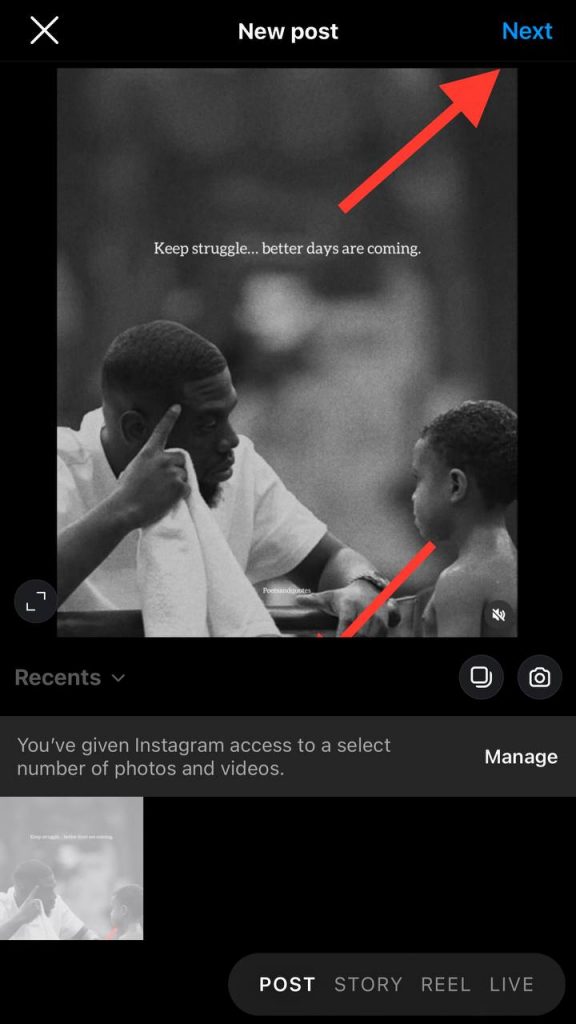
Step 3- Tap “Next” at the top right corner of the screen.
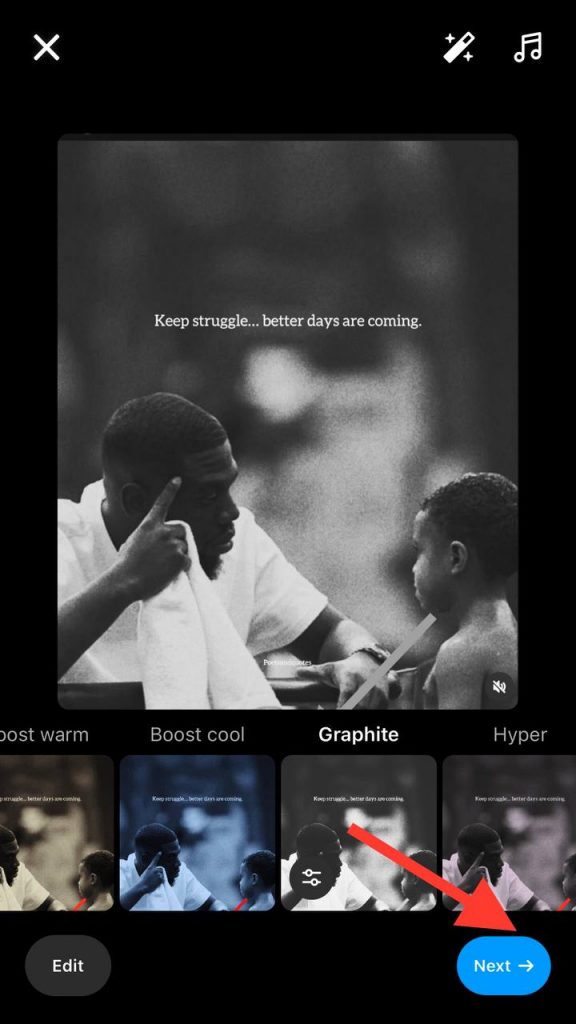
Step 4- Finalize the desired edit and tap on “Next” in the bottom right corner.
Step 5- Choose the “Tag people” option.
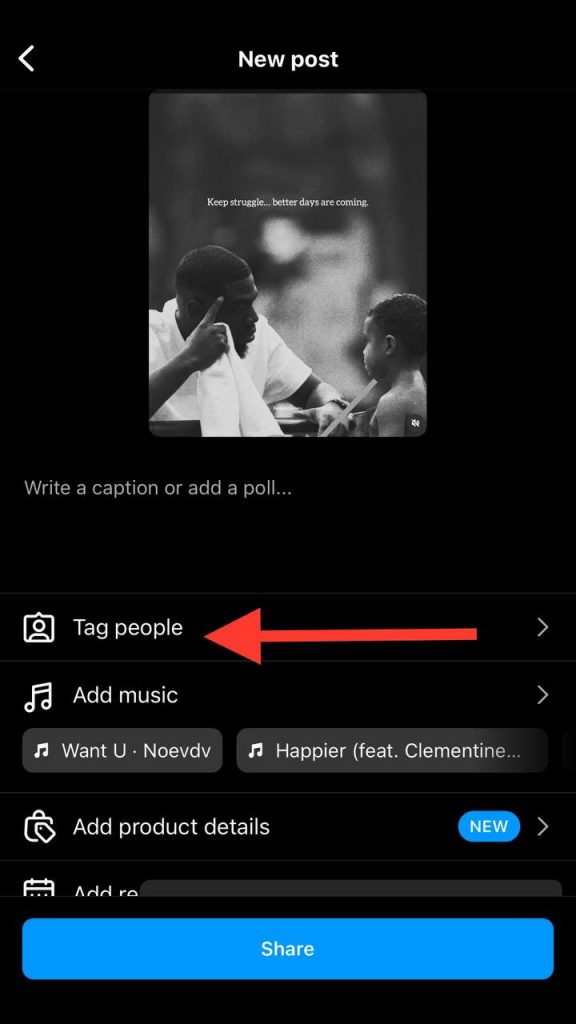
Step 6- Select “Invite collaborators.”
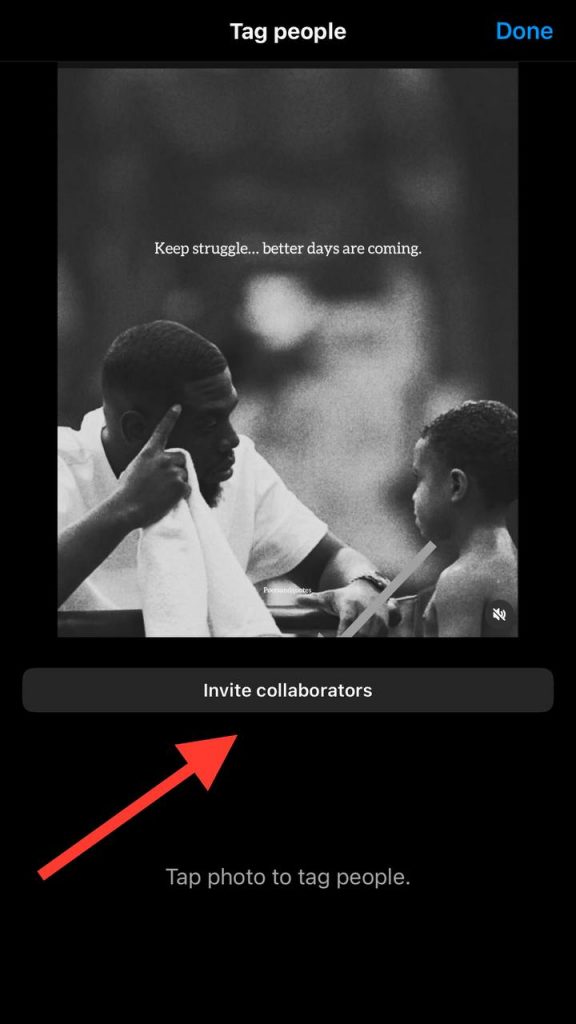
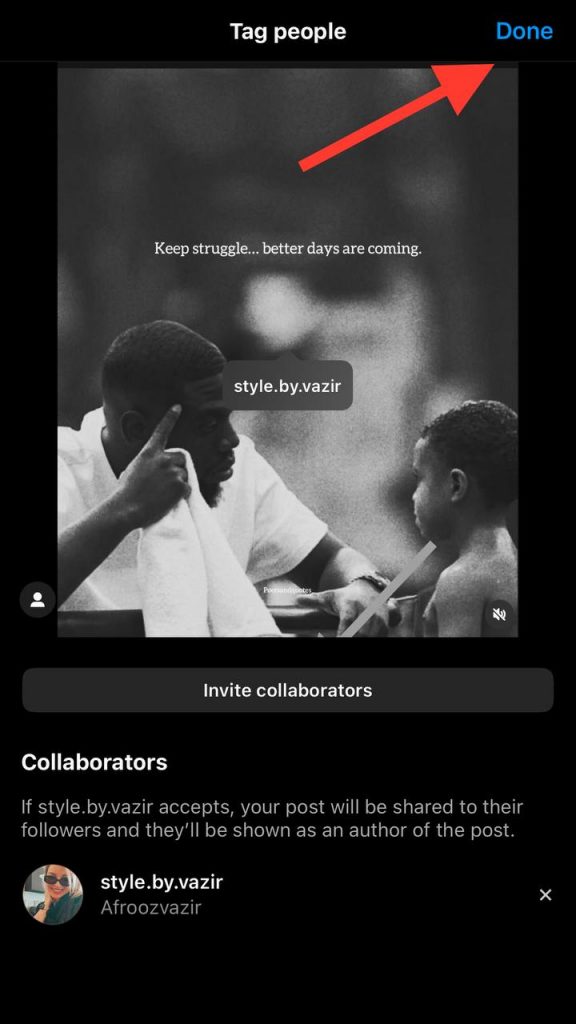
Step 7- Search for the user you want to collaborate with and select their username.
Step 8- Once you have selected the collaborator(s), tap on “Done.”
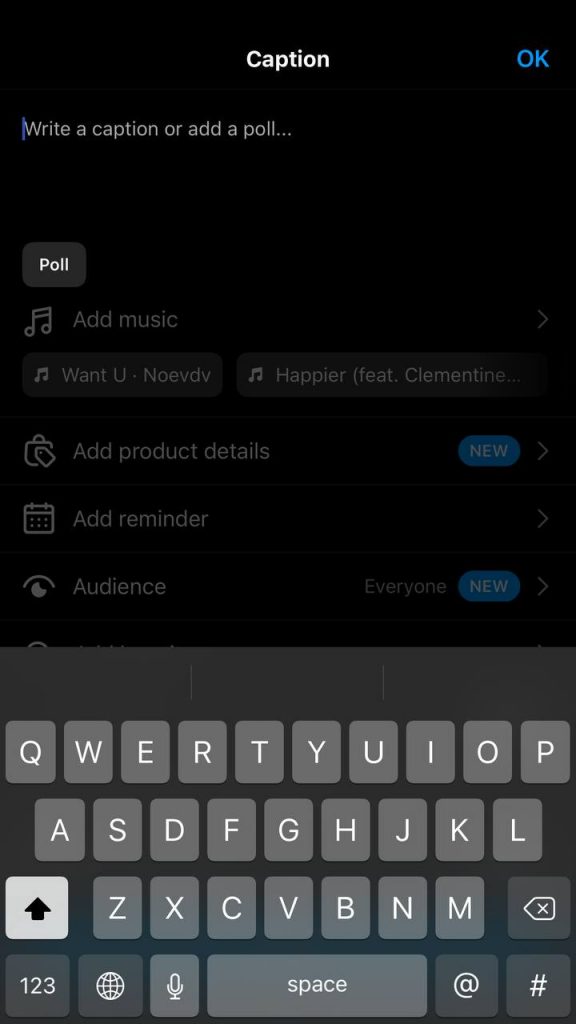
Step 9- Now, you can add more details to your post, such as hashtags, caption, location, etc.
Step 10- Then tap on the “Share” button to finish the process.
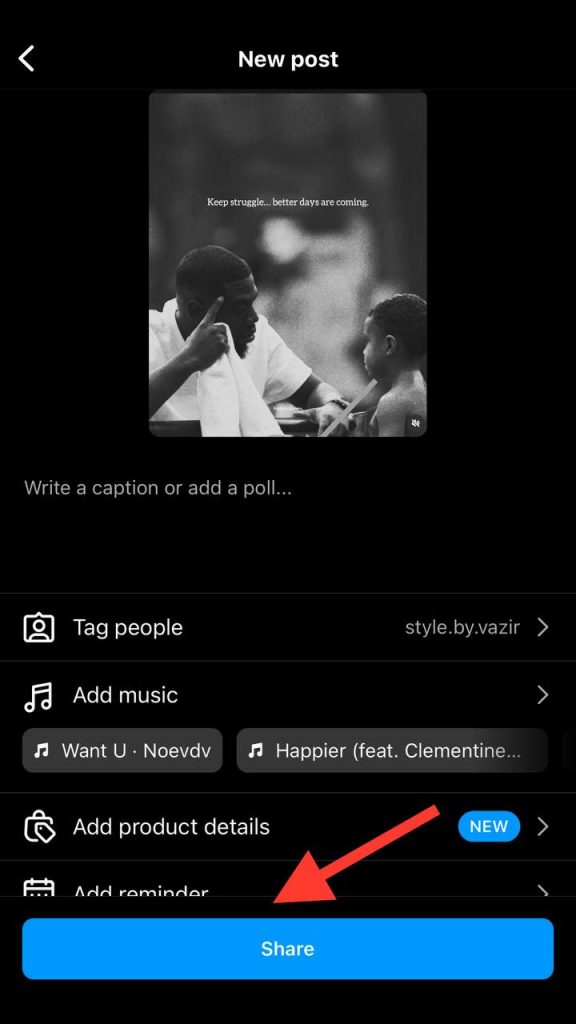
That’s how easily you can create a collab post and enjoy its various benefits!
How to Accept an Instagram Collaboration Invite

In the previous section, you learned how to invite a collaborator to post together on Instagram; now, it is time to learn how to accept an Instagram collaboration invite.
When someone sends you a collaboration request, you will receive a notification, so you have to tap on this notification to check the request and decide if you want to accept or reject it.
Follow the steps below:
Step 1- Click on the invitation notification from the activity page.
Step 2- Tap on the “Review” button to open a new window that wants you to accept or decline the request.
Step 3- Choose “Accept” to finish the process.
That’s it! You just accepted a new collaboration request on Instagram.
How to Leverage Instagram Collaboration Posts

You are now a pro at Instagram collaboration posts! Still, you need to review the following factors to get the most out of this feature.
1- Use it to promote a discount code
One of the best ways to use the collab post feature on Instagram is to promote a discount code to your audiences and ensure more new people have the chance to use this code and try your products or services for the first time.
2- Use it to show how well you work with each other
As the name describes itself, a collaboration post shows how two or more parties get along with each other on this platform. So, one of the purposes of using this feature is to show how well you work with others, even your competitors!
Moreover, sharing a collab post improves the creativity of each collaborator and shows that two or more individuals worked together to reach their goals.
3- Use it to show your products physically
If you sell physical products on Instagram, you can share a collaboration post to show how people can use your products in real life.
For this purpose, you can collaborate with an influencer or creator, ask them to make a video or take photos, and explain how people can use and benefit from your products.
Conclusion
Instagram is a great place for businesses and creators to promote their products and services to reach more target audiences, which leads to more engagement and sales.
The Instagram collaboration post feature is a handy tool for brands and individuals who are looking to expand their reach on the platform.
In this article, we explained all the vital information you need to know about this feature; now, you can invite someone to collaborate on a post or accept a request to open new doors to your business.
FAQs
1- Why can’t I invite a collaborator on Instagram?
As you know, only creator and professional accounts can be invited to a collab post on Instagram, so if you have a private account, you can not be invited to such a post.
2- How should I delete collaboration posts on Instagram?
You only have to choose the post, tap on the three-dot icon, and select “Stop sharing.” This will remove the post from your and all the collaborators accounts.
3- Why can’t I see my invited collaborator on Instagram?
This issue can have several reasons; the most common one is that you have a private account, and as you know, you can’t upload a collab post on a private account. So, make sure your account is a professional or business one.

Emi Daniel
Buy an Established Instagram Account
Skip starting from zero. Browse Instagram/TikTok accounts with audiences across many niches.
See Available AccountsRelated articles
-
Instagram Hashtags That Actually Work in 2025: Strategy, Research & Reels
Instagram posts with hashtags see 70% higher engagement rates and 12.6% more reach than those without. Yet most Instagram users struggle with hashtag strategy in its complex…
25 min readEmi Daniel
-
Top 30 Black Instagram Models to Follow in 2025
Black models are among the most followed in the industry on Instagram. A great example is “Naomi Campbell,” who has over 15 million followers. The main reason…
22 min read -
Good Times to Post on IG: Maximize Engagement and Reach in 2025
Your Instagram posts are getting lost in the noise. Since 2020, engagement rates have dropped by 30% across the platform. This means timing your posts has never…
27 min read