


Social media is like a wonderland! You can start a conversation with someone miles away from you with just a button!
One of the best places to chat with your friends is Instagram; however, sometimes, you may want to limit your interactions with someone and that’s where the “Restriction” feature comes to rescue you!
This feature enables you to limit interactions with specific users without blocking them, which may sound a bit rude!
Buy an Established Instagram Account
Skip starting from zero. Browse Instagram/TikTok accounts with audiences across many niches.
See Available AccountsIf you are here, it means that you have already heard about this feature but don’t know how to restrict someone on Instagram and what happens if you do so!
I guess today is your lucky day as you will learn everything you need to know about this cool feature, including how to restrict and unrestrict someone, what happens after, pros and cons, etc.
What Does Restricting Mean on Instagram?
Have you ever wished you could keep someone in your life but put a tape on their mouth and a blindfold on their eyes to stop them from talking with you and see what you do?

This is exactly what the “Restrict Accounts” feature does on Instagram! It was launched back in 2019 and expanded ever since to allow users to protect their privacy from bullying or unwanted interactions with certain people.
Consider this feature as an opportunity to better control your interactions on the platform to create a safer and more positive place, because a restricted account won’t be able to interact with your accounts; they are more like a ghost!
Reasons to Restrict Someone on Instagram
You may wonder why turning such people into ghosts rather than blocking them? Well, you are lucky if you can tap the block button whenever you want and block anyone who bothers you.
It’s a nightmare for some of us! Some users feel uncomfortable to block specific users, such as their friends or close followers, so restricting them is a better option.

Let’s see the common reasons you may want to restrict someone on Instagram:
- It’s better than blocking them.
- You can still keep them in your circle.
- It helps you avoid negative interactions.
- To manage unwanted interactions with certain accounts.
- Protecting your mental health.
- To limit interactions with people you don’t trust.
- It’s more polite than blocking.
- To be able to check on them from time to time.
See? These are some of the reasons you may want to restrict accounts without blocking them.
How to Restrict Users on Instagram?
There are various ways to restrict an Instagram account and each way has the same results. Let’s see them.
Method 1: Restrict someone through Direct Message
Step 1- Open Instagram and go to the DM section.
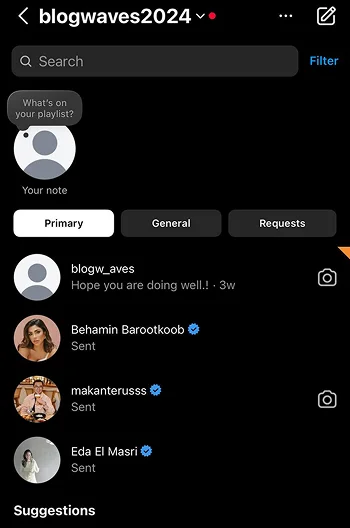
Step 2- Select the desired chat.
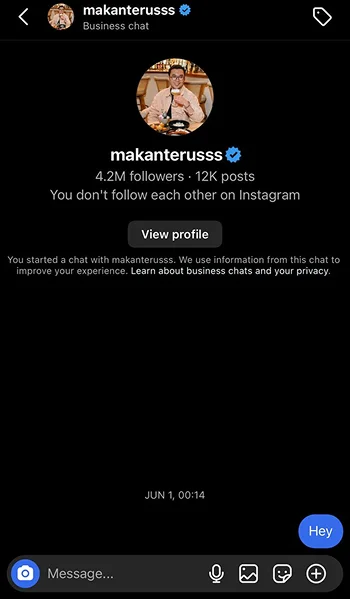
Step 3- Tap on their username.
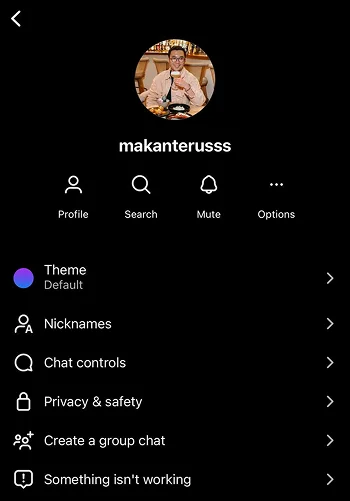
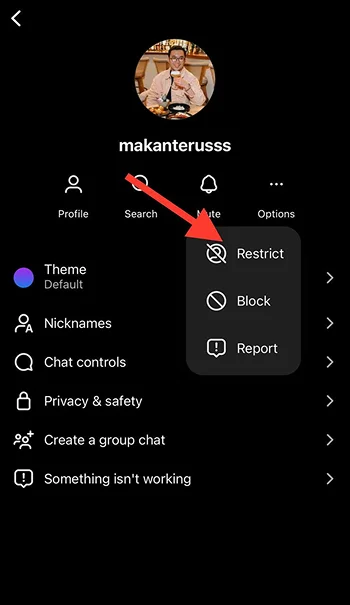
Step 4- Select “Options” (under the three dots icon) and choose “Restrict.”
Method 2: Restrict someone through comments
Step 1- Open Instagram and go to the post with unwanted or inappropriate comments.
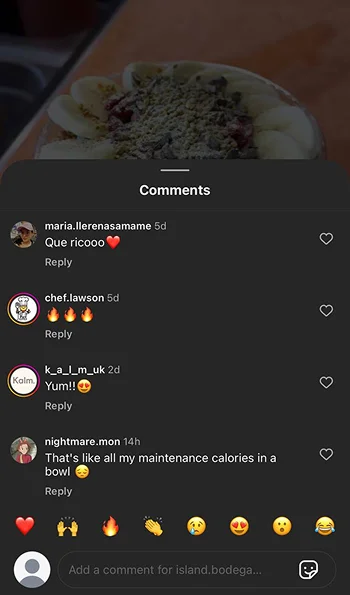
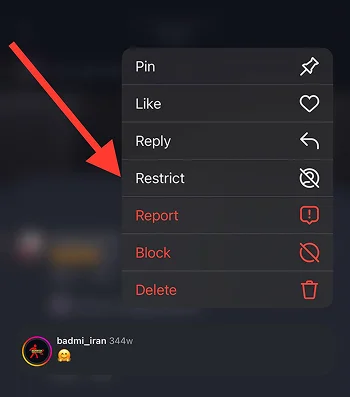
Step 2- Choose the comments and hold it for a second.
Step 3- Choose “Restrict” from the menu to finish the process.
Method 3: Restrict someone through your account’s settings
Step 1- Open Instagram and go to your profile.
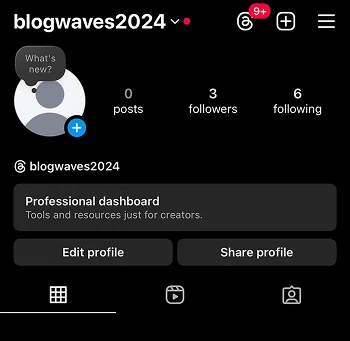
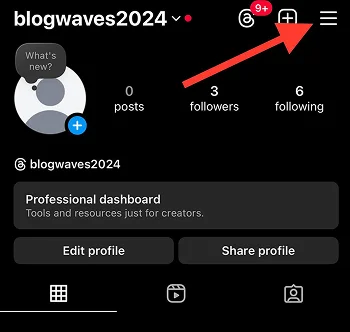
Step 2- Tap on the three line icon in the top right corner.
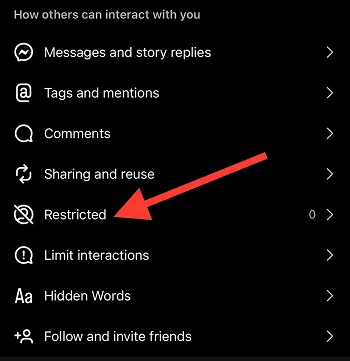
Step 3- Under the “How others can interact with you,” choose “Restricted.”
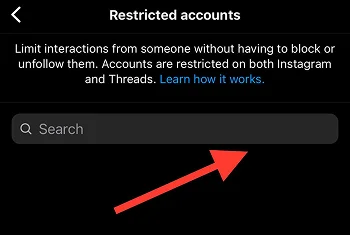
Step 4- In the search bar, type the desired username and select “Restrict” in front of it.
Method 4: Restrict someone through their profile
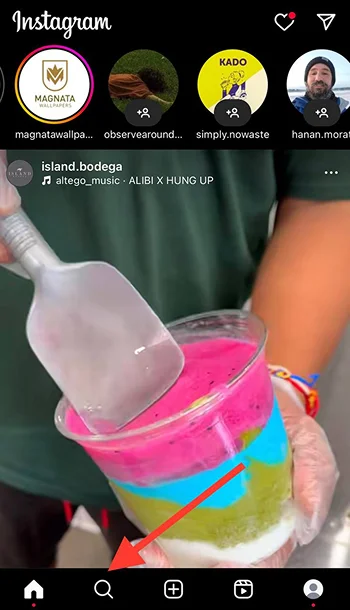
Step 1- Open Instagram and tap on the magnifier icon.
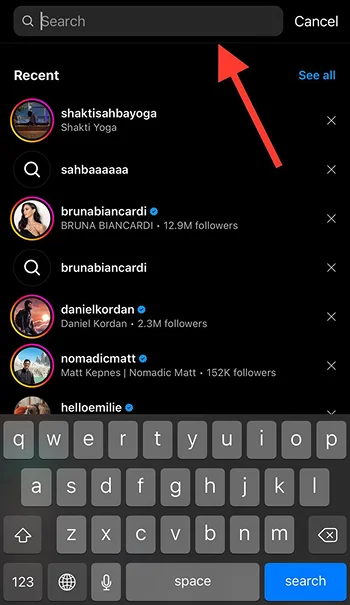
Step 2- Search for the desired account in the search bar.
Step 3- Tap on the three dots icon in the top right corner of their profile.
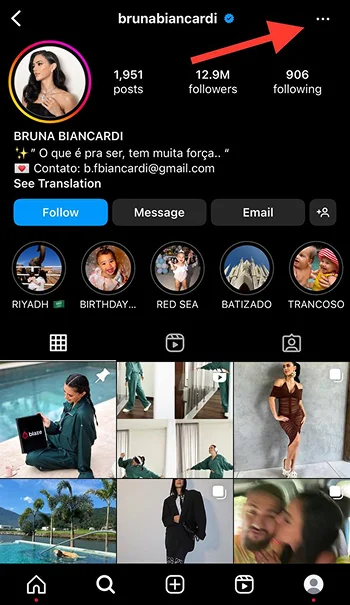
Step 4- Select “Restrict” from the menu.
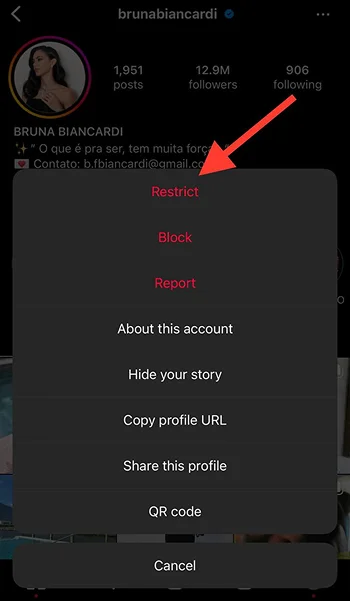
Easy-peasy lemon Squizzy!
How to Access Restricted Accounts and Unrestrict Them?
Now that you know how to restrict users on Instagram, you may wonder how to access these accounts and unrestrict them if needed. It has an easy process, which I explained in the following section.
Step 1- Open Instagram and go to your profile.
Step 2- Tap on the hamburger icon (☰).
Step 3- Scroll down the menu and choose “Restricted” under “How others can interact with you.”
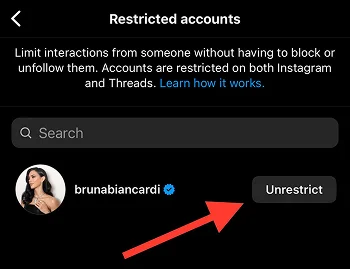
Step 4- Here, you will see all the restricted accounts. Tap “Unrestrict” in front of those you want to.
When to Use the Restrict Feature?
We all want to know how to deal with unwanted interactions and annoying accounts. The first thing that comes to your mind is blocking or restricting such accounts; however, the question is when should you use the restrict feature on Instagram? Let’s find out!
- Avoiding unwanted attention or interactions from specific users (ex-partners, friends, nosy relatives, etc.)
- Restricting accounts that bully you by leaving inappropriate comments on your posts.
- When you want to politely limit receiving messages from certain people.
- To avoid possible conflict and dramas with some annoying users.
- When you don’t want to directly block someone because of manners.
- To protect your privacy and mental health.
- To avoid endless conversations with people who make you uncomfortable.
- When you want to put an end to interacting with someone but you can’t block them because you are afraid of future conflicts.
These are some of the situations which are the best time to use this feature.
What Happens When You Restrict Someone on Instagram?
When you restrict someone on Instagram, it will affect both you and the restricted account experience on the platform.
Their comments are hidden: The restricted account still can comment on your posts; however, other users won’t be able to see their comments and it’s only visible to them until you approve them.
They won’t get notified that you have restricted their accounts: They won’t understand that you have restricted them, which may lead to confusion. Note that the restricted account still can visit your profile but they won’t realize that their interactions are limited.

Limited DMs: Their messages will appear in your message ‘Requests” section and they won’t realize if you have read their messages or not. You can also choose to answer or ignore them.
Muted comments: You won’t receive any notification about their comments on your posts.
Limited story visibility: The restricted account is still able to view your stories, but can’t reply or interact with them.
Pros and Cons of Using the Restrict Feature
Every feature on Instagram has its advantages and disadvantages. Let’s see the pros and cons of the “Restrict” so you can better decide whether to use it or not.
Pros:
Enhanced privacy without fully blocking users.
You are still able to watch the other person’s activities on the platform.
More control over how people interact with your content.
You can manage who can access your posts and stories.
You won’t receive notifications from specific accounts.
It prevents any further interactions with certain users.

Cons:
It doesn’t stop the restricted accounts from seeing your posts entirely.
The restricted account is still able to see your stories, unless you hide them.
It doesn’t feel like blocking someone to avoid all possible interactions.
Best Practices for Using the Restrict Feature on Instagram

Read this section carefully if you want to use the “Restrict” feature effectively!
Understand its impact on your social circle
It is true that the restricted account won’t get notified that you have restricted their accounts; however, the limiting interactions between the two of you will confuse them and make them start thinking about different scenarios!
Therefore, you should know that once you restrict someone from your social circle, it will eventually affect your relationship, which is why you must ensure that using this feature won’t lead to any tension.
Know when to use it over other settings
Most people use this feature to limit interactions without breaking their connection with specific accounts; however, it is important for you to know when to use it over other settings, such as muting or blocking someone.
If you want to allow some people to engage with you but not like others, it’s one your best options.
Consider it as a first step, not a final solution
If someone’s behavior is inappropriate and bothers you, but still doesn’t deserve a full block, you can restrict their interactions and if their behavior continues, decide to block or unfollow them.
Stay consistent when using this feature
Once you start restricting users on Instagram, there is no way back! Thus, you should consistently restrict accounts that make you uncomfortable or negatively interact with you.
Track their behavior after restricting them

It is better to keep an eye on the accounts you restrict to monitor their behavior. If you realize they have changed, you can give them a second chance and unrestrict them; on the other hand, if they continue aggressive behavior, it is time to block or unfollow them.
Keep it short-term
If you have a short period of tension with someone and you decide to restrict them, it is better to keep it temporary and then unrestrict their accounts. Doing so allows you to positively manage your relationships without continuing the tension.
How to Know If Someone Restricted You on Instagram?

So far, you have learned how to restrict an account on Instagram. Now, how would you understand if someone has restricted your account? This section is going to help you.
Comment on one their posts
When you restrict someone on Instagram their comments will be only visible to you and themselves. So, one of the best ways to see if you are restricted is to leave a comment on someone’s post and ask a mutual friend to check if they can see your comment or not.
Send them a message
When you restrict an account, their messages will appear in the “Request” folder and you won’t receive a notification that they messaged you. To check if someone has restricted you, send them a direct message, if it takes so long for them to answer you or you never see the “Seen” status under your message, it is more likely that your account has been restricted.
Look for changes in story interactions

You can confirm your account’s restriction if you can’t interact or reply to someone’s stories like before. To ensure you are restricted, try to reply or interact with their story with another account.
Check their activity status
If you haven’t disabled your activity status, you can see a small green dot next to their profile picture. However, if you can’t see their activity status anymore, you are probably restricted.
Search for their profile
If you search for their profile and can’t see the latest changes in their bio, you may be restricted. To ensure, it is better to try this method with another account.
Is Restricting the Same as Blocking?
Instagram restrict vs. block! Let’s take a closer look.
| Restricted Accounts | Blocked Accounts | |
| Sending DMs? | Yes | No |
| Checking your IG profile? | Yes | No |
| Interacting with your posts? | Yes | No |
| Commenting on your posts? | Yes | No |
| Can everyone see their interactions on your posts? | No | No |
| Can you see their interactions? | Yes | No |
| Receiving notifications? | No | No |
| Can you see their profiles? | Yes | Yes |
| Can you undo it? | Yes | Yes |
Tips for Maintaining Privacy on Instagram
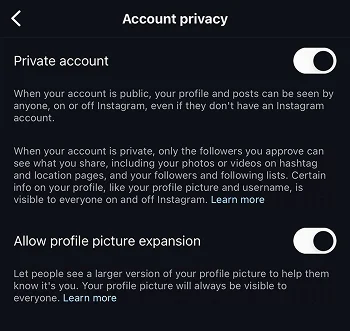
The following list includes the methods that help you maintain privacy on Instagram without relying on the ‘Restrict’ feature.
- Set your account to private.
- Use the “Close Friends” feature for stories.
- Use a separate account to share sensitive or personal content.
- Turn off the “Activity Status.”
- Hide stories from specific accounts.
- Limit data sharing.
- Turn off tagging and mentions.
- Unfollow and block unwanted accounts.
- Manage the comment settings.
- Restrict Direct Messages.
- Use the “Two-factor Authentication” feature.
- Don’t overshare personal information.
Conclusion
This is it! You are now a master in restricting users on Instagram! Using this feature helps you manage your interactions with others without blocking them.
It also enables you to create a safer and more positive atmosphere to better use Instagram. However, it is recommended to take more serious actions like blocking or unfollowing those who truly bother you and make you uncomfortable.
I hope you enjoy reading this article and find it helpful for controlling and protecting your privacy on Instagram!
FAQs
How do I restrict someone on Instagram?
You can restrict users through their profile, DMs, and comment section.
When you restrict someone on Instagram, can they still see your profile?
Yes. They can see your profile, posts, and stories, but their interactions are limited.
How long does an Instagram restriction last?
It doesn’t have a specific time, you can restrict an account as long as you want and then unrestrict them.
When you restrict someone on Instagram do they know?
No, Instagram won’t notify the account you restrict.
Can restricted accounts still tag you?
Yes, they can still tag or mention you; however, you won’t receive a notification.
When you restrict someone on Instagram, what do they see?
They won’t receive a notification that you have restricted them. They will see your posts like usual but their interactions are limited.

Emi Daniel
Buy an Established Instagram Account
Skip starting from zero. Browse Instagram/TikTok accounts with audiences across many niches.
See Available AccountsRelated articles
-

How to Use Instagram: The Creator’s Guide to Building an Audience
Instagram in 2026 is no longer just a place to collect followers. The creators who grow consistently are the ones who understand how to earn attention, turn…
17 min readEmi Daniel
-

How to Go Live on Instagram: A Step-by-Step Guide
Going live can feel more stressful than posting a Reel. You cannot remove a pause, rewrite a sentence, or start over after an awkward moment. But that…
17 min read -

Instagram Instants Feature: What It Is, How It Works, and How to Turn It Off
The first time I opened Instagram Instants, I almost backed out. I had taken a normal photo. Nothing worth editing. Nothing worth posting. Nothing that needed an…
11 min read