


“Comments on this post have been limited.” This is what you see when someone decides to limit comments on their Instagram posts. So, relax, it’s not a bug!
You may recall that Instagram comments are a helpful feature for staying engaged with followers and boosting social media visibility, right? So, why would someone want to limit them on their posts?
Well, that’s a good question, and you will get your answer here. But before we go any further, let me tell you that limiting comments is not the same as turning comments off on an Instagram post. Don’t mix them up!
Buy an Established Instagram Account
Skip starting from zero. Browse Instagram/TikTok accounts with audiences across many niches.
See Available AccountsLimiting comments on your Instagram posts allows you to have more control over your content and better manage who can interact with your posts.
In this article, I will provide all the information you need to better understand this feature.
You will learn what limited comments mean on Instagram, how to limit comments on posts, how to comment on a limited post, and more.
So, what are you waiting for? Read this article to the end to find all your answers.
What Are Limited Comments on Instagram?

Are you tired of receiving too many comments on your posts? Well, I have good news for you! Instagram allows you to limit comments on your Instagram posts and Reels, which gives you more control over your account.
Once you enable this feature, you can restrict comments to specific people among your followers, especially those who usually comment negatively on your posts.
You know how some people freely judge others by offending them, making fun of their appearance, and hating them. So, it is important to effectively use this feature.
We all know how important increasing engagement is on Instagram, right? But do you think you can handle getting harmful and unwanted comments in exchange for more engagement and visibility?
Let me explain it with an example. Suppose one of your posts goes viral, which means you will face various comments. Now, imagine how getting notified for each comment your post receives feels. I can say it’s not very comfortable!
So, you can easily limit comments on your posts, and you won’t receive any more comments after a while.
How to Limit Comments on Instagram?
Now that you know about this amazing feature, I bet you are curious about enabling it in your posts.
Well, it has easy steps; let’s find out.
Step 1- Open Instagram and tap on your profile icon in the bottom right of the screen.

Step 2- Tap on the three horizontal lines icon in the top right corner to access the settings menu.
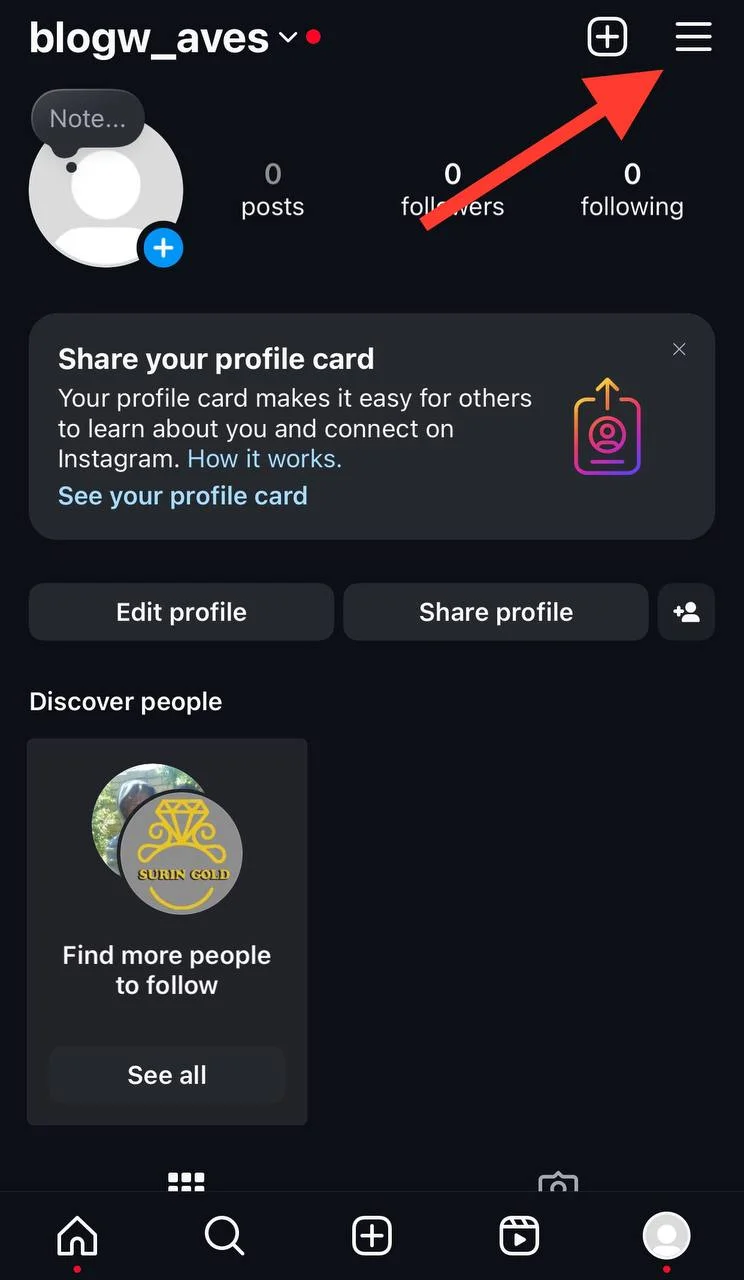
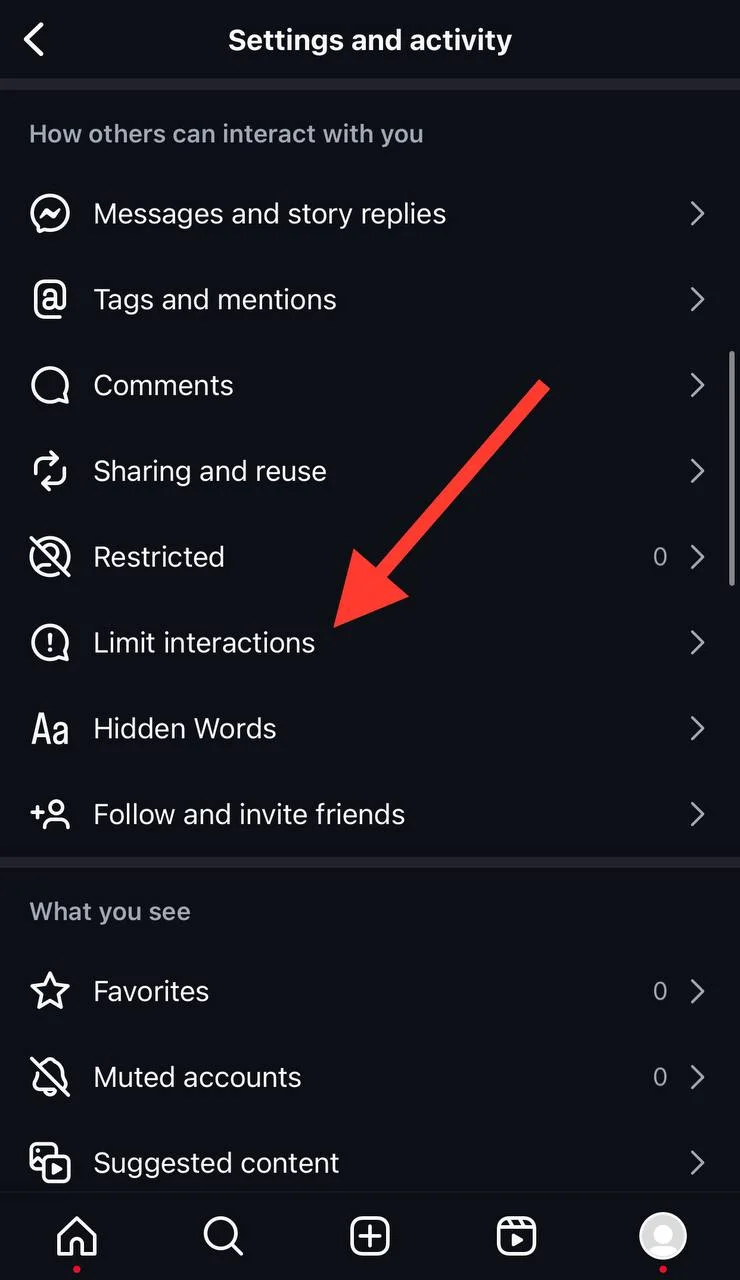
Step 3- Scroll the menu and select the “Limit interactions” option.
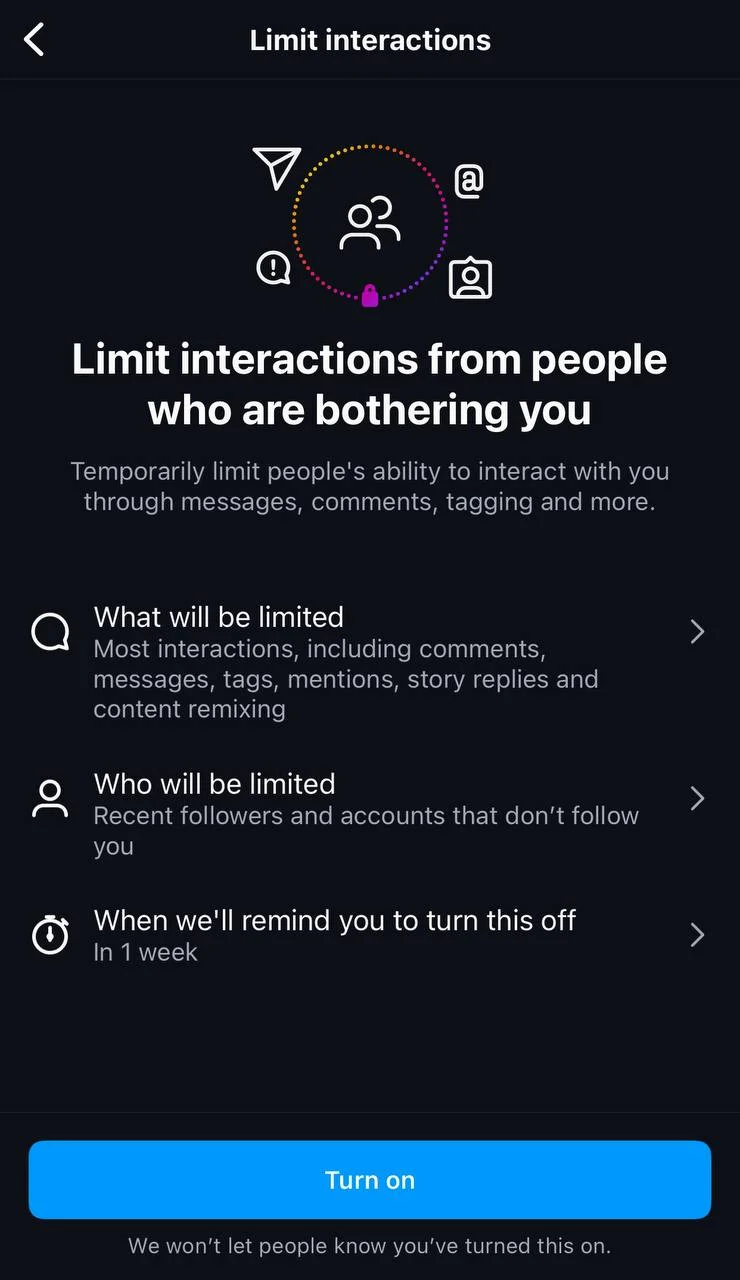
Step 4- Now you can see three options: 1- What will be limited 2- Who will be limited 3- When we’ll remind you to turn this off. You can tap on each to manage how you want to limit interactions.
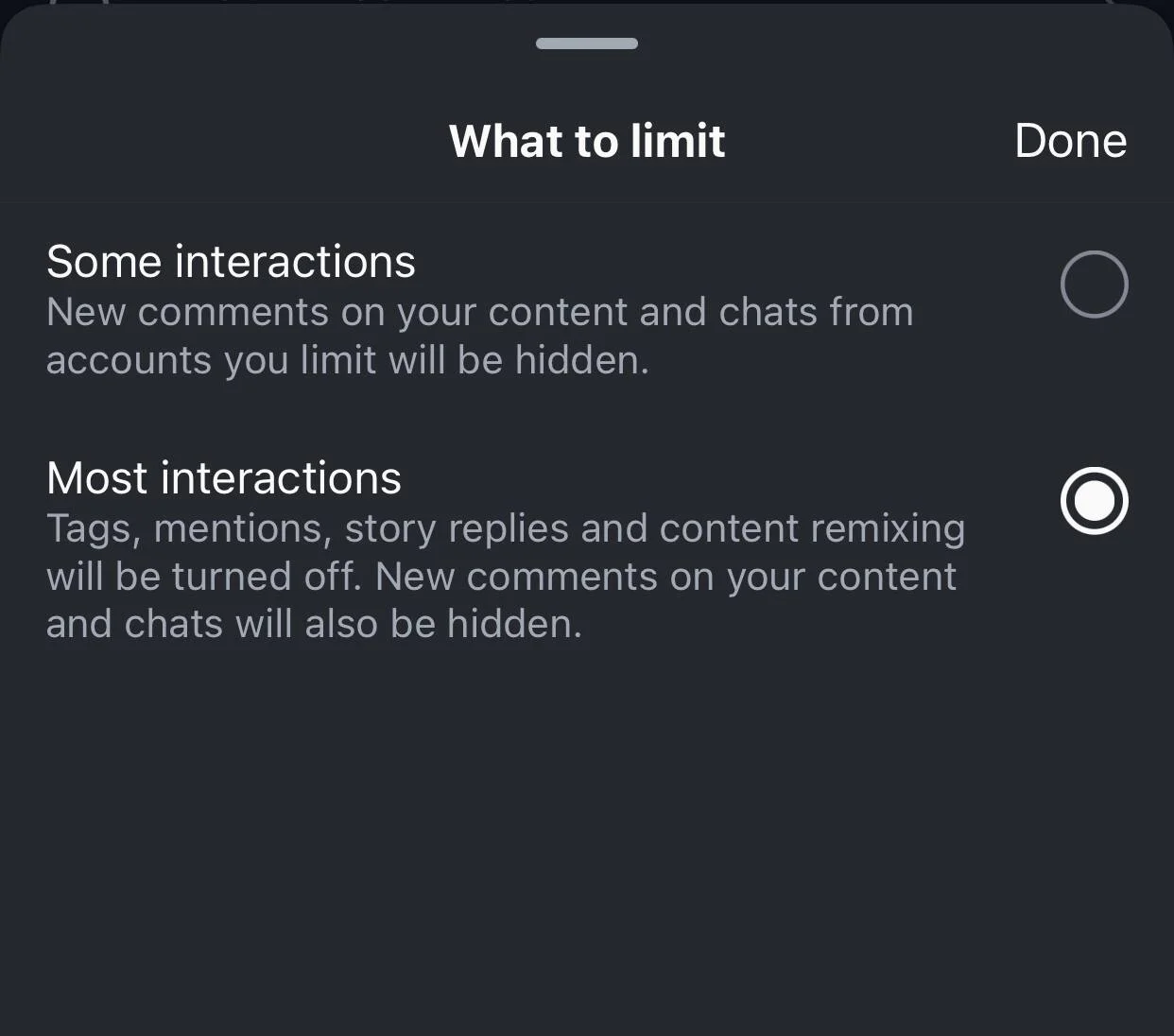
Step 5- By tapping on the first option, you can choose whether to limit some or most interactions. The second option allows you to limit everyone but your close friends, recent followers, or accounts that don’t follow you. The third option is to set an Instagram reminder to turn this feature off; the reminder can be from one day to four weeks.
Step 6- Once you have adjusted all the desired settings, tap “Turn off” to finish the process.
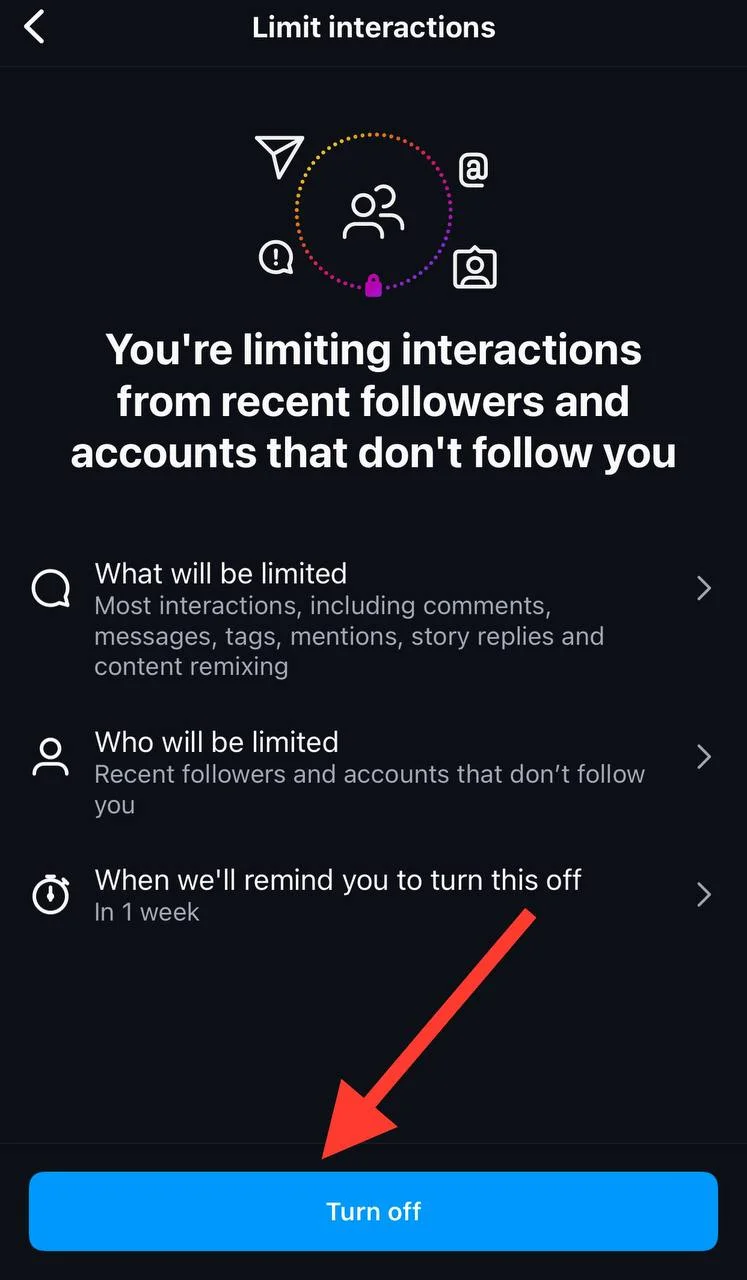
Ultimately, remember that whenever you want to limit people from posting offensive and harmful comments on your posts, you can easily enable this feature.
Why Limit Comments on Instagram?

There are various reasons why you may want to limit comments on Instagram; let’s see each to decide if you should enable this feature or not.
The first and most common reason is to reduce negativity on your account; predictable, right? As you know, most people on social media feel free to share what comes to their mind without thinking about how the other person would feel, which is why we see rude and negative comments on the Internet.
Not everyone can handle such comments; therefore, you can limit comments on your Instagram account to reduce negativity while protecting your mental health.
Another reason is to better manage your account’s engagement. Once you turn this feature on, you can manage who can interact with your content, which means you can have more positive and supportive discussions in your posts.
Is your account public? Are you an influencer or content creator? If yes, then you should limit comments to protect your mental well-being; otherwise, you allow people to comment whatever they want, which may be harmful.
I can say you were at least in this situation once. So, you know how it feels to let others freely talk about you! I can’t tolerate such a thing!
Ultimately, if you care about your privacy on Instagram and want to avoid unwanted attention and interaction, it is better to enable this feature right now!
Who Can Use Instagram Limited Comment Feature?

Oh, I like this question! If you think this cool feature is only for public or business accounts, you are wrong, my friend!
It is true that Instagram offers more features for public and business accounts, but the limited comments feature is an exception. So, don’t panic! You can still keep your account private and limit comments on your posts!
Therefore, it doesn’t matter if you have a personal, content creator, or business account; you can still limit comments on your posts.
Who Can Comment When Comments Are Limited?

If the comment section is not restricted, anyone can comment on your posts, including followers, non-followers, and people you don’t follow back.
However, when you limit comments, people who can comment on your posts depend on your chosen settings.
As you remember, I said once you decide to limit comments, you will have three options, which is where you can determine who can comment on your posts.
You can choose only your followers, people you follow back, and specific individuals from your account to comment on your posts.
Impacts of Limited Comments on Engagement Rate
This is one of the interesting parts of this article, where you wonder if limiting comments on your posts will impact your account’s engagement or not. Well, let’s see!
It will reduce the volume of receiving comments
Tired of getting too many notifications for new comments on your posts? Limiting the comments is what you have to do.
However, it is better to note that while enabling this feature will reduce the volume of comments, your content may get fewer interactions and engagement.
It will reduce the chances of getting spam and negative comments
Once you limit comments on your posts, you will see how safe you are from getting spam and negative comments, which means you will have more positive conversations on your posts, leading to a healthier engagement environment.
It helps to have focused interactions
It is good to know that limiting comments helps you have more focused interactions and conversations in your posts, which leads to more meaningful engagement.
How to Remove Limited Comments on Instagram?
Are you wondering how to remove the limits on your Instagram posts? Well, that’s easy. Follow the steps below, and you’ll be all done.
Step 1- Open Instagram on your device.
Step 2- Go to your profile and tap on the hamburger icon in the top right corner.
Step 3- Scroll the menu and select the “Limited interactions.”
Step 4- Tap on the “Turn off” button to finish the process.
See? That’s how easy it is to disable this feature.
Pros and Cons of Limiting Comments on Instagram

I think now that you almost know everything about limited comments on Instagram, you are wondering what the catch is in enabling this feature, which is why I will examine the pros and cons of this handy feature so you can decide whether to enable it.
Pros
- Receiving fewer comments can protect your mental health on social media.
- It helps increase your post’s quality by encouraging your followers to have more meaningful conversations.
- You can better manage your account’s privacy and avoid unwanted interactions.
- It reduces negativity while creating a positive environment.
- Brings more meaningful interactions and engagement to your account.
Cons
- It can reduce the overall engagement on your posts.
- It can make it challenging to build an engaging community.
- You may lose some of your followers because they are against limiting comments.
Now, what is your decision? Do you think it’s worth enabling this feature?
Is Limiting Comments the Same as Turning Comments Off?
Wait a minute! Don’t tell me you thought limiting comments and turning them off is the same thing! Because they are not!
Limiting comments stops certain users from commenting on your posts while turning comments off does not allow anyone to comment.
Let’s see how you can turn off comments on Instagram posts:
Step 1- Open Instagram and go to your profile.
Step 2- Choose the existing post for which you want to turn off comments.

Step 3- Tap on the three dots icon in the top right corner of the post.

Step 4- Choose “Turn off commenting” from the menu, and that’s it!
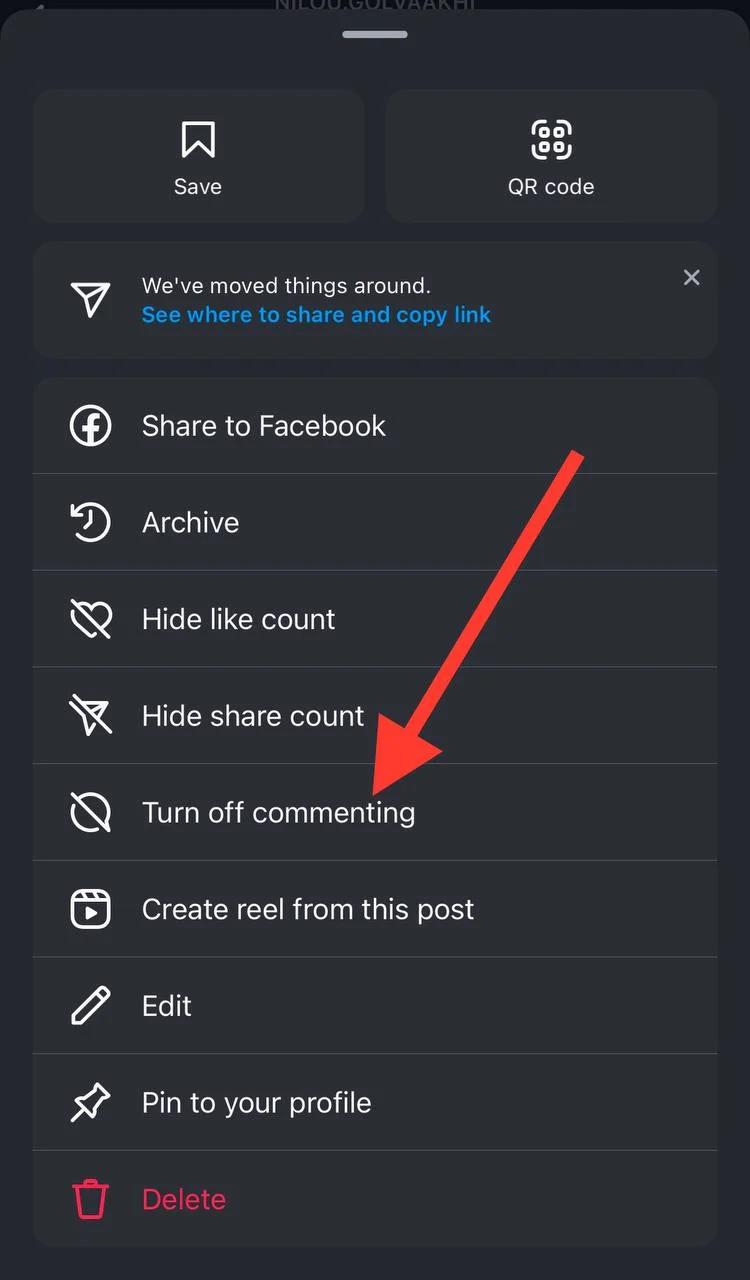
*A little tip: To turn the comments back on, follow the same steps and choose “Turn on commenting” instead.
*If you received comments before turning off the feature, they will still be kept on your post and once you enable the feature, they will be shown.
Let’s see how you can turn off comments on a new Instagram post:
Step 1- Open Instagram and tap on the + icon to prepare your new post.

Step 2- Apply all necessary edits and changes and tap “Next” in each step.

Step 3- Before sharing your post, tap on the “Advanced settings” option from the menu.
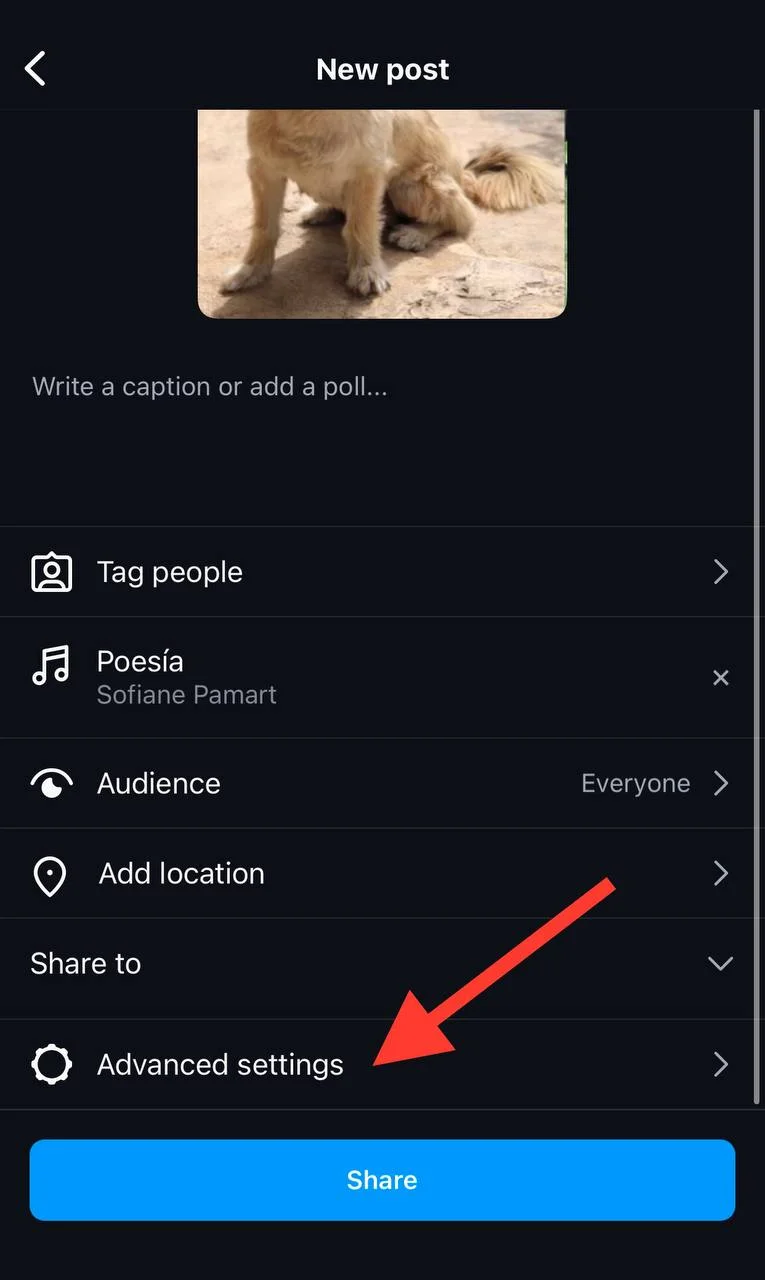
Step 4- Now, you can see the “Turn Off Commenting” option; toggle the switch in front of it.

Upload your post and no one will be able to comment on it!
Conclusion
We all agree that Instagram comments are a great tool for creating a positive environment on the platform, better engaging with your followers, and attracting more target audiences.
However, not everyone is a fan of getting notified about every single comment on a post, which is why Instagram offers to limit comments.
That is why this platform has billions of active users!
I explained all the information you need to know about this cool feature; now it’s your decision to keep it enabled or never go after it.
In my opinion, it is better to consider all the pros and cons to see if limiting comments on your posts is worth it.
FAQs
What is Instagram’s hourly comment limit?
Instagram has daily limits to prevent bot activities. The exact number for this question varies based on different factors; however, it has been said that each user is limited to 60–100 comments per hour.
Can I limit comments on one post on Instagram?
Yes, you can limit comments on a post you are about to upload or edit an existing one to limit its comments.
How to Comment on a Post with Limited Comments?
Commenting on a post with limited comments is not different from commenting on regular posts; however, if the account owner has restricted your account, then you won’t be able to add a comment to their posts.

Emi Daniel
Buy an Established Instagram Account
Skip starting from zero. Browse Instagram/TikTok accounts with audiences across many niches.
See Available AccountsRelated articles
-

How to Clear Instagram Cache on iPhone, Android & Desktop
Instagram can quietly build up a lot of temporary files while you scroll through Reels, watch Stories, save posts, and upload your own content. You may not…
12 min readEmi Daniel
-
How to See Who Reposted Your Instagram Post (2026 Guide)
Someone reposted your Instagram post, but you have no idea who it was. You check notifications, search through your profile, and still cannot find a clear answer. …
18 min read -

How to Reset Instagram Algorithm in 2026
Instagram can start showing too much of the same type of content. Your Explore page may no longer match your interests, Reels may feel repetitive, or suggested…
12 min read