


Do you have anyone on your Instagram follower list that you don’t really want on your account but can’t unfollow or block?
These people are the ones that you don’t want to interact with, yet they keep messaging you, commenting on your posts, and replying to your stories.
Since you don’t want to unfollow or block these accounts, you probably wish there was another way to keep them in your account without interaction.
Buy an Established Instagram Account
Skip starting from zero. Browse Instagram/TikTok accounts with audiences across many niches.
See Available AccountsThe good news is that Instagram has a feature that enables you to restrict accounts to limit possible interactions.
Whenever you feel someone annoys you on Instagram or you want to avoid unwanted interactions with specific accounts, you can restrict them.
In this article, we will explain what is restricted on Instagram, how to restrict people, what happens when you restrict someone on Instagram, and more.
Definition of Restrict on Instagram

As the name suggests, restricting interactions with Instagram accounts is like blocking someone on Instagram, but in a polite way.
When you block someone on Instagram, they can’t find your account, see your profile, or interact with your content; however, restricting a user on Instagram allows them to stay on your profile but limits their interactions and hides their comments and messages.
Moreover, when you restrict an account on Instagram, the user is not notified or made aware that you restricted them.
Is Restricting Someone on Instagram the Same as Blocking?
In the previous section, we explained how restricting is similar to blocking an Instagram user. Let’s take a deeper look at both these features.
| Restricted | Blocked | |
| Can they send you direct messages? | Yes | No |
| Can they visit your profile? | Yes | No |
| Can you DM them? | Yes | No |
| Can they like your stories? | Yes | No |
| Can they interact with your posts? | Yes | No |
| Will you receive notifications from them? | Yes | No |
| Can others see their interactions with your account? | Yes | No |
| Is it reversible? | No | N0 |
| Is it undoable? | Yes | Yes |
How to Restrict An Account on Instagram
Now that you are familiar with the definition of restricting on Instagram, it is time to learn how to restrict Instagram accounts.
In the following section, we will examine four easy methods to restrict someone on Instagram.
1- Restrict an account through the settings menu
Follow the steps below to restrict an account from the settings menu:
Step 1- Open the Instagram application on your mobile and go to your profile.
Step 2- Tap on the three horizontal lines in the top right corner of the screen.
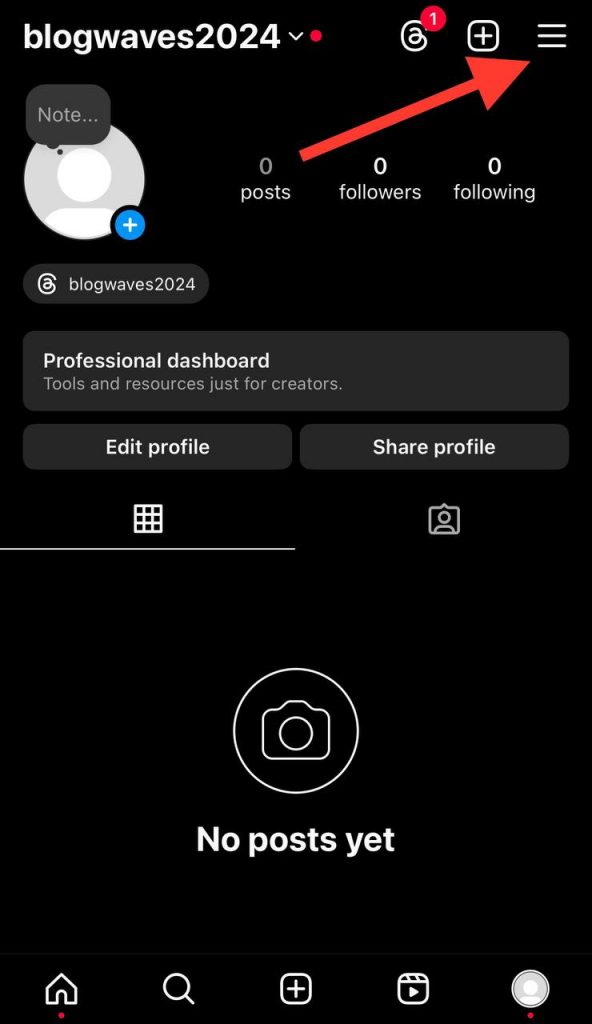
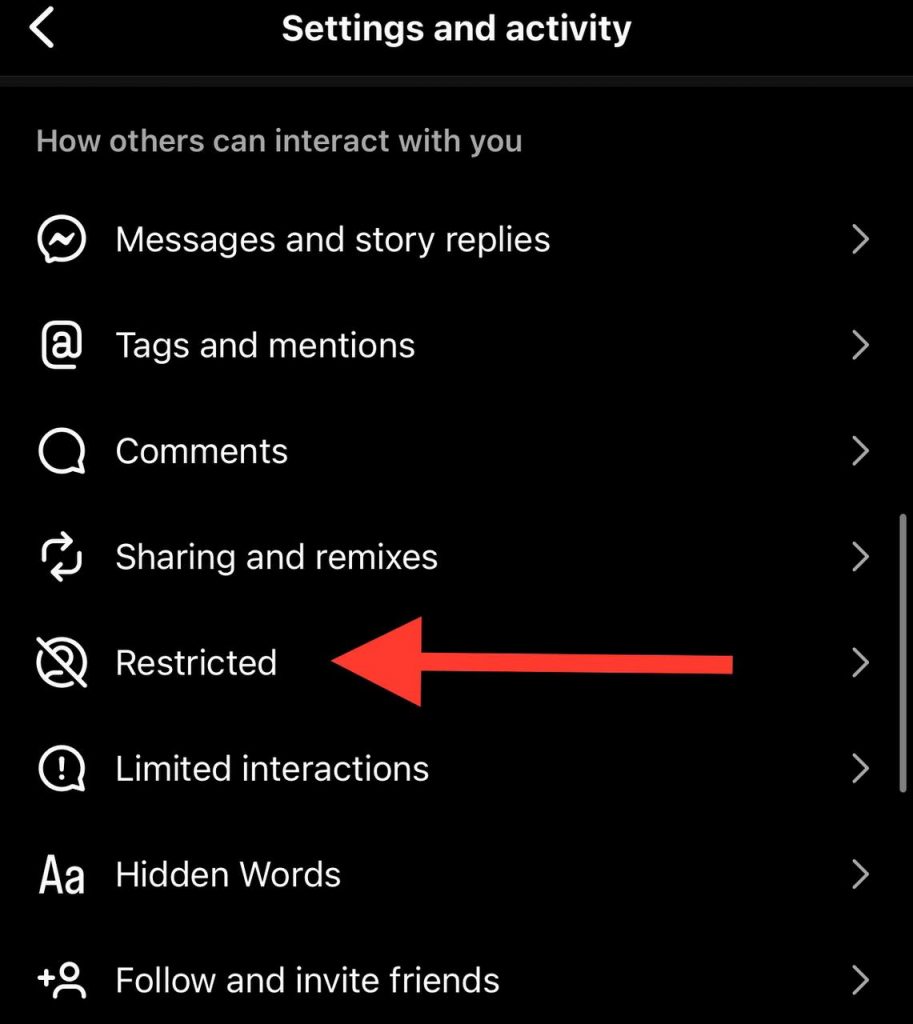
Step 3- Scroll down the menu and select “Restricted.
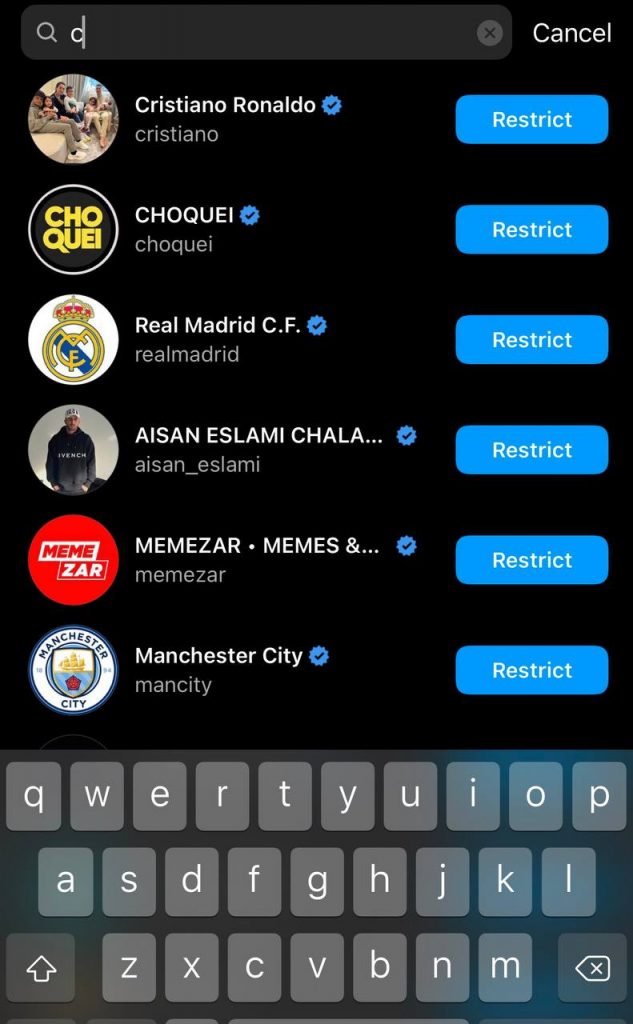
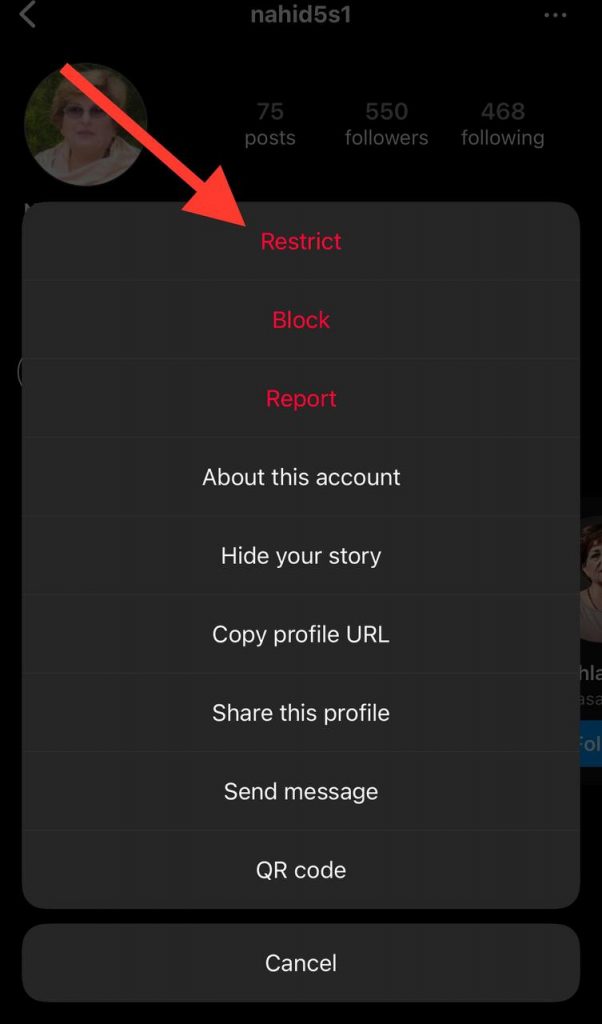
Step 4- Search for the desired account in the search bar, and tap on the username.
Step 5- Tap the three dots icon in the top right corner.
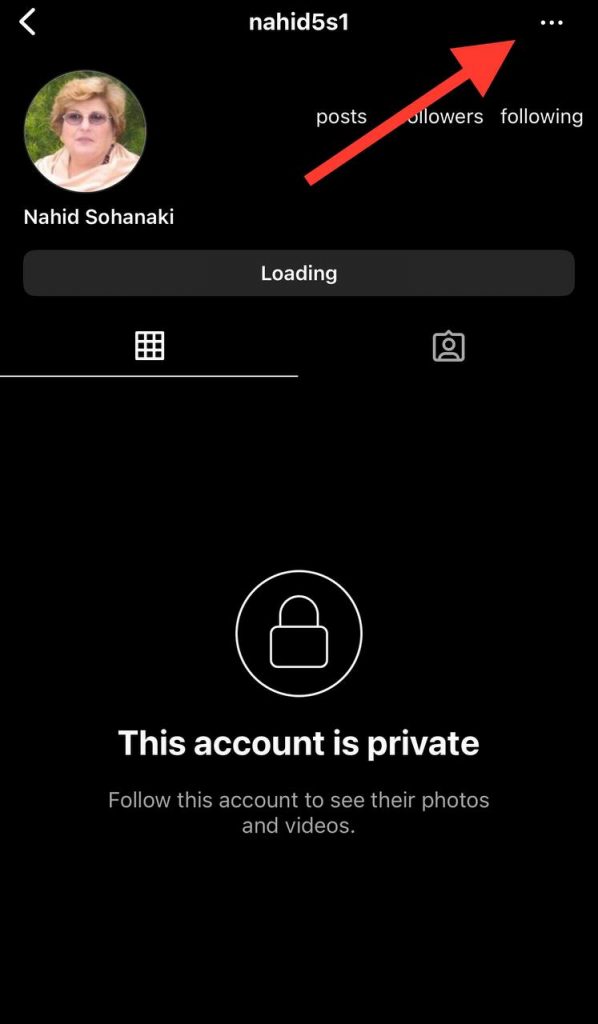
Step 6- Choose the “Restrict” option to finish the process.
2- Restrict an account through direct messages
Follow the steps below to restrict an account from the DM section:
Step 1- Open Instagram and go to the direct messages page by clicking on the arrow icon at the top right corner of the screen or by sweeping the screen to the right.

Step 2- Open the chat with the person you want to restrict their account.
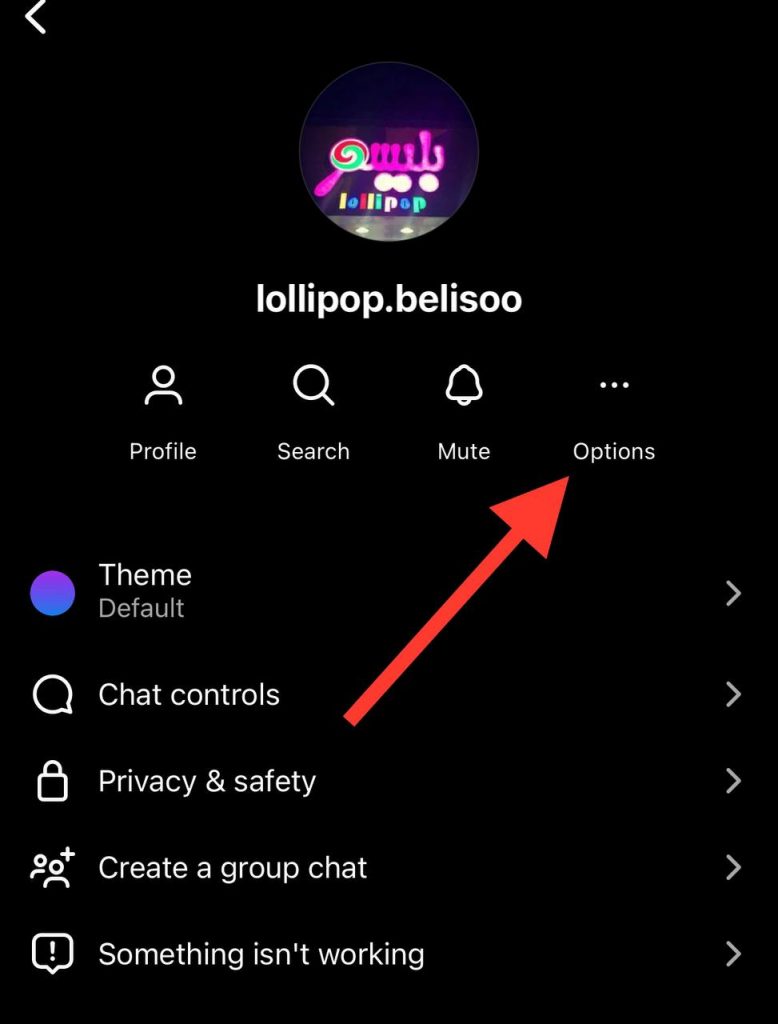
Step 3- Tap on their username.
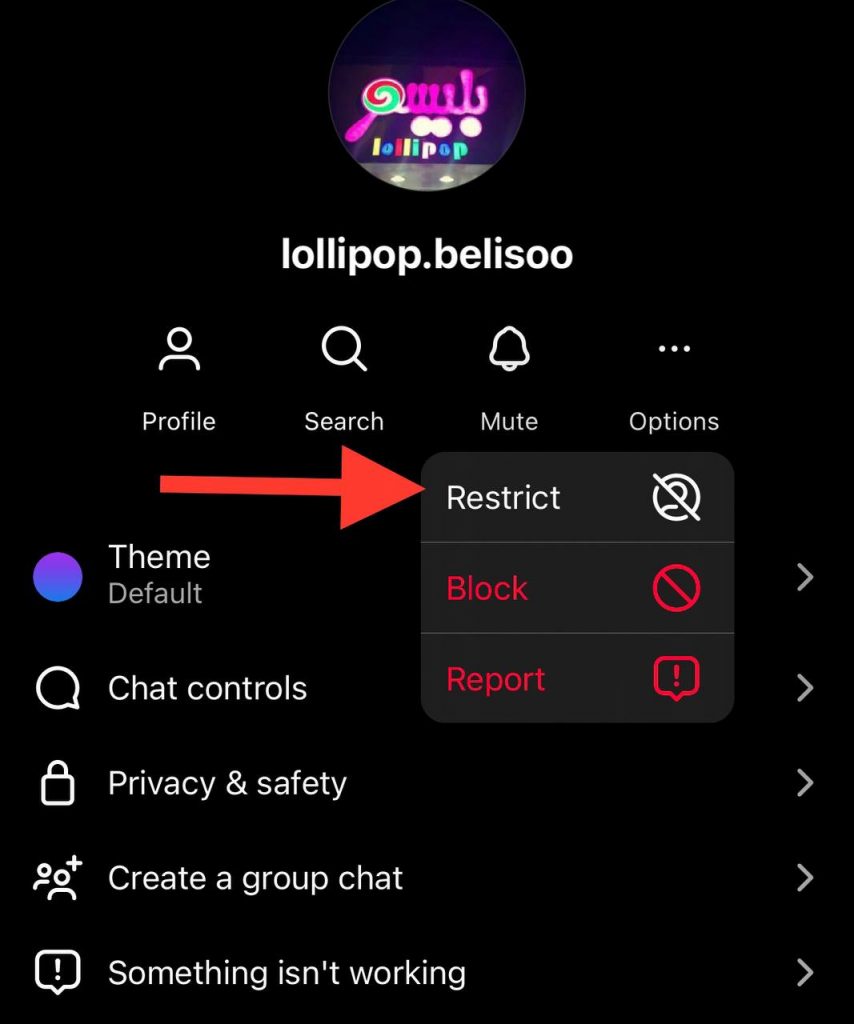
Step 4- Click on the three dots icon “Options.”
Step 5- Choose “Restrict.”
3- Restrict an account through their profile
Follow the steps below to restrict an account from their profile:
Step 1- Open the Instagram app and tap the magnifier icon next to the home page to search for the account you want to restrict.
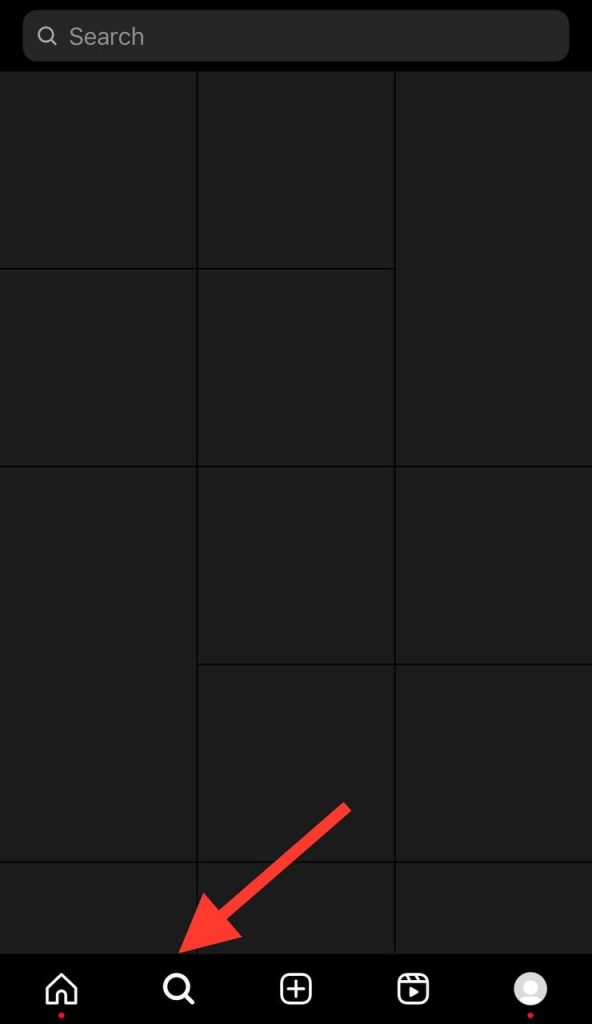
Step 2- Search for the desired account from the search bar and tap on the username.
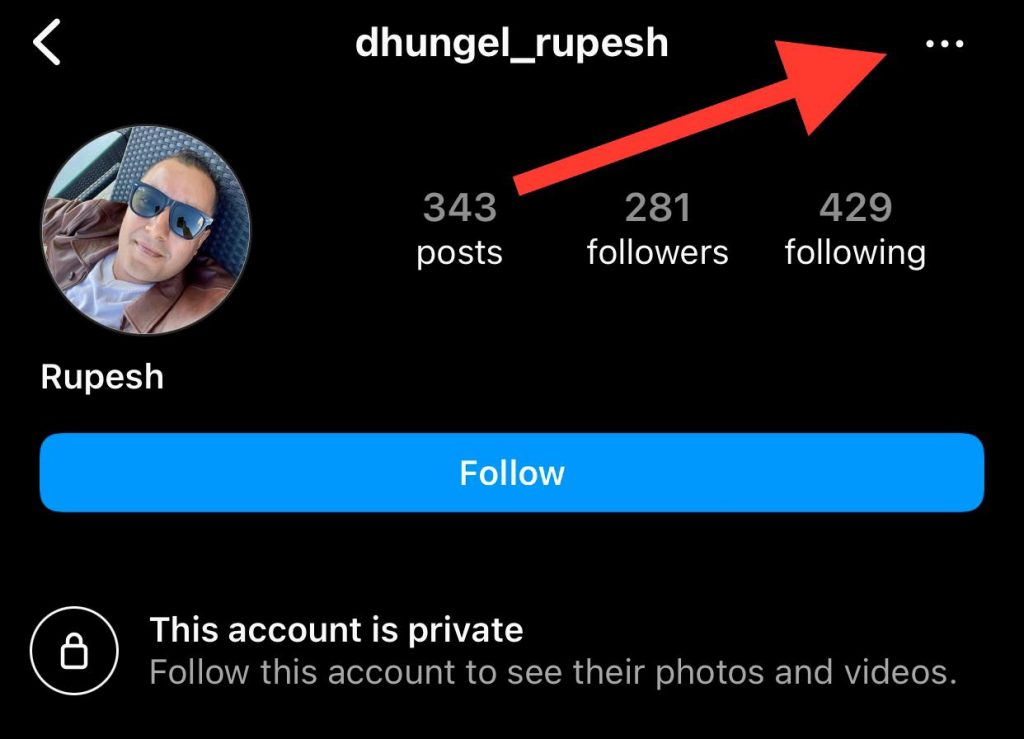
Step 3- Click on the three dots icon (…) in the top right corner of their profile.
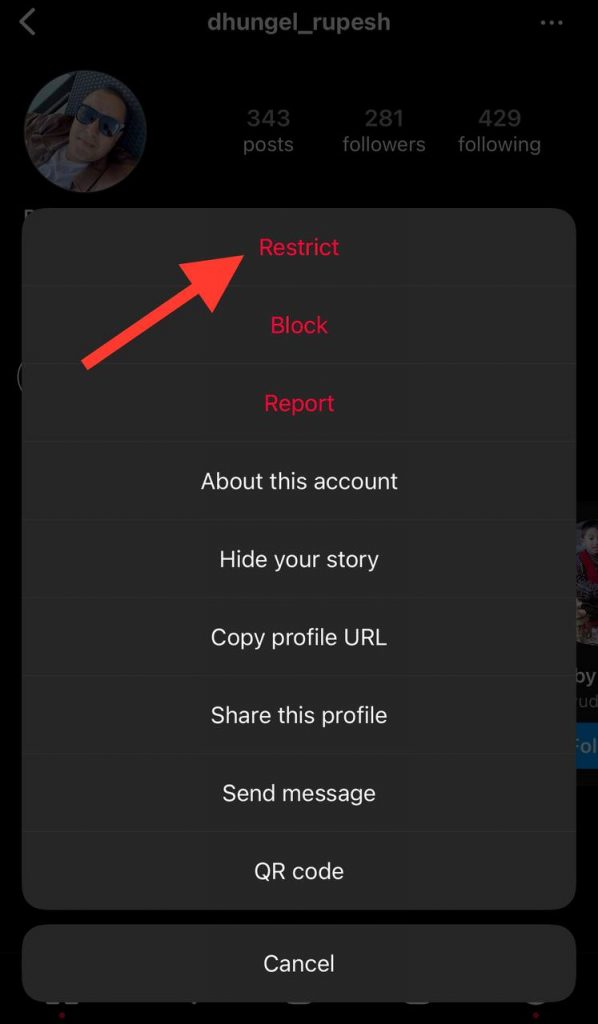
Step 4- Choose the “Restrict” option from the menu.
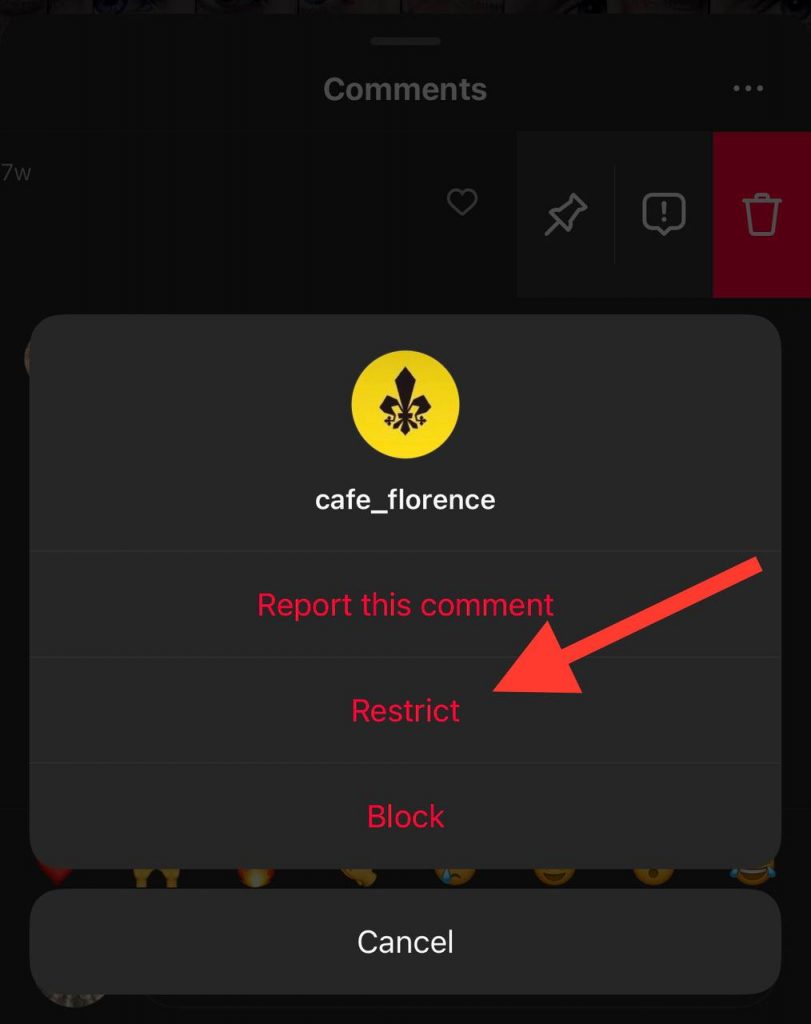
4- Restrict an account through the comment section
Follow the steps below to restrict an account from their profile:
Step 1- Open Instagram, go to your profile, and choose the post with unwanted comments.
Step 2- Choose the comment and slightly sweep it to the right.
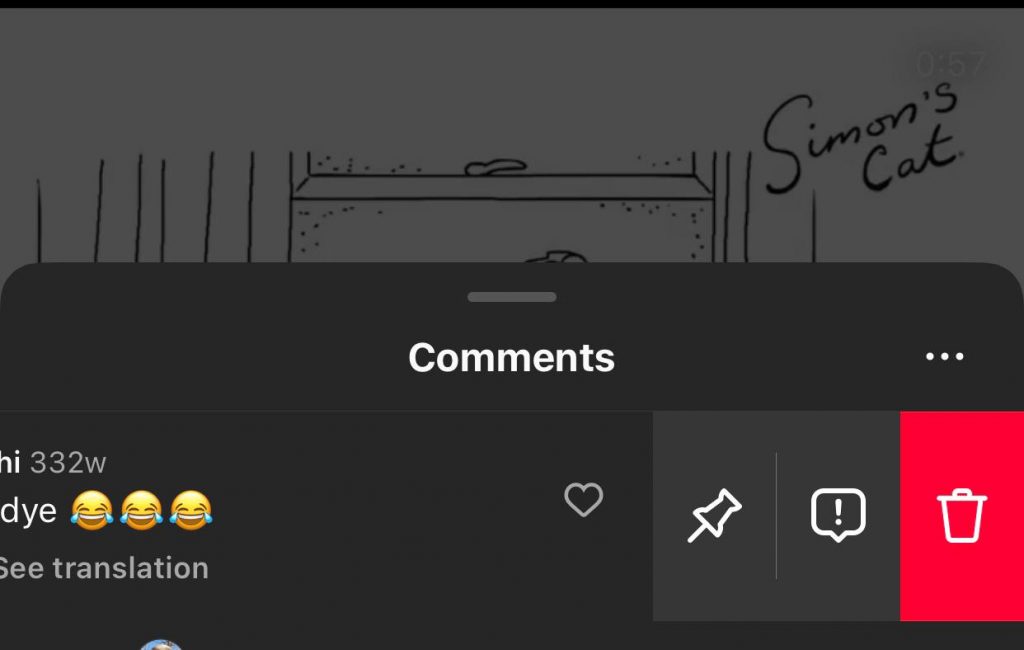
Step 3- Now, tap on the exclamation mark icon.
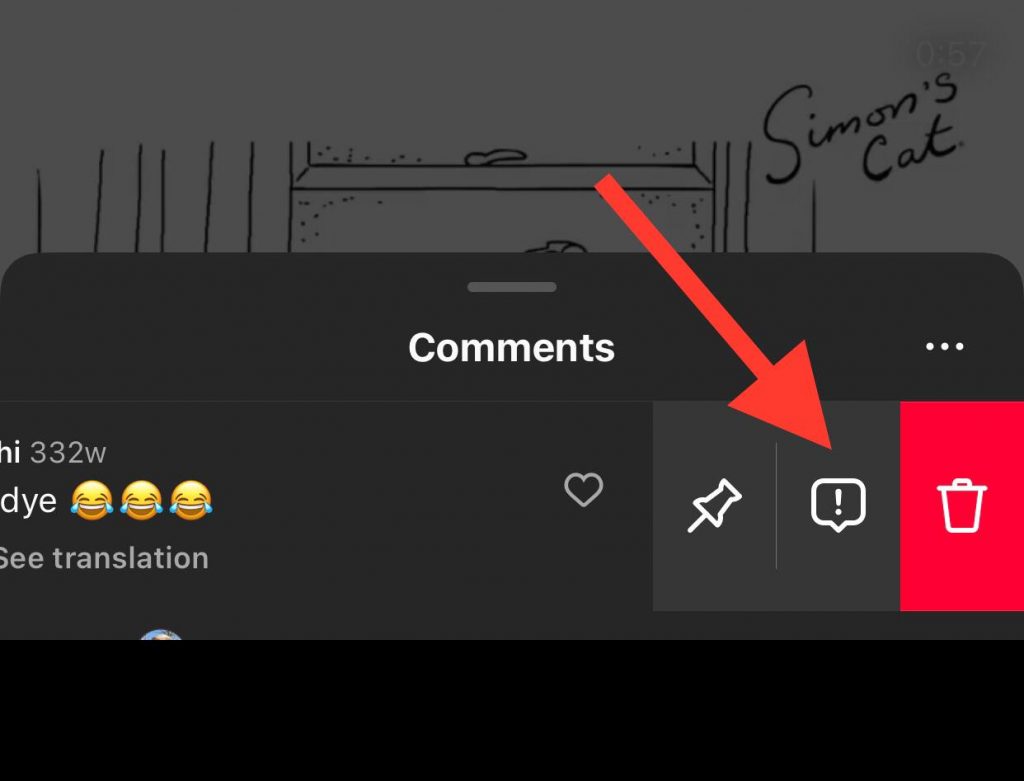
Step 4- Select the “Restrict” option to restrict the account.
How to See the Restricted Accounts on Instagram
Finding the restricted accounts in your profile is a simple task, which we will explain in the section below.
Step 1- Open the Instagram application and tap on your profile icon at the bottom right of the screen.
Step 2- Tap on the three horizontal icon in the top right corner.
Step 3- Scroll down the menu and select the “Restricted” option.
Step 4- Now, you can see all the restricted accounts.
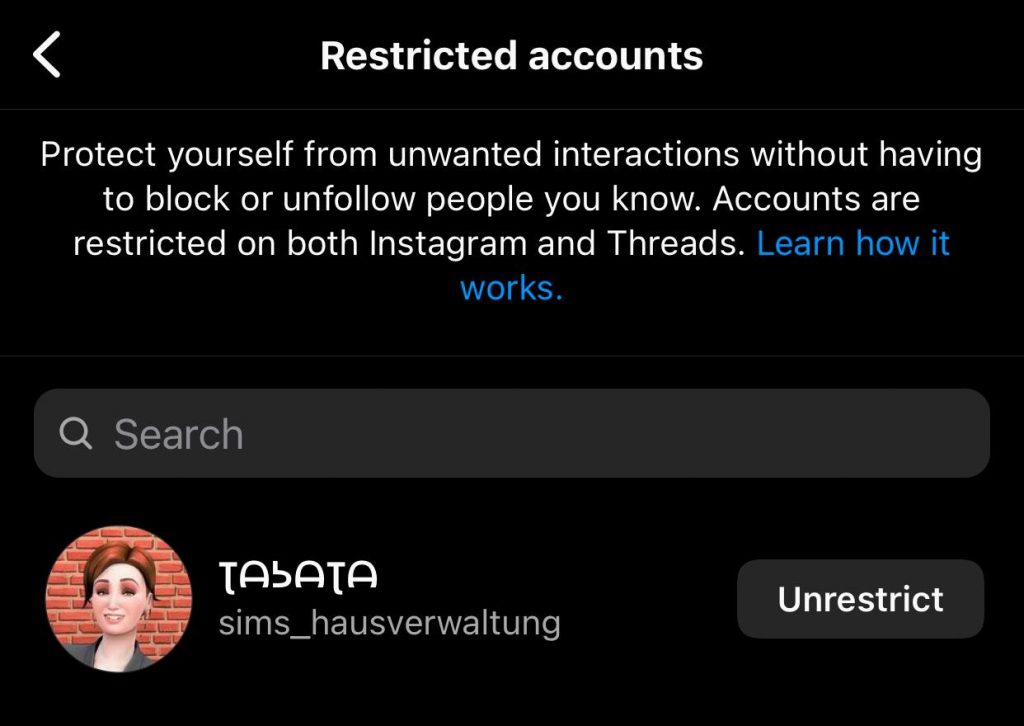
Note that you can un-restrict all accounts whenever you want. While you are viewing the restricted accounts, you can see the “Unrestrict” option in front of their names; simply tap on it to unrestrict them.
What Happens When You Restrict An Instagram Account
If you have restricted an account and now wondering what happens when you restrict someone on Instagram, this section is for you.
Your profile’s active status will be hidden
One of the first changes you will experience when restricting someone on Instagram is that they won’t be able to see your active status in the direct message section anymore.
It doesn’t matter whether both of you have the active status turned on or not; the restricted account can’t notice when you are online.
Therefore, if you are willing to avoid receiving unwanted messages from certain accounts, it is better to restrict them so they have more privacy on the platform.
You will receive messages in the requests box
When you restrict an account on Instagram, they can still message you, but their messages won’t appear in the main feed of your DMs; instead, they will appear in the requests section, which means you have to accept their messages so they can start a conversation with you.
Note that the messages from a restricted account will be shown as “Restricted.” Besides, the restricted account can no longer see when you read their messages.
Their comments will be hidden on your posts
The restricted accounts can add comments to your posts, but they will be visible only to you and them, which means others cannot see their comments or interact with them.
It means that you won’t receive any more bothering comments from certain accounts and your flowers can’t see their comments on your posts.
How to See If Someone Restricted You on Instagram
When you restrict someone, Instagram won’t notify them, which means you will not know if someone has restricted your account.
It is just a matter of time to notice if someone has restricted you on Instagram. However, there are tricks that help you determine whether your account is restricted or not.
To start, it is better to pay attention to the behavior and interactions of the person you doubt they restrict you. If they don’t interact with your content as they used to, it can be a sign that you must take it seriously!
Moreover, you can add a comment to one of their posts and ask a mutual friend to check if they can see your comment on their post.
Another thing you can do is check the green dots in the direct message section that show they are online. If you can’t see the green dot while a mutual friend can, it can be because you are restricted.
Conclusion
Now that you have learned what restriction on Instagram is, how to restrict someone, and what happens after you restrict an account, it is time to easily restrict that one account that annoys you with unwanted interactions.
Restricting Instagram accounts helps you create a more comfortable atmosphere and use this application more efficiently.
Therefore, next time your Instagram followers disturb you, and you don’t want to block them, remember that you can restrict their accounts in less than a minute and stop receiving unwanted messages and interactions.
FAQs
1- Is muting someone the same as restricting?
No, restricting is different from blocking and muting. When you mute someone on Instagram, it affects the visibility of a user’s content on your feed, while restricting mainly affects how others can interact with your account.
2- Will others be notified if you restrict them on Instagram?
No, Instagram won’t notify the restricted account. They will continue to see your content as before, but their comments and likes are hidden from your followers. Moreover, they can’t see when you are active on Instagram and when you see their messages.
3- Can a restricted account see my story and post?
Yes, a restricted account on Instagram is able to see all your content, including posts, stories, and reels like any other follower.

Emi Daniel
Buy an Established Instagram Account
Skip starting from zero. Browse Instagram/TikTok accounts with audiences across many niches.
See Available AccountsRelated articles
-

How to Use Instagram: The Creator’s Guide to Building an Audience
Instagram in 2026 is no longer just a place to collect followers. The creators who grow consistently are the ones who understand how to earn attention, turn…
17 min readEmi Daniel
-

How to Go Live on Instagram: A Step-by-Step Guide
Going live can feel more stressful than posting a Reel. You cannot remove a pause, rewrite a sentence, or start over after an awkward moment. But that…
17 min read -

Instagram Instants Feature: What It Is, How It Works, and How to Turn It Off
The first time I opened Instagram Instants, I almost backed out. I had taken a normal photo. Nothing worth editing. Nothing worth posting. Nothing that needed an…
11 min read