


When you are chatting on Instagram, you should know that mistakes are unavoidable because it is quite possible to send a wrong message to the wrong person or accidentally send an unrelated text to your friend.
Imagine you sent a drunk text to someone you’ve been avoiding, and now you regret it. What should you do in such a situation? Can you delete the message and ensure they won’t find out?
The good news is that Instagram enables you to unsend (delete) a message you accidentally sent or that you don’t want on the chat screen.
Buy an Established Instagram Account
Skip starting from zero. Browse Instagram/TikTok accounts with audiences across many niches.
See Available AccountsAs of 2026, this feature still works silently — Instagram does not notify the other person when you unsend a message.
In this article, we are going to examine how to delete messages on Instagram and discuss if Instagram notifies users when you delete a message in DMs.
How to Unsend Messages on Instagram in 2026
If you have accidentally sent a wrong message to someone that you don’t want them to see it, you need to delete it as soon as possible because the faster you unsend the message, the less likely they will know that you have even sent it.
Let’s see how you can do it in a few simple steps.
Step 1- Open the Instagram application on your device.
Step 2- Click on the airplane icon in the top right corner to open your DMs.
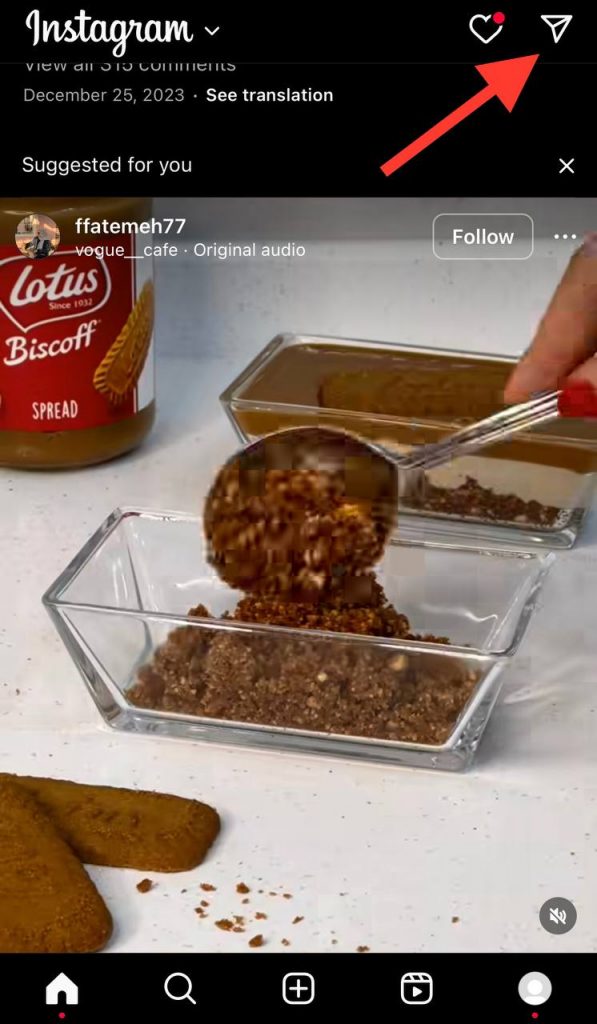
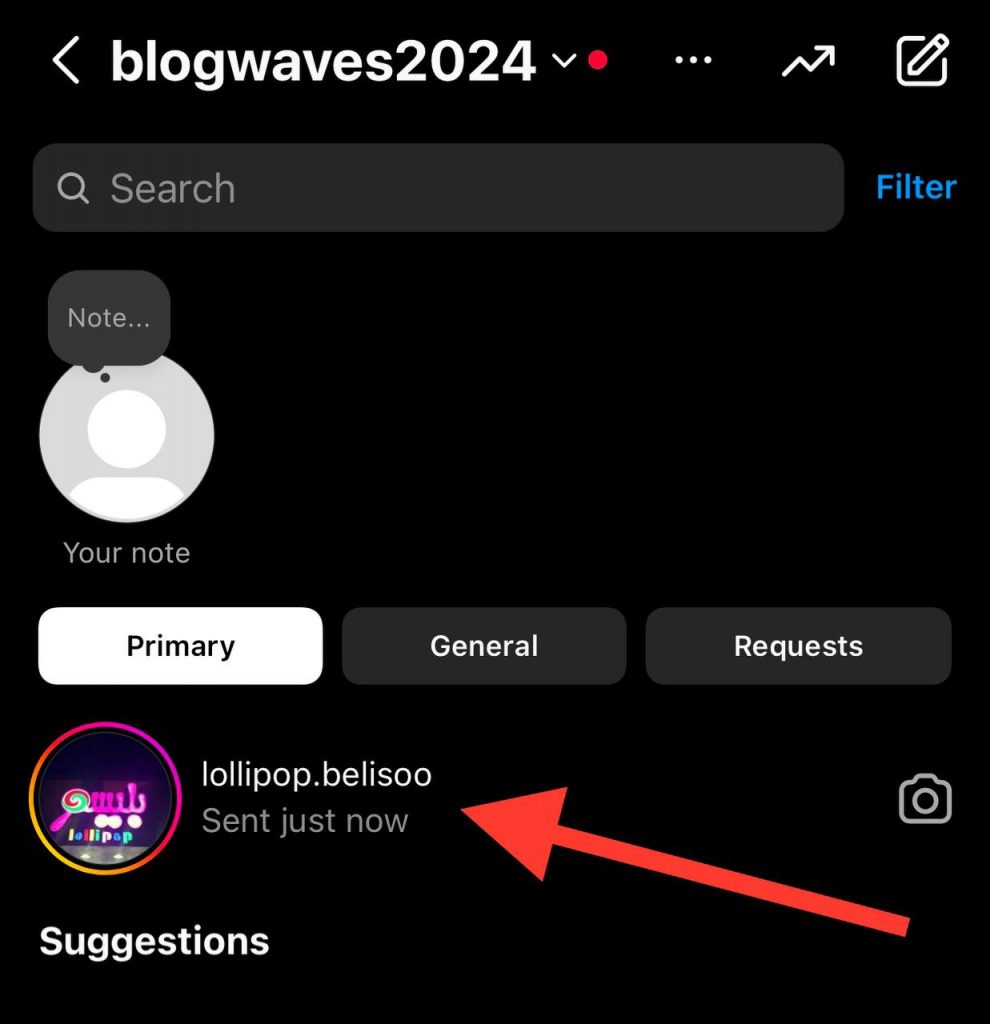
Step 3- Choose the conversation you want to delete the message for.
Step 4- Press and hold the selected message, tap on “Unsend,” and confirm it to delete the message. As of 2026, this process is still the same for text, photos, videos, voice messages, and stickers.

Note that you will receive a pop-up message that asks you to confirm unsending the message because it will be removed for everyone in the chat.
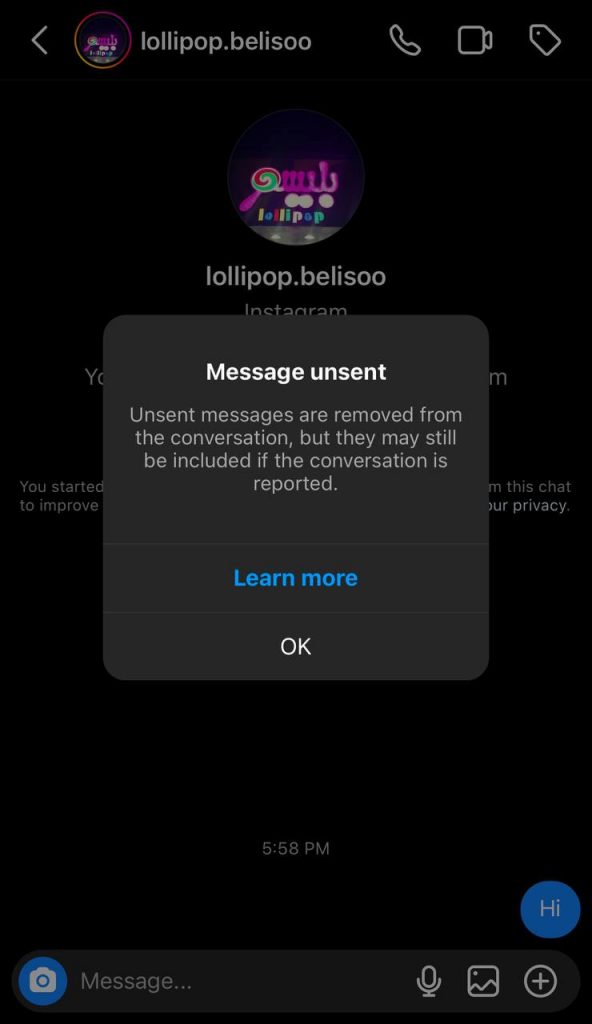
Moreover, you will also be warned that the other person may have already checked the message and even taken a screenshot of it, which means unsending it may be useless.
Finally, when you confirm the action, the message will be gone forever; and no one will notice a sign of the message, and you won’t be able to restore it.
Expert Tip: Instagram does not notify you when you unsend a message. However, if the recipient uses third-party apps or their internet is off when the message is sent, they might still view it. Always double-check before sending sensitive content.
Instead of deleting a message, some users prefer to simply react to Instagram messages, which can be a subtle way to acknowledge a message without sending a full reply.
Does Instagram Notify Others When You Unsend Messages?
Instagram won’t notify users when a message has been unsent, and you can delete any message in your DMs without worrying that other people will understand that you have unsent it.
However, you need to note that unsent messages can be reported to Instagram because deleting them from the chat doesn’t necessarily mean that you can do whatever you want in DMs, especially when other users may have evidence, such as screenshots.
Finally, unsending messages on Instagram is more useful when other users haven’t already seen the message, because when they check your message, and you see the “Seen” icon, it doesn’t make sense to delete the message.
Note: Instagram’s features can change. Be sure to check your app version and privacy settings regularly in case future updates change how message deletion works.
To further protect your privacy in DMs, you may also want to learn how to turn off read receipts on Instagram, which can prevent others from knowing when you’ve seen their messages.
What Happens When You Unsend a Message on Instagram

When you start a chat with someone and then unsend your messages, they can’t see what you have sent anymore; in other words, it’s like you never sent that message.
However, it all depends on if the other person has already seen the message or not, but both the message and the notification will be deleted.
In previous years, Instagram would show “This message has been unsent.” As of 2026, this message is no longer shown to protect user privacy.
When you unsend a message on Instagram, it will be deleted instantly for both you and the other person, and they can’t see what you have sent unless they were on the chat screen in the first place or have read the message from the notification bar.
Note that you are able to delete any message on DMs, and it doesn’t matter if it is an old or new message; the other person on the chat won’t be notified that you have unsent the text, photo, or voice message.
What Kinds of Messages Are Possible to Unsend on Instagram?

As you know, Instagram allows you to send text, photos, videos, stickers, emojis, voice, etc., on Instagram DMs.
Therefore, if you sent any type of these messages to someone and now want to delete them, you are free to unsend them at any time you want.
Note that the process of unsending any type of message on Instagram is the same, which means it doesn’t matter if you want to unsend a photo or a voice message; you should follow the same steps.
Is It Possible to See Unsend Messages

Some users wonder if there’s a way to view unsent messages on Instagram. While Instagram doesn’t offer an official way to do this, there are a few possibilities! Check them out here!
There are network issues
Suppose you are lucky enough to realize you have sent the message to the wrong person and want to unsend it immediately, but you or the other person’s network connection is weak, or Instagram servers are down; then there might be difficulties deleting the messages, and the receiver may be able to see them.
The other person uses third-party tools
There are different third-party applications that help people better use Instagram’s features, so these apps also help people save direct messages when they receive them.
However, it is better to avoid these tools because they access your account and messages, but if you are curious to see all the messages you get, you can use them.
Using these applications will automatically save all your messages, and it doesn’t matter if people delete their messages; you are still able to check them.
Many third-party tools that save DMs are also commonly used by fake followers on Instagram, which is another reason to be cautious about who you interact with.
Screenshots and Screen Recordings
Instagram doesn’t notify users when screenshots or screen recordings are taken in regular DMs. If the recipient captures the message using a screenshot or screen recording before you unsend it, the content is permanently saved on their device.
Unsend only removes the message from the chat; it cannot erase media that has already been manually saved by the recipient.
The receiver’s data is off
If you send a message to someone when their internet connection is active, they will receive the notification, but if you unsend the message before they disconnect their internet, they will still be able to read the message from the notification bar.
The chat screen is open on the recipient’s device
When you are chatting with someone, they will immediately receive the message you send because they are on the chat.
Therefore, you must be very quick in deleting the message before they see it!
Pro Tip: If you’re worried someone might see a message before you unsend it, use Vanish Mode on Instagram. It automatically deletes messages after they’re seen; there is no need to delete them manually.
Notification Previews on Lock Screens & Wearables
If the recipient has notification previews enabled, part or all of your message may appear on their device’s lock screen, notification shade, or smartwatch display. This happens almost instantly when the message is delivered.
Even if you unsend the message seconds later, the notification preview may already have revealed the content.
This is especially common on iOS, Android, Apple Watch, Wear OS devices, and desktop notifications from Instagram Web.
Through Email Notifications
Some users have Instagram DM notifications enabled via email. When this setting is active, Instagram may send a notification email containing part of the message text.
Once an email notification is delivered, unsending the message on Instagram does not remove the email from the recipient’s inbox. This means the message content can still be read even though it no longer exists in the chat.
Is There a Time Limit to Unsend Messages on Instagram

Some applications give you a limited time to delete unwanted messages, but there is no time limit to unsend messages on Instagram.
However, it is important for you to be aware of when you want to unsend the message because deleting a message after people see it may not be pleasant.
Remember that the longer it takes to delete a message, the higher the chance they may see it!
Finally, when people see the message, there is no logical point in unsending it from the chat. Doing so just prevents them from proving that you sent the message if they don’t have any proof, such as a screenshot.
Can Unsent Messages Be Reported on Instagram?
Yes, you are able to report unsent messages to Instagram even if you can’t read them anymore because Instagram has access to all messages that you have sent or received in the last 30 days, which can still be used for moderation or abuse reporting.
Therefore, if you think that you can send whatever you want and clear your tracks by unsending the message, you are wrong!
So, be careful about what you send to others on Instagram because this platform is restricted in its users’ privacy and security.
If you want to keep track of important or sensitive conversations, knowing how to use the flag feature on Instagram can help you organize messages before deciding whether to delete them.
FAQs
Does Instagram Notify Others When I Unsend a Message?
No, Instagram does not send notifications for unsent messages, but users may still see the content via notifications or third-party tools.
Why can’t I unsend messages on Instagram?
The most common reason may be because of your internet connection, so it is better to ensure you have a stable connection when unsending a message. Moreover, make sure you are using the latest version of the app.
Can I unsend messages after being blocked?
Note that when you have been blocked by someone, all conversations and communication between you two will be cut off, but you are still able to unsend all the previous messages.
Will others see the unsend messages in their DMs?
No, when you delete a message in DMs, the messages will disappear both in your and their inboxes, and no one will be able to see the unsend messages.
What happens to the notification bar if I accidentally delete a message on Instagram?
When you send a message to someone on Instagram, they will be notified that they have a new message, but if you delete the message, the notification will disappear, and that person can’t see the message.
What happens if I unsend a message on an Instagram group chat?
Doing so will delete the message for everyone in the group. However, those who had already checked the group before you deleted the text may be aware of the content you shared.
Conclusion
The unsend feature on Instagram is a helpful tool to better communicate with your friends, correct mistakes, and avoid further regrets in online chats.
In simple words, you can consider this feature as a digital eraser that can help you build stronger relationships with your followers.
However, you need to keep in mind that if someone uses third-party tools, turns off and on their internet, runs into an Instagram glitch or bug, they may be able to see the message you have deleted.
Therefore, the best thing you can do is to always review what you are sending, especially when you are chatting with a stranger or someone who is not very close to you.

Emi Daniel
Buy an Established Instagram Account
Skip starting from zero. Browse Instagram/TikTok accounts with audiences across many niches.
See Available AccountsRelated articles
-

How to Go Live on Instagram: A Step-by-Step Guide
Going live can feel more stressful than posting a Reel. You cannot remove a pause, rewrite a sentence, or start over after an awkward moment. But that…
17 min readEmi Daniel
-

Instagram Instants Feature: What It Is, How It Works, and How to Turn It Off
The first time I opened Instagram Instants, I almost backed out. I had taken a normal photo. Nothing worth editing. Nothing worth posting. Nothing that needed an…
11 min read -

How to Clear Instagram Cache on iPhone, Android & Desktop
Instagram can quietly build up a lot of temporary files while you scroll through Reels, watch Stories, save posts, and upload your own content. You may not…
12 min read