

Have you ever wished you could turn off read receipts on Instagram so the person you are chatting with won’t know when you read their message?
If your answer is yes, then you are lucky! Instagram announced that users can turn off read receipts on direct messages, not only for specific users but also for all chats.
As you know, once you open an unread chat on Instagram, there will be a ‘seen’ indicator under the message. The other person will know when you exactly read the message, and they might be upset if you don’t respond right away, which is why you wish you could turn the read receipt off.
Buy an Established Instagram Account
Skip starting from zero. Browse Instagram/TikTok accounts with audiences across many niches.
See Available AccountsOne of the main reasons you may not want others to know when you read their messages is to maintain some privacy. So, if you care about your personal space on Instagram, you should use this feature.
Therefore, read this article to the end if you are among those people who prefer others not to know when you read their direct messages.
In this comprehensive article, we will explain how to turn off the read receipt feature on Instagram for a certain chat or all direct messages and will share other important information to help you use Instagram more effectively and maintain your privacy.
How Does Instagram Read Receipts Work?

Before we go any further, let’s see how the Instagram read receipts work. In simple words, this feature allows users to know when the other person reads their direct messages.
As you know, when you send a message to someone, a ‘seen’ notification will appear under your message; if they just opened your direct message, you will see a notification saying ‘Seen just now.’
Moreover, Instagram shares the exact time when your direct message was read; for example, it says: ‘Seen 20m ago,’ ‘Seen Saturday,’ ‘Seen 5h ago,’ etc.
Thus, it doesn’t matter when the recipient reads your message; as long as they have this feature on, you can see when they have read your direct message, which is the same for you.
Instagram has designed this feature to promote transparency in online communication, so users can have better conversations on the app; however, not all users welcome this feature’s transparency.
Reasons People May Want to Turn Off the Read Receipts on Instagram?

People may want to turn off the Instagram read receipts for several reasons, which we will explain in this section.
Some users want to maintain more privacy on the platform because they don’t want others to know when they are online and read their messages, as they expect them to answer immediately.
Sometimes, you can not answer the recipient at the moment or need more time to give them a correct answer; when people see that you read their messages, they want you to answer them, which may put a lot of pressure and stress on you. To avoid this situation, you may want to turn this feature off.
Some users believe that having the read receipts feature on makes them feel they are being watched by the sender, which makes them uncomfortable, so if you ever feel this way, you must turn it off immediately.
As you can see, someone may decide to turn off Instagram receipts for different reasons. it doesn’t matter what your reason is; if you don’t want others to see when you have opened their chat and read their DMs, feel free to switch it off.
Do I Have to Turn Off My Read Receipts on Instagram?

It is completely your decision! Remember that Instagram is a great platform to communicate with your friends and followers, but using this application is up to you.
If you don’t care about others knowing when you read their messages, you can leave this feature on, but if you don’t have healthy relationships on this app or want to protect your privacy, it is recommended that you turn it off.
Besides, if you are among those people who are afraid of what others think about you and don’t want to put yourself in a situation where you feel you are being rude just because you saw a message and didn’t answer right away, it is better to turn off Instagram’s read receipts.
Finally, as you can see, you are the one who decides to keep this feature on or off based on your relationships and privacy situation on the app.
How to disable read receipts on Instagram

It doesn’t matter whether you are an iOS or Android user; the process of turning this feature off is the same.
Follow the steps below to turn Instagram read receipts off for a specific chat or all chats:
Disable read receipts for a specific chat
Step 1- Open the Instagram application on your device.
Step 2- Open your chat list by swiping the home page to the left.
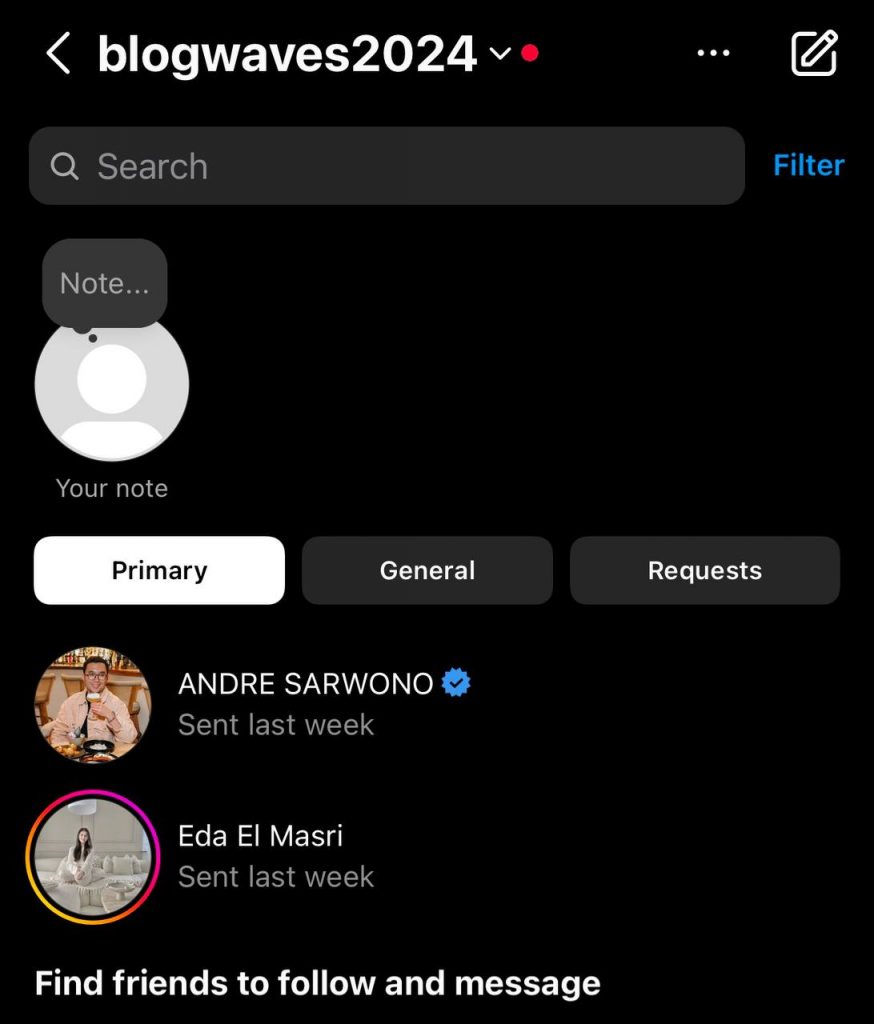
Step 3- Choose the chat you want to turn off the read receipts.
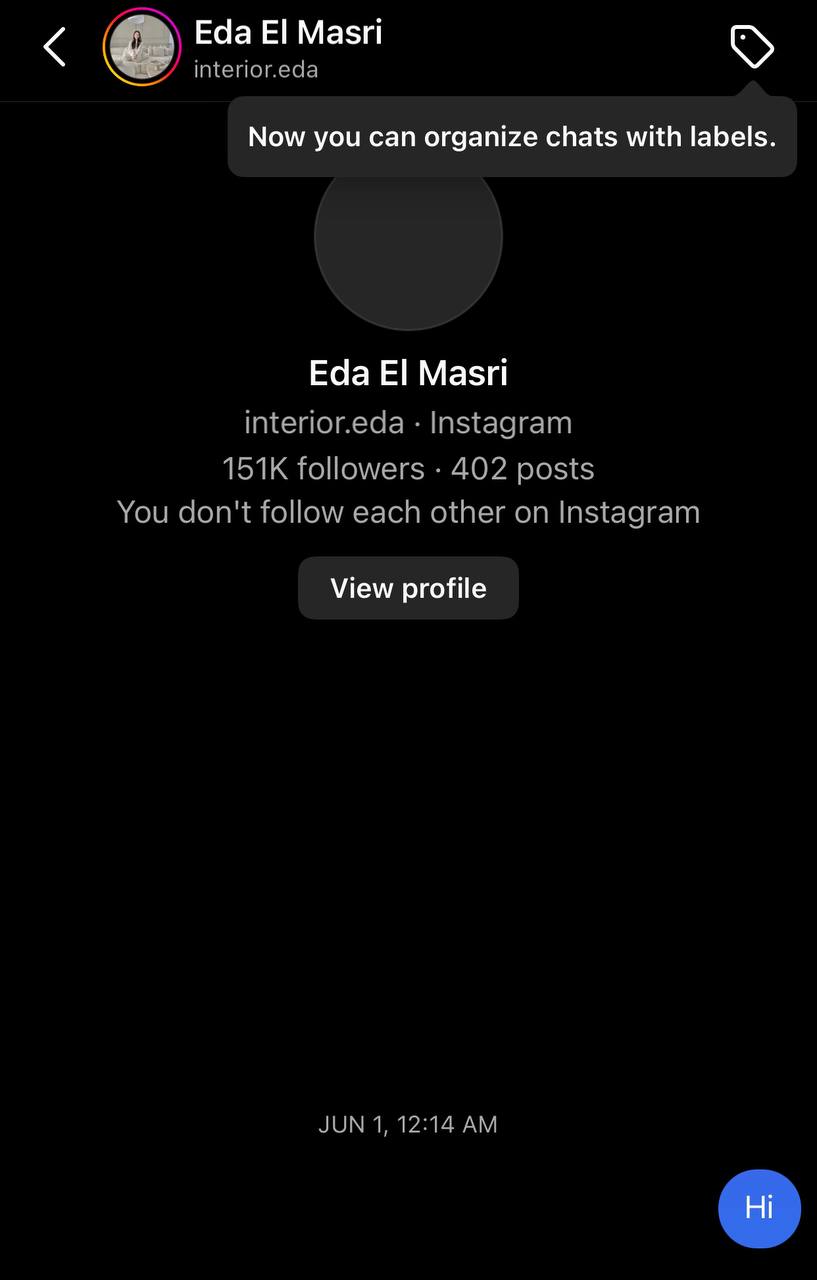
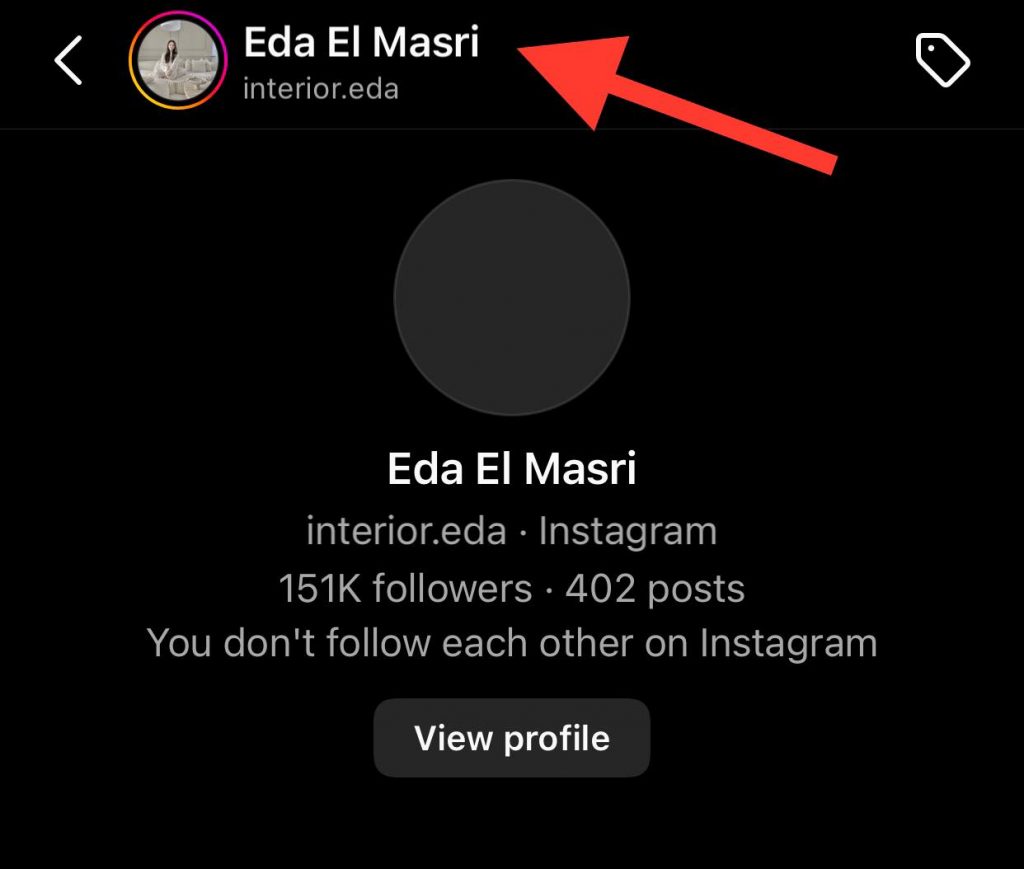
Step 4- Tap on the name at the top.
Step 5- Select ‘Privacy & safety’ from the menu.
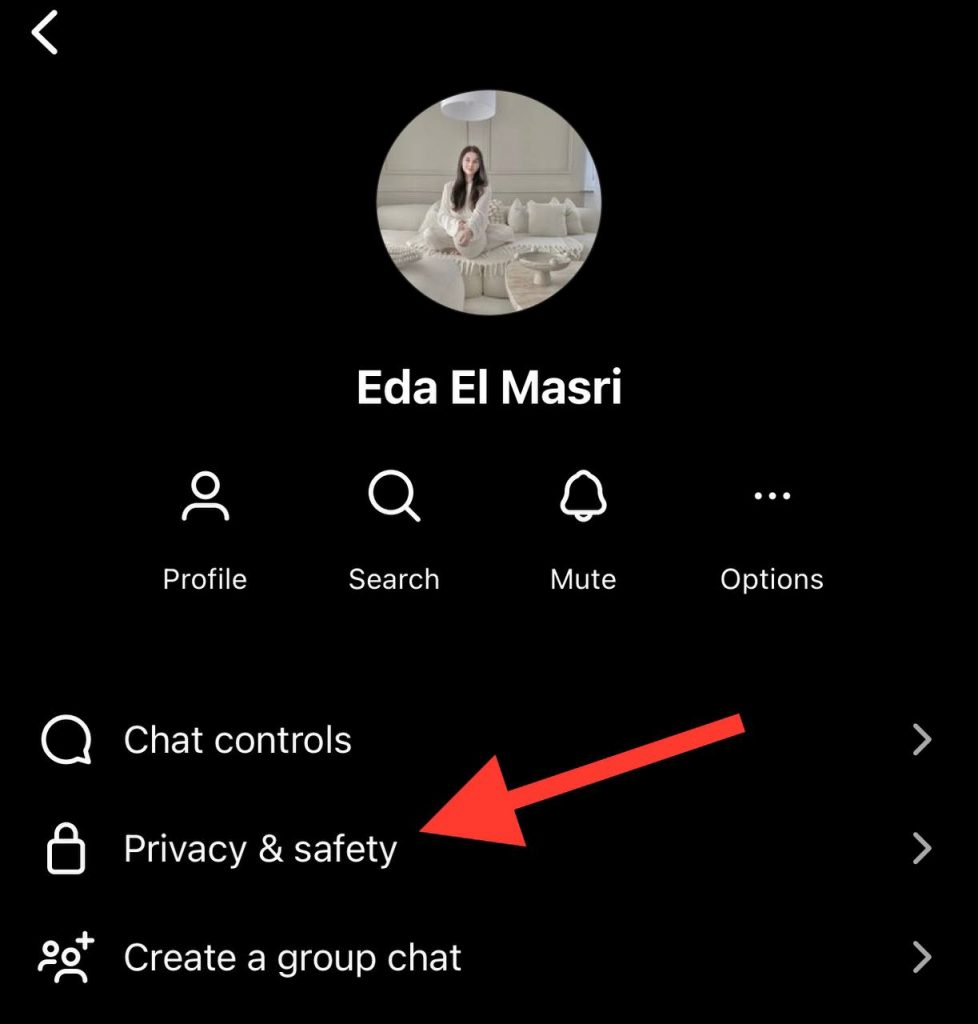
Step 6- Turn off the ‘Read receipts’; the receipts will not understand when you read their messages.
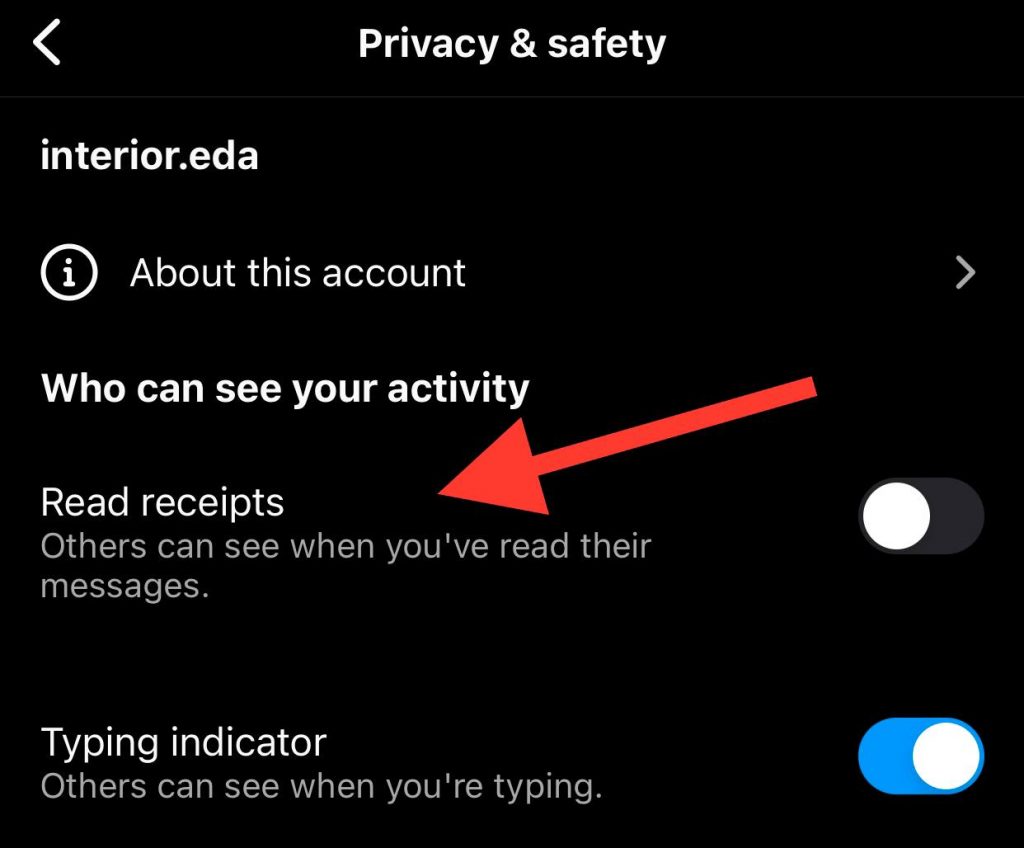
Turn off read receipts for all messages
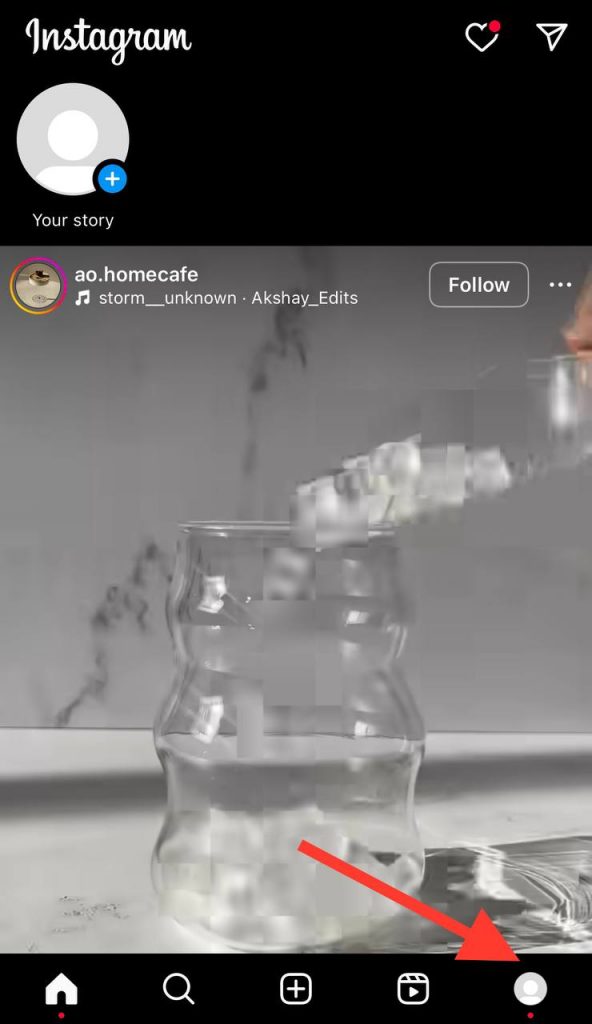
Step 1- Open Instagram and go to your profile by tapping your profile picture in the bottom right corner of the home page.
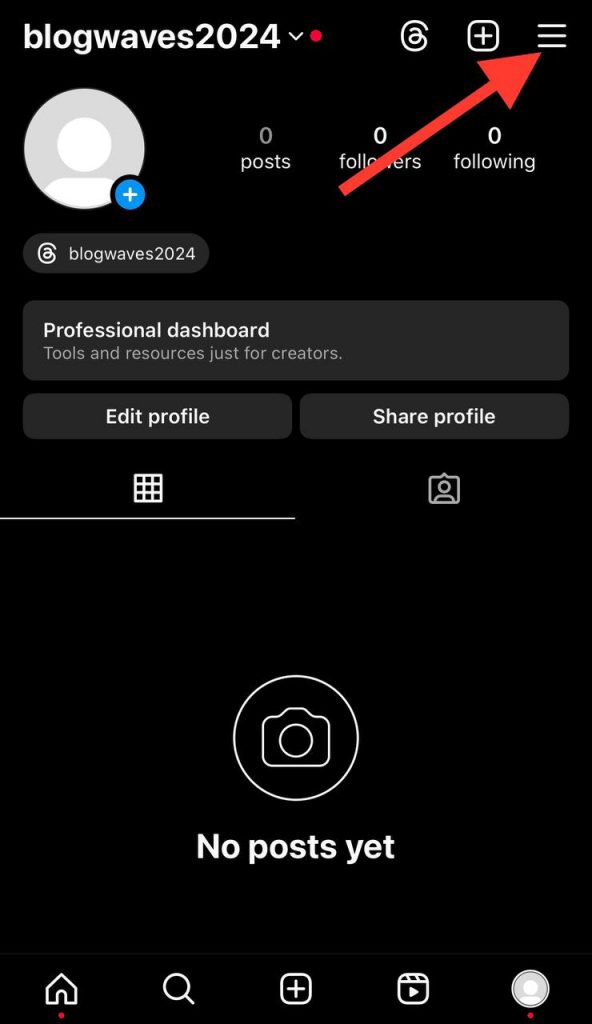
Step 2- Tap on the three horizontal line icon in the top right corner of the screen.
Step 3- Scroll down the menu and select ‘Messages and story replies.’
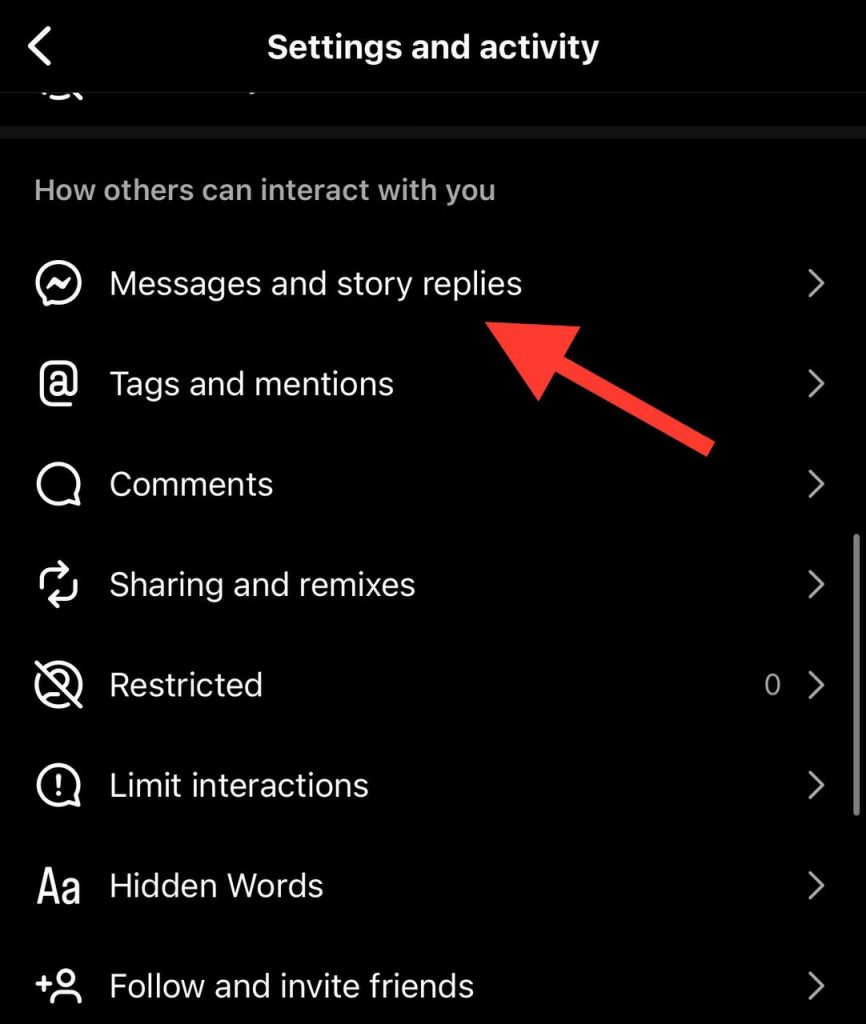
Step 4- Tap on ‘Show read receipts’ under the ‘Who can see you’re online’ section.
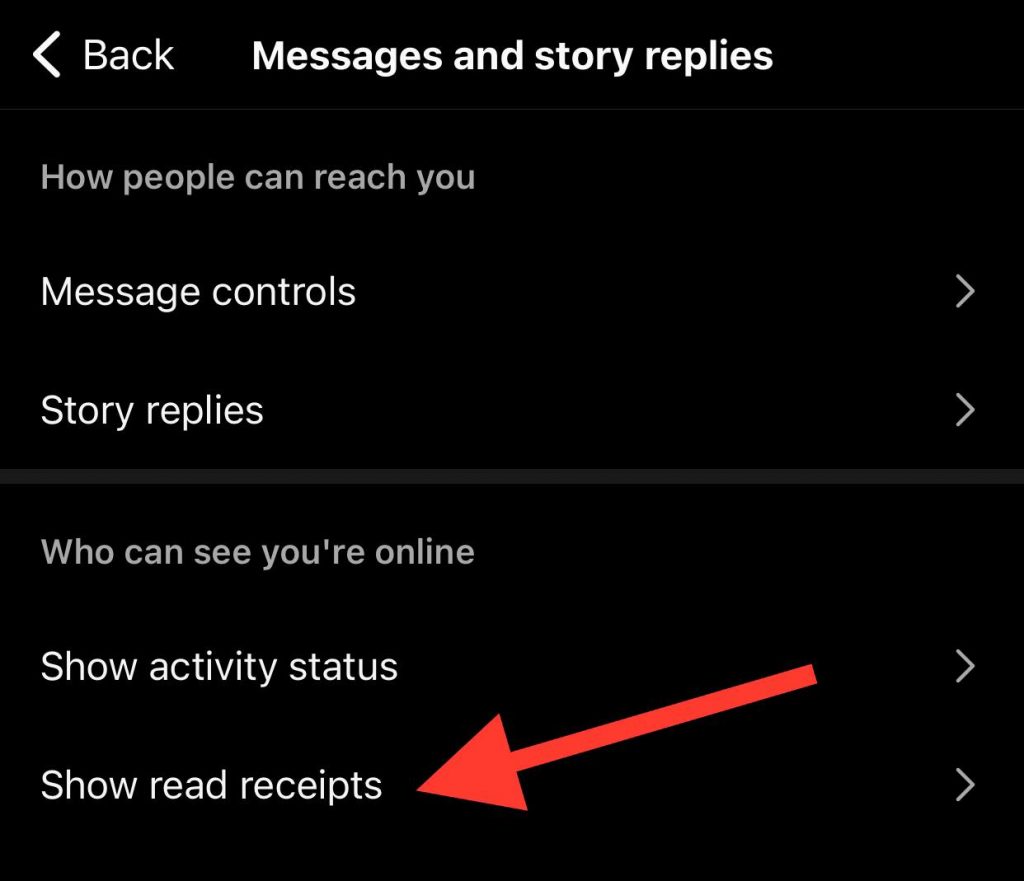
Step 5- Turn off the ‘Read receipts’ to finish the process.
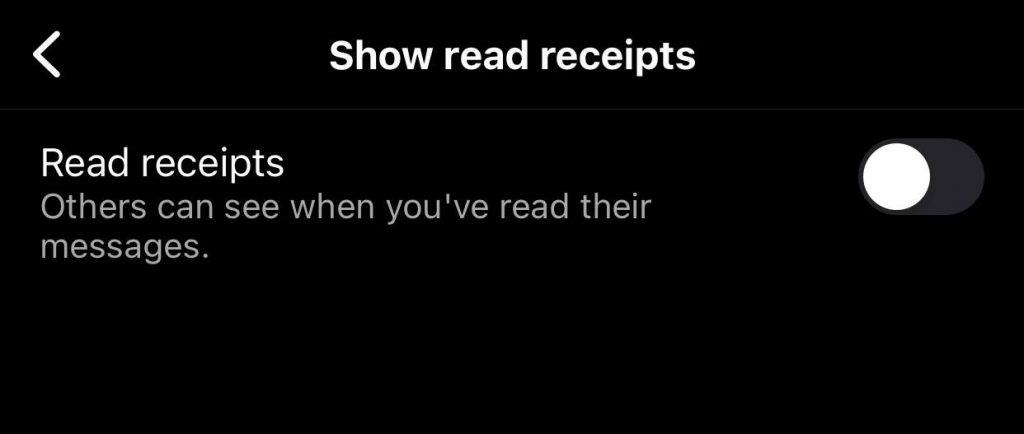
That’s how easily you can turn this feature off in just a few seconds.
Other Ways to Turn Off Instagram Read Receipts

If you don’t want to turn the Instagram read receipts off, there are other ways you can try to read Instagram messages without leaving a trace of when you read them.
Reading the message from the notification bar
As you know, when you receive a direct message on Instagram, you can see a part of it in the notification panel without opening the app.
You can review the message from the notification on your mobile, but the other person won’t understand when you have read their messages.
However, keep in mind that using this method, you can not read the whole message; you are only able to read a part of it.
Turn on the airplane mode on your mobile
Switching your mobile’s airplane mode allows you to read Instagram messages without leaving a ‘Seen’ notification on the chat.
As you know, once you activate your mobile’s airplane mode, your device will be disconnected from the internet, which allows you to read the message; however, it is better not to open the chat immediately when you activate the airplane mode.
Follow the steps below to read Instagram messages while your device’s airplane mode is enabled:
Step 1- Swipe down the control panel and tap on the airplane icon to enable the airplane mode.
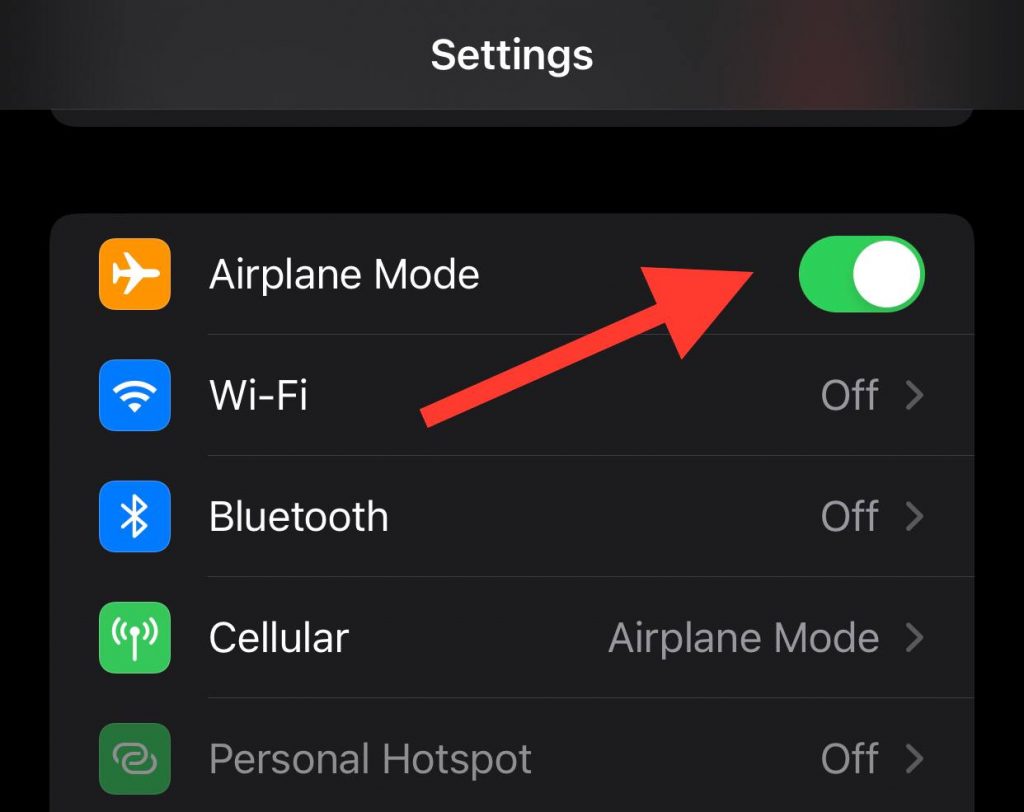
Step 2- Close the Instagram app to make sure it is not running in the background.
Step 3- Open the chat you want to read. Once you read it, turn off airplane mode.
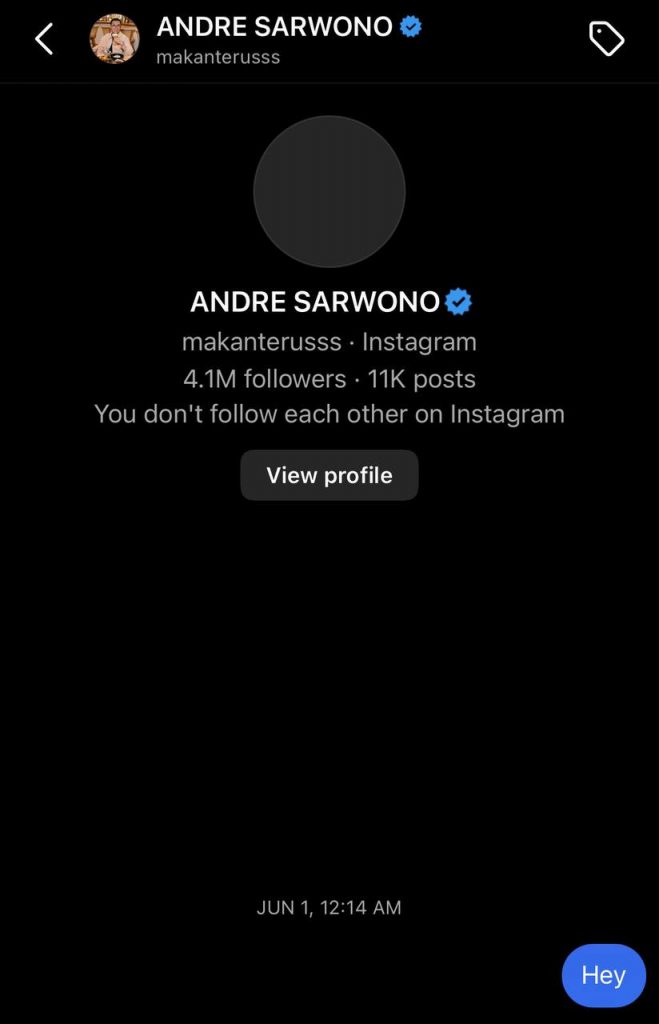
Note that once you turn off the airplane mode, the read receipts will be sent.
Restrict an account to disable read receipts on Instagram
It is good to know that you can restrict an account to disable read receipts on Instagram.
Follow the steps below to restrict an Instagram account:
Step 1- Open Instagram and go to the profile you want to restrict.
Step 2- Tap on the three dots in the top right corner.
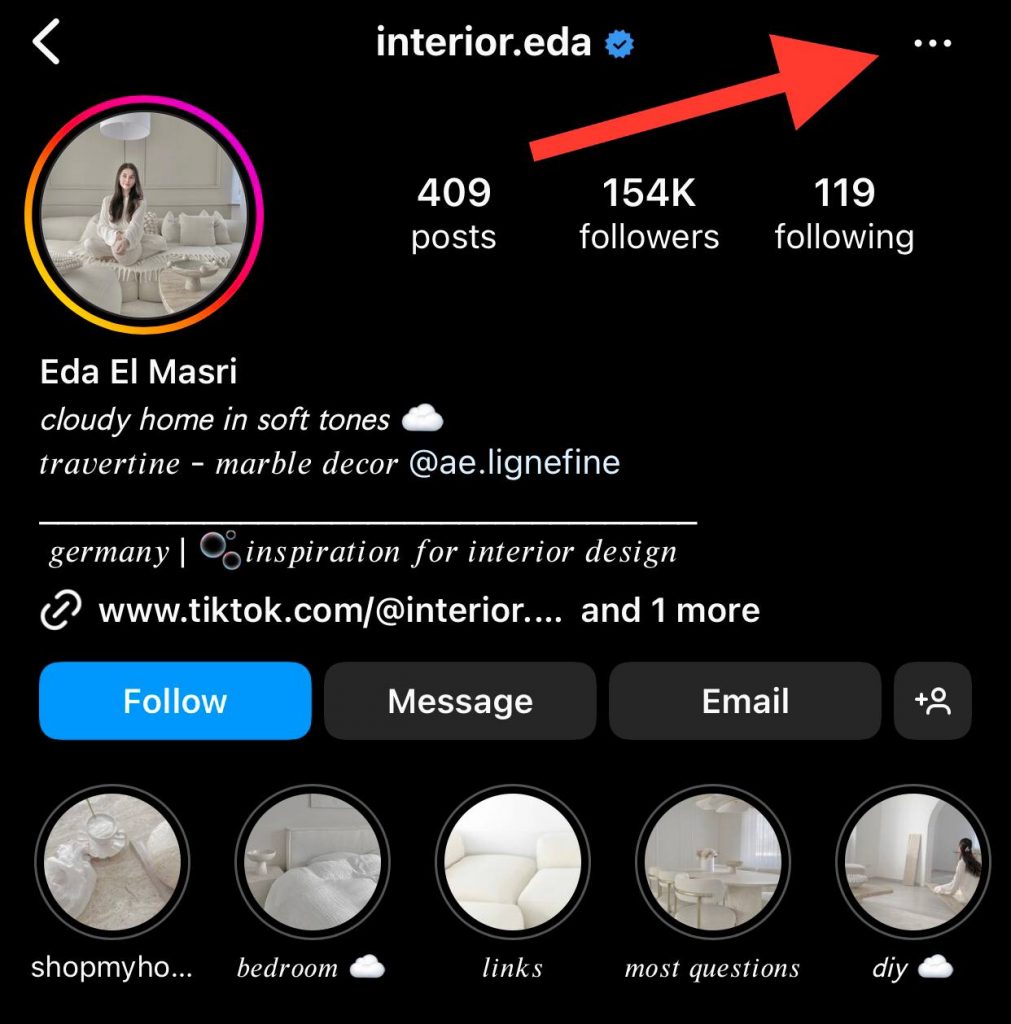
Step 3- Choose ‘Restrict’ from the menu to finish the process.
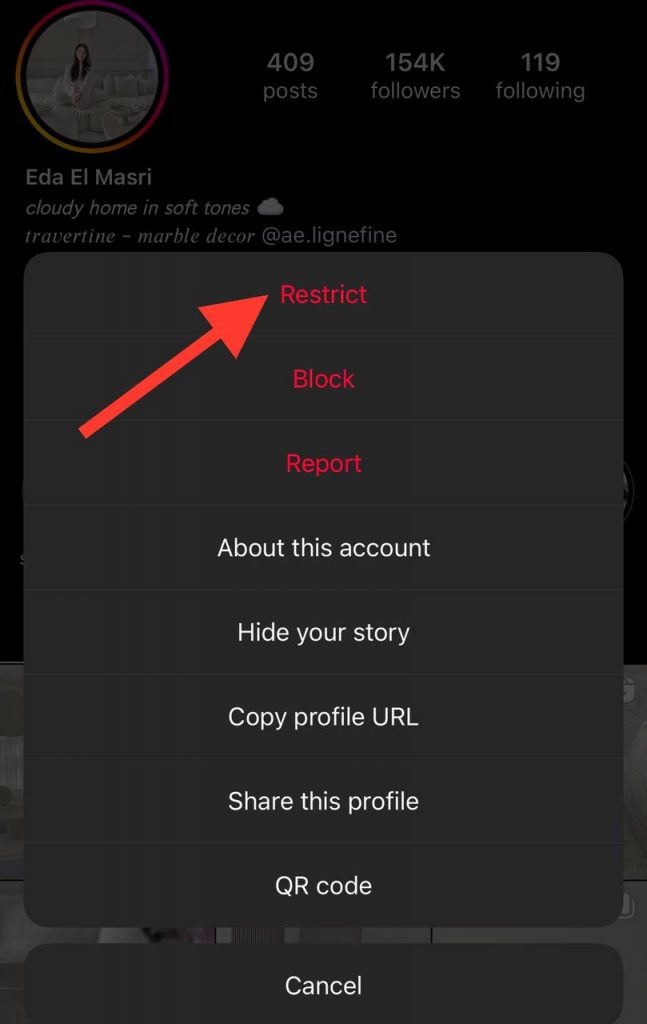
These are some of the methods you can try if you don’t want to turn the read receipts directly.
Conclusion
Managing your privacy on Instagram lets you better use this app, and being able to control the read receipts on direct messages allows you to control your privacy.
In this article, we examined the reasons you may want to disable this feature, helped you better decide whether to keep it on or off, discussed how to turn the read receipts feature off for a specific chat or all chats, and explained other methods to read Instagram direct messages without leaving a ‘Seen’ notification in the chat.
We hope you find this article helpful, and start managing your chats on Instagram today!
FAQs
1- How should I know if someone reads my message on Instagram?
To know if someone has read your direct message on Instagram, you should open the chat and look for the ‘Seen’ notification under your message.
If you can’t see this notification in your chat screen, the other person has not read your message yet or has turned off this feature.
2- Can you read Instagram messages without turning the read receipts off?
Yes, you can enable your device’s airplane mode, read messages through the notification panel, and restrict an account.
3- Why should I turn off Instagram read receipts?
The most common reason is to maintain your privacy on the platform.

Emi Daniel
Buy an Established Instagram Account
Skip starting from zero. Browse Instagram/TikTok accounts with audiences across many niches.
See Available AccountsRelated articles
-

How to Go Live on Instagram: A Step-by-Step Guide
Going live can feel more stressful than posting a Reel. You cannot remove a pause, rewrite a sentence, or start over after an awkward moment. But that…
17 min readEmi Daniel
-

Instagram Instants Feature: What It Is, How It Works, and How to Turn It Off
The first time I opened Instagram Instants, I almost backed out. I had taken a normal photo. Nothing worth editing. Nothing worth posting. Nothing that needed an…
11 min read -

How to Clear Instagram Cache on iPhone, Android & Desktop
Instagram can quietly build up a lot of temporary files while you scroll through Reels, watch Stories, save posts, and upload your own content. You may not…
12 min read