

How do you keep important information, messages, or notes in front of your eyes? By sticking a note on the fridge? Or writing it on a mirror? How about marking an Instagram DM as a special one?
You may think about pinning important messages at the top, but how would you realize it’s the chat you are looking for? That’s where Instagram’s flag feature comes to rescue you.
By flagging a DM on Instagram, you can mark it as an essential chat and locate it easier for further conversations or follow-ups.
Buy an Established Instagram Account
Skip starting from zero. Browse Instagram/TikTok accounts with audiences across many niches.
See Available AccountsThere is so much to learn about this amazing and helpful feature, and you are going to discover all of them here!
What Is the Flag Feature on Instagram?
The flag feature acts like a bookmark or organizational tool on Instagram Direct Messages, allowing users to mark specific chats to quickly find them.
It’s especially a perfect tool for businesses and anyone who receives too many DMs to track important messages and conversations without scrolling through hundreds of messages.

This feature is available on professional accounts, such as businesses and content creators. Regular users can pin messages to access them easily.
Please note that flagging a message on Instagram is far different from flagging a post because when you flag a post on IG, you are reporting it!
Reasons to Use the Flag Feature?
Here is a list of common reasons to use the flag feature on Instagram:
To stay organized: It helps you keep tracking important conversations without losing them in tons of messages in your entire inbox.
Helpful to businesses and creators: Flagging DMs helps business owners and content creators manage collaboration requests and customer inquiries more effectively.

To improve productivity: It’s difficult to access messages when needed, especially when you receive a high volume of DMs. Using this feature allows you to filter flagged messages and save more time and energy to focus on crucial matters.
Easy access to specific chats: You can mark worthy conversations and use the DM filter option to easily review all flagged messages.
To prioritize important DMs: Use this feature to mark chats that need your full attention or follow-ups.
Keeping track of customer inquiries: Flagging an Instagram DM helps you track customer inquiries and reminds you what to do with each flagged chat.
How to Flag a Direct Message on Instagram?
You can flag Instagram DMs in two ways; let’s see each of them:
Method 1:
Step 1- Open Instagram and go to your DMs.
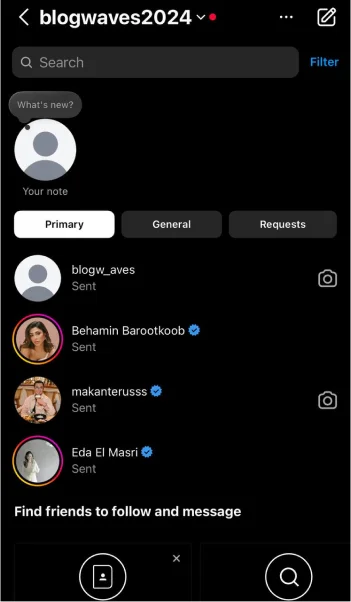
Step 2- Select the desired chat and swipe it to the left.
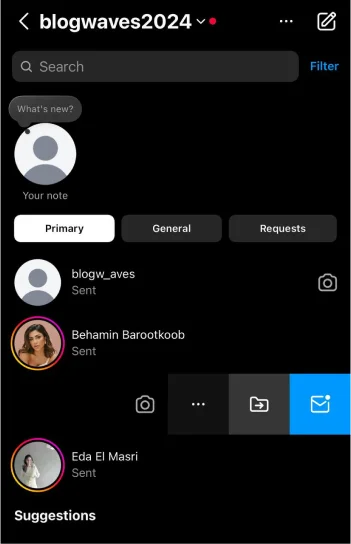
Step 3- Tap “More.”
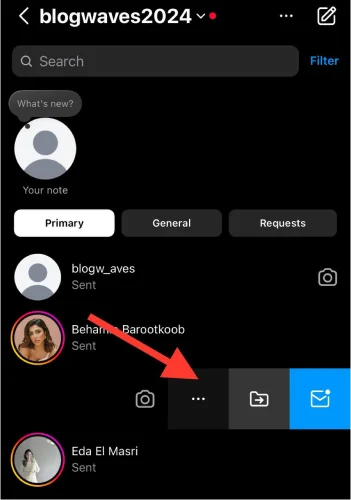
Step 4- Select “Add label” from the menu.
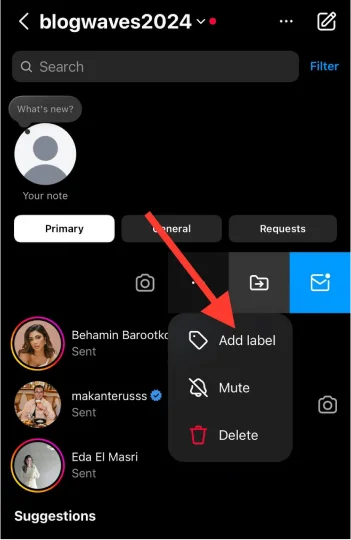
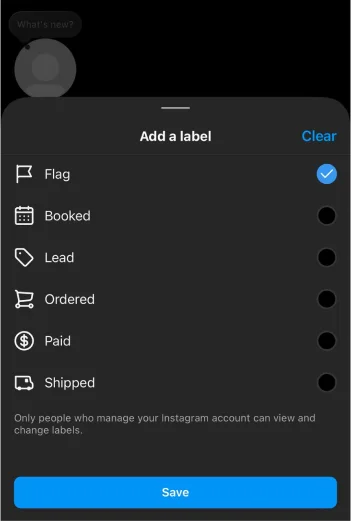
Step 5- Choose “Flag” by tapping on the small circle in front of it.
Method 2:
Step 1- Go to the Instagram DMs and open the chat you want to flag.
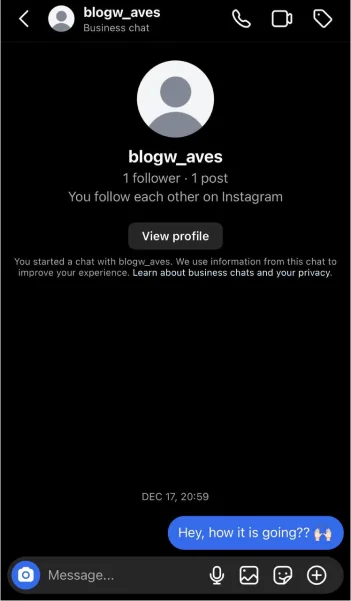
Step 2- Tap on the label icon in the top right corner of the screen.
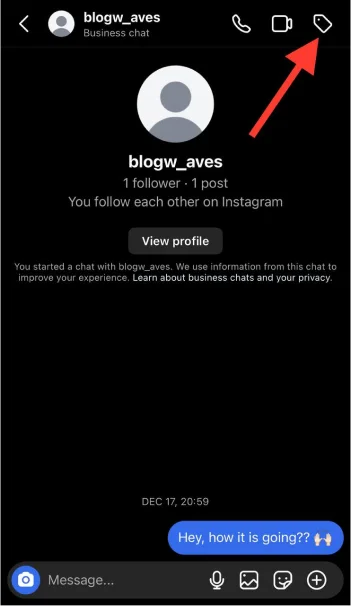
Step 3- Choose “Flag.”
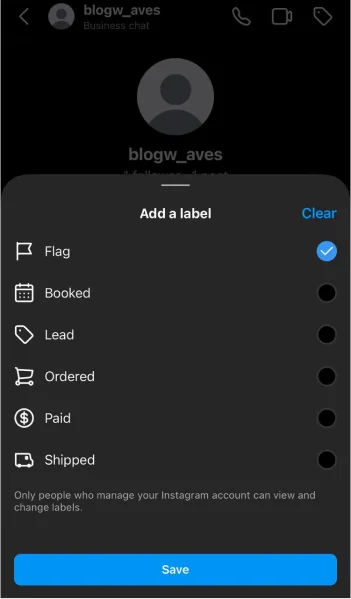
That’s how easily you can flag Instagram DMs to enjoy its various benefits!
What Happens After You Flag a DM on Instagram?
If you wonder what happens to your messages when you flag them, this section is for you.
The chat is highlighted in orange: The flagged conversation will be marked with an orange flag icon (in the right section of the chat), which makes it stand out among the entire inbox.

You can filter messages: Once you flag and label DMs, you can use the filter option to quickly access flagged conversations.
No notification is sent: The person you are flagging their chat won’t receive a notification; the flag is only visible to you.
You can better manage your DMs: It enables you to prioritize and control your messages more effectively.
Remove the flag feature anytime: If you don’t want a conversation marked as necessary, you can remove the flag feature at any time.
How to Use the Flag Feature Strategically

This amazing feature can be used strategically for personal and business purposes. This section guides you to get the most out of it.
Use it to track collaborations and campaigns
If you are running a campaign or collaborating with an influencer, you should flag relevant messages to your campaign or collaboration so that you can easily access them and mark them as important content.
To organize your Direct Messages
Looking to grow your Instagram account? One perfect strategy is to flag your DMs to organize them in different categories. You can also use labels to track each conversation.
To build relationships

You will quickly lose your relationships on social media if you don’t follow them up and make new conversations. Using the flag feature lets you easily find messages to keep your connections and relationships updated and build new ones.
Use it to track purchases

We discussed various labels you can use to flag DMs. These labels allow you to track and analyze purchases to help your customers and followers have a more pleasant shopping experience.
To separate personal and professional relationships
As a business owner, having personal chats and business conversations is natural. You can use it to separate these chats and relationships to avoid confusion.
How to Filter Flagged Direct Messages?
Let’s see how to access and filter flagged messages on Instagram.
Step 1- Open Instagram and open DMs.
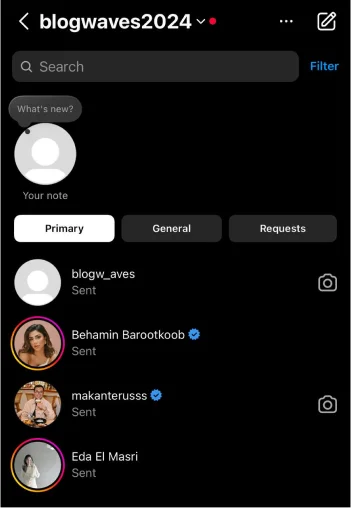
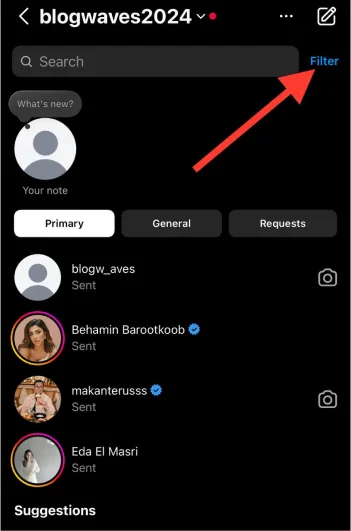
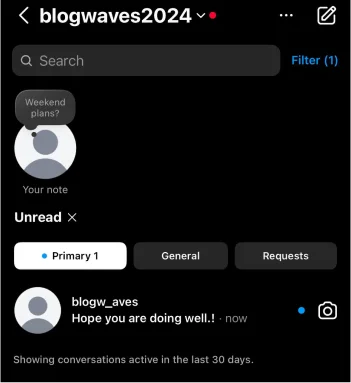
Step 2- Tap on “Filter.”
Step 3- Select how you want to filter messages: Unread, Unanswered, Flagged, Booked, Ordered, Paid, Shipped, and Lead.
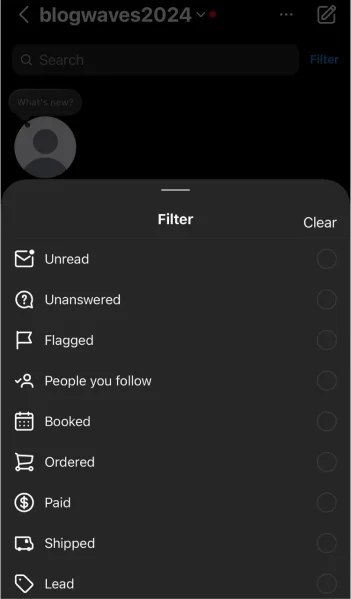
Step 4- Once you choose the desired option, you will access a list of filtered DMs.
Comparing Instagram’s Flag Feature with Other Social Media Tools
Check out this comparison of Instagram’s DM flag feature with similar tools on social media:
| Platform | Feature | Strength | Limits |
| Flag messages | Private, easy to use, and can be filtered. | It’s not a complete organizing tool. | |
| Star messages | No notification is sent. | It won’t pin messages. | |
| Pin chats | Helps to prioritize key chats. | No support for individual message marking. | |
| Bookmark | It’s completely private. | You can’t filter or categorize bookmarks. | |
| Pin chats | Allows you to quickly pin and unpin conversations. | There are no options for flagging or organizing specific messages. |
What Are the Labels to Flag DMs?
When you try to flag a direct message on Instagram, you will see other labels. Let’s examine each one.
Booked: It shows that a customer has confirmed a reservation or an appointment and is used to track or follow up on such conversations.
Lead: This label represents that a customer hasn’t purchased or committed to your product or service. (Consider it when your customer wants to use your product/service but hasn’t paid you yet.)

Ordered: This tag indicates that your client has placed an order. It helps you track their orders and ensure that everything is going well.
Paid: This one confirms that the customer paid for their orders, and you can mark a DM with this label to separate it from other messages.
Shipped: It shows that your customer’s order has been shipped, and you can use it to have a conversation with them about their purchase experience.
Pros and Cons of Using the Flag Feature on Instagram
Here is a list of pros and cons of using the flag feature that helps you better decide whether to use it or not.
Pros
It helps you manage your messages like a pro.
It doesn’t send notifications to the other person.
It saves you more time and energy, allowing you to focus on essential tasks.
You can access essential messages much more quickly.
It allows you to organize your DMs.
It increases focus and efficiency.
You can prioritize important messages.

Cons
It can be overlooked.
It doesn’t have a reminder system.
Lack of visual differentiation.
It doesn’t help you to respond to messages at the right time.
It doesn’t work as a full organizational tool.
Common Issues with the Flag Feature (With Easy Solution)
This feature is useful, but you may face some challenges and issues. Here is a list of common limitations with easy solutions.
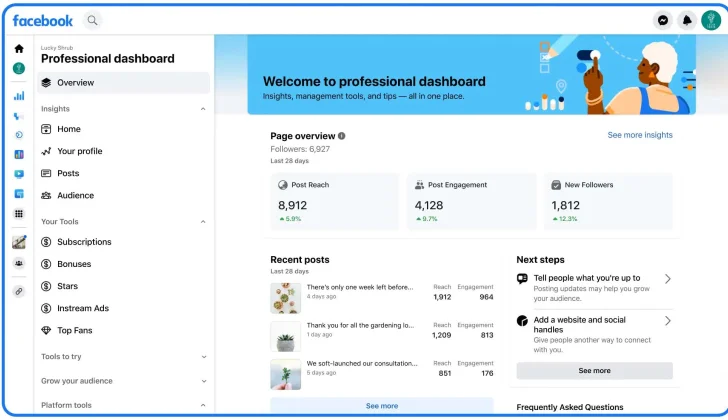
Issue: No search function for flagged DMs
Solution: 1) Add different contexts in chats. 2) Use external tools, such as Facebook’s Business Tool.
Issue: Overusing this feature may lead to confusion
Solution: 1) Don’t flag every conversation. 2) Review them regularly. 3) Be selective.
Issue: There are no automatic follow-up reminders
Solution: 1) Use third-party tools. 2) Manually follow up on important chats.
Issue: You don’t receive specific notification for flagged DMs
Solution: 1) Enable message notifications. 2) Add important messages to your favorite list.
Issue: They are limited to individual messages
Solution: 1) Create a summary note from each chat. 2) Pin key conversations.
Conclusion
Organizing direct messages on Instagram helps you better track customers’ orders and manage important conversations, leading to more solid relationships with your followers.
Consider it a simple yet useful feature to improve your DM organization. Whether tracking important inquiries or personal conversations, it helps you easily access necessary chats later.
I hope you enjoy reading this article and start using this fantastic feature to better manage chats and interact with your followers.
FAQs
Why can’t I flag messages on Instagram?
This feature is available for business accounts, so if you have a personal account, you can’t use it; however, contact Instagram support if you can’t use it on your professional account.
What does it mean to be flagged on Instagram?
If a post gets flagged on Instagram, it means it has been reported as spam or irrelevant.
How do you get the blue flag on Instagram?
To get the blue flag, also known as the blue badge, you must request Instagram support, and you will get it if you meet the requirements.
How long does the Instagram flag last?
You can remove the flag icon from Instagram DMs whenever you want.
Does the other person get notified if I flag our chat?
No, Instagram won’t notify the other person; the orange icon is only visible to you.
What happens if you flag someone on Instagram?
By flagging someone’s chat, you can quickly access their conversation and mark it as an important message.
Is the flag feature available on personal accounts?
No, it is available on business accounts.

Emi Daniel
Buy an Established Instagram Account
Skip starting from zero. Browse Instagram/TikTok accounts with audiences across many niches.
See Available AccountsRelated articles
-

How to Go Live on Instagram: A Step-by-Step Guide
Going live can feel more stressful than posting a Reel. You cannot remove a pause, rewrite a sentence, or start over after an awkward moment. But that…
17 min readEmi Daniel
-

Instagram Instants Feature: What It Is, How It Works, and How to Turn It Off
The first time I opened Instagram Instants, I almost backed out. I had taken a normal photo. Nothing worth editing. Nothing worth posting. Nothing that needed an…
11 min read -

How to Clear Instagram Cache on iPhone, Android & Desktop
Instagram can quietly build up a lot of temporary files while you scroll through Reels, watch Stories, save posts, and upload your own content. You may not…
12 min read