

Have you ever wondered what those three comments are that appear at the beginning of the comment section?
I like you! You’re the curious type! I have to say that we call those three comments the pinned ones.
The account owner decided to pin specific comments to attract the attention of users who open the comments to engage with content.
The question is, how can you pin and highlight top comments on your posts?
It’s super easy!
In this article, I will discuss how to pin and unpin comments, which comments to pin, the pros and cons of using this feature, and more!
What Are Pinned Comments on Instagram?

A pinned comment on an Instagram post is the first comment at the top of the comment section.
As of now, there can be up to three pinned comments on each post, which means you should choose them wisely.
This feature helps users better manage and control their comments. It’s very important because these comments are the first things your followers and profile visitors see in the comment section of your posts.
Which Comments Worth to Pin

As mentioned, you can pin up to three comments. However, you can’t pin any comments, and it’s better to be selective.
Let’s see what types of comments are worthy to pin.
Relevant comments
Pin the comments that are relevant to your content and will make other people interact with that comment.
When your post goes viral, there will be various comments on it. If you want to pin three of them, make sure you choose the most relevant ones.
Customer satisfaction

Make sure to pin at least one positive comment, such as happy customers who love and recommend your products and services to others.
Suppose you see a viral video and open the comment section, and you see a comment saying: “Thank you for the quality of my jacket! My sister just ordered one.”
How does it make you feel? I bet it tickles you to place your order because such comments build a sense of trust.
Interesting comments
One of the most pinned comments on Instagram are interesting ones, especially on funny or cute videos.
These comments usually get many likes, which helps your content go viral faster. You won’t believe me if I tell you there are comments with over 500k likes!
Most liked comments

As I said, there are comments with thousands of likes; what is better than pinning those comments on your posts so more people interact with them?
Doing so will benefit you because it leads more people to view and interact with your content.
Frequently asked question comments
If you want to get rid of answering the same questions, such as product details or prices, you can write this information and pin it on your post.
How to Pin a Comment on Instagram
Pinning a comment on Instagram is easier than you think; just follow the steps below, and you’re all done.
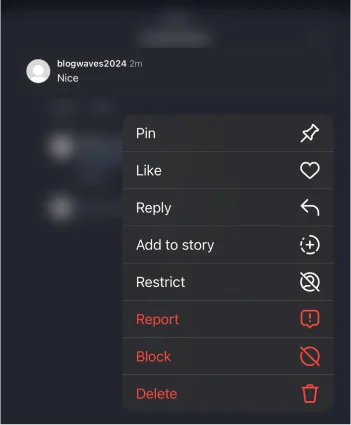
Step 1- Open Instagram and go to the post on which you want to pin a comment.

Step 2- Slowly drag the comment to the left.
Step 3- Tap on the little pin icon to finish the process.
What Is the Order of Pinned Comments?

You can pin up to three comments, right? When you pin the first comment, it will take the first place among others.
However, when you pin the second and third comments, they will appear as first and second, and the first pinned comment will be shown as the third one!
In simple words, the order of the comments will be such that the first pinned comment has the third position, the second one has the second position, and the third one has the first position.
How to Unpin a Comment on Instagram
You can easily unpin your post if you change your mind or want to pin another comment on it. Wondering how? Follow the steps below:
Step 1- Open Instagram and go to the desired post.
Step 2- Choose the comment you want to unpin.
Step 3- Drag the comment to the left.
Step 4- Tap the pin icon.
Step 5- Confirm the process by choosing “Unpin.”
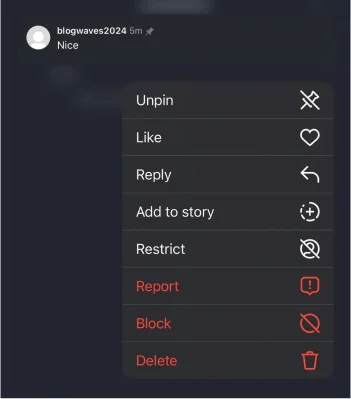
Note that this process is the same for pinning a comment on an Instagram post and Reel and works the same on both Android and iOS devices.
How to Pin a Comment on Instagram Live
Did you know that you can pin comments on Instagram Live sessions? It means you have more control over managing comments during live streams.
Let’s see how you can pin comments on Instagram Live.
Step 1- Start a live session on Instagram.
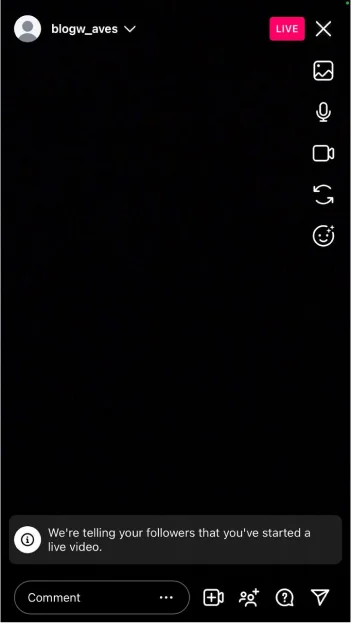
Step 2- Tap on the comment you want to pin.
Step 3- Choose “Pin comment” from the menu.
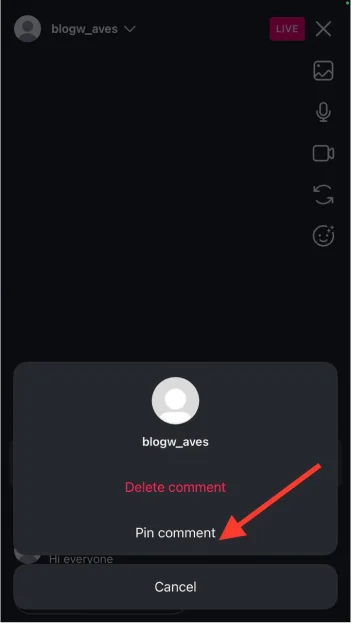
That’s it! You can pin your or your followers’ comments, which will appear at the top of the comment section.
Use this feature to share valuable information, the title of your live session, a link, etc.
What to Do If You Can’t Pin a Comment on Instagram

If you can’t pin a comment on Instagram, these quick solutions help you out!
- Check your internet connection.
- Ensure to use the latest version of Instagram.
- Clear Instagram cache.
- Reinstall the app.
- Close and open the app, then take each step.
- Check Instagram servers.
Try these methods, and the problem will be solved in just a few seconds.
Pros and Cons of Pinning Comments on Instagram

Every feature on Instagram has its own advantages and disadvantages, and pinning comments is no exception.
Let’s see the pros and cons of pinning comments on your posts.
Pros
- It shows how people engage and interact with your content.
- Pinning comments with many likes helps your posts go viral faster.
- Encourage more people to comment on your post.
- Build a sense of trust among your followers and profile visitors.
- Creates relevant conversations about your content.
- It can push down negative or inappropriate comments.
Cons
- You can only pin up to three comments.
- May cause others to comment negatively on your posts.
Conclusion
Instagram comments can be super beneficial if you use them correctly! However, the first step to getting comments is to create engaging and quality content.
Pinning comments on your posts helps you manage interactions and gives you more control over what other people would comment on.
I hope you find this article useful and enjoy reading it!
FAQs
Can I change pinned comments?
Yes, you can unpin a comment and pin another one!
Is it possible to delete a pinned comment on Instagram?
Yes, you can delete any comments on your Instagram posts, including the pinned ones.
Can others pin comments on my Instagram posts?
No, only you and anyone with access to your account can pin comments.
Will Instagram notify users when I pin their comments?
Yes, Instagram will message the person you pin their comments.
Can I pin my comment on my post?
Yes, it’s also a great way to continue the caption in the comment section, answer a question, or mention the price of your product.
