

Did you know that Instagram allows users to send photos and videos that can only be viewed once before disappearing? Cool, right? This feature is called “disappearing photos.”
We all have been in a situation where we doubted sending a photo or video to someone online because no one guarantees privacy after you click the send button.
When Instagram introduced this helpful feature, many people called it a life savior because it gave users more freedom to share a silly selfie with a friend, send a private short video, or share something they didn’t want others to view more than once.
Buy an Established Instagram Account
Skip starting from zero. Browse Instagram/TikTok accounts with audiences across many niches.
See Available AccountsIn this article, I will share valuable information about sending disappearing photos on Instagram, including a detailed description, how to send them, its disadvantages, and more.
Definition of Disappearing Photos on Instagram?
Instagram disappearing photos or videos are content (images or videos) sent through Instagram direct messages and will disappear once the recipient opens them. I know! It’s interesting!
You can use this feature whenever you want to share a picture or video without letting the other person rewatch it. So, useful!

Instagram’s disappearing photos enable users to protect their privacy on the platform and better communicate with others. Cool! Right?
Note that you can only send disappearing photos or videos to your Instagram followers or someone you have conversed with. It would be weird if we could send such messages to everyone. Don’t you think so? Imagine dealing with receiving disappearing messages from strangers!
How to Send Disappearing Photos on Instagram?
Now that you know the disappearing photos feature, you may wonder how to send such an image to your friends. To do so, follow the steps below.
Step 1- Open the Instagram application on your device and open the DMs by tapping on the paper plane icon in the top right corner of the home page.
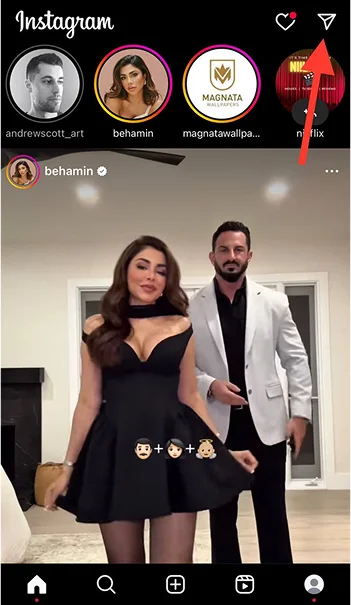
Step 2- Select the chat you want to send a disappearing photo to. You can also search for a specific chat by typing the username into the search bar.
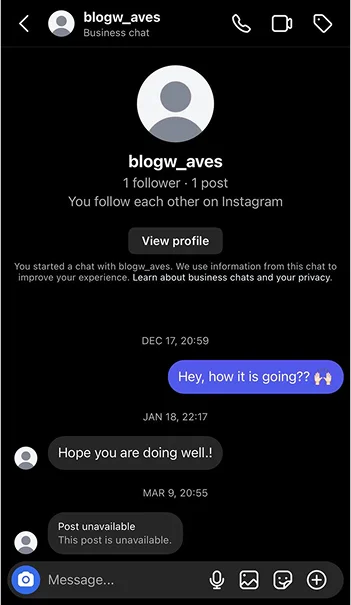
Step 3- Tap on the camera icon next to their username. You can also open the DM and select the blue camera icon at the bottom left of the screen to take a photo.
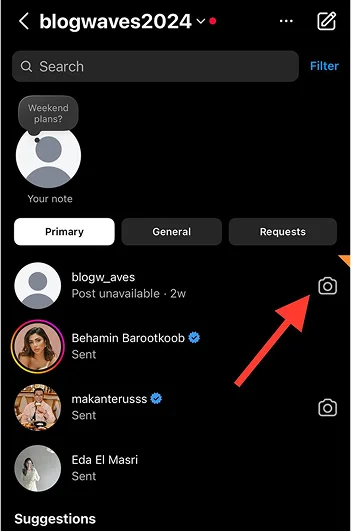
*Note that if you can’t find the camera icon next to their username or in the chat screen, it means that the person does not allow receiving images.
Step 4- Take the desired photo and apply the necessary changes or edits.
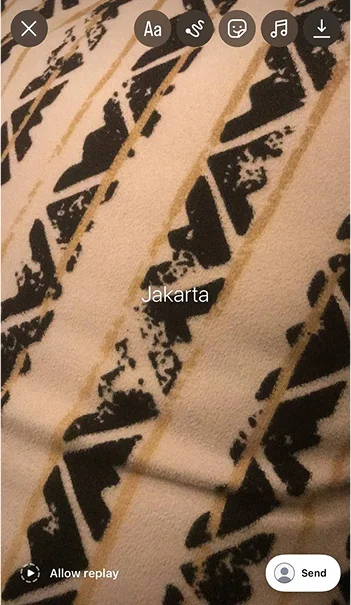
Step 5- Now, you can see the “Allow replay” option in the lower-left corner. This option allows the recipient to rewatch the photo after reviewing it for the first time. To change this mood, tap on it until you see the “View once” option.
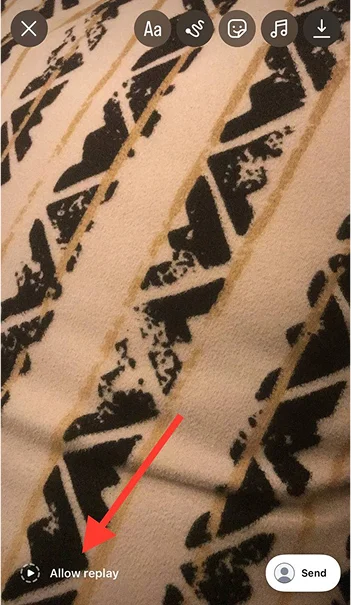
*A little tip: When you click on “Allow replay,” you will have two more options: “Keep in chat” and “View once.”
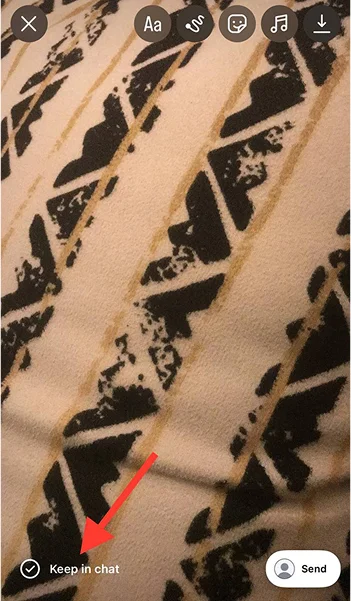
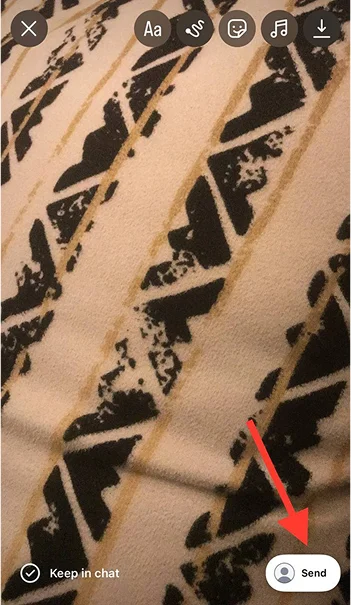
Step 6- Click the “Send” button to finish the process.
How to Reply to Disappearing Photos in Instagram DMs?
Let me guess something about you! You feel confused when someone sends you a disappearing photo on Instagram because you don’t know how to reply, right? In other words, my friend, you have no idea the message will disappear once you open it!
Just a reminder! To view and reply to a disappearing photo or video, you have to open the direct message and tap on the “View photo” or “Play video” button.

Can I have your attention? Remember that once you open the photo or video, it will be played like an Instagram story; however, you can not hold your finger on it to pause it! It will disappear after a few seconds, and if the sender disabled the “Allow replay” option, you won’t be able to rewatch it.
When the photo or video is playing, you have the opportunity to reply to it like an Instagram story, and when it disappears, you can reply to it like a normal photo in a chat, which means you can hold it or drag the message to the right to reply.
Why Sending Disappearing Photos on Instagram?
So far, you have understood what disappearing photos are and how to send and reply to them; now, you may ask yourself why someone would want to use this feature when you can send pictures and videos regularly.
There are various reasons to use this feature, and I gathered the most significant ones in this section.
The first and most common reason is for more privacy on social media. This feature allows users to send photos and videos that will vanish after only a few seconds and can not be rewatched, so it gives more space to share personal and sensitive content without worrying that someone will take advantage of it.
Moreover, using this cool feature can add more excitement to your conversations and engage the other person more with your content because they know they have limited time to view your photo or video.
Besides, it’s a great opportunity for perfectionists who always want to send the perfect photo. This feature reduces their anxiety and stress about sending a bad image because they no longer worry about the quality of something that will vanish after playing one time.
Finally, it can also help users have more casual and comfortable conversations because they can permanently send something that won’t be saved to their chat history.
Disadvantages of Sending Disappearing Photos on Instagram
I think that not all of us admire the disappearing photo feature on Instagram, how about you? If you are on the same page with me, let’s see some of the disadvantages of this so called cool feature!
The first disadvantage is that it can lead to confusion and miscommunication. Not everyone may be familiar with this feature and don’t know that the content will disappear after they open it.
They think they have a second chance to view it and may not pay enough attention to it for the first time, so they may miss the whole point of the subject and can’t communicate with the sender correctly.

It is true that this feature protects users’ privacy; however, it can increase the risks of taking screenshots without asking for the sender’s permission, which can lead to misuse.
If you remember, I said that Instagram notifies you when someone takes a screenshot of your disappearing photo, but what can you do after they screenshot your content? I think the same! Nothing much! Therefore, it is always better to send such a photo to people you trust.
The last one may surprise you! This feature would limit the recipient’s engagement with your content because they can’t rewatch it to interact with your video or photo, leading to limited engagement.
How to Send Disappearing Text Messages on Instagram?
You’d be surprised to know you can also send disappearing text messages on Instagram! However, it’s not the same as the disappearing photo feature.
To send disappearing text messages in Instagram DMs, you have to enable the “Vanish mode” in your Instagram account. Relax! I explained how to enable this feature!
Follow the steps below to enable this feature and send text messages that will vanish.
Step 1- Open Instagram on your mobile and go to the DMs.
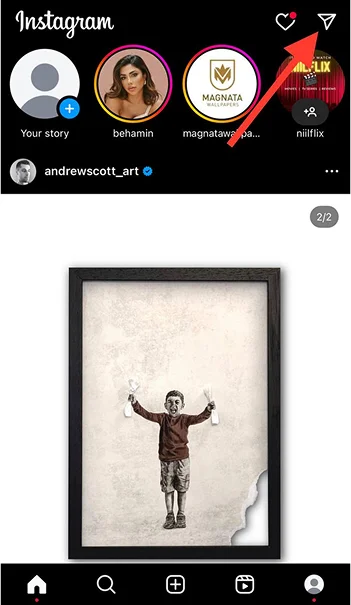
Step 2- Select the chat you want to send a disappearing text message.
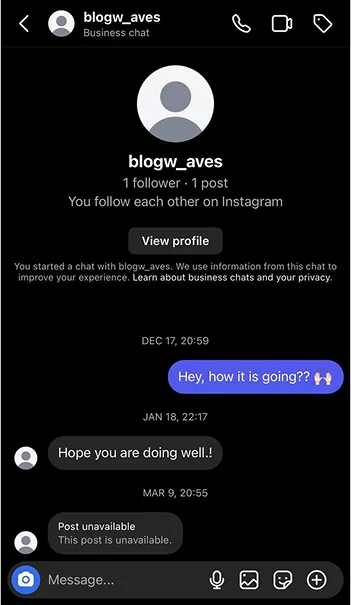
Step 3- Swipe up from the bottom of the chat screen to enable the vanish mode. Once this feature is on, you will see a message saying, “Vanishing Mode is now on.”
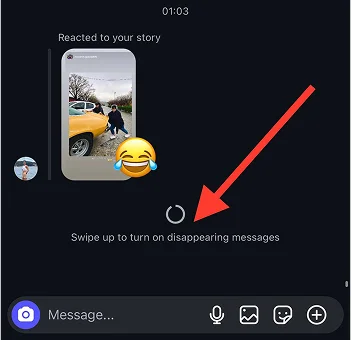
Step 4- Type your message and send it. The text message will disappear once the recipient reads it and exits the chat.
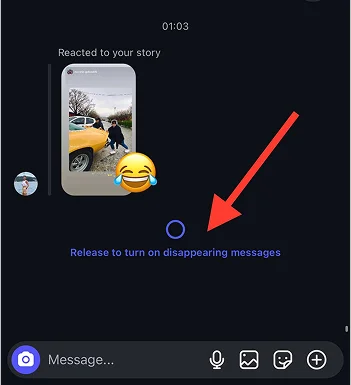
*To disable this feature, swipe up the chat screen again or tap on the “Turn off vanishing mode” option at the top of the chat screen.
Conclusion
Instagram is among the top platforms for sharing photo and video messages. Many people use it to communicate with their followers and friends; however, not everyone is comfortable sending visual content to others.
It was all before the “disappearing photo” feature launched on this platform. Now, more and more people use it to better chat with others while protecting their privacy.
This feature helps users communicate better online in many ways. We explained all the information you need to know about sending disappearing photos on Instagram; to better understand it, start using it today!
FAQs
Can I send disappearing voice messages on Instagram?
Unfortunately, Instagram does not currently support this feature. The voice message you send in a direct message remains available for the recipient, who can listen to it whenever they want.
If you want to temporarily share something, you can send disappearing photos or videos or even delete the voice message once you ensure they listened.
Can I send disappearing photos to non-followers?
No, you can use this feature for your followers or someone you already have a DM with.
How do I understand if someone takes a screenshot of my disappearing photo on Instagram?
If someone takes a screenshot of your disappearing photo or video, Instagram will send you a notification and will notice you.

Emi Daniel
Buy an Established Instagram Account
Skip starting from zero. Browse Instagram/TikTok accounts with audiences across many niches.
See Available AccountsRelated articles
-
Instagram Instants Feature: What It Is, How It Works, and How to Turn It Off
The first time I opened Instagram Instants, I almost backed out. I had taken a normal photo. Nothing worth editing. Nothing worth posting. Nothing that needed an…
11 min readEmi Daniel
-
How to Clear Instagram Cache on iPhone, Android & Desktop
Instagram can quietly build up a lot of temporary files while you scroll through Reels, watch Stories, save posts, and upload your own content. You may not…
12 min read -
How to See Who Reposted Your Instagram Post (2026 Guide)
Someone reposted your Instagram post, but you have no idea who it was. You check notifications, search through your profile, and still cannot find a clear answer. …
18 min read