


Have you ever wished for a way to share your Instagram stories only with certain people? Especially those you trust the most, not your exes or jealous friends! Imagine you went to a party without some of your friends; now, how would you share your stories without them knowing?
What? Blocking them? Nah! There is a much easier way to keep your moments secret! It’s Instagram’s “Close Friend” feature!
Once you upload your story, all your followers can see and interact with it, right? However, if you share it with your close friends, it will be shown only to a specific user you selected. Cool, right?
Buy an Established Instagram Account
Skip starting from zero. Browse Instagram/TikTok accounts with audiences across many niches.
See Available AccountsBut how should you create a close friend list and how should you use it? Easy! In this article, you will get straight answers to all your questions about this amazing feature and more!
What Is Instagram Close Friend Feature?

Are you among those people who let almost everyone follow them on Instagram? Do you feel uncomfortable sharing specific content with all your followers? If so, this feature is your new assistant!
Instagram’s close friend feature allows users to select certain users as their close friends and share sensitive or private content with them, not regular followers.
Once you upload a story, a red circle appears around your profile picture, but when you upload a story for your close friends, a green circle appears around your profile picture and will be shown only to the people in your list.
This feature helps you protect your privacy and have more private space with only your trusted friends.
Fun fact! Back in 2024, Billie Eilish did a trick on all her followers around the world! She added ALL her followers to her close friend list and made everyone wonder what is going on!
To be honest, I was on her list and felt super special for a moment! Doing so, she gained millions of followers in less than 24 hours!
If you are a content creator, influencer, or business owner, using this feature has various benefits, which we will discuss later.
How to Create a Close Friend List on Instagram?
Step 1- Open Instagram and tap on your profile picture in the bottom left.

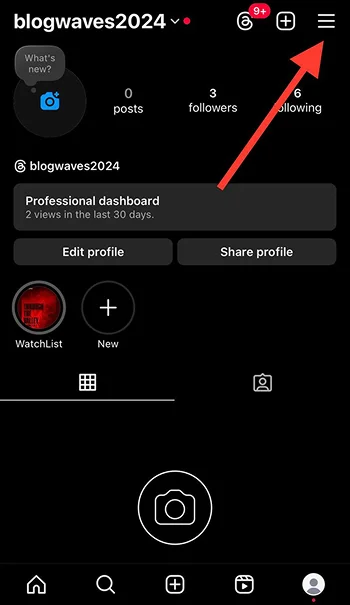
Step 2- Tap the three horizontal line icon to access the “Settings and activity” menu.
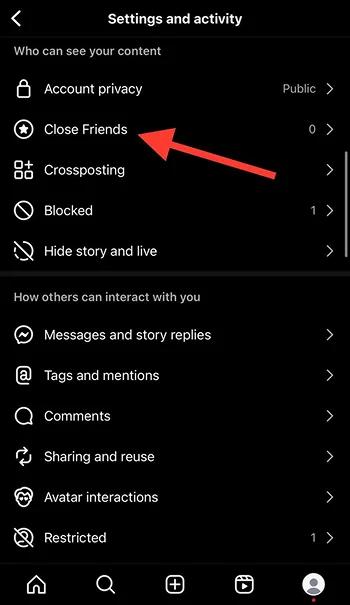
Step 3- Select “Close Friends” from the menu.
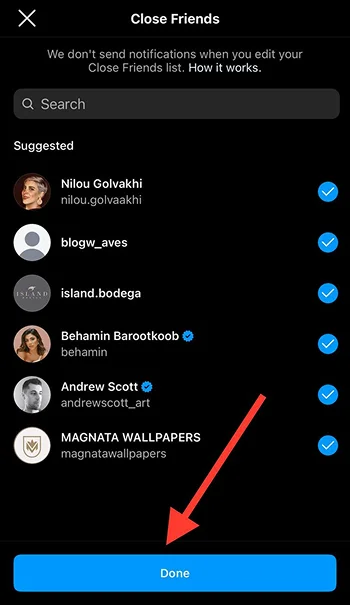
Step 4- Add your friends or favorite followers to the list.

Step 5- Tap the “Done” button to finish the process.
How to Share Stories with Close Friends?
Step 1- Open Instagram, tap the + icon, or swipe the screen to the right to select the story.

Step 2- Once you select the picture or video, tap “Close Friends.”
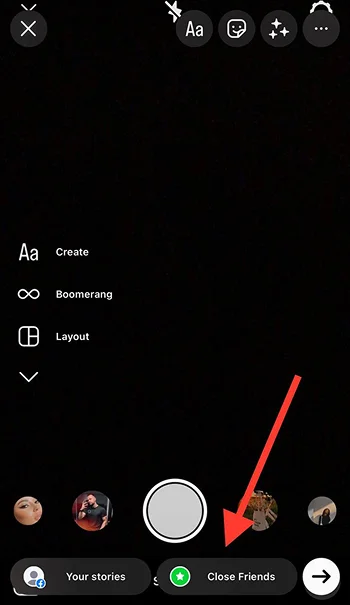
Step 3- Your story will be shared with your close friends list, and a green circle will appear around your profile picture.

How to Use the Close Friend Feature Effectively?

Engage with your close friend list members
One great way is to keep engaging with them to build a stronger relationship and encourage them to interact with your content. You can start by liking their posts and replying to their stories.
Besides, sharing something personal or exclusive with your close friends is better because that’s what they expect to see when they open your story!
What’s the point of using this feature if you share a picture of your dinner?
Be selective with the content you share
To get the best results, it is recommended that you be selective with the content you share. For example, if you want to announce a product launch or an event date, you can only share exclusive and private information with your close friends.
If I were you, I would do something like this: First, I would share a regular story about the event and then share a picture of my outfit or special offers at the event for people on my close friend list.
Use it frequently

It is better to regularly post to your Close Friend story to keep your loyal followers updated and make them feel included.
Remember that consistency is the key to maintaining a strong connection with your followers while attracting more target audience.
Moreover, change the type of content you share with your close friend list to keep them engaged and entertained; otherwise, they won’t interact with your stories as they did before.
Consider privacy
It is true that your Close Friend list is like a VIP club, allowing you to share more private content; however, you must ensure you have added only people you trust the most. If not, you should be cautious with what you want to share.
Lastly, one great way to effectively use the Close Friend feature is by sharing exclusive content with those who engage most with your stories, creating a deeper connection with your most loyal followers.
Platforms like Social Tradia offer resources and guidance for growing your Instagram audience and optimizing your content strategy.
Reasons to Use Instagram’s Close Friends Feature

More privacy
Do you care about your privacy on Instagram? Do you get nervous when sharing stories, knowing you have nosy people among your followers?
If yes, one solid reason to use this feature is to have more privacy without being forced or uncomfortable uploading private content to all your followers.
Imagine you are sunbathing and want to share this moment with your friends, but you have your colleagues or boss among your followers! I think we all agree that sharing such content with your boss may be awkward! The best thing is to share it with your close friends without worrying what they think about you!
Ideal for personal and business use
This feature is helpful for regular users and business owners who want to increase engagement, attract more target followers, and increase sales.
You can use it to share the latest news, special offers, product launch dates, or announcements only with certain users who are your loyal customers. This will build more trust and solid relationships with your followers.
More engagement

Sharing specific content with some of your followers makes them feel special and encourages them to interact with your story, which increases engagement on your account.
Besides, you can plan a strategy and announce to your followers that they can request to be added to your close friend list. Doing so will make your followers curious, leading to more engagement.
Exclusive content for loyal followers
Are you looking for a way to thank your loyal followers and customers? You can do it by adding them to your close friend list and sharing exclusive content with them.
You don’t have to try so hard to create exclusive content; you can share behind-the-scenes videos, tutorials, special offers, etc.
Pros and Cons of Using the Close Friend Feature on Instagram

Pros:
- You have more privacy.
- You can comfortably share exclusive and personal content.
- You have more control over who can see your stories.
- You can regularly manage and update your list.
- You don’t have to be worried about being judged by others.
Cons:
- Limited reach.
- You may feel forced to be selective about the people you add to your list.
- It may not guarantee your privacy.
- Managing your list can be time-consuming.
Common Mistakes to Avoid Using Instagram’s Close Friend

- Overusing this feature is a common mistake you must avoid to keep it engaging.
- Not updating your list regularly is another mistake.
- Keep adding too many people to your list! If so, what is the point of having a specific list?
- You may be too secretive and hide something from your regular followers.
- Sharing sensitive and private content without thinking and considering privacy.
- Not engaging with your close friend list members.
- Assuming that Close Friends content is 100% private.
Conclusion
Instagram’s Close Friends feature allows you to create a safer space with people you trust to share more personal and exclusive content.
It helps you customize who can view your stories, which gives you more control over your privacy while building solid relationships with your followers.
Consider it a VIP club available only for your closest friends and people you trust the most.
If you are looking for a way to enhance your social media presence while protecting your privacy, using this feature is one of your best options!
I hope you enjoy reading this article and start sharing more personal stories with your besties or loyal followers.
FAQs
How does close friends on Instagram work?
When you share a story with your close friends, a green circle will appear around your profile picture.
What are the benefits of close friends on Instagram?
You have more privacy and freedom, which helps you build stronger relationships with your followers and makes them feel special!
How do I know if I’m on someone’s close friends list?
If you can see the green circle around their profile picture, it means you are on their list.
What are close friends used for?
To share more private and sensitive content, to share exclusive content for a special group, and to share special offers to loyal customers and followers.
Does Instagram send notifications if I remove or add someone to my close friend list?
No, it won’t notify others.

Emi Daniel
Buy an Established Instagram Account
Skip starting from zero. Browse Instagram/TikTok accounts with audiences across many niches.
See Available AccountsRelated articles
-

How to Use Instagram: The Creator’s Guide to Building an Audience
Instagram in 2026 is no longer just a place to collect followers. The creators who grow consistently are the ones who understand how to earn attention, turn…
17 min readEmi Daniel
-

How to Go Live on Instagram: A Step-by-Step Guide
Going live can feel more stressful than posting a Reel. You cannot remove a pause, rewrite a sentence, or start over after an awkward moment. But that…
17 min read -

Instagram Instants Feature: What It Is, How It Works, and How to Turn It Off
The first time I opened Instagram Instants, I almost backed out. I had taken a normal photo. Nothing worth editing. Nothing worth posting. Nothing that needed an…
11 min read