


Instagram is one of the best and most popular social media platforms, with many users worldwide who use it to share their moments and follow people to interact with their shared content.
Instagram allows its users to determine which people follow them, thus allowing them to have more privacy and manage their followers. This platform also allows you to hide your followers, which we will discuss more in this article.
Therefore, keep reading if you want to know how to hide your Instagram followers and get more helpful information.
Buy an Established Instagram Account
Skip starting from zero. Browse Instagram/TikTok accounts with audiences across many niches.
See Available AccountsHow To Control Follower’s Visibility
This section will guide you through valuable strategies to control who sees your follower list while providing insights on attracting more subscribers to your account.
Hiding Followers From Non-followers
People may find your account on Instagram but not follow you, but still they can access your list of followers and followings, to prevent this, follow the steps below.
- Open Instagram on your mobile, tap the profile icon in the bottom right corner, and then select the “Settings” menu by tapping the three horizontal lines in the top right corner of the screen.
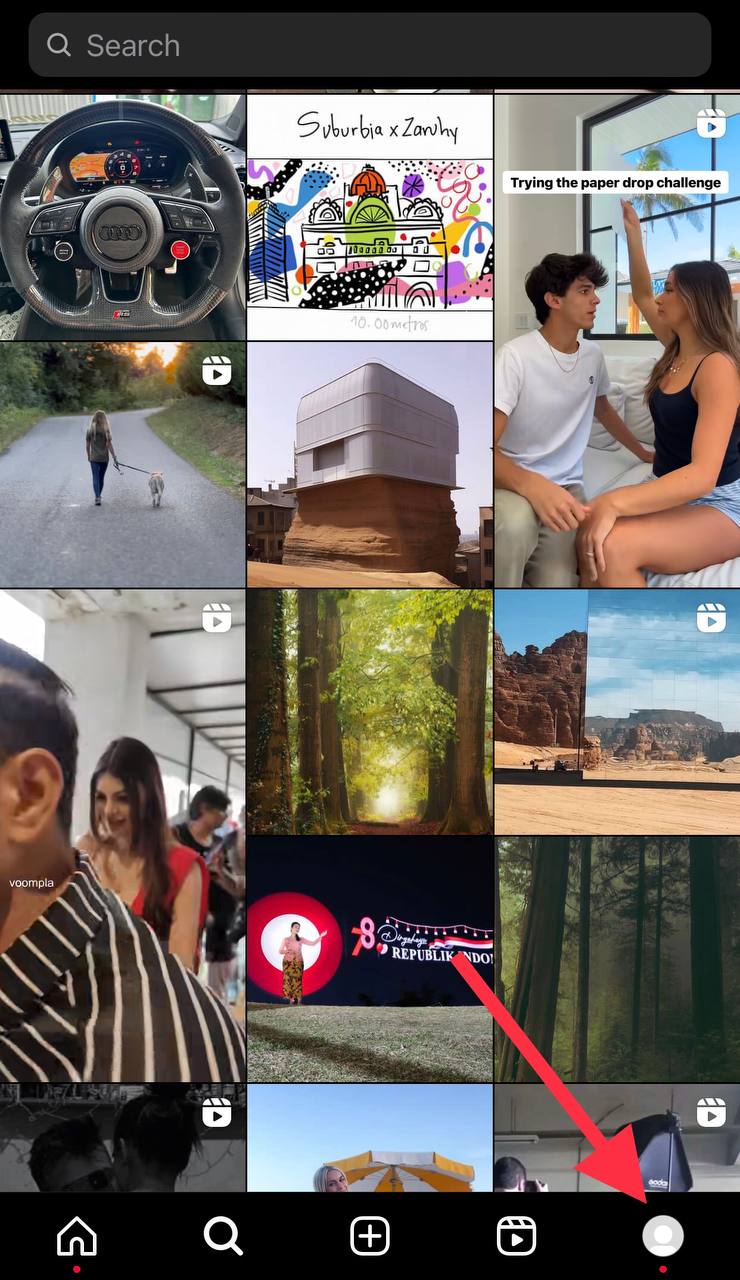
- Choose “Privacy” from the settings menu and locate “Follower List” under the “Connections” section. Now, you should turn on this option to ensure that only your followers can see the accounts that follow you.
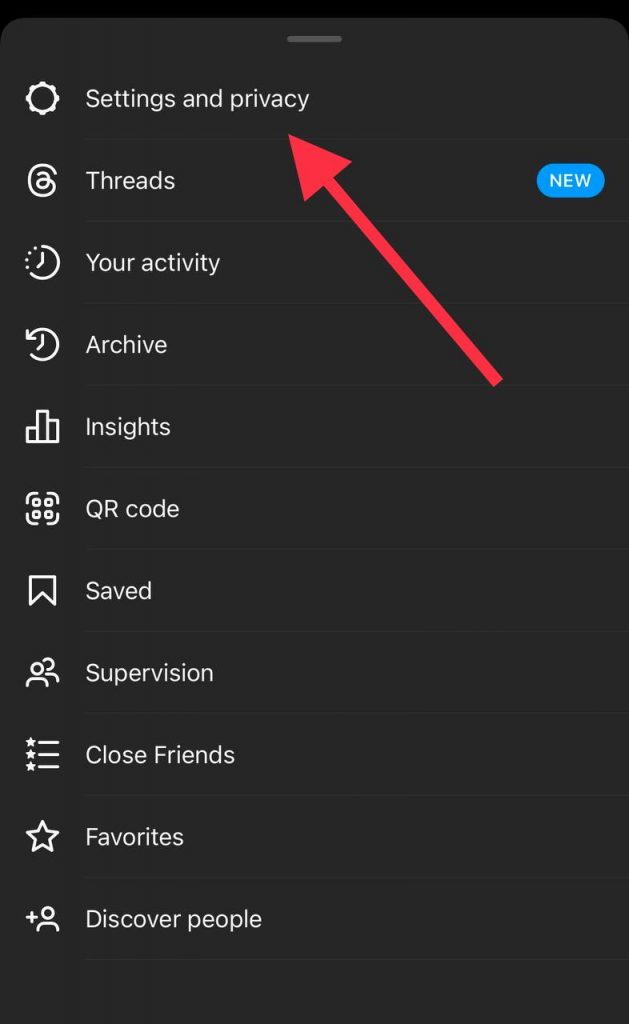
By doing these simple steps, you can make sure that only people who are your followers can access your following list.
Restrict Access To Followers and Followings Lists
Instagram allows you to restrict and limit your follower list, which helps you to know who can check the accounts you follow. To do so, follow the below steps.
- Open your Instagram, tap on your profile icon, then select the three-line icon to access the settings section.

- Go to the “Connections” section and find “Following List.” Adjust the setting to make your list of followed accounts visible only to your followers.
When you configure this section, you can more easily specify which people can see your following list, which helps you maintain the privacy of your account.
Keep Followers Hidden In Public Accounts
As you know, people have more access to public account information, but don’t worry because you can hide your followers without going private. Doing so helps you stay engaged with your audience while getting more privacy.
- Open Instagram on your device, tap the hamburger icon in the top right corner of your profile and go to the “Settings” section.
- Tap the “Account Privacy” option in the privacy settings menu.
- In this section, you can see the option to hide your follower count this time; tap on it to keep your follower count hidden from non-followers.
Activating this option will help you to have a public account, but keep the number of your followers away from others and enjoy the benefits of a public account while maintaining privacy.
How to Hide Followers on a Business Account
As it was said, people create user accounts on Instagram for various issues; if a brand or business wants to operate on Instagram, it is better not to have a private account so that their content is easily accessible to people from all over the world.
Business accounts are different from normal accounts on Instagram, one of these differences is that the owners of these accounts have more options for using this platform, and Instagram gives them good insights that help their content to be seen more.
For these reasons, people should pay more attention to the privacy of their business accounts. In this section, we want to check how you can manage your follower list and following in the business account.
Follow the steps below:
Step 1- Open the Instagram application on your device. Go to your profile section, tap on the three horizontal lines at the top-right corner, then select “Settings.”
Step 2- Now, choose “Privacy” from the setting menu.
Step 3- Find the “Connections” section, and you will see “Follower List.” You are now able to adjust the visibility of your follower list.
Step 4- Finally, you can choose your desired setting based on your preferences. You can keep your follower list public, visible only to followers, etc.
Advanced Privacy Settings
We mentioned earlier that with the advancement of technology, maintaining the security of the information we share on social media is especially important, which has many benefits. In the following, we will check the methods that will help you increase the privacy of your Instagram account.
Removing Accounts
If you want to increase the privacy of your Instagram account, one of the best ways is to remove people you don’t know or think should not be on your page from your followers list.
To do so, do the following steps:
- Open Instagram and tap the profile icon to see your followers and the following list.
- Now, tap on “Followers” to see which accounts follow you.

- Look at each account, then decide which one you want to remove. You will see a “Remove” option next to each name; just click on it to remove them from your followers.

Restricting Accounts
Instagram allows you to restrict some accounts, meaning you will interact less with their content. Note that this feature does not mean blocking or unfollowing. In the following, we will explain how you can restrict the account.
- Choose the account you want to restrict.
- Tap on the three dots icon in the top right corner of the screen.
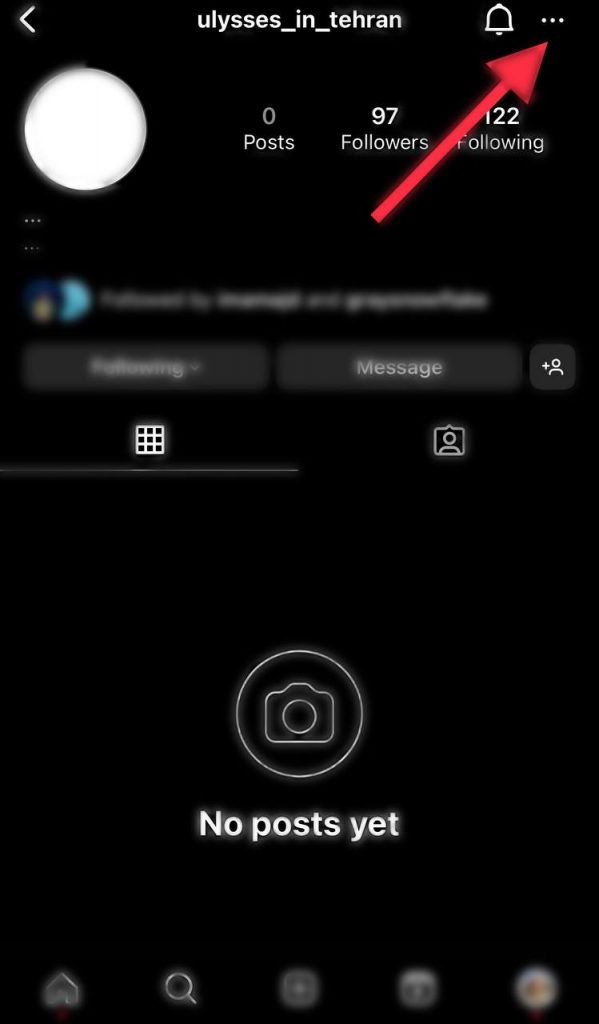
- Choose “Restrict” from the options to finish the steps.

You need to know that you can find the “restricted” item from the settings section and click on it to see your restricted accounts.
Blocking Accounts
If you are familiar with social media platforms, you are familiar with blocking and its advantages and disadvantages. One of the ways that help users increase the privacy of their Instagram accounts and manage their followers is blocking.
- Find the account you want to block it.
- Tap on the three dots icon on its profile.
- Choose “Block,” and you will easily block the account.
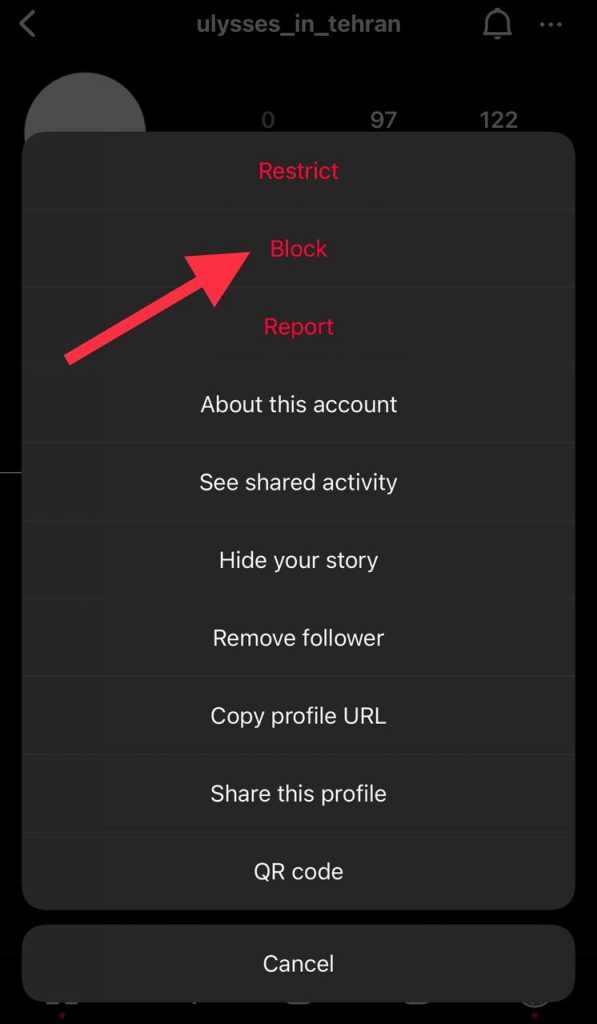
The accounts you block cannot send you messages or find your ID. In addition, to see what accounts you have blocked, just go to your profile settings and click on “Blocked”.
FAQs
1- Where can I see the latest followers on Instagram?
The latest followers are shown on top of the followers list on Instagram.
2- How to see someone’s else newest followers?
The easiest way is to go to their profile, click on their followers list, and you will probably see the newest followers on top.
3- How to understand who unfollowed me on Instagram?
If you are curious about it, you can use third-party tools that show you who unfollowed you recently.
Conclusion
Hiding Instagram followers has various benefits that help you to have a better experience using this platform. Remember that many people use social media platforms such as Instagram for different purposes, so keeping your information private helps you to get more privacy on it.
So far, you have understood the importance of managing Instagram followers, and according to the things mentioned in this article, you know how you can control your list of followers and followings to have more privacy and have a good experience using this application.

Emi Daniel
Buy an Established Instagram Account
Skip starting from zero. Browse Instagram/TikTok accounts with audiences across many niches.
See Available AccountsRelated articles
-

How to Use Instagram: The Creator’s Guide to Building an Audience
Instagram in 2026 is no longer just a place to collect followers. The creators who grow consistently are the ones who understand how to earn attention, turn…
17 min readEmi Daniel
-

How to Go Live on Instagram: A Step-by-Step Guide
Going live can feel more stressful than posting a Reel. You cannot remove a pause, rewrite a sentence, or start over after an awkward moment. But that…
17 min read -

Instagram Instants Feature: What It Is, How It Works, and How to Turn It Off
The first time I opened Instagram Instants, I almost backed out. I had taken a normal photo. Nothing worth editing. Nothing worth posting. Nothing that needed an…
11 min read