


Instagram app is one of the most popular social media platforms, with millions of active users. Many people who use Instagram believe numerous followers are an advantage and try to increase their followers. Many followers mean an increase in the engagement of your account. That is why many people are interested in buying Instagram accounts with high engagement from different platforms like SocialTradia.
When your followers increase, your privacy also decreases; when you want to share an Instagram story, many people see your content, so what should you do if you’re going to share a moment that you only want your close friends and family to see?
This is where Instagram’s “close friend” feature comes into play. This option, which is active for Instagram stories, helps protect users’ privacy.
Buy an Established Instagram Account
Skip starting from zero. Browse Instagram/TikTok accounts with audiences across many niches.
See Available AccountsThis article will review everything you need about the close friends story feature. So, keep on reading!
What is Instagram’s Close Friend Feature?
Instagram’s close friends story feature allows users to create a close friends list of their followers, so only these people can see it when they want to share private or particular content.
Instagram’s close friends’ feature is only active for the story section, meaning you can not use it to share posts or live videos.
Instagram does not select the list of close friends. There is no algorithm for this, but you have to choose these people and add them to your list to make a close friends list.
The important thing is that regular stories are shown with a red circle around them, but when you add someone to your Instagram’s close friends list, a green circle will be shown around your Instagram stories.
It is the same for when you are on someone’s Instagram’s close friends list; you will see their stories on your Instagram feed with a green circle.
You can add or remove people to your Instagram close friends list after you have created it, but it is impossible to remove yourself from someone’s close friends list, and if you don’t want to be on someone’s close friends, you must ask that person directly.
You need to know that only you can see the list of your Instagram close friends, that is, people who are on your list and those who are not, cannot access your list and know who is on your close friends list.
In addition, the content of your Instagram stories will not be shown to those not on your list under any circumstances, so your content is safe.
Knowing that you can highlight the stories you share with your Instagram close friends is interesting. However, the critical point is that when you highlight these stories, only people on your Instagram close friends list can see the highlights.
Highlighting stories is an exciting and practical way to save stories in your account for a long time. Highlights will remain on your Instagram profile until you delete them and your followers can see them.
How To Create An Instagram Close Friend List
Now that you understand the feature of Instagram close friends, it is time to figure out how to form your close friends story list. In this section, we will explain the steps step by step.
Step 1- Open the Instagram application.
Step 2- Tap on the “profile” icon at the bottom right of the home page.
Step 3- Now, tap on the “three-lines” option at the top right side of the screen.

Step 4- You will see a menu; tap “close friends” option from the menu.
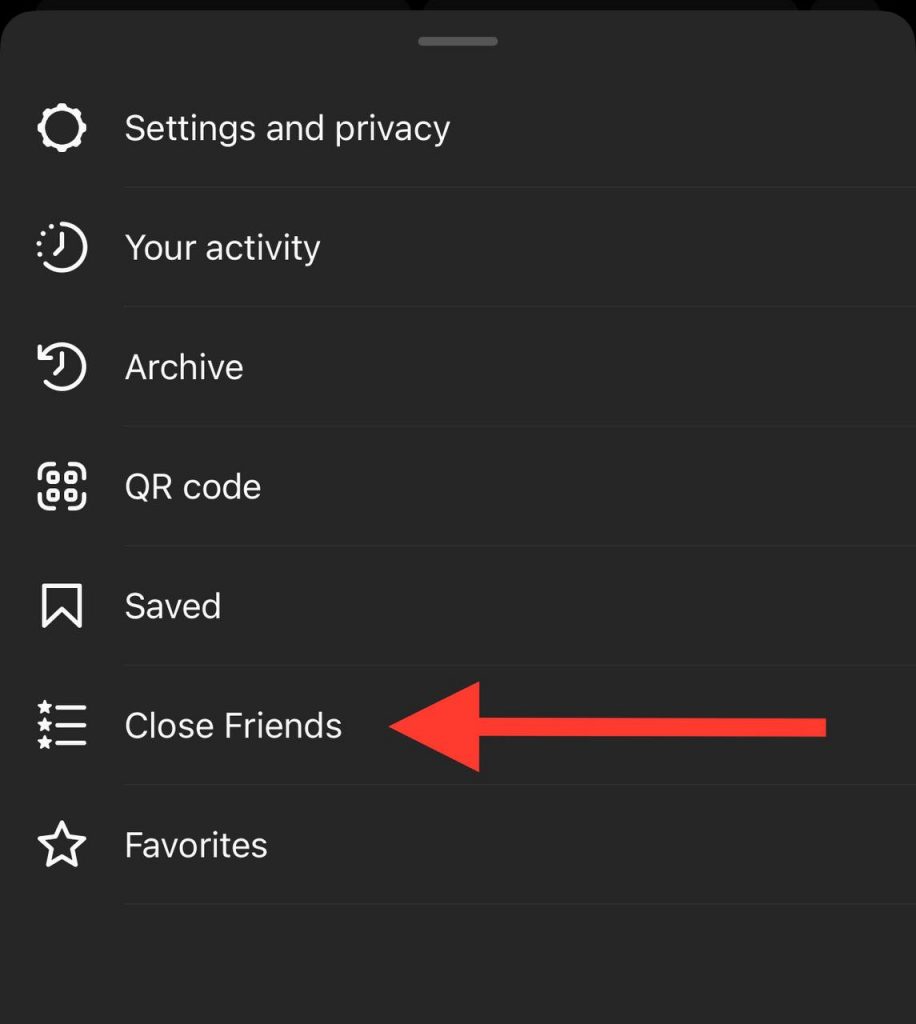
Step 5- You can see the list of your followers; you need to scroll the list and add the ones you want to be on your list.

Step 6- After choosing your close friends, tap “done” to finish the process.
Tip: You can use Instagram suggestions to find your friends. The suggestion profiles are shown based on your account activity.
Tip: You can easily tap search bar to find a specific account to add to your close friends lists.
Tip: You can also use the “add” option in the screen’s upper-right corner and look for accounts you want to add to your close friends list.
How To Add And Remove Accounts From A Close Friend List
As mentioned in the previous sections, you can add or remove people from your close friends list after creating your close friends list.
Because the primary purpose of Instagram close friends feature is that you can share your private content with people you feel close to.
Next, we will check how you can easily edit the close friends list.
Step 1- Open Instagram and go to your “profile.”
Step 2- Tap the “three horizontal lines” and choose “close friends” from the menu.
Step 3- Choose an account you want to remove, and click on the “remove” button to remove the account.
Step 4- To add a new account to your list, find the account and tap on it.
Step 5- After editing the list, tap on “done” to finish the process.
Tip: You can remove all the accounts on your Instagram close friend list with just a click! If you want to do so, tap the “clear all” option to remove and delete all the accounts simultaneously.
How To Post An Instagram Story To A Close Friends List
As we mentioned, the Instagram close friend feature is only for the story section, and you can not have a close friends list to post photos and videos.
There are different reasons for sharing content more privately and through close friends, you may want to share a picture of moments that you don’t want everyone to see, or even you want to share some news that you don’t want everyone to know about but your close friends.
This section will explain how to share your photo or video with your close friend through the Instagram story section.
Step 1- Open the Instagram application on your phone.
Step 2- Tap on the ‘your story” option in the top left side of the home page.

Step 3- Then, tap on the gallery icon at the bottom left of the screen.
Step 4- Choose the photo or video you want to share on the story.
Step 5- Select the “close friends” option to share the story only with your close friend list contacts.
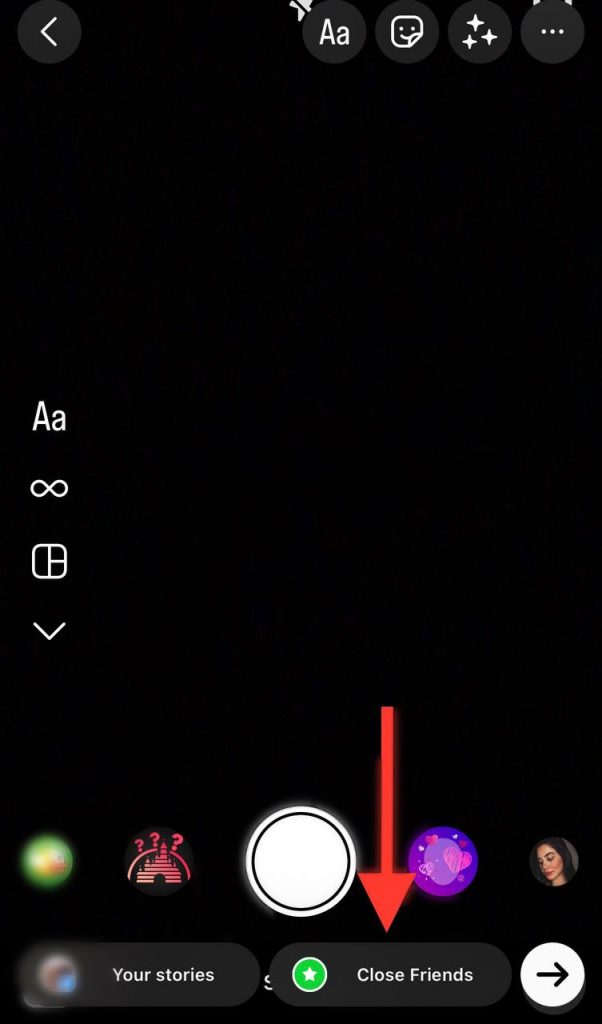
By doing these simple steps, you can easily share your private moments only with your close friends and be sure that other people do not have access to it and your content is safe.
Advantages Of Using Instagram’s Close Friend Feature
As mentioned, Instagram is one of the most popular social media platforms that help users to have a better experience using this application by providing attractive features.
The Instagram close friend feature has made Instagram users, especially those with many followers, have a better experience using Instagram and a more private space for themselves and their loved ones.
In the following, we will examine some of the most important advantages of this feature.
- You can share more private content you don’t want everyone but your close friends to see.
- You can create a close friends list and relatives with whom you are close and share your Instagram stories with them.
- You can highlight the stories of your close friends and be sure that only people in your close friend list can see them, not all your followers.
- Only you can see the close friend list.
- You can add or remove people to the close friend list whenever you want.
- You are the only one who can create a close friend list, and there is no algorithm for making a list, and you will not receive any suggested accounts from Instagram.
- With the help of the close friends’ feature, you can communicate only with the specific group you specified, and you don’t need to share the story with everyone.
- You can post typical Instagram stories and close friend stories simultaneously, and the content of the normal Instagram stories will be shown to all followers (including people on the close friend list). Still, the content of the close friend story will only be shown to the close friend list.
- Business accounts and influencers can put people on their close friend list and form more intimate relationships with them.
These are some of the most important advantages of making and using Instagram’s close friend feature; anyone can use this feature differently according to their goals and benefit differently.
Conclusion
Instagram is still at the top of the popular platforms for users by providing updates and new features.
The close friends feature, which we explained in full in this article, is one of the best features of Instagram, which has many fans and satisfied users worldwide.
If you still need to make your close friends list, make your list according to the points mentioned in this article, edit it whenever you want, and share the moments you want to share with your close friends as stories.

Emi Daniel
Buy an Established Instagram Account
Skip starting from zero. Browse Instagram/TikTok accounts with audiences across many niches.
See Available AccountsRelated articles
-

How to Use Instagram: The Creator’s Guide to Building an Audience
Instagram in 2026 is no longer just a place to collect followers. The creators who grow consistently are the ones who understand how to earn attention, turn…
17 min readEmi Daniel
-

How to Go Live on Instagram: A Step-by-Step Guide
Going live can feel more stressful than posting a Reel. You cannot remove a pause, rewrite a sentence, or start over after an awkward moment. But that…
17 min read -

Instagram Instants Feature: What It Is, How It Works, and How to Turn It Off
The first time I opened Instagram Instants, I almost backed out. I had taken a normal photo. Nothing worth editing. Nothing worth posting. Nothing that needed an…
11 min read