


Nowadays, almost everyone uses the Instagram application, one of the most popular social media platforms. That is why the Instagram app has more than one billion monthly active users.
If you are one of the users of the Instagram app and spend time using it daily, you should be familiar with its various features.
Have you ever scrolled through your Instagram feed, liked a post, and wanted to save Instagram posts to your phone?
Buy an Established Instagram Account
Skip starting from zero. Browse Instagram/TikTok accounts with audiences across many niches.
See Available AccountsThis is where the Instagram collection feature comes into play.
If you want more details about the Instagram collection feature, read this article until the end. Because in this article, we provide you with all the information and details you need about Instagram collections.
What Is Instagram Save To Collection Feature?
As mentioned, while scrolling through the Instagram page, you may see a photo of a product or an educational video and want to save it so you can easily access it later.
You can take a screenshot of the photo you want and save it on your mobile phone, but this method only sometimes meets our needs.
This is where Instagram’s collections feature comes into play, and you can easily use it and enjoy its benefits.
With the help of this helpful feature, you can save posts you see (photo or video) in a personal file in your Instagram account and access them whenever you want and be able to see them again at any time.
In addition, the saved posts will be put into a private file, so you can ensure that only you can access them.
Saving Instagram posts is handy when users visit an online shop and want to save the Instagram post of that product to buy it later or when they see a tutorial or life hack post and think that this tutorial might be useful one day, so they want to save the Instagram post to use it when they need it.
It is interesting to know that the Instagram collections feature also helps people who have an online shop on Instagram, have a business account, or are influencers or need their Instagram posts to be seen more for any reason.
One of the ways that Instagram algorithms consider a post important and attractive is that many people have saved that post, so Instagram algorithms recognize that the post’s content is important and, as a result, show it to more people. It also will cause appearing on the explore section faster.
This way, it helps business accounts, creators, etc., get more engagement, and more people see their Instagram posts.
Finally, using this amazing and easy-to-use feature on the Instagram app will help regular users, business accounts, influencers, etc., in many ways.
How To Save Posts On Instagram?
Saving posts on Instagram is easy, and by following the steps described in the section below, you can create a collection for any Instagram post and save your favorite posts in them, so you can view them whenever you want.
Step 1- Select the post you want to save while using Instagram.
Step 2- Tap on the “bookmark” icon under the post.
Step 3- When you tap the bookmark icon, the post will automatically be saved in the Instagram default collection of all posts.
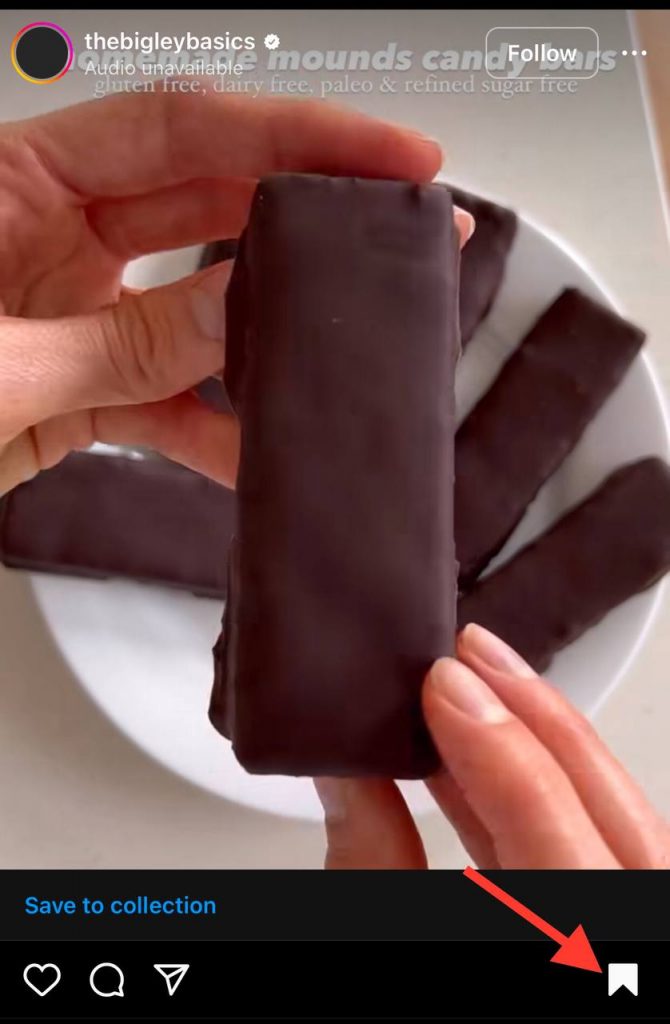
Step 4- If you haven’t created a collection, you can easily do that by choosing the “new collection” option. After that, select a name for the folder and tap “done” to finish the process.
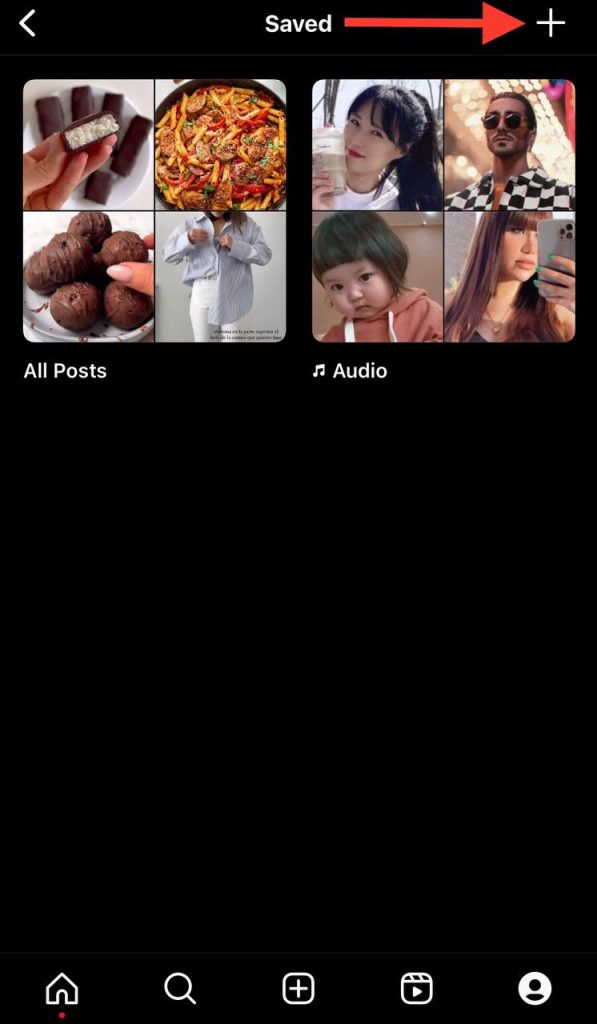
Step 5- If you already created a collection and want to add a new post, tap on the “plus” sign, and the post will be saved to that collection.
How To See Saved Collections On Instagram?
In the previous section, you learned how to save the posts you want on Instagram and categorize them.
In this section, we explain how to view saved posts on Instagram, but before that, let’s check some important points related to saved Instagram posts:
- Note that if you save the post in the related collection, you can still watch all of them in the “All Posts” section.
- It is good to know that the posts you save on Instagram are stored in private folders, and only you can access them if someone has your account password.
Now follow the steps below to view the saved posts:
Step 1- Open the Instagram application
Step 2- Go to your profile by tapping the profile icon at the bottom right of the home page.
Step 3- Tap on the “three lines” symbol at the top right side of the screen.
Step 4- Choose “saved” from the menu, and you will access all your saved posts.

In addition to the above, it is good to know that if you want to delete a post from your collection or if you no longer want to save it, follow the two steps below:
Step 1- Select the post you saved
Step 2- Tap on the bookmark icon (shown in black since you have saved the post), and the post will be automatically deleted from your saved collection list.
Conclusion
By now, according to the points mentioned in this article, you must have realized the importance of using this attractive feature of Instagram and learned that by following a few simple steps, you could create different collections of your favorite posts on Instagram and be sure that as long as Ask that you have access to them, and you can see them if needed.
In this article, we have explained all the points and details you need to know about this feature, such as what this feature is, how you can save posts, how you can access them, etc., so that you can easily use it. Use it and enjoy its benefits.

Emi Daniel
Buy an Established Instagram Account
Skip starting from zero. Browse Instagram/TikTok accounts with audiences across many niches.
See Available AccountsRelated articles
-

How to Clear Instagram Cache on iPhone, Android & Desktop
Instagram can quietly build up a lot of temporary files while you scroll through Reels, watch Stories, save posts, and upload your own content. You may not…
12 min readEmi Daniel
-

How to See Who Reposted Your Instagram Post (2026 Guide)
Someone reposted your Instagram post, but you have no idea who it was. You check notifications, search through your profile, and still cannot find a clear answer. …
18 min read -

How to Reset Instagram Algorithm in 2026
Instagram can start showing too much of the same type of content. Your Explore page may no longer match your interests, Reels may feel repetitive, or suggested…
12 min read