


How do you deal with unwanted and inappropriate comments during Instagram live sessions? Do you play rush and block the users? Or do you just ignore them the whole time?
If you think about blocking such users, it’s not a bad option, but what if there are too many accounts? Or how can you concentrate during the session if you decide to ignore such comments?
There is a helpful way that lets you professionally run your live sessions. You can hide chats during Instagram live! The good thing about this feature is that it can be done with just a few clicks.
Buy an Established Instagram Account
Skip starting from zero. Browse Instagram/TikTok accounts with audiences across many niches.
See Available AccountsLet’s see how to hide chats during Instagram live, reasons to do, pros and cons, and more.
How to Start an Instagram Live?
To hide the comments and chats on Instagram lives, you have to start a live session first! Follow these steps to learn how to start a live session on Instagram.
Step 1- Open Instagram and swipe the home page screen to the right.
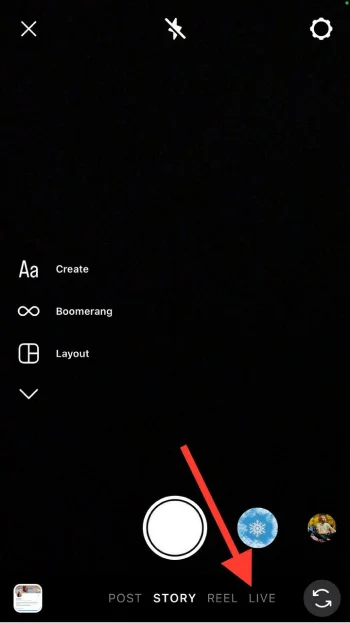
Step 2- Choose “LIVE” from the options.
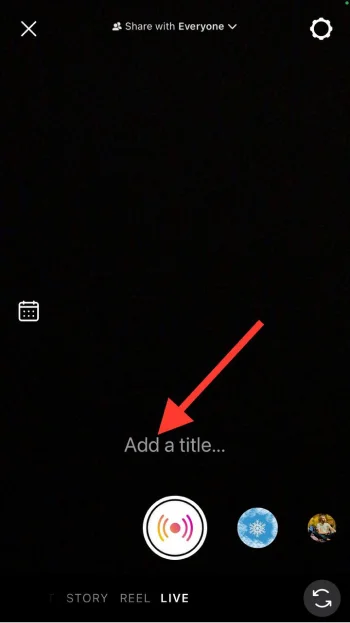
Step 3- Tap “Add a title” and add title to your live session.
Step 4- Tap on the live button to start your session.
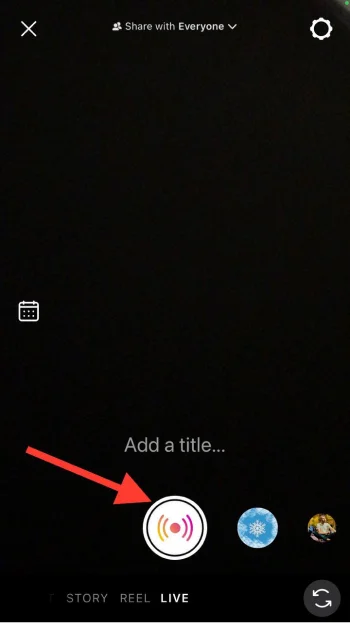
Once you finish the process, Instagram will notify your followers and they can join.
Note that you have an option that allows you to share the live with all of your followers or close friends only. If you want to share the live with close friends: tap the “Share with Followers” button at the top of the screen. It will show you the option to share with “Close Friends”, select it and only your close friends will notify and join the live.
Reasons to Hide Chat on Instagram Live
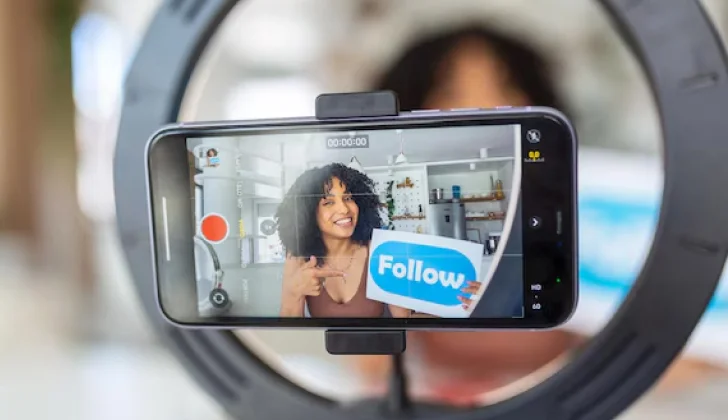
If you think that hiding chats and comments during Instagram live is not reasonable, the following list of common reasons to hide chat on Instagram live may convince you.
Managing comments
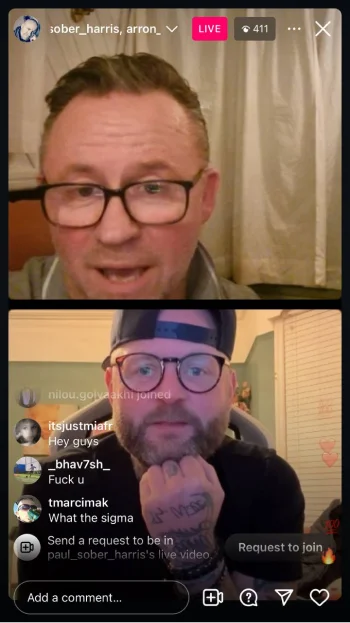
It helps you to manage the comments you receive during the live session. There are billions of users on Instagram who freely share their opinions on social media, which is why some people only share hatred and negative comments that may hurt your feelings.
Therefore, you can turn commenting off to avoid any spam, inappropriate, negative and irrelevant comments. Remember that you can open the comments and chats from time to time to allow your followers to ask their questions and interact with the content you share.
Avoiding distractions
If you are running an Instagram live to share important information that needs lots of concentration, it is better to hide chats and turn off comments during live to avoid distractions for you and your followers.
Believe me! It’s hard to focus on the main topic when people can chat and comment in the live session, because you must keep up with the comments, answer them, and manage them.
Maintaining privacy
Another common reason is to protect your privacy on social media! Hiding chat and comments during an Instagram live is the best way to avoid sharing personal information from your followers and friends!
Imagine how bad it can be if your friend sends a message including your personal information! However, you can avoid such accidents by turning off comments and hiding chats.
Respecting audience preference
How much do you care about your followers and respect their preferences? If you see them as your friends and family, you should respect their preferences and if they don’t like to see comments and chat during live sessions, you should listen to them!
To create a professional atmosphere as a host
When you start a live session on Instagram, you are hosting your followers and should create a professional atmosphere, especially if the session is about something important.
Hiding chat and comments during Instagram live helps you create a more professional atmosphere that makes everyone stay concentrated and focused.
How to Hide Chat on Instagram Live
This is the part you were all waiting for! The below steps help you to understand how to hide chat on Instagram live as a host and viewer.
As a host
Step 1- Open Instagram and go live.
Step 2- Tap on the three dots icon next to the red “Live” button in the top right corner.
Step 3- Select “Turn off commenting” from the menu.
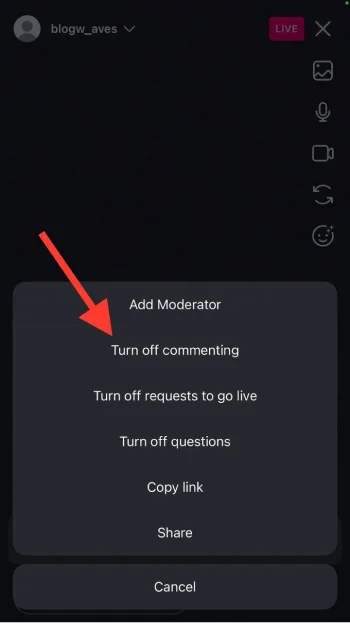
Now, no one can chat and comment during your live session until you open the comment section again.
As a viewer
Step 1- Open Instagram and join a live session.
Step 2- Tap on the “Comments” section.
Step 3- Write the “@” symbol and don’t add anything else.
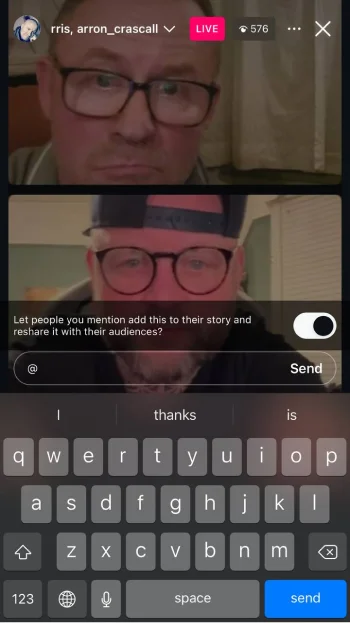
Step 4- That’s it! Now, you won’t see comments during the live session.
To get the comments back, just erase the “@” and they will be shown again.
Pros and Cons of Hiding Chat on Instagram Live Sessions
Disabling each feature on Instagram has its benefits and disadvantages and hiding chat and comments during Instagram live is no exception. So, let’s see the pros and cons here.
Pros:
– You have more control over interactions and comments in the session.
– It helps users to stay focused.
– Allows you to protect your privacy.
– It’s a better option for sensitive topics to avoid offensive conversations.
– It reduces the negativity and inappropriate comments.
– It may encourage your audience to interact with your account in other ways, such as sending DMs.

Cons:
– It may affect the engagement of the live session.
– Your audiences may not be able to properly interact with your content.
– Your followers may not be satisfied with being unable to ask their questions when they want.
– Missed opportunities for Q&A sessions.
Conclusion
Going live on Instagram is a wonderful experience that allows you to build closer relationships with your followers, make them feel they are an important part of your life, encourage them to engage with your account, and share amazing feelings.
However, there are always people who may not like your live session and want to negatively comment or chat during your live video. The best way to avoid inappropriate, offensive, and negative comments is to hide chat during live sessions by turning off commenting.
Doing so helps you to create a more positive and respectful atmosphere during the session and lets you stay focused on the topic.
I hope you enjoy reading this article and find it helpful!
FAQs
How to hide chat in Instagram live?
Tap on the three-dots icon in the top right corner and select “Turn off commenting” from the menu.
How do you hide active chat on Instagram?
Start the live session> tap on the screen once> hold down until you see a pop up that says “Hide comments.”
How to hide words on Instagram live?
Go to your Instagram profile> tap on the three-line icon> Select “Hidden Words”> Tap “Manage custom words and phrases”> Tap “Add words separated by comma” to add your preferred words.
Can I make Instagram live private?
You can either share the live session with your close friends list or hide the video from specific users. To share it with your close friends, tap “Share with Followers” on the live screen and select “Close Friends.” To hide the session from specific users, tap on the “Settings” icon on the live screen> Choose “Live”> Tap “Hide Live From”> Select the users> Tap done.
How to hide comments on Instagram live on Android?
Hiding comments on Instagram live has the same process on all devices, including Android and iOS. Tap on the three-dots icon in the top right corner and select “Turn off commenting” from the menu.
Why are my comments off on Instagram live?
It can be due to technical glitch, platform limitations, or account settings.

Emi Daniel
Buy an Established Instagram Account
Skip starting from zero. Browse Instagram/TikTok accounts with audiences across many niches.
See Available AccountsRelated articles
-

How to Use Instagram: The Creator’s Guide to Building an Audience
Instagram in 2026 is no longer just a place to collect followers. The creators who grow consistently are the ones who understand how to earn attention, turn…
17 min readEmi Daniel
-

How to Go Live on Instagram: A Step-by-Step Guide
Going live can feel more stressful than posting a Reel. You cannot remove a pause, rewrite a sentence, or start over after an awkward moment. But that…
17 min read -

Instagram Instants Feature: What It Is, How It Works, and How to Turn It Off
The first time I opened Instagram Instants, I almost backed out. I had taken a normal photo. Nothing worth editing. Nothing worth posting. Nothing that needed an…
11 min read