

Ever opened your Instagram notifications only to find a bunch of follow requests from sketchy-looking accounts with weird usernames and no profile pictures? That’s when you should feel alerted! You will find out why!
Every day, millions of Instagram users run into this same unsettling scenario. In fact, according to Meta’s latest 2025 transparency report, the platform removed over 110 million fake accounts in a single quarter. Can you believe it? Over 110 million fake accounts and still some people insist that ALL their followers are real!
For regular users, these fake followers can mess with your privacy, compromise your account’s security, and even impact how your real content performs.
Buy an Established Instagram Account
Skip starting from zero. Browse Instagram/TikTok accounts with audiences across many niches.
See Available AccountsKnowing why these accounts show up in your notifications and how to deal with them is now a must! Of course, if you want to use Instagram safely!
In this article, we’ll dive into the scale of Instagram’s fake account problem, why you might be getting targeted, how to spot these accounts, what kind of damage they can cause, and—most importantly—what you can do to protect your profile and your peace of mind.
The Scope of Instagram’s Fake Account Problem
It doesn’t matter how hard Meta tries to remove fake Instagram accounts, still security researchers estimate that fake accounts still make up about 10-15% of Instagram’s total user base.
According to recent data from cybersecurity firm Imperva, bot activity on social platforms has jumped nearly 50% since 2020. A big reason? The rise of DIY bot creation tools and shady services that promise instant followers, likes, and engagement, for a price.
Instagram’s fake account problem includes several distinct types:
1. Bot accounts operate automatically using software to follow, like, and sometimes comment on posts.
2. Manually operated fake profiles created by real people with deceptive intentions.
3. Hacked legitimate accounts that were taken over and repurposed.
4. Deepfake accounts using AI to create fake but convincing profiles.
5. Impersonators posing as celebrities, influencers, or brands.
Many users want to increase their followers quickly to boost their profile’s visibility. Some try to buy Instagram followers to appear more popular, but fake accounts can damage their credibility. That’s why it’s important to focus on organic growth and authentic engagement.
Why Fake Accounts Follow You on Instagram?
Have you ever looked at a new follower and thought, “Who even is this?” — you’re not alone.
Fake accounts don’t just go after influencers or brands; regular users are targeted all the time. And more often than not, there’s a strategy behind it.
Data Harvesting Motives
Many fake accounts are designed to collect personal information. By following you, they can see your photos, locations, and daily activities—especially if your profile is public.
They might also gather details from your captions and bio, like where you work, your interests, or who you interact with.
All of this is pieced together into detailed user profiles that can be sold on shady data marketplaces. I bet you didn’t know this, but it’s true!
Financial and Scam Motivations
Scammers often use fake accounts to make money, plain and simple.
Some try to lure you into romance scams or catfishing schemes, while others send phishing links through DMs, promote fake investment opportunities (crypto, anyone?), or market counterfeit products.
Wait! Some even use these accounts for spammy affiliate marketing tactics, trying to cash in on your clicks or attention.
Engagement Manipulation
Plenty of fake accounts follow real users just to look more legitimate themselves. How tricky!
By padding their following/followers ratio, they appear authentic enough to later scam others, build fake engagement for sponsored content, or sneak past Instagram’s spam detection.
It’s all about creating the illusion of being real, for profit or reach.
Strategic Targeting Patterns
Is your account public? Are you spending most of your time scrolling through the app? Do you post with trending hashtags? Bad news! You’re more likely to be targeted by fake accounts!
Users in certain industries—especially influencers, business owners, or creators—tend to attract more bots. If you are among them, don’t worry! You will learn how to deal with them!
Many influencers look to sell their Instagram accounts on verified marketplaces to get the best offers. That’s why keeping your follower base genuine and your account in good standing is critical.
Political and Social Influence
Politically motivated fake accounts have experienced a 200% rise in election years, a study by Syracuse University found, proving how quickly these networks grow when it comes to keeping pace with what’s transpiring.
How to Identify Instagram Fake Accounts

Learning how to spot fake accounts early can protect you from scams and a lot of unnecessary headaches. The good news? Most fake profiles follow certain patterns, and once you know what to look for, they become easier to catch.
Profile Red Flags
Start with the basics: the profile itself! Many fake accounts use generic or stolen profile photos! You know what I’m saying, right?
If the username looks like a random string of letters and numbers (like sarah2958393), that’s another giveaway. New accounts that already follow thousands of users or profiles with barely any bio info should raise suspicion.
Watch out for weird names or when the profile photo doesn’t match the age or vibe suggested by their bio.
Oh, lastly, if the account has only a few posts but is following hundreds—or even thousands—of people, something’s probably off.
Behavioral Indicators
Fake accounts also tend to act strangely. They often leave the same vague comments like “nice pic” or drop a bunch of emojis on posts, regardless of context. If you get a DM out of nowhere containing a sketchy link or a “too good to be true” offer, that’s a major red flag.
These accounts usually lack genuine interactions and have inconsistent posting habits. They may also follow and unfollow people rapidly to get attention or tag unrelated users just to increase visibility.
Content Analysis
A heads up? A lot of fake profiles use low-quality images or steal content from popular accounts. Their captions might be copied word-for-word or feel generic and soulless.
Besides, many of them don’t have a clear theme or identity, and some push nonstop promotions for questionable products.
See? It’s not that complicated to catch fake accounts on Instagram! You just have to be smart enough not to close your eyes to such red flags!
Tools for Detection
If in doubt, certain tools may be helpful. Verified accounts are marked with Instagram’s blue check, making it easy to see who is authentic.
Social media audit tools are ideal for analyzing follower authenticity, and checking how long the account has been active can also be insightful—new accounts deserve extra suspicion.
Suspicious Follower-Following Ratio Patterns
Look for profiles with a highly skewed follower-to-following ratio. For instance, profiles following tens of thousands of users but being followed back by very few, or the other way around. This in itself is not conclusive, but it’s a common indicator of bot-like activity.
Different Types of Fake Instagram Accounts
Here’s a quick look at the main types you might run into:
- Bots: These are automated profiles that follow tons of people, like random posts, and drop generic comments like “Nice!” or just emojis. They rarely have real photos or anything personal.
I bet most fake accounts you’ve seen fall into this common category.
- Scam Accounts: These sneaky profiles try to trick you into clicking shady links or sharing private info. That’s why you must be careful when you receive suspicious DMs!
You may not believe it but they often pretend to be well-known brands or even someone you know.
- Impersonators: These guys steal pictures and bios from celebrities or big brands, hoping you’ll fall for the fake identity. You may think you won’t fall for such accounts, but sooner or later, you will!
- AI-Generated Faces: With new tech, some fakes use computer-made photos that look surprisingly real, but they’re fake.
- Engagement Pods: Groups of fake accounts that comment and like each other’s posts in an attempt to trick Instagram’s algorithms and make profiles look popular.
The Impact of Fake Followers on Instagram
Having fake followers on Instagram isn’t just annoying—it can affect your experience in some important ways.
Personal Security Risks
Fake followers often gather bits of your info to use for identity theft or trick you and your contacts through social engineering. They might spam links that infect your devices with malware or provide an entrance for harassment, as well as doxxing. Over time, they establish detailed profiles of your habits and vulnerabilities, undermining your privacy enormously.
Engagement and Algorithm Effects
Fake followers can distort your engagement rates and confuse Instagram’s algorithm, which can reduce your content’s visibility. This makes growing a genuine, engaged community much harder. In some cases, if Instagram spots suspicious activity tied to fakes, it could even shadow ban your account. Plus, all those fake numbers paint a misleading picture of who’s watching.
Business and Influencer Implications
If you’re using Instagram professionally, fake followers cause extra headaches. They throw off audience data, making brand partnerships tricky because sponsors can’t trust your metrics. Fake followers can hurt your reputation once they’re discovered and ultimately waste your marketing budget on people who aren’t there.
Psychological Impact
Knowing you have fake accounts out there can stress you out and make you wonder about your online relationship. It adds unnecessary stress to keeping on dealing with or dismissing fake attention, which takes away from the joy and satisfaction of building a real, supportive fanbase.
Should You Accept Unknown Requests?
Getting follower requests from strangers can be tricky. Here’s how to decide smartly:
- Check the profile carefully: Is it complete and seems real? Do you share mutual friends or connections? Does their content match who they say they are? Remember that you don’t need to accept all the follow requests on Instagram; why? Because not every account is safe and not everyone is your friend on social media!
- Think about relevance: For business or creators, could this person be a potential client, collaborator, or valuable connection? If you have a business account on Instagram, you are no exception for fake accounts! They will damage your account as much as they can hurt a regular user.
Quick tip: If your account is public, it is highly recommended to remove suspicious accounts from time to time.
- Weigh the pros and cons: Accepting unknown followers might open doors for networking and increase your visibility—but it also undermines your privacy and can hurt your engagement levels or expose you to scammers.
- Use Instagram features: Instead of approving straight away, use “Restrict” to limit what they can see or do. If you’re not sure, send a quick message to ask who they are.
- Trust your gut: If something feels off, don’t hesitate to ignore or block! Always trust your feelings, so when you notice something suspicious, just ignore it.
Now! Do you think you should accept unknown follow requests or you are convinced to be more cautious?
How to Prevent Fake Accounts on Instagram?
The best way to deal with fake accounts? Stop them before they start showing up.
A few small changes can keep your account way more secure:
Account Settings Optimization
Start with the basics: turn on two-factor authentication—it’s quick and makes a huge difference. If you’d rather keep things low-key, set your account to private.
You can also filter out sketchy comments and control who can message you. For personal posts, use the “Close Friends” feature, and make sure you approve any tags before they go live.
Follower Management Techniques
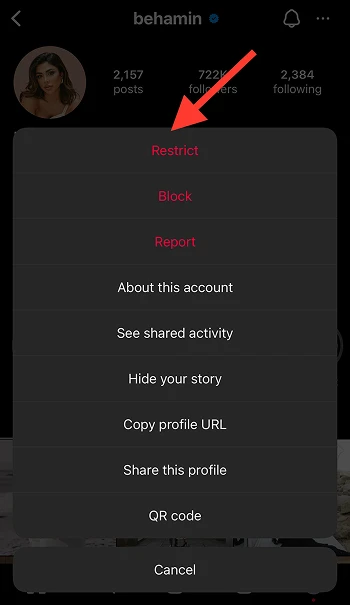
Do a quick follower cleanup every now and then! If someone looks fake or inactive, just remove them.
Not ready to block? Use the “Restrict” option to keep an eye on them without drama. And when new followers roll in, take a second to check their profile before hitting accept.
Content Protection Practices
Protect what you share. Add watermarks to original work, avoid spamming big hashtags, and hold off on posting your location until after you’ve left. Think twice before sharing anything super personal, and use content settings to control who sees what.
Reporting and Platform Tools
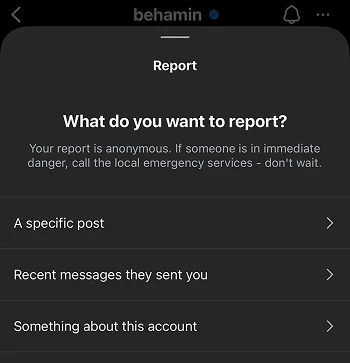
If something feels off, report it; Instagram has tools for that, and they help. Save any messages or screenshots if things get serious, and don’t be afraid to get others to report too—it adds weight.
Digital Literacy Development
The more you know about online scams and shady behavior, the better. Share tips with your friends, follow trusted security pages, and always trust your gut.
How to Report and Remove Fake Accounts
Spot a fake account? Don’t ignore it—reporting helps protect both you and the community.
Complete Guide to Reporting Fake Accounts
Follow these steps to report effectively:
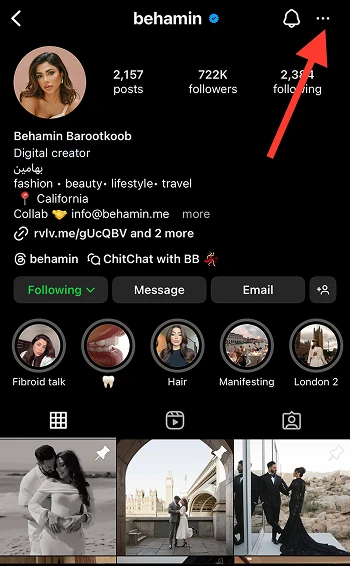
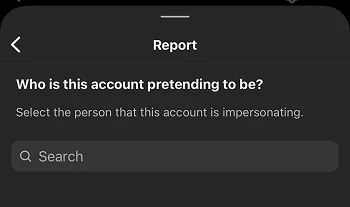
1. Go to the suspicious profile
2. Tap the three dots in the upper right corner
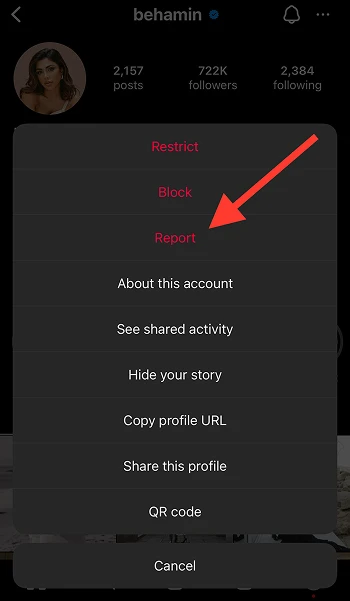
3. Select “Report”
4. Choose the most appropriate reason (usually “It’s pretending to be someone else” or “It’s a spam account”)
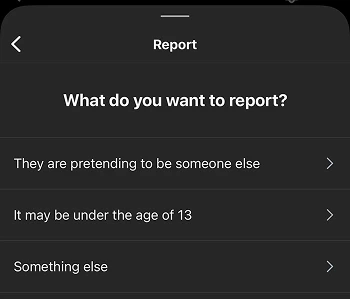
5. Follow the prompts to complete your report
6. Instagram may ask for more details—provide them when possible
Getting Harmful Accounts Deleted
Instagram takes action fastest on accounts that harass, impersonate, or promote scams. If a simple report doesn’t do the trick, try reporting individual posts too.
Clear proof helps, and when others report the same account, it adds weight.
Following Up on Reports
Once you report something, check your Support Requests in settings to track progress.
For serious issues, head to the Help Center or use the in-app support chat and if someone’s harassing you, take screenshots—you might need them later.
Blocking vs. Reporting
Blocking stops someone from seeing or messaging you. Reporting alerts Instagram about rule-breaking behavior.
For real safety, do both! Blocking is instant while reporting takes longer—but it helps clean up the platform.
Instagram’s Efforts to Combat Fake Accounts
Instagram’s been stepping up its game to fight fake profiles—but there’s still work to do.
- Platform Security Updates
They’ve rolled out smarter AI to catch suspicious activity, added new verification tools, and started tracking devices that pump out fake accounts.
There’s even facial detection tech to spot deepfake profile photos.
- Policy Enforcement
Meta’s now stricter than ever! Fake behavior leads to faster bans, mass bot purges happen regularly, and they’ve teamed up with law enforcement for serious scams.
- The Catch?
Fake accounts are still everywhere!
Bots are getting smarter, and with so many users, some reports fall through the cracks. Even real accounts get flagged by mistake sometimes. It’s better than before—but far from perfect.
Future Trends in Fake Account Prevention
The battle against fake accounts continues to evolve with technology.
Emerging Technologies
New tools are on the horizon that could make spotting and stopping fake accounts much easier. Blockchain-based verification systems are being explored as a way to confirm digital identity more securely.
We’re also likely to see improvements in biometric authentication—moving beyond basic two-factor methods. Meanwhile, machine learning is getting better at spotting even subtle patterns in how fake accounts behave.
User Responsibility Evolution
It’s not just up to platforms anymore. Users are expected to play a bigger role in keeping the space safe. Community reporting tools are becoming more efficient, and digital literacy is starting to get the attention it deserves—especially in education.
We’ll also see more emphasis on collective security, with users building trusted networks and sharing safety tips with one another to raise awareness.
Platform Development
Instagram itself is likely to roll out more refined privacy settings that give users better control over their audience.
Creators can expect deeper insights into who’s following them, along with stronger, more accessible verification systems. And perhaps most importantly, there’s a growing push for more transparency around how authentic—or fake—an account is.
When Fake Accounts Become Dangerous?
While most fake accounts are annoying rather than dangerous, some situations require immediate attention.
Warning Signs of Malicious Intent
Be alert to these escalation signals:
- Repeated contact attempts after being ignored.
- Requests for personal information or financial details.
- Threatening or manipulative language.
- Attempts to move conversations to other platforms.
- Creation of multiple accounts to contact you after blocking.
When to Involve Authorities
Consider outside help when:
- You receive specific threats of harm.
- Someone is using your images or identity.
- Harassment becomes persistent or severe.
- Financial fraud occurs.
- The situation involves minors.
Conclusion
Fake accounts aren’t going anywhere anytime soon—but that doesn’t mean you’re powerless.
The more you understand why they show up and how they operate, the better equipped you are to protect your space.
Taking a few smart steps like recognizing red flags, tightening up your security settings, and reporting anything suspicious can make a big difference.
At the end of the day, Instagram should be about real connections, not spam bots and scams. So be mindful, check in on your follower list now and then, and don’t be afraid to hit that block or report button when something feels off.
Stay smart, stay safe—and keep enjoying the platform the way it was meant to be.
FAQs
Can I be hacked just by accepting a follow request from a fake account?
While simply accepting a follow request doesn’t directly compromise your account, it begins a relationship that increases risk through potential DM phishing attempts and access to your personal content.
Why do I suddenly get waves of fake follower requests?
Sudden increases often indicate your profile appeared on suggested user lists, you used trending hashtags, or your account was added to a bot targeting database. Location tagging can also trigger regional targeting.
Does Instagram notify me when they remove fake accounts following me?
Instagram doesn’t typically notify users when removing fake accounts from their follower list, though you may notice periodic follower count decreases during platform-wide purges.
How can I tell if someone bought fake followers for their Instagram?
Look for dramatic follower increases without corresponding engagement, unusually high follower-to-following ratios, and a high percentage of followers with suspicious profile characteristics.
Will blocking fake accounts stop more from following me?
Blocking individual accounts helps manage your current follower list but doesn’t prevent new fake accounts from finding you. Privacy settings and reduced hashtag use are more effective preventative measures.
Can fake followers harm my Instagram algorithm performance?
Yes, fake followers typically don’t engage with content, which lowers your overall engagement rate and can signal to Instagram’s algorithm that your content is less interesting, potentially reducing reach.
What should I do if I suspect my account is being targeted by bots?
Set your account to private temporarily, avoid using trending hashtags, review and strengthen security settings, report suspicious accounts, and consider removing location tags from posts.

Emi Daniel
Buy an Established Instagram Account
Skip starting from zero. Browse Instagram/TikTok accounts with audiences across many niches.
See Available AccountsRelated articles
-

How to Clear Instagram Cache on iPhone, Android & Desktop
Instagram can quietly build up a lot of temporary files while you scroll through Reels, watch Stories, save posts, and upload your own content. You may not…
12 min readEmi Daniel
-

How to See Who Reposted Your Instagram Post (2026 Guide)
Someone reposted your Instagram post, but you have no idea who it was. You check notifications, search through your profile, and still cannot find a clear answer. …
18 min read -

How to Reset Instagram Algorithm in 2026
Instagram can start showing too much of the same type of content. Your Explore page may no longer match your interests, Reels may feel repetitive, or suggested…
12 min read