

If you have a professional account on Facebook, you already know that you need advertising to grow your account and attract more target audience.
We all know how difficult the advertising process might be, so how can you make the process easier? The answer lies in using the Facebook ads library to use it for competitor research!
Have you ever wondered how your competitors create those engaging Facebook ads that seem to be everywhere? That’s where Facebook ads library comes in to offer you valuable competitive intelligence without the guesswork.
Buy an Established Instagram Account
Skip starting from zero. Browse Instagram/TikTok accounts with audiences across many niches.
See Available AccountsLet’s explore how this powerful and free tool can transform your approach to social media advertising through strategic competitor research.
What Is Facebook Ads Library?

You are right to wonder what Facebook ads library is in the first place! Let’s see!
Facebook Ads Library is a searchable database that offers users detailed information about ads available on Facebook’s platforms, including Instagram and Messenger.
It was launched in 2019 and was created to combat political misinformation and introduce more accountability into political advertising.
However, soon it was clear that the Ads Library had much more value than was ever conceived. For marketers and companies alike, it is now an essential tool for competitive auditing, creative inspiration, and strategic planning.
The library allows you to see active and inactive ads for any given advertiser, giving you insight into their messaging, creative approach, and even rough splits of what they’re doing with their ad activity. And the best part is, all that data is free, so it’s one of the most accessible.
What Information Does Facebook Ads Library Contain?
The Facebook Ads Library provides various information about ads running on Facebook’s platforms.
For each ad, you can view:
- The ad creative (images, videos, and copy).
- When the ad started running. (Don’t underestimate this point!)
- Which platforms it appears on (Facebook, Instagram, Messenger, etc.).
- Whether the ad is active or inactive. (You can’t believe what valuable insight it gives you!)
- Approximate impressions and spend ranges (for political ads).
- Page information about the advertiser.
How Facebook Categorizes Different Ad Types
Facebook categorizes ads in the library primarily by advertiser and by type.
The main categories include commercial ads (standard business advertisements), political and issue ads (which include additional disclosure requirements), and housing, employment, and credit opportunity ads (subject to special rules).
Each category has different levels of information available, with political and issue ads providing the most comprehensive data, including estimated audience reach and spend information.
How to Access Facebook Ads Library for Research
Accessing and using the Facebook Ads Library is simple:
Step 1- Visit facebook.com/ads/library.
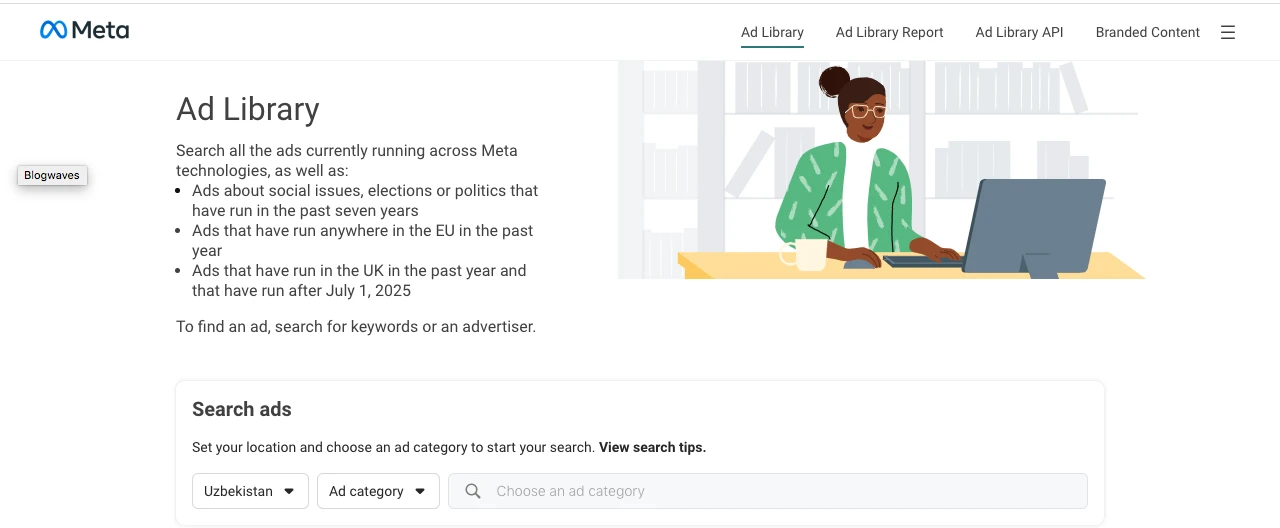
Step 2- No login is required—the library is publicly accessible.
Step 3- Enter a competitor’s name in the search field.
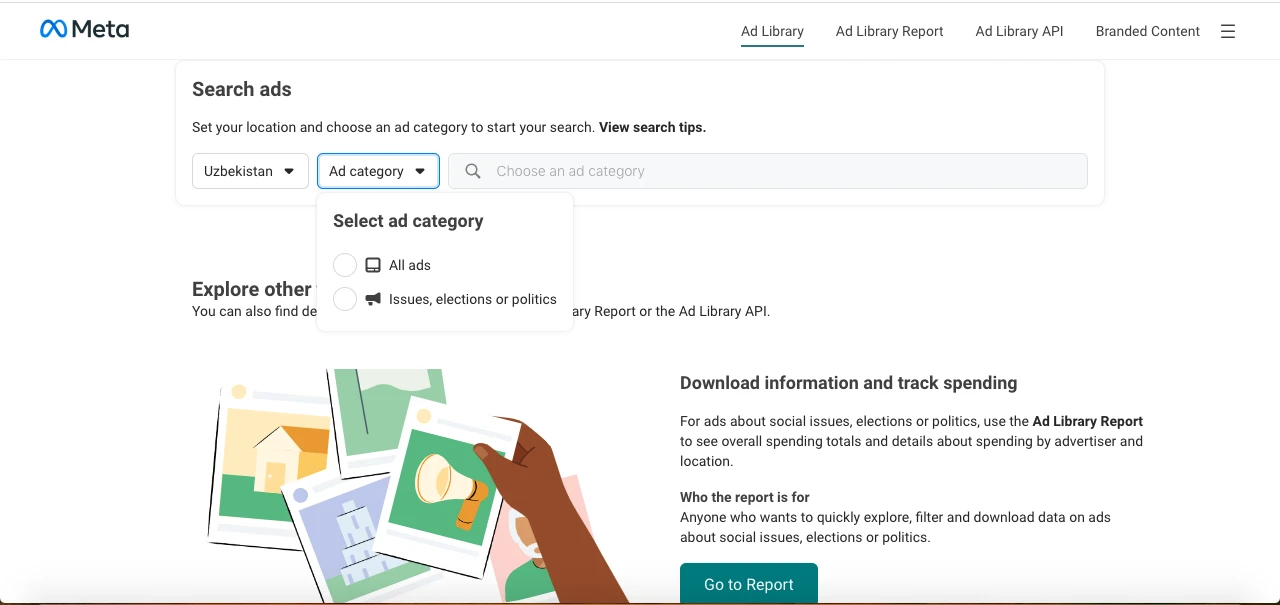
Step 4- Select the appropriate country from the dropdown.
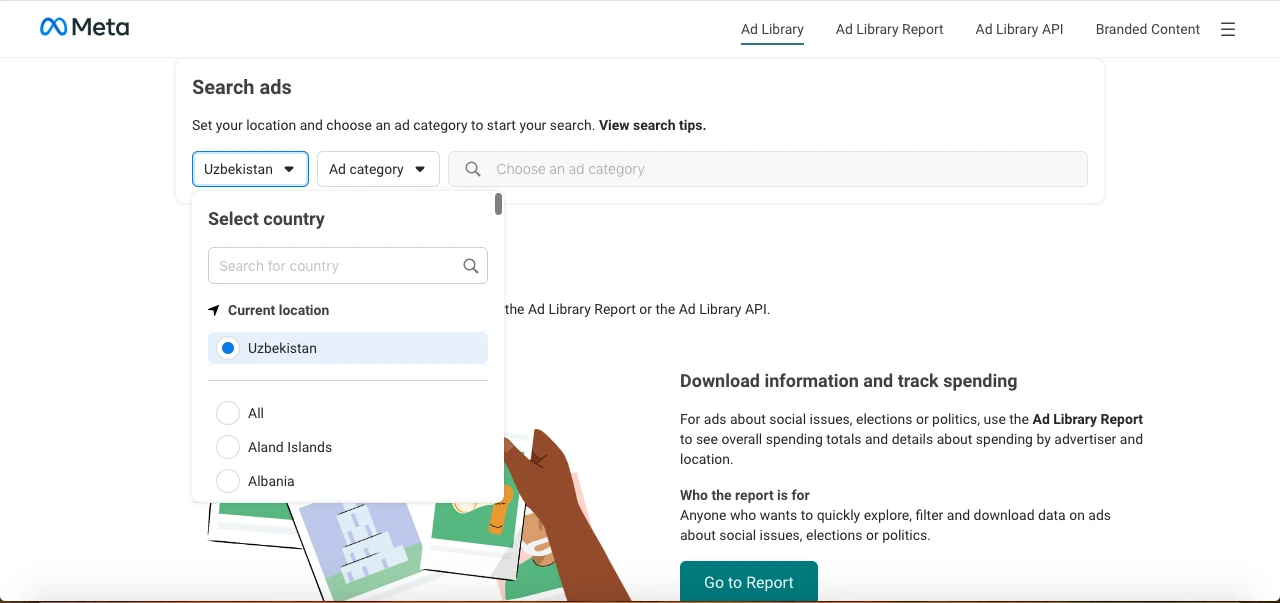
Step 5- Review the list of ads that appears, sorted by most recent first.
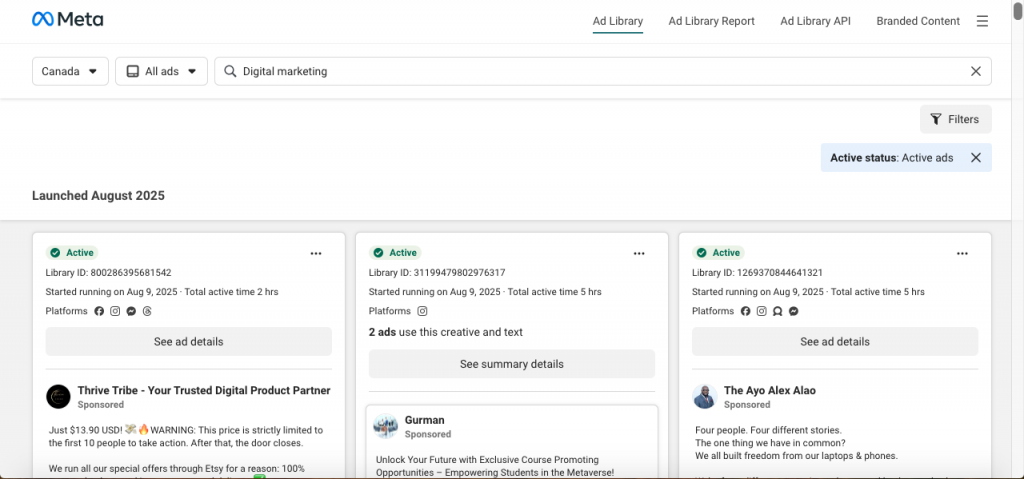
Step 6- Click on any ad to expand and see its details.
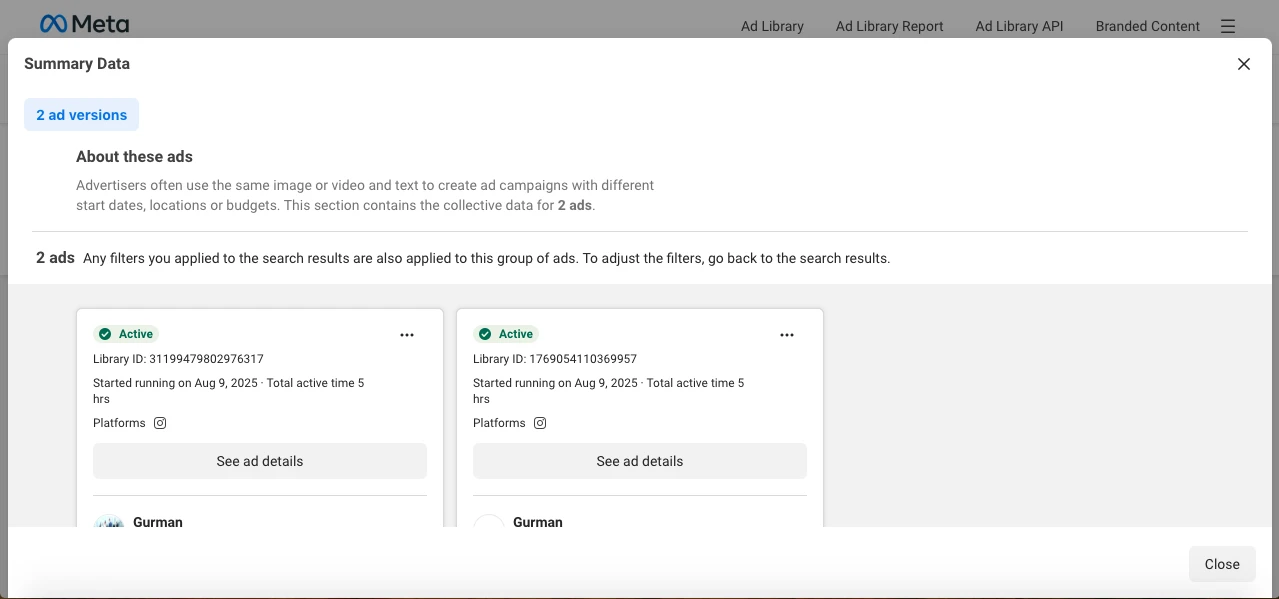
Filtering Options to Refine Your Ad Research
To make your research more efficient, there are filtering options you can use.
The options provided include platform filters to see ads that are running only on Facebook, Instagram, or Messenger, active/inactive status to see existing versus inactive campaigns, and media type filters to reach image ads, video ads, or carousels.
When analyzing multiple competitors, use identical filters to allow for comparable comparisons between brands.
Analyzing Active vs. Inactive Competitor Campaigns
Active campaigns reveal what works for others right now, while inactive campaigns address previously used methods.
For in-depth research it’s more advisable to begin with active campaigns in order to gain an overview of current positioning, examine inactive campaigns from the last 3-6 months, subsequently note those ads that ran for short periods versus those that ran over longer durations, and lastly take particular note of ads that were constantly updated with slight modifications—these were probably being tested and optimized.
5 Key Benefits of Using Facebook Ads Library

Here are top 5 benefits you will enjoy once starting using Facebook ads library!
Gaining Valuable Competitive Intelligence Without Costs
One of the most advantages of the Ads Library is that it’s completely free! Who doesn’t like free tools?
Before this tool existed, companies would pay thousands for competitive intelligence software to gain insights into competitor strategies. Now, with a few clicks, you can see what your competitors are promoting, how they’re positioning their products, and what messaging they’re using!
Understanding Industry Ad Spend Patterns
While you can’t directly observe ad spend dollars on most business commercials, you can get a sense of relative investment levels by observing how many a competitor has running at any given moment and how frequently they refresh their creative.
This enables you to apply typical industry standards to compare your own ad budget and figure out when competitors are most likely boosting spending.
Discovering Successful Creative Approaches in Your Niche
By studying which ads your competitors run for extended periods (likely their best performers), you can identify creative patterns that resonate with your shared audience. Pay attention to:
– Visual styles that appear repeatedly
– Copy length and tone
– Call-to-action approaches
– Types of offers that seem to persist longer
These patterns can inform your own creative development without directly copying competitors.
Monitoring Brand Mentions in Competitor Advertising
The search functionality in Ads Library allows you to not only search for specific advertisers but also for keywords. This means you can search for your own brand name to see if competitors are mentioning you in their ads—perhaps in comparative advertising or as part of their positioning against you in the market.
Identifying Seasonal Campaign Strategies and Timing
By reviewing inactive ads, you can see when competitors launched special promotions throughout the year.
This historical view helps you identify key seasonal campaigns, product launch timing, and how early competitors begin promoting for major shopping events.
This insight allows you to plan your own promotion calendar either in sync with industry trends or identifying holes your competition might be overlooking.
How to Use Facebook Ads Library for Competitor Research
Now, it’s time to learn how to use the Facebook ads library effectively. Make sure you won’t miss even one of the followings:
Identify Your Top 3-5 Competitors to Track
For effective competitor research, focus on a small set of competitors, i.e., your direct competitors (those who offer nearly the same products/services), aspirational competitors (large brands you wish to compete with someday), and indirect competitors (those who solve the same customer issues differently).
Create a simple spreadsheet for tracking these competitors’ activities over time, noting new campaigns and changes in messaging to identify patterns.
Analyze Competitor Ad Copy and Value Propositions
When looking at competitor ads, take a very close look at their messaging components.
Such elements include major value propositions and how they’re stated, particular features they highlight, call-to-action strategies and promotions, and
price positioning (premium, value, competitive).
Look for evolution in these elements over time to understand how competitors are refining their messaging based on what works.
Filter Your Search
Use available filter options to filter and narrow your search to country, platform, active status, ad category, impressions by date, and advertiser.
Spot Gaps to Fill
A smart use of the Facebook Ad Library is to get a clearer picture of the market you’re in. By looking at what kinds of ads your competitors—or even similar small businesses—are running, you can pick up on patterns in their marketing strategy.
From there, think about what’s not being done. Maybe most brands in your space are sticking to Instagram ads. That’s a clue—dig into why, and maybe try running campaigns on Facebook or Messenger instead. There could be less competition and more room to grab attention.
Pay attention to how their ads feel in the feed. If everything looks overly branded and clearly promotional, try the opposite—ads that feel native, like something a friend might post. User-generated content, casual videos, or storytelling might stand out more. Or if everyone’s using static images, maybe video is worth testing.
Pay Attention to Successful Ad Creative and Visual Elements
Visual elements often communicate as much as the copy itself.
It is recommended to explore color schemes and how they align with brand personality, video length and style for video ads, smartphone-optimization tactics, and image categories (lifestyle, product-focused, user-generated).
Creating a visual swipe file of competitors’ ads can help identify patterns that might inform your own creative direction.
Track Competitor Campaign Frequency and Duration
The timing and duration of competitor campaigns reveal important strategic insights, such as average duration of their campaigns, seasonal patterns in ad frequency, how frequently they launch new campaigns, and if they maintain “always-on” ads alongside promotional campaigns.
These patterns help you understand your competitors’ budget allocation and campaign planning cycles.
Use Filters and Keywords to Find Your Desired Ads
Facebook’s Ad Library has robust filters to help you discover the kind of ads you desire to view.
To search for specific phrases, enclose them in quotes—”Shop the sale now”. To search for more than one phrase simultaneously, use more than one set of quotes—”Shop now” or “Sale”. If you need to look for ads that have some words together in any sequence, use the | symbol to separate them—”shoes | sale | Christmas”.
Save Your Search
Did you know that you can save your searches in the Facebook Ad Library to streamline your ad research?
After you’ve entered your keywords and filtered by, ad type, location, or active status—simply click “Save search” and give it a name.
This comes in particularly handy if you are constantly monitoring seasonal campaigns, competitors, or particular industries. Stored searches can be referenced at any moment from your account, preventing you from repeatedly applying the same settings to identical queries.
Advanced Facebook Ads Library Research Techniques

Do you need more specific ways to use the Facebook ads library? Here are top three advanced methods you can try:
Decode Competitor Marketing Funnels
By organizing competitor ads by their apparent funnel stage, you can map their customer journey.
You may now wonder what their journey might include, right?
It has awareness ads: Broad messaging, educational content, brand-focused, conversion ads: Emotional CTAs, time-limited promotions, urgency considerations, retention ads: Loyalty schemes, cross-sell/upsell offers, and consideration ads: Product information, comparison, testimonials.
This organization helps you better visualize how competitors are pushing customers through their sales funnel and identifying gaps in your own funnel.
Use Ads Library to Spot Market Trends Early
The Ads Library can serve as an early warning system for industry shifts. Start by monitoring when multiple competitors begin emphasizing similar features and note when new messaging themes emerge across several competitors.
Let’s not forget that it is better to track seasonal promotion timing changes year-over-year and watch for new product categories being advertised.
These observations can help you stay ahead of market trends rather than merely reacting to them.
Compare Multi-Platform Advertising Approaches
Many advertisers create platform-specific content rather than using identical ads across all platforms:
- Compare how messaging differs between Facebook and Instagram ads.
- Note format preferences for each platform (carousel on Facebook vs. single image on Instagram).
- Identify platform-specific calls to action.
- Observe differences in creative style between platforms.
These distinctions can help you optimize your own cross-platform advertising strategy.
Complementary Tools to Enhance Ads Library Research
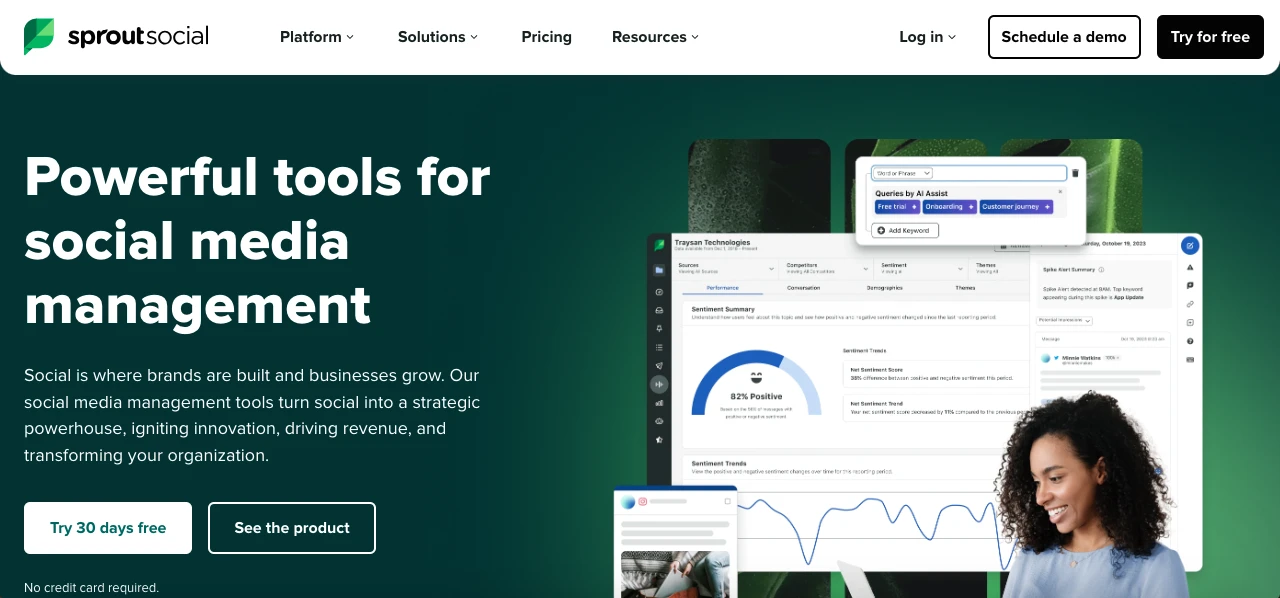
Expand your research capabilities with these complementary tools:
1. Sprout Social: Combines social listening with competitive analysis to understand both ads and organic content performance. More importantly, Sprout Social provides Facebook advertisement management functionalities such as analytics and scheduling.
2. SimilarWeb: Provides traffic insights that help you understand where competitor ads are driving visitors. Note that Similarweb doesn’t directly offer an “ad library” feature for Facebook. So, how does it work? In fact, its Digital Marketing Intelligence platform allows you to analyze competitor ad strategies.
3. Pathmatics: Offers more detailed competitive ad intelligence, including estimated spend and impression data that goes beyond what Facebook Ads Library provides. Pathmatics can be used to gain insights into Facebook ads as it provides data on competitor advertising techniques.
These tools provide additional context that makes your Ads Library research more valuable.
Tips to Turn Facebook Ads Library Insights Into Action
Are you ready to use Facebook ads library to improve your marketing strategies and grow your social media presence? The following tips help you along the way!
Create Your Competitive Analysis Framework
Develop a structured approach to competitor ad analysis by creating a template that tracks key elements (messaging, visuals, offers, etc.), categorizing ads by objective and target audience, and documenting changes in strategy over time.
This systematic approach transforms casual browsing into actionable intelligence.
Focus on High-Performing Ads
Be careful about ads that have been up for a long time or continually reappearing. Those are likely working well; otherwise, the company would not keep paying for them.
Try to determine what is contributing to their success. Is it the message? The style? The tone? Once you can see the patterns, you can apply those concepts to your campaigns in a manner that’s true for your brand.
Develop Better Ad Campaigns Based on Findings
Apply competitor insights to improve your own campaigns. You may ask how?
Start with identifying messaging gaps competitors have left behind, refining your unique value proposition regarding competitive positioning, and testing promotion frameworks that appear to work for similar products.
Don’t copy, but extract the best of what works and differentiate your brand.
Don’t Miss Seasonal Trends
Notice how your competitors change up their ads for holidays, seasonal events, or key moments in your industry.
Paying attention to these shifts can help you get ahead—so you’re ready to launch the right campaigns when customers are most interested and their habits start to change.
Know When to Imitate vs. Differentiate in Your Strategy
Strategic balance is crucial when applying competitive insights:
- Imitate fundamental structures that work (ad formats, general funnel approaches).
- Differentiate your core value proposition and brand voice.
- Adopt successful tactical elements (offer structures, CTA approaches).
- Establish a unique visual identity while respecting industry conventions.
- Fill gaps in competitor messaging rather than directly competing on their strengths.
The most effective strategy often combines industry best practices with distinctive brand elements.
Common Challenges When Using Facebook Ads Library

Here are some of the most common challenges you may face and should be ready to handle while using Facebook Ads Library:
Limited historical ad data:
Facebook removes inactive non-political ads, so check competitors often and save screenshots or PDFs to keep track over time.
No performance metrics:
Since you can’t see results, use ad duration as a clue—longer-running ads usually do well. Notice repeated themes and variations, and listen to audience feedback elsewhere.
No conversion info:
Guess which ads work by spotting long-running ads with strong calls-to-action. Ads that change a lot or disappear quickly are likely to underperform. Patterns across many ads help confirm this.
Overlooking different platforms:
Many brands focus on one platform, like Instagram. Don’t miss chances by ignoring Facebook or Messenger—try testing ads there to find untapped audiences.
Copying instead of adapting:
Copying competitor ads won’t cut it. Use insights to inspire your own ideas and fill gaps your audience actually cares about.
Conclusion
Facebook Ads Library has transformed competitive research from an expensive, limited activity into an accessible, ongoing practice for businesses of all sizes.
By regularly monitoring competitor ads, analyzing patterns in their strategies, and thoughtfully applying those insights to your campaigns, you can develop more effective advertising without the costly trial and error.
Remember that the goal isn’t to copy competitors but to understand what resonates with your shared audience. Use these insights to highlight your unique strengths, address gaps competitors have missed, and position your brand more effectively in the marketplace.
FAQs
What is the Facebook Ads Library?
It’s a free tool showing active and some inactive ads running across Facebook, Instagram, Messenger, and Audience Network.
Can I see ad performance data in the Ads Library?
No, it shows ad creatives but doesn’t provide detailed performance metrics like clicks or conversions.
How do I find specific ads using keywords?
Use quotation marks for exact phrases (e.g., “summer sale”) or the | symbol to search multiple words (e.g., shoes | sale).

Emi Daniel
Buy an Established Instagram Account
Skip starting from zero. Browse Instagram/TikTok accounts with audiences across many niches.
See Available AccountsRelated articles
-
Best Influencer Marketing Software in 2026: Top Platforms to Grow Your Brand
Influencer marketing used to feel optional, something you tried after you’d “done” everything else. Now it’s often the first place customers hear about a brand. The problem…
18 min readEmi Daniel
-
The Ultimate Digital and Social Media Marketing Playbook: From Basic to Advanced Tactics
Are you tired of trying different methods and realizing your brand doesn’t get the attention it deserves? If so, you need to come up with the right…
23 min read -
Social Media Competitor Analysis: Tools, Benchmarks, and Strategy Guide
Are you getting fewer likes lately? You’re not alone. On Instagram, the average engagement dropped to about 0.45% in 2025, down 24% from last year. Still, the…
26 min read