

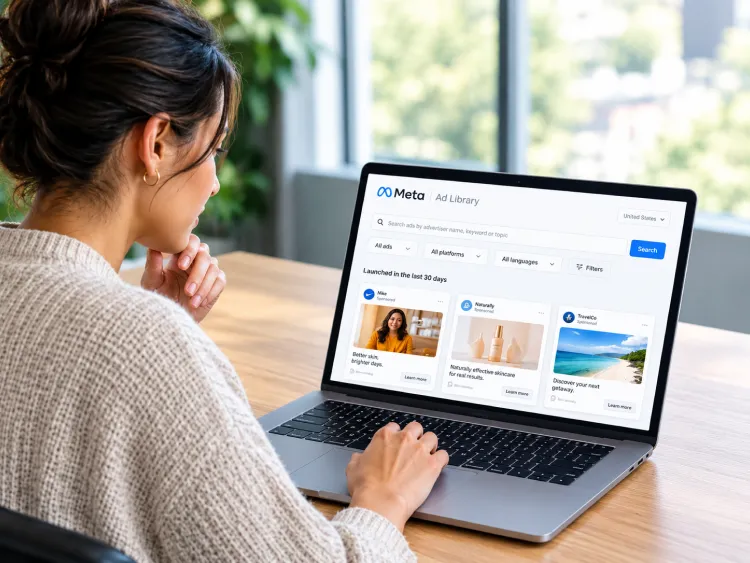
Some ads are easy to ignore until you notice the same brand appearing in your feed again and again. You may start wondering what they are saying, what offer they are pushing, and you might ask yourself if their ads are actually working.
Meta Ad Library gives you a way to look behind that curtain. It lets you search active ads from brands on Facebook, Instagram, Messenger, and other Meta platforms without needing access to their ad account.
You will not see their sales, targeting, or real budget, but you can see what they are willing to put in front of people. That alone can tell you a lot when you know what to look for.
Buy an Established Instagram Account
Skip starting from zero. Browse Instagram/TikTok accounts with audiences across many niches.
See Available AccountsIn this post, you will learn how to search Meta Ad Library, find competitor ads, use the most useful filters, understand what the tool can and cannot show, and turn what you find into original ideas for your own campaigns.
What Is Meta Ad Library?
Meta Ad Library is Meta’s public ad-transparency tool. It shows ads that are currently running across Meta’s platforms, including Facebook and Instagram. You can use it without running ads yourself and, in many cases, without logging into Facebook.
People also call it the Facebook Ads Library, which is the older name many marketers still use. The tool is still reached through Meta’s Ads Library page, but it now covers more than Facebook.
For most marketers, business owners, and creators, its main use is simple: see what competitors are advertising right now.
You can use it to study:
- The ads a brand is currently running
- Their images, videos, copy, offers, and calls to action
- When visible ads started running
- Which Meta platforms the ads appear on
- How a brand changes its message across products or markets
It is useful because it shows the actual creative that people can see in their feeds. It is not a shortcut to a competitor’s campaign results.
What Meta Ad Library Can and Cannot Tell You
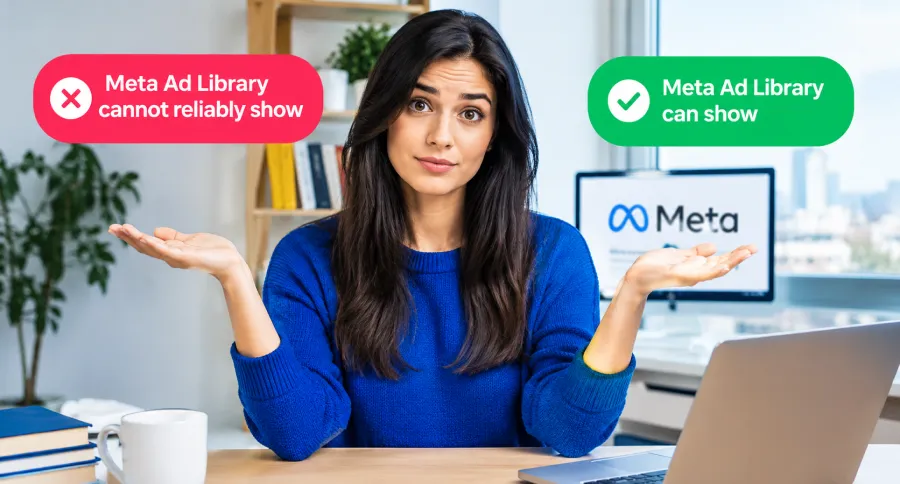
Before you start searching, it helps to know where the tool is useful and where it stops.
| Meta Ad Library can show | Meta Ad Library cannot reliably show |
| Active ad creative | Exact commercial ad spend |
| Ad copy and calls to action | Revenue, leads, or sales |
| Advertiser or Page name | ROAS or conversion rate |
| Delivery start date | Full targeting settings |
| Platforms where an ad appears | Custom audiences or retargeting lists |
| Visible ad variations | Campaign budgets, bids, or optimisation events |
| Some extra data for political or issue ads | Whether an ad is profitable |
Meta Ad Library shows what a brand is testing publicly. It does not show the private numbers behind the campaign. A video that has been running for months may be successful, but it may also have a small budget, serve a narrow audience, or remain active for another reason.
In my experience reviewing competitor ads, the biggest mistake is assuming that a visible ad is automatically a winning ad. Treat it as a useful clue. Look for repeated messages, several variations around one offer, and patterns that show up across a brand’s ads over time.
How to Open Meta Ad Library
Open Meta Ad Library in your browser at facebook.com/ads/library.
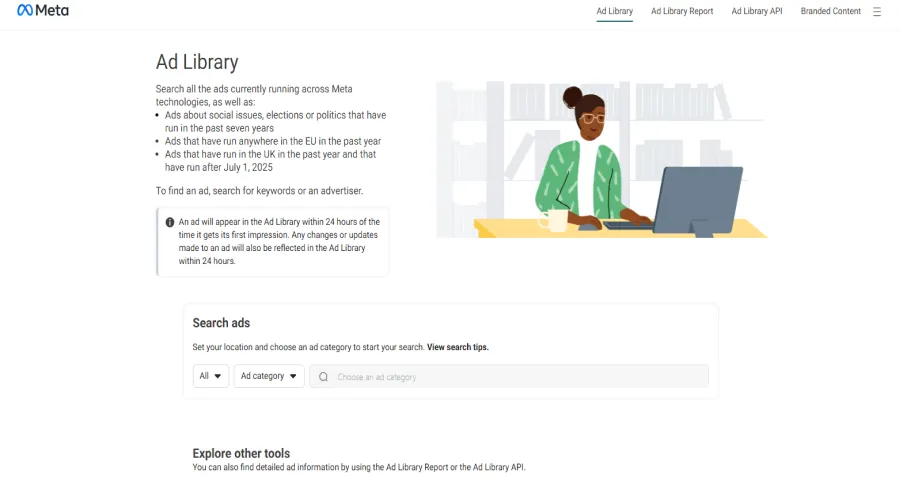
Meta Ad Library’s search page lets you choose a location, select an ad category, and search by keyword or advertiser.
- Choose the country you want to research.
- Select All ads for normal commercial research.
- Search for a brand, advertiser, Facebook Page, or keyword.
- Open the results and review the ads that are currently active.
The country matters more than people expect. A brand may use different prices, offers, languages, landing pages, and products in different markets. If you sell in the UK, for example, researching only US ads may give you ideas that do not fit your audience.
Search by Brand First
If you already know the competitor you want to study, start with their brand or Page name.
This usually gives cleaner results than searching a broad keyword. You can see the brand’s active ads together, compare their formats, and spot the message they repeat most often.
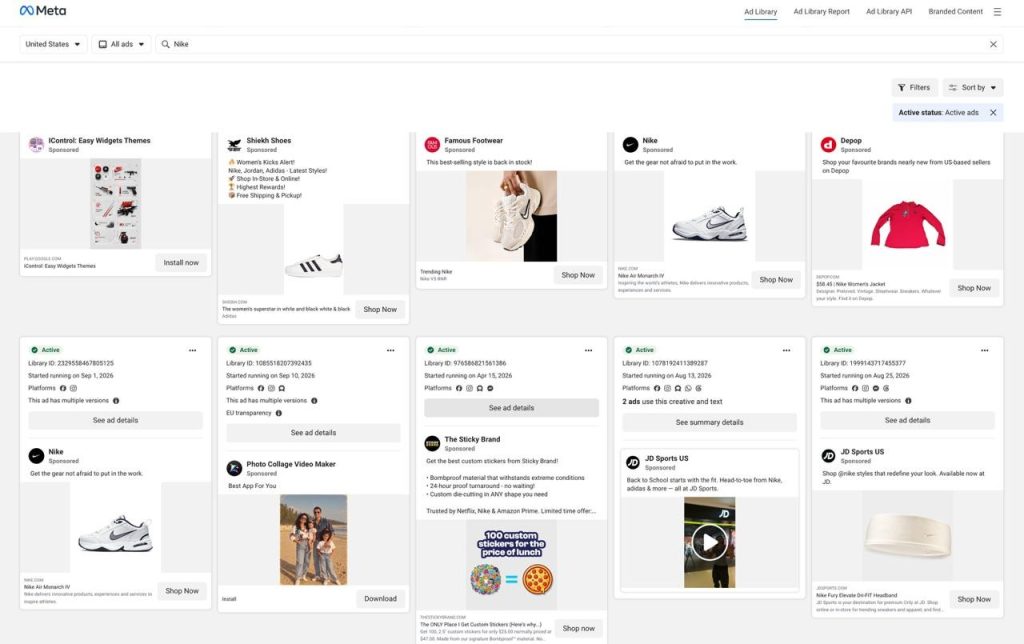
Searching an advertiser shows the active ads connected to that brand.
Try these steps:
- Search the brand name.
- Check spelling variations if nothing appears.
- Look for country-specific Pages or separate product Pages.
- Open the correct advertiser profile.
- Review the ads as groups, not as isolated posts.
Some brands run ads under a parent company, a local Page, or a name that does not perfectly match their website. If the search does not work, visit the brand’s Facebook Page and check its Page Transparency section. This can help you find the Page name used for advertising.
A direct advertiser search is usually the fastest way to understand a competitor’s current strategy.
Can You Search Meta Ad Library by Website or Domain?
You cannot usually enter a website domain into Meta Ad Library and see every ad linked to that site. The standard search works best with an advertiser or Page name.
If you only know a competitor’s website, search the brand name first, then check its Facebook Page and Page Transparency to find the advertiser name Meta uses. Larger companies may advertise through separate product, regional, or parent-company Pages, so it is worth checking more than one result.
Search by Keyword for Market Research
Keyword search is useful when you want to understand a wider market rather than one brand.
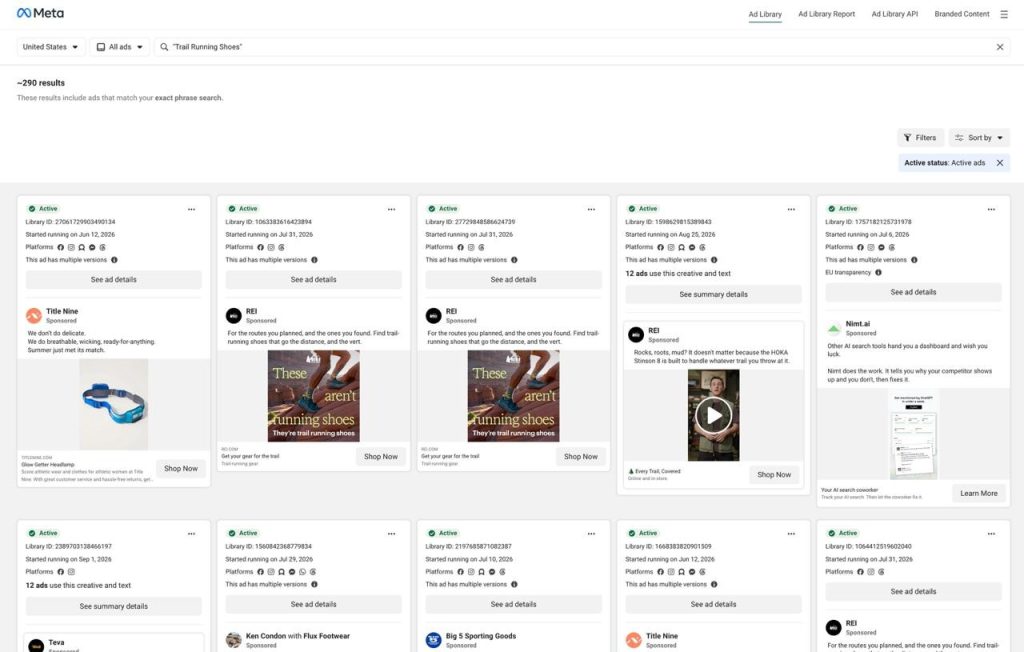
Keyword searches help you find recurring offers and messages across a category.
For example, if you sell a productivity app, do not only search “productivity app.” Try the phrases customers may care about:
- “save time at work”
- “stop switching between tools”
- “organize your projects”
- “free trial”
- “book a demo”
If you sell skincare, search customer concerns and offer language:
- “sensitive skin”
- “dark spots”
- “fragrance free”
- “before and after”
- “20% off”
Keyword results can be messy. You may see irrelevant advertisers, similar words used in another context, or ads from brands outside your target market. That is normal.
For example, a search for “running shoes” may return general sportswear or footwear ads alongside ads for actual running shoes. Use a more specific phrase, then save relevant advertisers and search for them by name.
The useful habit is to search in layers:
- Start with a product category.
- Search a customer problem.
- Search an offer.
- Search a phrase you see repeated in competitor ads.
- Save relevant advertisers and research them by name afterwards.
This gives you a clearer view of the language buyers see across your category.
Meta Ad Library Filters That Matter
The tool has simple filters, but using them well can save time.
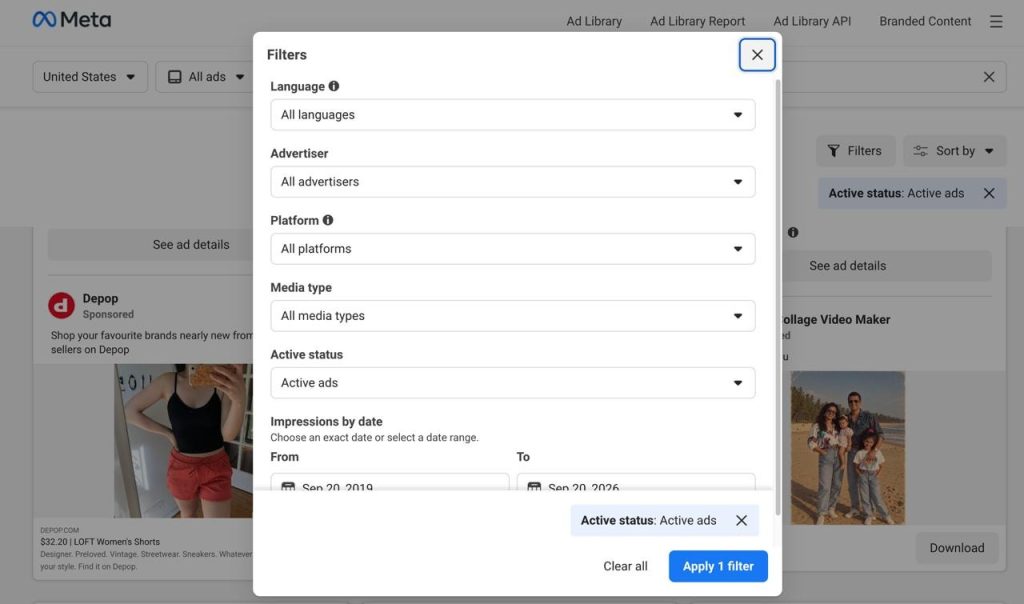
Filters help you narrow results by market, platform, format, and activity.
Country or region
Set the country before you start comparing ads. You are not only choosing a location. You are choosing the version of the market you want to understand.
A clothing brand may show a summer offer in Australia, a winter campaign in Canada, and a different price point in the UK. Comparing them without checking the country can lead to the wrong conclusions.
Ad category
For normal competitor research, choose All ads.
Meta also separates political, election, and issue ads because those categories have extra transparency rules. You may see more information for those ads, including “Paid for by” details and certain delivery or spending information. That does not mean the same data will appear for a normal product, ecommerce, app, or service ad.
Ad status and delivery date
Active ads help you see what a company is running now. Delivery dates help you understand whether a creative is new or has remained visible for a while.
Still, do not use the start date as proof of success. It is one signal, not a verdict.
Format and placement
When the interface provides the option, look at the format and platform placements. A vertical creator-style video may be designed for Instagram Reels, while a static image may be better suited to feed placement.
What matters is not whether a brand uses video or images. Look for how the format supports the message:
- Does the video demonstrate the product quickly?
- Does a founder speak directly to camera?
- Does the image make an offer obvious in one second?
- Does a carousel answer several buyer questions?
- Does a testimonial lead with a specific result?
What to Look for in a Competitor’s Ads
Do not just collect screenshots because the ads look good. That becomes a folder you never use.
Instead, look for the decisions behind each ad. Looking at strong Instagram ads examples can also help you compare formats, hooks, and calls to action before planning your own creative.
| Element | Questions to ask |
| Hook | What does the ad say or show first? |
| Audience | Who does it seem to speak to? |
| Problem | What frustration, desire, or risk does it mention? |
| Promise | What outcome does it offer? |
| Proof | Does it use a review, demo, customer result, expert opinion, or data? |
| Offer | Is there a discount, trial, bundle, consultation, or free resource? |
| Format | Is it a product demo, UGC-style video, founder video, testimonial, static image, or carousel? |
| CTA | Does it ask people to shop, learn more, book, sign up, or claim an offer? |
| Landing page | Does the destination match the message in the ad? |
Ad details show the creative, visible copy, start date, and available placements.
I have found that the most useful insight often comes from the message a brand repeats, not the prettiest individual ad. If five ads use different visuals but all lead with “made for sensitive skin,” that claim may be doing important work in their marketing.
A Simple Competitor-Research Workflow
You do not need to study every competitor at once. Start small and repeat the process regularly.
Build a short list
Choose:
- Three direct competitors
- Two larger brands you want to learn from
- Two adjacent brands competing for the same customer’s time or money
For example, a meal-planning app might review other meal-planning apps, a popular recipe subscription, a grocery-delivery service, and a fitness brand that sells nutrition plans.
This gives you a wider view without turning the research into a huge task.
Record the date and market
Write down the date you checked the Library and the country you selected. Ads change quickly, and a screenshot without context becomes less useful after a few weeks.
Group ads by campaign
Do not count every variation as a new strategy. One brand may run the same offer with five videos, three headlines, and several placements.
Group ads that share:
- The same product
- The same main promise
- The same offer
- The same landing page
- The same campaign theme
This helps you see whether the brand is testing different angles or simply adapting one campaign.
Look for repeated patterns
Pay attention to things that appear more than once:
- The same customer problem
- A similar product demonstration
- A repeated discount or free trial
- The same type of creator or customer testimonial
- The same call to action
- Different hooks leading to one landing page
Repeated patterns are often more useful than one unusual ad.
Turn patterns into original tests
Your goal is not to copy a competitor’s script, design, footage, reviews, or claims.
Instead, use the research to create better questions:
- Which customer problem should we explain more clearly?
- Do people respond better to a demo or a testimonial in this category?
- Is there an objection we have not addressed?
- Would a simpler offer be easier to understand?
- Can we show our own proof in a more direct way?
For example, if several competitors promote “quick setup,” do not copy their wording. Test your own proof, such as a short screen recording that shows a customer completing the setup in a few minutes.
How to Tell if an Ad Is Worth Studying
You cannot confirm an ad’s profitability from Meta Ad Library. But you can decide whether it is worth analyzing more closely.
An ad deserves attention when you see a few signals together:
- The brand has several variations around the same offer.
- Different creative formats use the same main message.
- The same product or campaign remains visible over time.
- The ad’s promise matches the landing page, product page, or email sign-up offer.
- The hook addresses a specific customer problem.
- The brand has tested several ways to prove the same claim.
One ad alone is rarely enough to draw a conclusion. A group of similar ads is more useful because it suggests the brand is investing in a particular angle.
Track Competitor Ads Over Time
A one-time search can give you ideas. Tracking the same brands over time gives you a strategy.
Create a simple spreadsheet or Notion page with these columns:
- Date:
- Brand:
- Country:
- Campaign theme:
- Hook:
- Offer:
- Format:
- CTA:
- Start date:
- Landing page:
- Your test idea:
Example entry:
- Date: September 21, 2026
- Brand: Nike
- Country: United States
- Campaign theme: Everyday running shoes
- Hook: A runner starts an early-morning city run
- Offer: Explore the new running collection
- Format: Short vertical video
- CTA: Shop Now
- Start date: August 14, 2026
- Landing page: Nike running-shoe collection page
- Your test idea: Test a short product demo that shows the main product benefit in the first three seconds.
A simple tracker in Notion or a spreadsheet makes it easier to compare campaigns and notice changes over time. Check the same brands every two to four weeks.
Over time, you may notice that:
- A discount disappears and a new offer replaces it.
- A brand launches more creator-style video ads.
- Several new ads use the same message.
- A seasonal campaign begins.
- The landing page changes.
- A company shifts from selling one product to promoting a bundle or subscription.
This is much more useful than saving dozens of random ads. It lets you see how competitors change their marketing, not only what they are doing on one day. ads. It lets you see how competitors change their marketing, not only what they are doing on one day.
How Different Businesses Can Use Meta Ad Library
The same research process works for most businesses, but the details worth tracking depend on what you sell and how customers make decisions.
Ecommerce Brands
Ecommerce businesses can use Meta Ad Library to study how brands present products before someone visits the product page.
Look for:
- Product demonstrations
- Customer reviews and creator content
- Before-and-after claims
- Bundles and quantity offers
- Shipping promises
- Free gifts
- Limited-time promotions
- Guarantees
- Seasonal messages
Pay close attention to the first few seconds of video ads. Many ecommerce ads either show the product in use immediately or begin with a problem the product solves.
If you sell a physical product, a good question is: “Could someone understand what this does without turning the sound on?” Competitors often reveal how clearly a category needs to be explained.
SaaS and B2B Brands
For SaaS and B2B companies, Meta Ad Library is useful for studying how other companies make an abstract product feel relevant.
Look for:
- Pain-point hooks
- Product walkthroughs
- Demo requests
- Free trials
- Webinars and lead magnets
- Customer logos or case studies
- Time-saving or cost-saving claims
- Before-and-after workflow comparisons
A common pattern is an ad that points to a small, immediate problem: too many spreadsheets, missed follow-ups, slow reporting, or manual work. The ad does not need to explain the entire product. It needs to earn enough interest for someone to click.
Agencies and Freelancers
Agencies and freelancers can use the tool before a sales call or pitch.
Review a prospect’s current ads to understand:
- Their visible offer
- Their main audience message
- The formats they are using
- Whether their ads match their landing page
- Whether their campaign looks consistent
Do not tell a prospect that their ads are “not working” just because you can see them in the Library. You cannot know that from public data.
A better approach is to say:
“I noticed you are testing several ads around your free consultation. I have a few ideas for showing customer proof earlier in the creative.”
That sounds informed without making claims you cannot prove.
Creators
Creators can use Meta Ad Library to understand how people promote digital products, newsletters, communities, coaching, courses, and services.
Look for how other creators:
- Introduce a topic or pain point
- Turn educational content into an offer
- Share testimonials without sounding scripted
- Promote a free guide or email list
- Frame a course, consultation, or membership
- Use video, screenshots, or personal stories as proof
The useful lesson is usually not the exact words. It is the journey from a useful idea to a simple next step.
Meta Ad Library for Political and Issue Ads
Political, election, and issue ads are different from normal commercial ads.
Meta keeps these ads in a longer-term archive and provides extra transparency information because they can affect public debate and elections. Depending on the country and ad type, you may see information such as who paid for the ad, delivery data, spending ranges, and demographic information. These records can remain available for years after the campaign ends.
Do not expect that level of detail when researching a clothing brand, online store, software company, or local business. Standard commercial ads have more limited public data.
Meta Ad Library API: Do You Need It?
Most people do not need the API.
The website is enough if you want to review a few competitors, save examples, or collect ideas for your next campaign. The API becomes relevant when you need structured information across a large number of advertisers or want to build reports, monitoring systems, or research tools.
API access can have stricter rules than the public website. Available fields, review requirements, categories, and retention can also differ. It is especially relevant to political, issue, and regulated-ad transparency data rather than being a complete commercial ad-intelligence tool.
If you are not building a product or running large-scale research, the browser version is the simpler choice.
Meta Ad Library vs. Meta Ads Manager
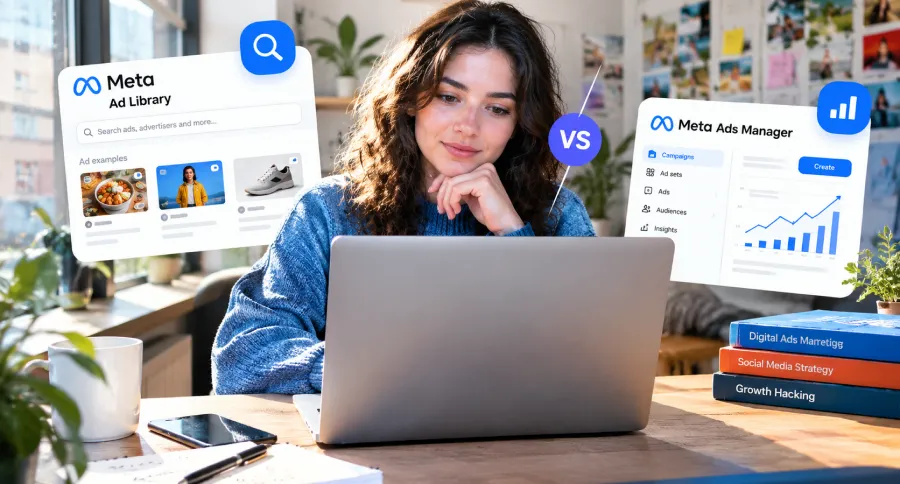
These tools serve different purposes.
| Meta Ad Library | Meta Ads Manager |
| Public research and transparency tool | Private workspace for your own advertising |
| Lets you view visible competitor ads | Lets you create, manage, and measure your ads |
| Shows creative, copy, and delivery details | Shows your own spend, results, audience, and conversions |
| Does not let you launch campaigns | Lets you build, pause, edit, and optimise campaigns |
| Does not show a competitor’s private data | Shows only data from your own ad account |
If you want to research competitors, use Meta Ad Library. If you want to publish and measure your own campaigns, use Ads Manager.
Meta Ad Library vs. TikTok Creative Center
Both tools can help with ad research, but they answer different questions.
| Meta Ad Library | TikTok Creative Center |
| Focuses on active advertising across Meta platforms | Focuses on TikTok creative, trends, and ad inspiration |
| Best for finding a competitor’s visible Facebook and Instagram ads | Best for understanding TikTok-native formats and trends |
| Useful for offers, landing pages, and Meta creative patterns | Useful for sounds, formats, creator styles, and trend signals |
| Does not reveal full commercial performance data | Does not show a complete view of a competitor’s marketing either |
Common Meta Ad Library Issues
Even a simple search can be confusing when results are missing, filters behave differently than expected, or an ad disappears before you can review it. These are the most common issues and what they usually mean.
I cannot find a competitor
Try the brand name, Page name, parent company, spelling variations, or a country-specific Page. You can also visit the company’s Facebook Page and check Page Transparency for its advertising details.
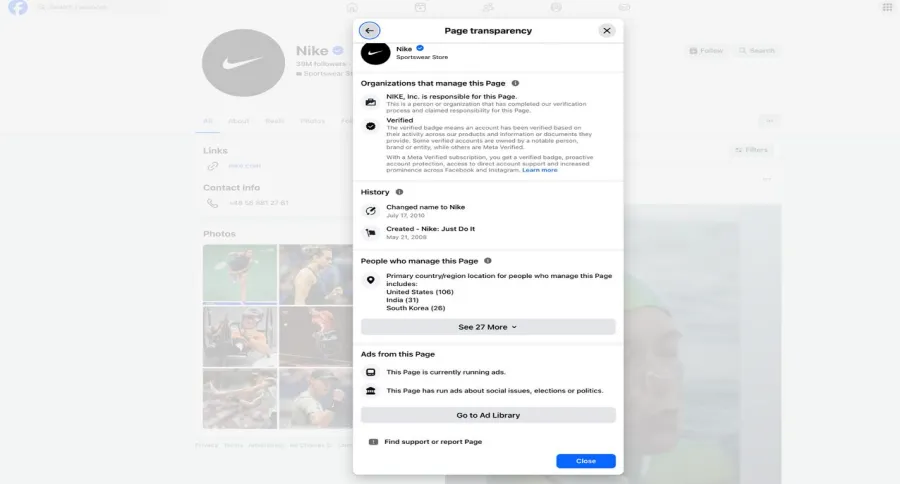
Page Transparency can help you find the advertiser name used in Meta Ad Library.
The brand may not be running active ads in the country you selected. It may also be advertising through a different Page name.
My keyword search shows irrelevant ads
Use a more specific phrase. Search a customer problem, product benefit, offer, or short phrase from an ad rather than a broad category word.
Then save the relevant advertisers and search them directly.
I cannot see spend or targeting
That is normal for ordinary commercial ads. Meta Ad Library does not show exact budgets, conversions, ROAS, full audience settings, or retargeting details for standard brand campaigns.
How Far Back Does Meta Ad Library Go?
For ordinary commercial ads, Meta Ad Library mainly shows ads while they are active. Once an ad stops running, it may disappear soon after.
Political, election, and social-issue ads remain in the archive for seven years. Ads delivered in the EU may remain available for about one year after they stop. This is why you may find a competitor’s current ads but not their older commercial campaigns.
I cannot open an ad’s landing page
Some ads lead to lead forms, app stores, unavailable pages, dynamic product pages, or destinations that do not open consistently from the Library. Save the visible copy, offer, and call to action, then treat the landing-page detail as unavailable rather than guessing what the user sees after clicking.
If you want fewer sponsored posts in your own feed while researching, you can also manage Facebook ads through your account settings.
Final Thoughts
Meta Ad Library will not reveal a competitor’s whole advertising strategy. It cannot show their real budget, audience targeting, or return on investment.
What it can show is still valuable. You can see the problems brands talk about, the offers they repeat, the proof they use, and the creative formats they keep testing.
Use it to build a simple habit: study a few competitors, record the patterns you notice, and turn those patterns into original tests for your own audience. That is where the real value of Meta Ad Library comes from.
Frequently Asked Questions
Is Meta Ad Library free?
Yes. Meta Ad Library is free and public. You can use it to view available ads without running a Meta ad campaign yourself.
Can I see a competitor’s Meta ad budget?
Usually, no. Meta Ad Library does not show exact spending for ordinary commercial ads. Some political, election, and issue ads include additional spending-related transparency information.
Can I see a competitor’s Meta ad targeting?
No. You cannot see a competitor’s full targeting setup, custom audiences, retargeting lists, lookalike audiences, exclusions, or optimisation settings through Meta Ad Library.
Can I see old Meta ads?
It depends on the ad type and market. Standard commercial ads are usually visible while active and may disappear shortly after they stop. Political, election, and social-issue ads are retained for seven years. Ads delivered in the EU may remain available for about one year after they stop.
Is Meta Ad Library the same as Facebook Ad Library?
Yes. Facebook Ad Library is the older name many people still use. Meta Ad Library is the current name for Meta’s public advertising-transparency tool.
Can I copy ads from Meta Ad Library?
You can use ads for research, but you should not copy another brand’s wording, visual identity, footage, customer reviews, product claims, or design. Use the Library to understand market language and customer problems, then create original ads that fit your own brand.

Emi Daniel
Buy an Established Instagram Account
Skip starting from zero. Browse Instagram/TikTok accounts with audiences across many niches.
See Available AccountsRelated articles
-
A Guide to Gen Z Emojis: Speak Their Language on Social Media
Emojis are more than fun add-ons for Gen Z. They can signal humor, irony, tone, and shared cultural references in a few characters. For brands and creators,…
17 min readEmi Daniel
-
Top 10 Apps Like Pinterest to Try for Free (2026 Guide)
Pinterest used to feel like flipping through someone’s real taste. Lately it feels more like scrolling past ads with a few actual pins mixed in, and a…
21 min read -
How to Increase Your Snapchat Score in 2026: Records, Strategies & Smart Tips
Snapchat Score is one of social media’s most mysterious features, and plenty of people check it every day just to see that number go up. At first…
15 min read