

Stitch is one of them and if you’ve spent time on TikTok, chances are you’ve already come across it.
So, what is Stitch on TikTok? Launched back in September 2020, Stitch lets you take a short snippet (up to five seconds) from someone else’s video and follow it up with your own. It’s a simple but powerful way to respond, react, continue a story, or add your unique take—while giving credit where it’s due.
Think of it like a conversation but in video format. Either you’re interrupting a viral moment, following up on someone’s tutorial, or adding your own satirical spin to a viral video, Stitch makes it easy to join the conversation that is already happening on the app.
Buy an Established Instagram Account
Skip starting from zero. Browse Instagram/TikTok accounts with audiences across many niches.
See Available AccountsWhether just having fun, building a personal brand, or promoting a business, knowing how to use the Stitch feature can make a difference. It helps you get noticed, connect with others, and grow your presence on TikTok naturally and authentically.
How TikTok’s Stitch Feature Works
Creating your first Stitch is straightforward once you know the process:
1. Find a video you want to Stitch with
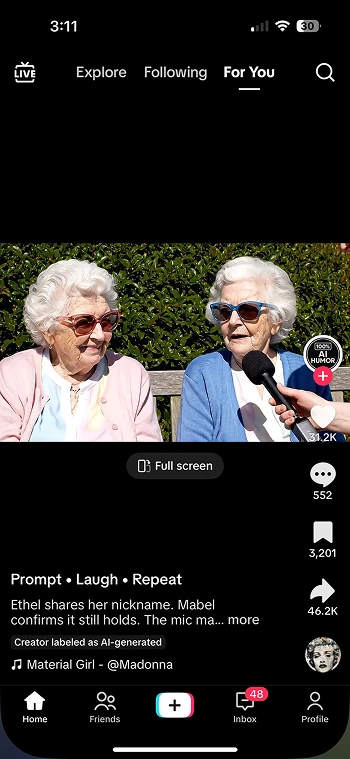
2. Tap the share arrow (the one pointing right)
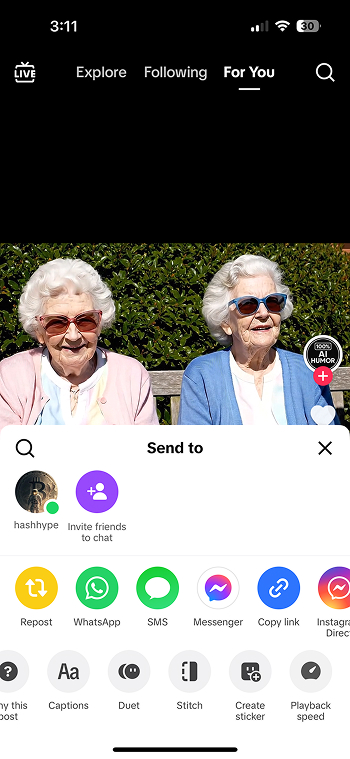
3. Select “Stitch” from the options that appear
4. Choose which 5-second clip from the original video you want to include

5. Record your addition to the video
6. Edit with effects, text, or sounds as desired
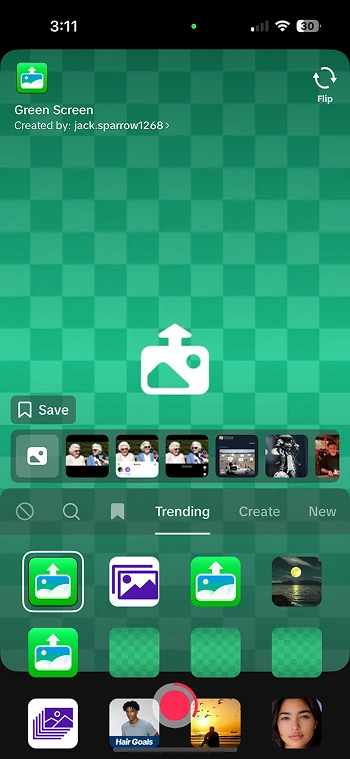
7. Add a caption and post your creation
Not all TikTok content can be Stitched. Creators have the option to disable the Stitch feature on their videos or accounts. Additionally, private accounts and certain music-heavy videos may have Stitch disabled by default due to licensing restrictions.
It’s important to note several limitations when using Stitch:
– You can only include up to five seconds from the original video
– Your addition can be up to 60 seconds long (including the original clip)
– You cannot further edit or modify the original clip, only select which portion to use
– The original creator’s username remains permanently attached to your Stitch
While both encourage collaboration, Stitch differs significantly from TikTok’s Duet feature. Duets place videos side-by-side simultaneously, while Stitch plays content sequentially—first the original clip, then your addition. This sequential format makes Stitch ideal for direct responses, reactions, and continuations of narratives.
Why Has Stitch Become So Popular?

Stitch taps into the power of social connection
- It creates visible links between creators, making content feel more interactive and community-driven.
- Viewers can follow the “conversation” between videos, mimicking real-world social interactions.
Makes content creation easier and more collaborative
- Creators don’t have to start from scratch—they can add their take to trending content or existing ideas.
- This format lowers the barrier for new creators while encouraging creativity and collaboration.
Boosts engagement significantly
- Stitched videos often receive 2–3x more engagement than original standalone content.
- They connect to trending conversations and communities, increasing visibility and shares.
Perfect for brands and marketers
- Brands can create Stitch-friendly content that encourages audience participation and user-generated content.
- They can also Stitch audience videos (with permission) to show they’re paying attention—building trust and authenticity.
Fuels content that feels current and relevant
- Since Stitch content builds off viral trends or popular videos, it gives creators a built-in audience and context.
- This makes videos more likely to be shared, commented on, and discovered via TikTok’s algorithm.
5 Creative Ways Creators Use Stitch Successfully
Innovative creators have developed numerous approaches to leverage the Stitch feature effectively:
Reaction videos that boost engagement metrics
The most straightforward use of Stitch is creating reaction content. Successful creators don’t just show basic reactions—they add commentary that provides genuine value, whether through humor, expertise, or emotional resonance. These reactions work because they tap into existing conversations while adding a new perspective that advances the discussion.
Storytelling techniques using the Stitch format
Some of TikTok’s most compelling content comes from creators who use Stitch for collaborative storytelling. By picking up where another creator left off, users create narratives that span multiple videos and perspectives. This approach has given rise to improvised stories, joke setups with unexpected punchlines, and even crowd-sourced fiction.
Collaborative content creation opportunities explained

Stitch enables multiple creators to contribute their own specialization to the same topic. As an example, a personal trainer can demonstrate a basic movement that nutritionists, physical therapists, and athletic coaches can Stitch with their expertise. Such multi-dimensional content is developed around specific topics through this collaboration.
Question-and-answer interactions with followers
Many creators post open-ended questions specifically designed to be Stitched. These prompts encourage followers to share their experiences, advice, or opinions. This format works particularly well for building community engagement and gathering diverse perspectives on relatable topics.
Tutorial extensions and knowledge building content
When a creator posts a basic tutorial, others can Stitch it to show advanced techniques, variations, or applications. This creates an evolving knowledge base where content builds upon itself. For example, a basic cooking technique might be Stitched by others showing regional variations or special applications.
How to Manage TikTok Stitch Privacy Settings (And Protect Your Content)
Whether you’re a casual user or a creator managing brand-sensitive videos, knowing how to adjust your Stitch privacy settings is key.
How to Turn Stitch On or Off for a Single Video
Before you publish any TikTok video, you can choose whether or not to allow others to Stitch it:
- On the final posting screen, tap “Privacy settings.”
- Toggle “Allow Stitch” on or off, depending on your preference.
- Finish editing and post your video as usual.
How to Set Your Global Stitch Preferences
- Open your profile and tap the three-line menu (☰) in the top right corner.

- Select “Privacy.”
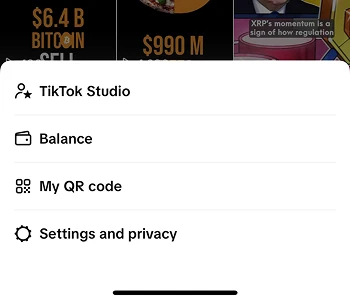
- Tap on “Stitch.”
- Choose who can Stitch your content:
- Everyone (default)
- Friends only
- No one
What to Do If Someone Misuses Your Content
If someone Stitches your video in a way that’s inappropriate, misleading, or against your wishes, here are your options:
- Comment on their video and politely request removal.
- Report the video if it violates TikTok’s Community Guidelines.
- Block the user to prevent them from interacting with you in the future.
- For more serious concerns, contact TikTok Support directly.
7 Tips to Get More Views with Stitch

Maximizing your Stitch potential requires strategic thinking about both the content you create and how you respond to others.
Creating Stitch-worthy original content strategies
The best way to encourage Stitches is creating content specifically designed for it. Ask questions, create open-ended scenarios, or present the first part of a process. For example, “Stitch this with your best cooking hack” or “Show me how this situation would play out in your profession.” This explicitly invites engagement through the Stitch feature.
Best practices for timing your Stitch responses
Speed matters when Stitching trending content. The first wave of creative responses to viral videos often receives the most attention. Set TikTok notifications for creators you frequently engage with, and prioritize responding to trending content within the first 24-48 hours for maximum visibility.
How to leverage trending Stitches effectively
Monitor which videos are receiving multiple Stitches in your niche. When you notice a format gaining traction, put your unique spin on it while the trend is still building. This allows you to ride the algorithmic boost that trending formats receive without simply copying what others have already done.
Adding value versus simply reacting considerations
Successful Stitches do more than just react—they contribute something meaningful. Before creating a Stitch, ask yourself: “What new perspective, information, or entertainment am I adding?” Whether through expertise, humor, or a viewpoint, ensure you’re enhancing the original content rather than merely piggybacking on it.
Technical tips for better Stitch video quality
Maintain consistent lighting and sound quality between your portion and the Stitched clip. Consider recording in the same orientation and setting as the original if appropriate. If the original has music, either continue with complementary audio or ensure your sound doesn’t clash jarringly with the clip you’re Stitching.
Caption and hashtag strategies specific to Stitches
Always credit the original creator in your caption with their @username. Include both niche-specific hashtags and Stitch-related tags like #stitch, #tiktokstitch, and #stitchthis. When relevant, add context to your Stitch with a brief explanation in the caption to help viewers understand your response.
Analyzing which of your Stitches perform best
Use TikTok’s creator tools to track which of your Stitches generate the most engagement. Look for patterns in content type, time of day posted, and the original creators you’ve Stitched with. This data helps refine your strategy to focus on what resonates most with your audience.
Common Stitch Questions and Troubleshooting
Even experienced TikTok users encounter questions and issues with the Stitch feature.
Why can’t I Stitch certain TikTok videos?
The most common reasons include:
– The creator has disabled Stitch for that specific video
– The creator has disabled Stitch account-wide
– The video uses licensed music that restricts Stitch functionality
– The video comes from a private account
– The video contains content TikTok has flagged as sensitive
Fixing audio synchronization issues in Stitches
Audio syncing problems typically occur when:
– Your device is running low on memory
– The TikTok app needs updating
– Your internet connection is unstable
To resolve these issues:
1. Close and restart the TikTok app
2. Ensure you’re using the latest version
3. Connect to a stronger internet signal
4. Clear your app cache in your device settings
5. As a last resort, record your portion separately and edit it together using TikTok’s editing tools
Understanding attribution and credit in Stitches
TikTok automatically maintains attribution by displaying the original creator’s username in the Stitch. However, ethical creators take attribution further by:
– Verbally acknowledging the original creator
– Tagging them in the caption
– Adding context about why they chose to Stitch that particular content
– Directing viewers to check out the original creator’s profile
How Stitch affects your TikTok algorithm performance
Stitch can significantly impact your algorithmic reach in several ways:
– Stitching popular content can expose your profile to new audiences
– High-quality Stitches that receive a good engagement signal to TikTok that your content adds value
– Consistent use of Stitch helps TikTok categorize your content more accurately
– Being Stitched frequently by others boosts your overall authority in TikTok’s system
However, repeatedly Stitching without adding substantial value can potentially flag your account as attempting to exploit trending content, so quality remains essential.
Conclusion
As TikTok continues to grow and roll out new features, Stitch isn’t going anywhere—in fact, it’s becoming even more powerful. Recent beta tests hint that TikTok may soon allow longer Stitch clips and offer advanced editing tools, giving creators more flexibility and control. There’s also talk of improved analytics tailored specifically for Stitched videos, which could help users better track performance and engagement.
At its core, Stitch reflects what TikTok does best: turning content into a two-way conversation. Rather than just pushing out videos, Stitch helps users interact, collaborate, and build on each other’s ideas.
To truly get the most out of Stitch:
- Create content that adds real value
- Respond to others with thoughtful, relevant takes
- Keep the collaborative spirit alive
Whether you’re growing a personal account or managing a brand, TikTok Stitch is one of the best tools for boosting engagement, visibility, and authentic interaction. So jump in, start Stitiching, and become part of the conversation.
FAQs
Why do TikTokers say “stitch incoming”?
It’s a heads-up that they’re about to use the Stitch feature to respond to or build on someone else’s video.
How long is a TikTok stitch?
You can Stitch up to 5 seconds from another user’s video.
Can I control who can Stitch my TikToks?
Yes! You can adjust Stitch settings per video or for your whole account; choose whether everyone, friends, or no onecan Stitch your content.
Is it better to stitch or Duet on TikTok?
It depends on your goal: Stitch is great for adding context or commentary after a clip, while Duet is better for real-time reactions or side-by-side interaction.
What’s the difference between Stitch and Duet?
Stitch plays a clip first, then your video, while Duet shows both videos side-by-side in real time. Use Stitch for storytelling, and Duet for live reactions.

Emi Daniel
Buy an Established Instagram Account
Skip starting from zero. Browse Instagram/TikTok accounts with audiences across many niches.
See Available AccountsRelated articles
-
A Guide to Gen Z Emojis: Speak Their Language on Social Media
Emojis are more than fun add-ons for Gen Z. They can signal humor, irony, tone, and shared cultural references in a few characters. For brands and creators,…
17 min readEmi Daniel
-
Top 10 Apps Like Pinterest to Try for Free (2026 Guide)
Pinterest used to feel like flipping through someone’s real taste. Lately it feels more like scrolling past ads with a few actual pins mixed in, and a…
21 min read -
How to Increase Your Snapchat Score in 2026: Records, Strategies & Smart Tips
Snapchat Score is one of social media’s most mysterious features, and plenty of people check it every day just to see that number go up. At first…
15 min read