


As we know, Instagram is always trying to make it easier for its users by providing new features for this platform.
One of these features is the ability to filter sensitive content that is on Instagram.
You might know how much sensitive content malicious accounts share on Instagram. Some people can’t bear to see a series of content that includes unpleasant images or moments. Also, many parents want to prevent their child from seeing inappropriate pictures or videos on the explore tab.
Buy an Established Instagram Account
Skip starting from zero. Browse Instagram/TikTok accounts with audiences across many niches.
See Available AccountsSo what to do if you want to avoid seeing inappropriate content on your Instagram account?
This feature helps people not to be forced to watch things they don’t want to.
In this article, we will check what kind of content is sensitive and how to use this feature of Instagram fully.
What kind of content qualifies as sensitive?
Not all the content shared on Instagram is attractive and suitable for everyone; some contain disturbing or unpleasant scenes and images that are not proper for everyone.
If you check different types of accounts on Social Tradia, you’ll some inappropriate accounts that are not suitable, especially for children.
Content such as videos or photos containing distressing scenes from an accident or a natural disaster such as an earthquake is sensitive.
Moreover, content that is for adults and sexually explicit and not everyone is interested in seeing, such as scenes of sexual activity or nude images that are sexually suggestive, is also inappropriate content.
In addition to this, violent posts that represent physical violence and the like is also classified as sensitive content.
Therefore, Instagram does not show the harmful content of these images or videos to all users through this feature.
And before playing that video or showing that photo, it warns that it contains sensitive content. In fact, you can tell Instagram that you don’t want to see more sensitive content.
What is sensitive content control?
If you plan to share a photo or video on Instagram, but are not sure if the content is suitable for everyone or if the content you want to share contains disturbing scenes, you can use the sensitive content controls option.
In this way, before showing your shared content, Instagram warns users that this video or image contains sensitive content, and people can decide whether to see that or not.
Therefore, as an Instagram user, with the help of the sensitive content controls feature, you can decide what content to see in Instagram’s search, explore, and reels section.
Also, you can decide how much of some kind of content you want to see on Instagram.

What is the benefit of using Instagram’s sensitive content control?
Undoubtedly, this feature has good advantages for users and enables people to avoid bad content. So we will review some of them in this section:
- You can decide what content to see on your Instagram feed
- Filter content that is inappropriate and unpleasant
- You are less exposed to harmful content
- Help minimize the negative impact of inappropriate content
- It helps parents control the content their little ones see
- If you are under the legal age, not all content will not be shown to you
How to enable sensitive content control on Instagram
Follow the steps below to change the default setting and enable sensitive content on Instagram:
Step 1) Open the Instagram application.
Step 2) Tap on “Your Profile Picture” in the bottom right corner.
Step 3) Tap on the three-line icon in the top right corner.
Step 4) Then, choose “Settings” to go to the account settings

Step 5) Tap on “Account” and then tap “Sensitive content control”

Step 6) Now you need to choose the default of this feature which is “Standard,” “Less,” and “More”

In this step, you determine whether you want to see less, more, or a standard amount of some type of content on your Instagram feed.
- Standard
The standard default will prevent users from seeing some sensitive content and accounts
- Less
If you choose less as the default, you will see less of that kind of content.
- More
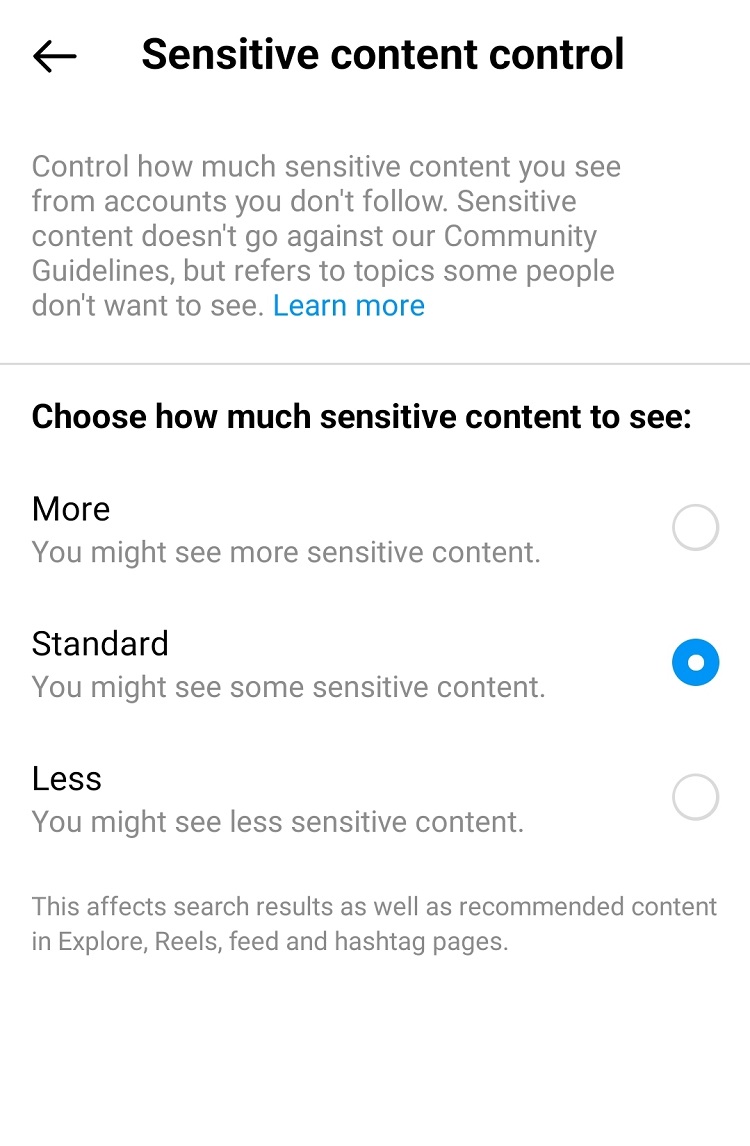
When you choose “More” as the default, it will let users see more of some types of sensitive content or accounts.
When you are done with these steps, you can exit the settings and use the application usually, and all the changes will appear quickly.
How to disable Instagram sensitive content control
When you turn off the sensitive filter, Instagram stops limiting the content it flags as offensive.
Follow these steps to understand how to disable this option:
Step 1) Open the Instagram app, and go to your Instagram profile and tap on the three-line icon in the top right corner of the screen
Step 2) Select “Settings” to go to the settings menu
Step 3) Tap on the “Account” section
Step 4) Select the “Sensitive content control” option
Step 5) Choose the “More” option
Step 6) Confirm the steps by tapping on “Ok” or “Done”
Conclusion
By using the sensitive content control feature, you can decide what content to limit and view less on Instagram or even determine which type of content you don’t have a problem with and want to see in the Explore or Search section of Instagram.
Therefore, the correct use of this option can help you to see the content that is more interesting to you and not see those that you do not like or tolerate.
In this article, we have explained the control feature of sensitive Instagram content and discussed its advantages.
Also, now you know how to activate this option on Instagram and disable it whenever you want.
Therefore, you have access to all the information you may need about this topic in this article and don’t need to search for each topic separately!

Emi Daniel
Buy an Established Instagram Account
Skip starting from zero. Browse Instagram/TikTok accounts with audiences across many niches.
See Available AccountsRelated articles
-

How to Go Live on Instagram: A Step-by-Step Guide
Going live can feel more stressful than posting a Reel. You cannot remove a pause, rewrite a sentence, or start over after an awkward moment. But that…
17 min readEmi Daniel
-

Instagram Instants Feature: What It Is, How It Works, and How to Turn It Off
The first time I opened Instagram Instants, I almost backed out. I had taken a normal photo. Nothing worth editing. Nothing worth posting. Nothing that needed an…
11 min read -

How to Clear Instagram Cache on iPhone, Android & Desktop
Instagram can quietly build up a lot of temporary files while you scroll through Reels, watch Stories, save posts, and upload your own content. You may not…
12 min read