


Are you among those who don’t know what to do with their unfinished Instagram Reels in the Draft field? Don’t worry, you are not alone.
Sometimes, you have various ideas to make a new Reel on Instagram, but you can’t edit all of them, leading to saving them as drafts.
You can easily access and permanently delete draft Reels on Instagram in just a few seconds.
Buy an Established Instagram Account
Skip starting from zero. Browse Instagram/TikTok accounts with audiences across many niches.
See Available AccountsIt helps you organize your content, focus on creating quality videos, and manage your Instagram account.
In this article, you will learn how to save Instagram Reels as drafts, how to find and delete them, reasons to do so, and more!
How to Save Instagram Reels as Draft?
If you create an Instagram Reel and don’t want to upload or delete it, you can save it as a draft to edit or delete it later.
Step 1- Open Instagram and start creating a Reel.
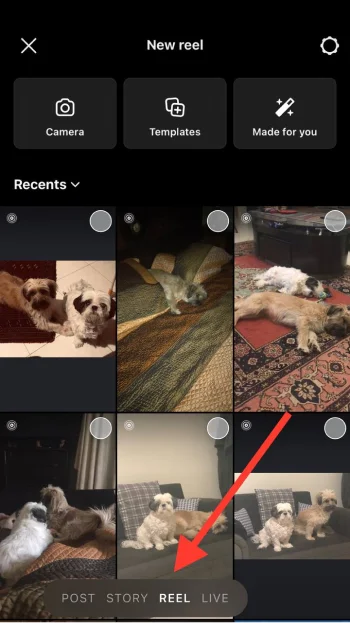
Step 2- Once you have adjusted all the necessary edits, keep tapping the “Next” button until you reach the uploading phase.
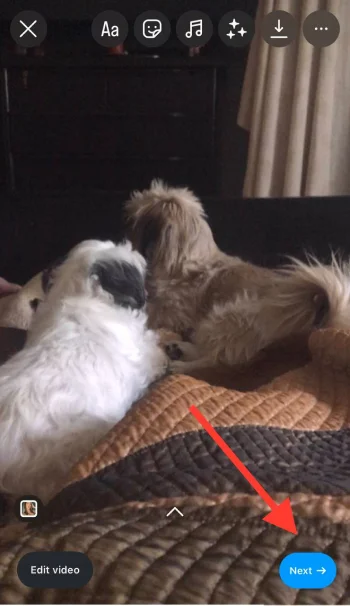
Step 3- Right next to the blue “Share” button, you can see the “Save draft” option.
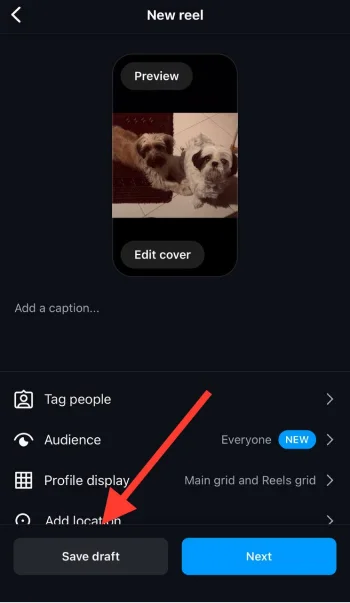
Step 4- Tap on it, and your Reel will be saved as a new draft.
That’s how easily you can save IG Reels as drafts and keep them safe until you decide to upload or delete them.
How to Delete Draft Reels on Instagram?
Now, you may wonder where Reels go after you save them as drafts. Follow the steps below to access and delete them.
Step 1- Open Instagram and go to your profile by tapping on the profile icon at the bottom right of the screen.
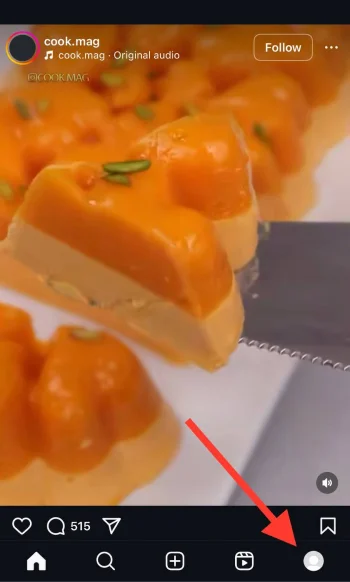
Step 2- Here, you have three sections: 1) Your profile grid, 2) Your Reels, and 3) Posts and videos you’ve been tagged in. Choose the second one (Reels).
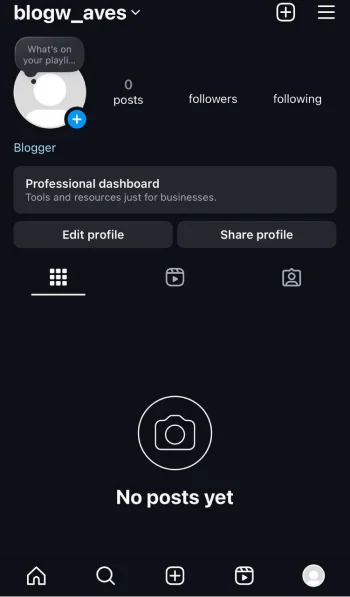
Step 3- Now, you can see all the Reels you shared.
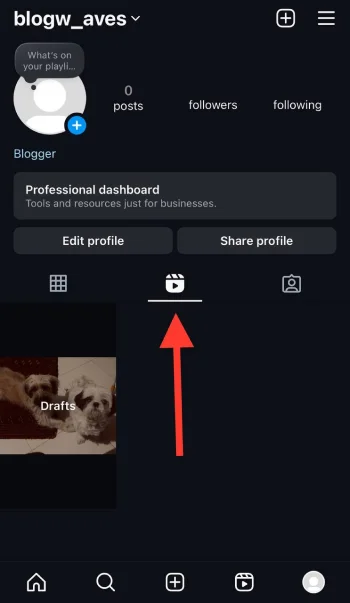
Step 4- Next to your latest shared Reels, you can see “Drafts.”
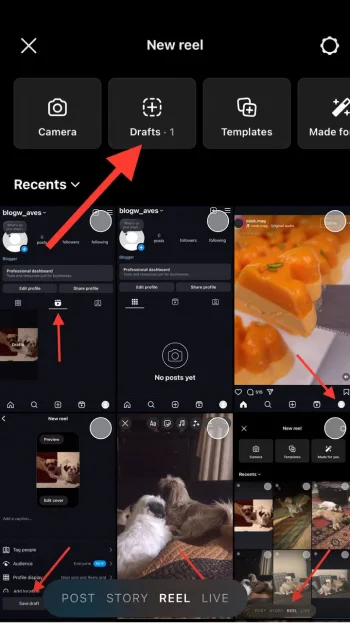
Step 5- Tap on it to access all the draft Reels.
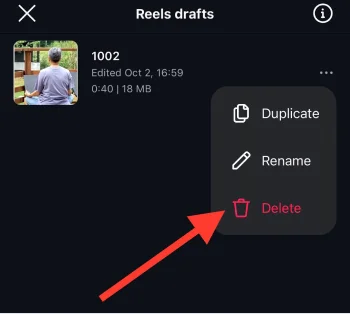
Step 6- Choose the Reel you want to delete and tap on the “three dots” icon.
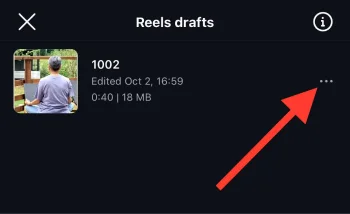
Step 7- Select the “Delete” option, confirm the action, and it will be removed from your draft videos.
Reasons to Delete Instagram Draft Reels

Now, you know how to delete draft Reels on Instagram, it’s time to see the common reasons you may want to do so.
To avoid confusion
If you have ever checked the draft section when there are too many draft videos, you know how they can lead to confusion about what videos you have created. Therefore, deleting some unnecessary drafts helps you clarify your content strategy.
Outdated content

Trends change quickly on Instagram. So, if your Reels are based on old trends that are no longer relevant, it is better to delete them and create new ones.
Quality over quantity

Deleting draft Reels lets you focus on creating more quality videos rather than sticking to many unfinished ones.
It is better to delete some videos and create high-quality ones to keep your followers engaged with your content.
Technical issues
Sometimes, there might be technical issues while saving Reels as drafts and failing to save them properly. If you are experiencing such issues, delete them because keeping them as drafts won’t solve the problem.
Common Issues for Deleting Draft Reels on Instagram

In this section, you will learn some common issues you may face when trying to delete draft Reels on Instagram, along with quick solutions!
Being unable to delete draft Reels
Issue: You keep tapping on the “Delete” option, but nothing happens.
Solution: First, ensure you followed each step correctly; if the issue continues, try restarting the app or your device.
Can’t find draft Reels
Issue: You take each step, yet you can’t find draft Reels in the draft section.
Solution: Refresh the app to solve the problem. If the issue continues, log out and log back to your account, and ensure you use the latest version of Instagram.
There is no “Delete option
Issue: You can’t find the “Delete” option for some draft Reels.
Solution: You may be trying to delete a draft, which is part of an active collaboration! If so, you can’t delete it.
However, if you ensure you just can’t find the delete option for a regular Reel, it may be an in-app bug, and it is better to report the issue.
Deleted draft Reels keep reappearing

Issue: After you delete a draft Reel, you can still see it in the draft section.
Solution: Ensure your app is updated to the latest version. However, if the issue continues, report it to Instagram support.
Error message when trying to delete a draft Reel
Issue: You can’t delete a draft Reel because you keep receiving an error message.
Solution: It is usually a temporary issue with Instagram servers or an in-app bug. Wait a few minutes and try again.
App crashing

Issue: When you want to edit or delete the draft Reel, the Instagram app crashes.
Solution: Check for app updates and restart your device. If the problem continus, uninstall and reinstall the app to prevent further glitches.
These solutions help users troubleshoot common issues they might face when deleting draft Reels on Instagram. I hope they help you!
Conclusion
Deleting draft reels on Instagram helps you manage your content and focus on creating reels relevant to the latest trends.
Don’t let old drafts hold you back from being creative. Delete the old Reels to create new ones that resonate with your audience.
In this article, I discussed how to save reels as drafts and delete them in easy steps with screenshots. I also mentioned the common reasons you may want to delete draft reels and how to overcome issues when you fail to delete a reel.
FAQs
What are draft Reels on Instagram?
They are unfinished videos you save on Instagram to edit or publish later.
Can I edit draft Reels on Instagram?
Yes, you can adjust the length of the video, the music, the caption, the text, etc.
Are draft Reels visible to my followers?
No, they are private and only visible to you. Your followers can see the Reel only when you publish them.
Can I change the music of Instagram draft Reels?
Yes, you can adjust any edit after saving a Reel as a draft.
Is there a limit to how many draft Reels I can save?
No. However, having too many draft Reels may confuse you and make it difficult to manage and organize your content.
Can I recover deleted draft Reels?
No, once you delete a draft Reel, it can’t be recovered, so save any important details or ideas before confirming deletion.

Emi Daniel
Buy an Established Instagram Account
Skip starting from zero. Browse Instagram/TikTok accounts with audiences across many niches.
See Available AccountsRelated articles
-

How to Clear Instagram Cache on iPhone, Android & Desktop
Instagram can quietly build up a lot of temporary files while you scroll through Reels, watch Stories, save posts, and upload your own content. You may not…
12 min readEmi Daniel
-

How to See Who Reposted Your Instagram Post (2026 Guide)
Someone reposted your Instagram post, but you have no idea who it was. You check notifications, search through your profile, and still cannot find a clear answer. …
18 min read -

How to Reset Instagram Algorithm in 2026
Instagram can start showing too much of the same type of content. Your Explore page may no longer match your interests, Reels may feel repetitive, or suggested…
12 min read