

Have you ever been in a situation where you are lying down, scrolling through your old Instagram posts, and wishing you had never clicked the share button? Let me guess! Your first impression would be asking yourself, “What was wrong with me?”
I know the feelings! But it’s also difficult to delete those posts because they hold memories. So, you may wonder what you can do to keep the posts to yourself while hiding them from others.
Well, the answer is here! Instagram has the archive/unarchive feature, which allows users to archive their posts, stories, and live videos without actually deleting them. Fascinating, isn’t it?
Long story short, you can archive your posts and then unarchive them whenever you want, and they will appear on your home page again. It’s like you never remove them from your profile! However, if you have a stalker follower, they would understand!
Don’t go anywhere and read this article to the very last word because I am going to explain all the information you need about this cool feature.
What Does It Mean to Archive a Post on Instagram?
This handy feature allows Instagram users to hide their photos and videos from their followers without deleting them, which gives users more space to protect their content; how cool is that!
Imagine you have a warehouse on your Instagram account, and instead of keeping fruits and stuff, you are hiding Instagram posts, stories, and live videos.
You may now be asking me where all those archive posts go. Well, let me tell you how to access your archived posts.
The following steps help you better find them.
Step 1- Open Instagram on your device.
Step 2- Tap on your profile picture icon at the bottom right of the screen and the three-line icon at the top right of your profile.

Step 3- Here, on the menu, you can see “Archive;” tap on it.
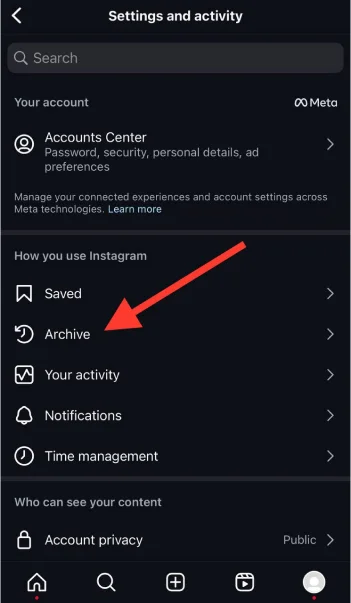
Step 4- Now, you can see all the stories, posts, and live videos you have archived.

See? That’s how simple it is to access your archived content.
How to Archive a Post on Instagram?
In the previous section, I told you how to access your archived posts; now, it’s time to see how to archive an Instagram post in the first place.
Let’s go and find out!
Step 1- Open Instagram and go to your profile.
Step 2- Select the photo or video you want to archive.
Step 3- Tap on the three-dots icon in the post’s top right corner.

Step 4- Choose the “Archive” option from the menu, and that’s it!
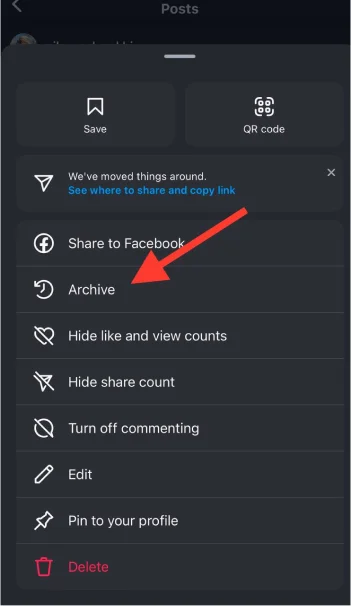
Short and sweet, right?
How to Unarchive a Post on Instagram?
You may ask yourself if it’s possible to unarchive a post on Instagram. Good question! But wait! The whole article is about unarchiving Instagram posts! So, YES! You can unarchive Instagram posts.
It’s just as simple as archiving a post. Follow the steps below to unarchive your posts in a few seconds.
Step 1- Open Instagram and go to your profile page.
Step 2- Tap on the hamburger menu (the three-line icon) and choose the “Archive” option from the menu.

Step 3- Tap on “Posts archive.”
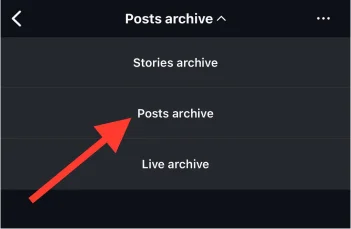
Step 4- Select the post you want to unarchive to appear on your home page again.
Step 5- Tap on the three-dots icon in the top right corner of the post.

Step 6- Select “Show on profile” to finish the process.
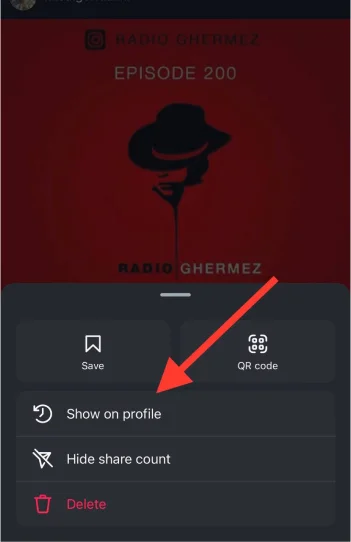
*To ensure you did every step correctly, revisit your profile, and the post will be there. Note that the unarchived post will not appear on your homepage like a ‘new post.’ It will be exactly where it used to be, based on the date you uploaded it in the first place.
What Happens When You Archive and Unarchive an Instagram Post?

To be exactly honest with you, nothing significant happens when you archive and unarchive Instagram posts! Wait, you didn’t expect this, right?
In fact, you don’t even have limitations in archiving and unarchiving your posts on Instagram. In other words, you can archive and unarchive ONE or ALL of your posts as many times as you want.
When you archive a post on Instagram, the only thing that happens is that your followers can no longer see that content on your profile until you decide to unarchive it.
It’s a cool feature, right? I call it Instagram Magic! Why? Because when you archive a post, no one can see it except you!
Why Archive and Unarchive Instagram Posts?

If you agree with me about this fantastic feature, you may want to know why you should archive and unarchive Instagram posts.
Well, that’s another good question, and I have the answer!
Reasons to archive a post on Instagram
The first reason is to manage your Instagram feed. How many of us have the same aesthetic as five years ago? I don’t think very many.
So, as your aesthetic changes over time, you can archive your old posts to control the appearance of your home page.
Another reason is being able to take a short break from old memories. Take it from me! Sticking to the past and memories is not always a good idea. I know you have already heard it like a hundred times, but it’s true!
Thus, to avoid your old memories without deleting those posts, you can easily archive and unarchive them whenever you want.
Now, suppose you are a business owner on Instagram, and some of your old posts are getting negative comments or no longer align with your brand.
You can easily archive them and be sure it won’t affect your account.
Reasons to unarchive a post on Instagram
One of the most important reasons to unarchive an Instagram post is to bring engagement to your account. If you accidentally or mistakenly archived an engaging post, you can unarchive it, bringing engagement and conversation to your account.
Are you following Instagram trends? If yes, then I have to tell you that you MUST unarchive any of your old posts that would fit into a new trend on Instagram.
Another good reason to unarchive a post on Instagram is to celebrate an event or anniversary. Suppose you have archived your first post, and now it’s a year later; take this opportunity to celebrate that moment with your followers.
Changing your mind about archiving a post? No worries! Unarchive it, and you will have all those memories and joys back on your home page.
Does Archiving and Unarchiving Instagram Posts Affect Engagement?

As you remember, I said nothing happens when you archive and unarchive a post on Instagram; however, it doesn’t mean that taking such an action can’t affect your account’s engagement.
In this section, I will explain how archiving or unarchiving an Instagram post affects your engagement rate.
How archiving affects engagement
First thing first! note that archiving a post may reduce your account’s engagement rate because your followers can’t see and engage with that content. However, after archiving, all the post’s interactions (likes, saves, shares, and comments) will remain the same.
If your Instagram doesn’t perform as well as you wish, you can archive it. Doing so helps you protect your account’s engagement rate.
Overall, archiving an Instagram post is not going to negatively affect your engagement, but it’s always better to choose the right post to archive.
How unarchiving affects engagement
One good thing about this feature is that it helps you unarchive an old post that is now a trend on Instagram, which means you have more chances to increase your engagement rate.
Imagine you unarchive an Instagram post that best fits into this algorithm system. What does it mean? Simple! It means that Instagram will show your post to more interested users and increase your account’s engagement.
Delete or Archive: Which Is Better?

We have come so far and learned new things about this feature. It’s time to decide! Is it better to delete or archive a post on Instagram?
Well, I will examine the pros and cons of each, and then you can decide.
Deleting an Instagram post – Pros
- Allows you to permanently remove a post from your account.
- Deleting underperforming posts lets you better manage your account’s engagement rate.
- You have more control over your shared content.
Deleting an Instagram post – Cons
- You can never access the deleted content.
- You will lose all the post interactions.
- You will lose the memories behind every deleted post.
- You miss the opportunity to produce well-performed content.
Archiving an Instagram post – Pros

- You can repost your content anytime you want.
- You can keep old memories without permanently losing them.
- It helps you reuse old content without spending time on creating new ones.
- It helps you manage your Instagram feed without deleting anything.
Archiving an Instagram post – Cons
- It may reduce your account’s engagement rate.
- It may confuse your followers as they can no longer visit the archived post.
- You may forget that you have a helpful archived post and miss significant opportunities.
Conclusion
Wow, the archiving/unarchiving feature on Instagram. What a handy feature, right?
Finally, unarchiving a post on Instagram is a great way to hide specific content and memories from your followers.
It helps you to better manage your shared content and try new ways to boost your visibility on social media.
Whenever you feel like deleting a post from Instagram, remember that you can easily archive it to restore it if you ever change your mind.
I hope you liked this article and use the information mentioned to archive your desired posts on Instagram.
FAQs
Should I archive a post that doesn’t perform well?
Instagram experts believe that archiving an underperforming post on Instagram is better than keeping it on your profile and hope it will get attention.
Does archiving and unarchiving an Instagram post affect the algorithm?
This action won’t directly impact the Instagram algorithm; however, it can affect engagement metrics, which is exactly what the algorithm system monitors.
Will the unarchived post appear on my Instagram homepage?
Yes, once you unarchive an Instagram post, it will appear on your home page based on the publishing date.
