


Have you ever been tagged in an ugly photo and worried everyone can see it? Or have you hidden a tagged content and later, you wondered how to bring it back?
You’re at the right place!
Welcome to our guide on how to unhide tagged photos and videos on Instagram! If you have gone through any of those situations, you’re not alone!
Buy an Established Instagram Account
Skip starting from zero. Browse Instagram/TikTok accounts with audiences across many niches.
See Available AccountsInstagram provides an option to hide tagged photos and videos, which can be useful for managing your online presence. However, sometimes you might want to reverse that decision and make those tagged moments visible again.
Well, you’re able to both remove tagged photos or videos or bring them back in case you want them. Today, we’ll walk you through the step-by-step process of uncovering those hidden contents on your Instagram profile.
Whether it’s a memorable picture with friends or a video from an exciting event, we’ll show you how to bring them back into the spotlight.
So, let’s dive in and learn how to do it!
Unveiling Your Tagged Content
Curious about the world of hidden tagged photos and videos on Instagram? Let’s begin by exploring the basics and shedding some light on the concept of hidden tags.
Understanding Hidden Tags
Maybe there’s a reason you wanted to keep certain moments private. Either way, Instagram gives you the ability to choose what others see.
Essentially, it’s a way to control the visual narrative of your Instagram feed.
Hidden tags are like little secrets tucked away on your Instagram profile. When you hide a tagged photo or video, it becomes invisible to anyone visiting your profile.
Implications of Hidden Tags
While hiding tagged content offers a sense of control, it’s essential to recognize the implications. Yeah! There are implications!
“Like what?”; you may wonder!
Well, friends and followers who once saw those tagged photos might wonder why they’ve disappeared.
Imagine your Instagram feed as a visual story, and hidden tags as chapters that you’ve decided to keep to yourself.
So, it may raise questions and hypotheses!
What about the person who tagged you? Will it break their heart if you remove the tag?
So, if you’re not happy with your decision to hide the tags, you can always rewind it! We’ll show you how!
Step-by-Step Guide: Unhiding Tagged Photos and Videos
Let’s roll up our sleeves and dive into the process of bringing your hidden tagged photos and videos back to the surface!
With these simple steps, you’ll be able to share those memories with the world once again.
Accessing Your Profile Settings
First, open your Instagram app and head to your profile.

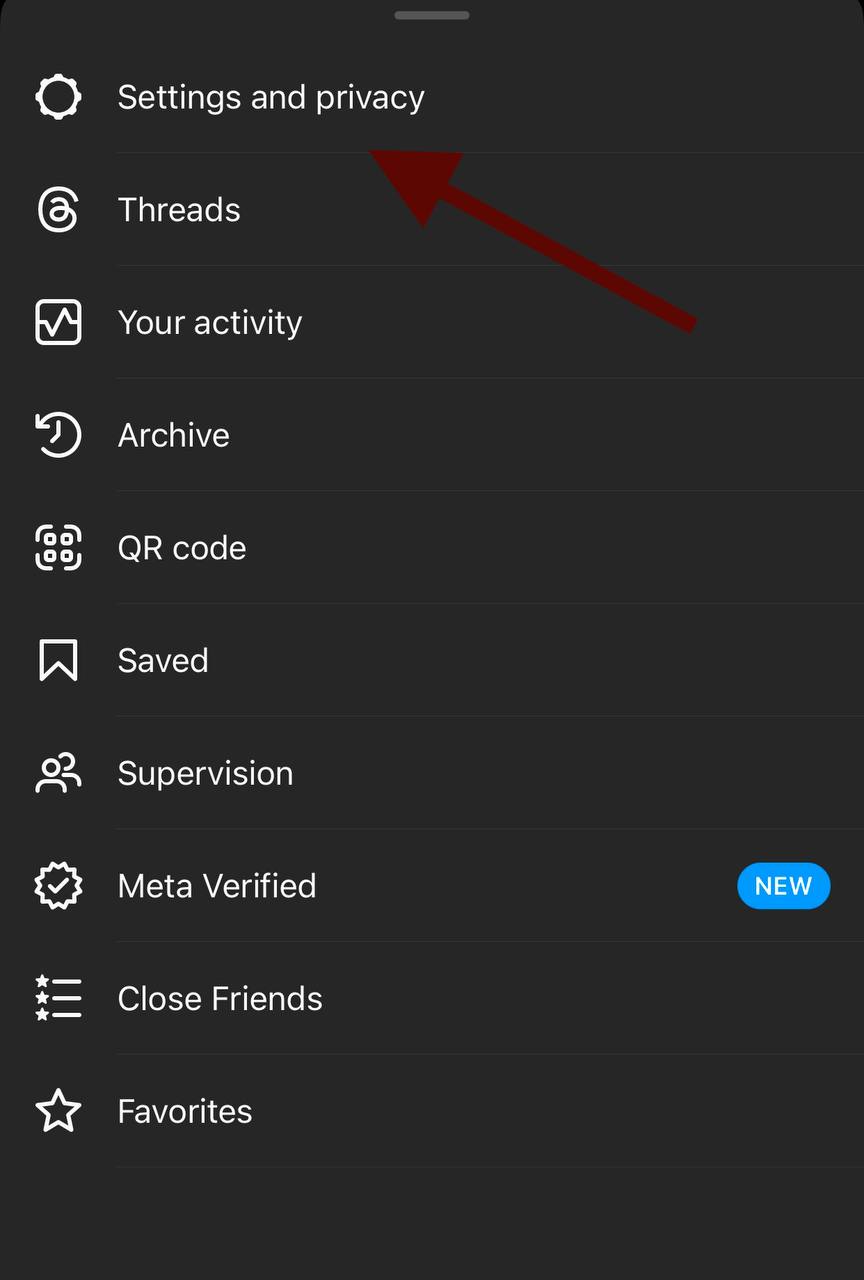
Look for the settings icon, which usually is a small gear or three dots, typically located in the upper-right corner of your profile screen. Tap on it to access your profile settings.
Navigating to Hidden Tags

Within your profile settings, keep an eye out for a section related to “Privacy” or “Content”.
The wording might vary slightly depending on updates, but the essence remains the same.
This is where the magic happens. Look for an option that refers to “Tagged” or “Photos of You” and select it.
Revealing Hidden Tagged Content

you navigate to the “Tagged” or “Photos of You” section, you’ll encounter a list of tagged photos and videos. Scroll through this list until you find the ones you previously hid.
It’s time to reverse that action! Each hidden tag should have an option to “Unhide” or “Show on Profile”.
Tap this option, and voilà! the photo or video will reappear on your profile for everyone to see.
A Shortcut to Swift Unhiding
Some may ask “Is there a shortcut?”
Well, yes!
Time is precious, and Instagram understands that. That’s why there’s a nifty shortcut to streamline the process of unhiding tagged photos and videos.
Now, we’ll show you a quick fix that can have your hidden content back in no time.
Using the “Manage” Option for Efficiency
Instagram offers a handy “Manage” option that simplifies the task of unhiding tagged content.
Head to your profile settings, and look for the “Privacy” or “Content” section as before.
Within this section, you’ll find the “Tagged” or “Photos of You” option. Instead of scrolling through a list of tagged content, tap on “Manage”.
Saving Time with This Approach
By selecting “Manage,” you’ll gain access to a complete view of your tagged photos and videos. This view allows you to swiftly review and adjust the visibility status of each tagged piece of content.
Toggle the hidden tags to “Unhide” with a simple tap, and watch them resurface on your profile.
This approach is especially useful when you want to manage multiple hidden tags.
It saves time and offers a convenient way to fine-tune your tagged content without navigating through every individual photo or video.
Hiding Tagged Photos on Instagram
Your privacy matters!
Privacy is a paramount concern in our digital age, and Instagram recognizes the importance of giving users control over their tagged content.
Let’s dive deeper into Instagram privacy and learn why and how to hide tagged photos on Instagram.
Reasons for Hiding Tagged Photos or Videos
Maintaining Privacy
When you’re tagged in photos or videos, they become a part of your profile for the world to see!
Hiding tagged content lets you get control over what you share, keeping personal moments private and limiting who can view them.
Curating Your Online Presence
Your Instagram profile is a reflection of your identity; a virtual image of you!
Hiding tagged content lets you curate your profile to align with how you want to present yourself online. It’s about showcasing the moments that matter most to you and creating a narrative that resonates.
Controlling Visual Consistency
Some like their profile to be beautiful!
A well-organized profile often follows a visual theme or aesthetic.
Hiding tagged photos or videos that don’t fit this theme helps maintain a consistent and visually appealing feed, enhancing the overall look and feel of your profile.
Managing Unwanted Associations
Sometimes, tagged content might associate you with situations or people you’d rather not be connected to publicly.
Hiding such content lets you distance yourself from these associations, allowing you to shape your online identity more intentionally.
Step-by-Step Guide to Hiding Tagged Content
Hiding tagged photos and videos is a straightforward process that can provide you with a sense of control over your profile.
Here’s a step-by-step guide to help you navigate through it:
- Open your Instagram app and go to your profile.
- Look for the settings icon – usually represented by a gear or three dots – in the upper-right corner and tap on it.
- Within the settings, locate the “Privacy” or “Content” section. The wording might vary, but you’ll find the essence remains the same.
- Look for the option named “Tagged” or “Photos of You” and select it.
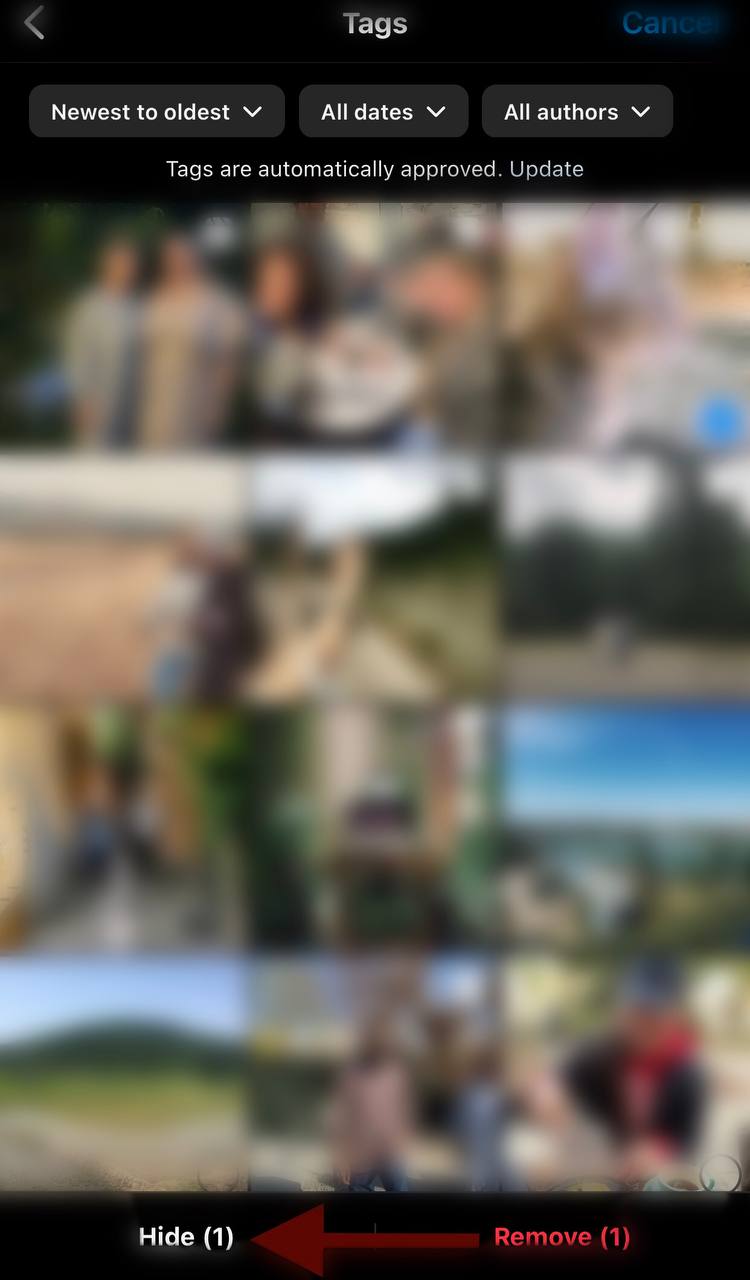
- You’ll find a list of tagged photos and videos. Choose the ones you want to hide and tap on them.
- On each photo or video, you’ll see an option to “Hide from My Profile.” Tap on this option to hide the content from your profile.
Managing Tags for Profile Curation
Well, it’s not all about privacy!
Managing is also a way to curate the story you’re telling on your Instagram profile.
You know, your profile is an image of you, and you’re the one to decide what to portray. Managing tags is Instagram’s tool that helps you manage your tags.
Using it, you can maintain a professional presence or share specific aspects of your life.
Frequently Asked Questions
How Do I Untag Myself from a Photo on Instagram?
To untag yourself from a photo on Instagram, follow these steps: Locate the tagged photo, tap on your username, select “Remove Me from Photo,” and confirm your choice. This simple process allows you to disassociate yourself from unwanted tags with ease.
Can I Uncover Several Tagged Pictures at the Same Time?
Certainly, you can reveal multiple tagged photos simultaneously on Instagram. Use the “Manage” option within your profile settings to efficiently unhide a batch of photos at once, streamlining the process for convenience.
Does Unhiding a Picture Notify the Person Who Tagged Me?
No, unhiding a picture on Instagram does not trigger a notification for the person who initially tagged you. The process respects privacy and ensures a discreet transition.
Can I Prevent Individuals I Don’t Know from Tagging Me on Instagram?
Absolutely, Instagram provides the capability to manage tagging preferences. By adjusting your settings, you can prevent unfamiliar users from tagging you, giving you control over your online identity.
How Does the Process Work When I Hide and Subsequently Make Visible a Tagged Photo?
When you hide and then make visible a tagged photo on Instagram, you’re essentially controlling its visibility on your profile. The photo becomes invisible when hidden and reappears when made visible, without altering its underlying presence.
How Can I Manage Tagged Content on Instagram?
To manage tagged content on Instagram, access your profile settings, navigate to the “Tagged” or “Photos of You” section, and use the available options to hide or unhide tagged photos and videos.
Is the Process of Hiding and Revealing Tagged Videos the Same as with Photos?
Yes, the process of hiding and revealing tagged videos on Instagram follows the same steps as with photos. Consistency is maintained to ensure a user-friendly experience.
Are There Limits to the Number of Tagged Photos I Can Unhide?
Instagram doesn’t impose specific limits on the number of tagged photos you can unhide. You can comfortably reveal as many hidden tagged photos as you desire, enhancing your profile as you go.
What Should I Do If I Accidentally Unhide a Tagged Photo?
If you accidentally unhide a tagged photo on Instagram, don’t worry. You can easily re-hide it by following the same steps used for hiding, ensuring your profile remains as you intended.
Can I Hide Tags for Only Specific People Without Hiding the Entire Post?
As of now, Instagram doesn’t offer a feature to hide tags from specific individuals while keeping the entire post visible. Hiding tags affects the post as a whole.
Is There a Frequency Limit for Switching Between Hiding and Revealing Tagged Content?
Instagram does not impose any specific frequency limit for toggling between hiding and revealing tagged content. You can manage your tagged content as often as you wish.
Wrapping Up
Now that we’ve come to the end of our journey to the world of Instagram Privacy Tools, we want you to remember you’re able to create the most authentic image of yourself!
Managing tagged photos and videos isn’t just about control; it’s about celebrating the moments that shape your story.
Every tagged photo and video is a piece of your unique image, waiting to be shared. By understanding how to hide and unhide these moments, you can strike a balance between privacy and sharing.
Your profile becomes a canvas where you paint memories, adventures, and milestones, all in your own unique way.
As you’ve seen, the process of managing tagged content is more than just something technical. It’s a tool for self-expression.
It empowers you to craft an online presence that resonates with who you are. Whether you’re revealing joyful gatherings with friends or preserving your personal space, the choice is yours.
It is not a very complicated process, and you don’t need to be very techy to grasp it. You can just take the few steps we taught you and hid or unhide any photo or video you want.
There is also no limitation. So, whenever you changed your mind, you can also change the way your Instagram profile looks.
So go ahead, and embrace the memories that bring a smile to your face, and curate your Instagram profile to reflect the vibrant tapestry of your life.
Remember, you’re not just managing tagged photos and videos; you’re weaving a story that’s uniquely yours.
So, write your story the way you want; not the way others tag you in!

Emi Daniel
Buy an Established Instagram Account
Skip starting from zero. Browse Instagram/TikTok accounts with audiences across many niches.
See Available AccountsRelated articles
-
300 Instagram Notes Ideas to Attract Attention
Are you looking for a new and creative way to communicate with your followers and grab their attention? You don’t have to search anymore, as Instagram Notes…
27 min readEmi Daniel
-

How To See Most Recent Followers On Instagram
Instagram is a unique online platform on social media and almost 2 billion people use it daily for different reasons, from sharing special moments to promoting a…
6 min read -

What Does NFS Mean On Instagram?
Have you ever encountered three mysterious letters while scrolling through your Instagram feed? Yes, we’re talking about NFS. You may have seen it in captions, comments, or…
6 min read