


As we all know, YouTube is one of the largest and most used social media platforms, with billions of users worldwide. If you want to learn anything or have fun, YouTube is probably the first place you check.
This platform provides new features and updates, allowing users a better experience.
One of the attractive features of YouTube is short videos, also called “shorts.” This feature is attractive for both users and greatly helps YouTubers and video creators.
Buy an Established Instagram Account
Skip starting from zero. Browse Instagram/TikTok accounts with audiences across many niches.
See Available AccountsShort videos on YouTube are popular among users these days. This is a great way to get your content in front of the right audience and attract them to your channel.
In this article, we intend to provide you with all the information you need about YouTube Short videos, so keep reading if you are interested!
What are YouTube short videos?
YouTube Shorts is a short video feature launched in 2020. When you first see this feature on YouTube, you realize these short videos are like Instagram reels or TikTok videos.

So, you can say that YouTube short videos are here to compete with competitors like Instagram Reels and TikTok.
This feature allows content creators and YouTubers to record short videos of up to 60 seconds in length using the multi-segment camera and add features such as music/sound overlays to the YouTube app.
It is also interesting to know that short videos offer useful tools not available on regular YouTube videos that help YouTubers to create engaging content and attract more subscribers.
The tools mentioned enable video creators to control playback speed, add tracks from an extensive music library, add animated texts, and access hands-free recordings with countdown timer tools.
Moreover, YouTube Shorts (vertical videos) allows users to connect with new audiences around the world using their smartphone and the short camera in the YouTube application.
Finally, people who watch your short videos can share, comment, like, dislike, and subscribe to your channel while watching the video.
Where Can You Find YouTube Shorts on YouTube App?
As you know, to be able to use some features of YouTube, you need to reach some points to unlock those features. But YouTube short videos are a feature that is not restricted, meaning you don’t need to reach any special milestone to unlock and use it.
You only need to ensure that your videos are less than one minute, meet the short-form video criteria, and comply with YouTube Shorts.
Moreover, you don’t need to use hashtags (e.g. #shorts) in your titles to ensure that your short videos will be displayed on your YouTube channel and others can watch them.
The good news is that since YouTube announced Short videos, there have been big changes along the way, and now people can watch these videos in more places on the platform.
If you open the YouTube application on your mobile phone, you don’t need to scroll down the screen too far to see shorts. You can find many Short videos with different topics on the home page. There is also a dedicated place for short videos down the bottom of the screen that you can tap on to see various short videos.
Additionally, if you review the Subscription section, which shows the content of channels you subscribe to, you can access more short videos based on your favorite content.
The things mentioned are the same when using YouTube on your desktop. You don’t need to search or scroll very far to find them. You can also tap “Shorts” on the left side of the screen to see only shorts.
How to make a YouTube short video
This section explains in full detail and step-by-step how to make short YouTube videos.
Step 1- Open the YouTube application.
Step 2- On the button of the screen, tap on the “plus” sign and then select the “create a short” option.

Step 3- Now, you must specify if you want to make a 15-second or 60-second video.
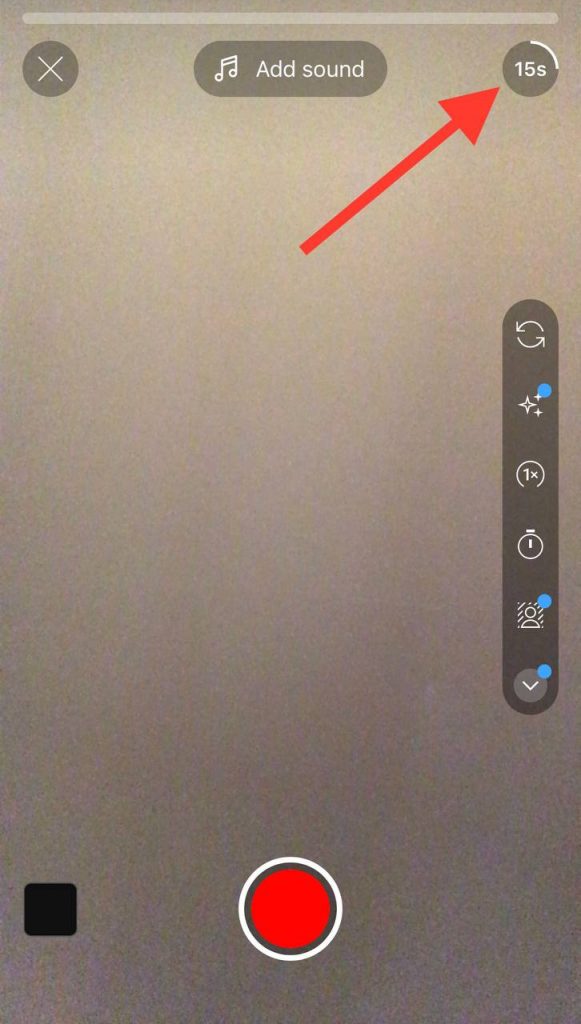
Step 4- In order to record a 15 seconds short video, you need to hold the red record button to start recording and stop when you want.
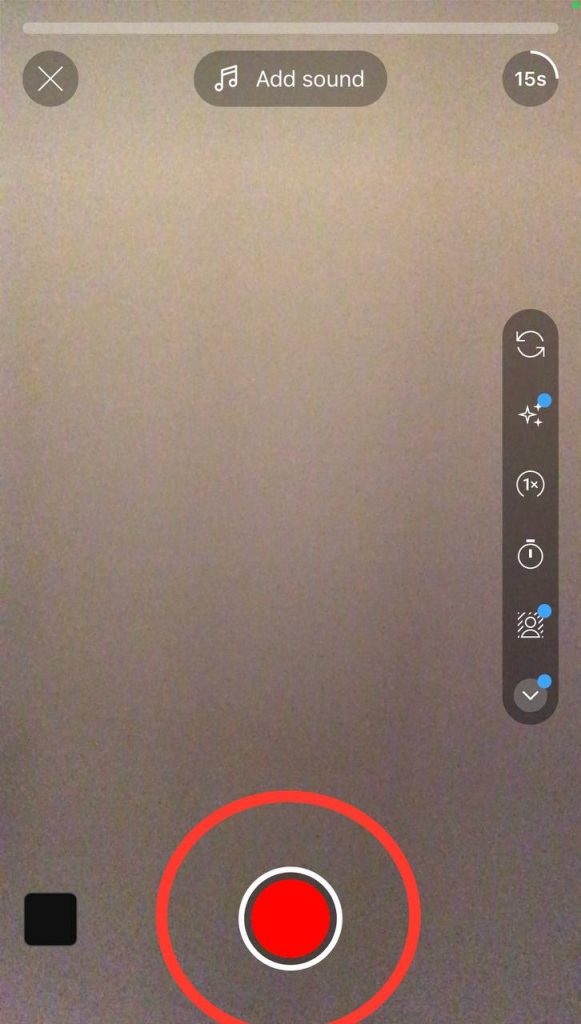
Step 5- After recording the video, tap the checkmark icon to save the video.
Step 6- Now, you can edit your video.
Step 7- When finishing editing, tap “next” in the top right corner of the screen.
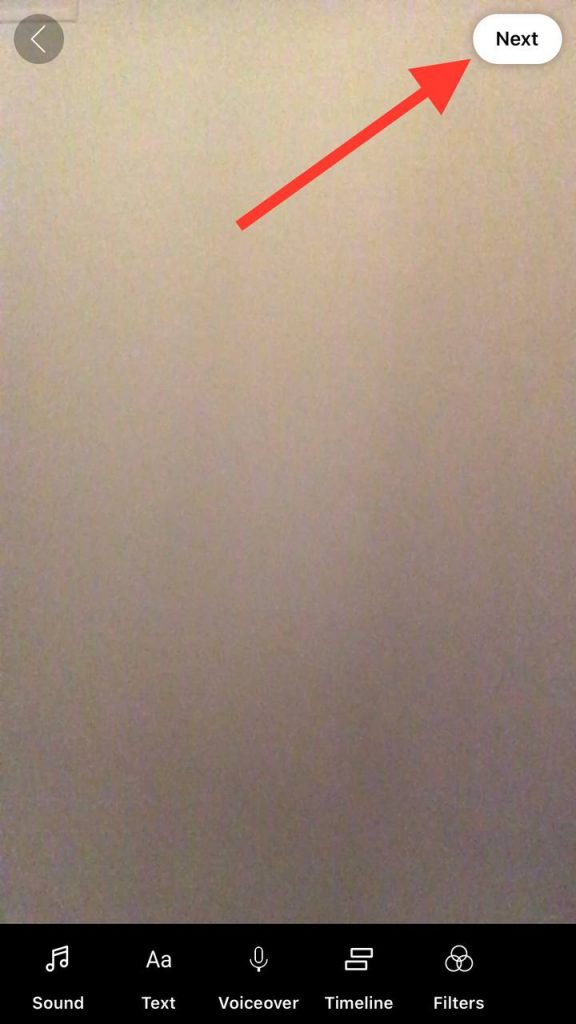
Step 8- Choose whether you want your short video to be public or private, and then choose “upload short” to finish the process.

These simple steps allow you to make attractive short-form videos and share them on your channel.
Using the feature of YouTube short videos, you can show your content to your target audience more easily so that more people will subscribe to your channel and take advantage of it.
What Is YouTube Shorts Length?
As you know, YouTube Short videos are short-form videos of less than one minute and can be uploaded on mobile phones or desktops. So, if your video is longer than one minute or uploaded in widescreen, it’s not a shirt video.
The suitable length for YouTube Shorts is 60 seconds (full-length video), but you can also create and upload videos in 15 seconds.
You should create YouTube shorts in vertical form with the 9:16 aspect ratio, and the YouTube Shorts resolution should be 1920 pixels by 1080 to meet all the criteria of making shorts.
Tips for creating professional YouTube short videos
Now that you know how to make short YouTube videos, it is time to tell you some tips to help you make the best and pro videos to attract more attention.

- To record a full 60-second video, tap on the number 15 above the red recording icon and change it to 60.
- If you want to add special effects to your video, select different items from the “toolbar” on the right side of the screen.
- To record videos using the hands-free option, tap the clock icon to set a timer, run into a position and start filming.
- You can change your video background by tapping the “person” icon. It will change your background to a green screen or a photo you choose.
- Select the “add music” icon at the top of the screen to add music to your short videos.
- If you made a mistake while recording or editing your video, tap the ‘reverse” icon next to the red recording button.
- You can also redo any parts of the previous video clip you made so that you can add any desired changes.
- There is a lighting adjustment under the arrow icon at the bottom of the screen that you can use to boost the lighting of your video if you are recording a video in a dark place.
- You can control the speed of your video using the 1x icon and create normal, slower, or faster videos.
- There are different face filters on the right side of your mobile screen, and you can choose your favorite among them.
- If you made a mistake while making the video, there is an undo button down the bottom, and you can undo the last process by tapping on that.
- There is a green screen effect on the toolbar on the right side of the screen that you can use to cut yourself out of the video, change the background, etc.
Benefits of Creating YouTube Shorts
As you know, YouTubers earn from YouTube by sharing different videos on their channel based on the number of views and subscribers and using its other benefits. In this section, we will examine the benefits of short YouTube videos.
High Engagement
One important thing that makes YouTube videos get many views is their high engagement. Today, most people prefer to watch complete content about different topics in a shorter time, so short videos are more attractive to individuals, and they show more interest in these types of videos.
As a result, the YouTube community watches short YouTube videos, like them, and leaves comments, and in this way, the engagement of YouTubers’ videos and channels increases.
Zero Subscribers Needed
As mentioned in previous sections, YouTube Shorts is a feature you don’t need to meet certain milestones to use. So, you don’t need many subscribers to start making short videos and benefit them.
You can just create high-quality vertical videos and upload them on your channel, and people will watch your videos, you get more subscribers, and you can develop your channel.
Easy To Create And Upload
In the previous parts, we explained how to make and upload YouTube shorts, and you realized that by doing a few simple steps, you can make an attractive short video and share it on your channel.
Making normal YouTube videos with standard length requires special equipment such as a quality camera and microphone, and you have to work hard to make those types of videos, but you can easily make short videos on your mobile phone and upload them with a few simple clicks.
Reach More Subscribers
As mentioned, people prefer to watch shorter videos with high-quality content, so short videos attract more people, ultimately allowing you to have more subscribers, expand your YouTube channel, and attract target audiences.
In addition, remember that when more people watch your short-form video content, your channel’s engagement and YouTube video views will increase, which has many benefits.
Mobile Friendly
Another advantage of YouTube Shorts videos is that you don’t need a computer to make them, and you can produce interesting content using only your mobile phone and without special equipment.
Conclusion
YouTube is one of the largest social media platforms that has billions of users worldwide every day and has a special place among all people. By adding new features, YouTube mobile app has made users have a great experience using it.
As mentioned, one of these features is short videos, which have brought great changes to this platform, and we have discussed it comprehensively in this article and provided you with the information you need about it.
We discussed the size of short videos, their importance, their benefits, and how to make and upload them on the YouTube platform. You can start making short videos with your mobile using the content mentioned in this article and take advantage of it.

Lina Stewart
Buy an Established Instagram Account
Skip starting from zero. Browse Instagram/TikTok accounts with audiences across many niches.
See Available AccountsRelated articles
-

Best Influencer Marketing Software in 2026: Top Platforms to Grow Your Brand
Influencer marketing used to feel optional, something you tried after you’d “done” everything else. Now it’s often the first place customers hear about a brand. The problem…
18 min readEmi Daniel
-

The Ultimate Digital and Social Media Marketing Playbook: From Basic to Advanced Tactics
Are you tired of trying different methods and realizing your brand doesn’t get the attention it deserves? If so, you need to come up with the right…
23 min read -
Social Media Competitor Analysis: Tools, Benchmarks, and Strategy Guide
Are you getting fewer likes lately? You’re not alone. On Instagram, the average engagement dropped to about 0.45% in 2025, down 24% from last year. Still, the…
26 min read