


It’s cool to add music to an Instagram story, but how?
No matter what your Instagram account category is, it would be best if you had music to make your stories and posts more attractive. It’s one of the most important factors in Instagram engagement rates.
You must have seen lots of stories and reels on Instagram with beautiful songs that have been added. In fact, the music had not been recorded in the first place, and that Instagram account has added it to its picture or video clip.
Buy an Established Instagram Account
Skip starting from zero. Browse Instagram/TikTok accounts with audiences across many niches.
See Available AccountsSo if you want to learn how to add music to an Instagram story, read the following article.
What Is Instagram Music Sticker?
In 2018, Instagram released the music sticker, which allows you to add music to your Stories. You can now include Instagram Stickers in your Stories, making them more attractive.
By using a library with thousands of songs, you can add 15-second audio clips to your Stories in a matter of minutes.
The choice is yours! Whether it’s your favorite pop song or favorite film soundtrack, you’ve got it!
How to Use the Music Sticker on Instagram Stories
Here is how to add music to an Instagram story using the music sticker on the app.
- Go to your Instagram app
- Create a new Instagram story and add a picture or video
- On your screen’s top right, you’ll see a sticker icon
- Select the Music sticker icon
- Choose a song that you want to perform
- Note: You can learn about a song’s name, artist, genre, and mood
- Decide which portion of the song you want to include
- Note: Remember that the sticker can only hold 15 seconds of sound
- Determine how the music sticker will be shown
- Click on “Done”
It’s vital to choose the finest section of the song that matches your Story’s topic (or your favorite lyrics) since the songs are up to 15 seconds long.
Luckily, Instagram’s music stickers help you use the portion of the song you are likelier to like by automatically starting from the chorus.
Consequently, you won’t have to spend too much time hunting for the right section of the song. You’ve got Instagram covered.
When your followers see your Story, the selected song will automatically play, so make sure you pick the best moment!
Why Can’t I See the Music Sticker on my Instagram Story?
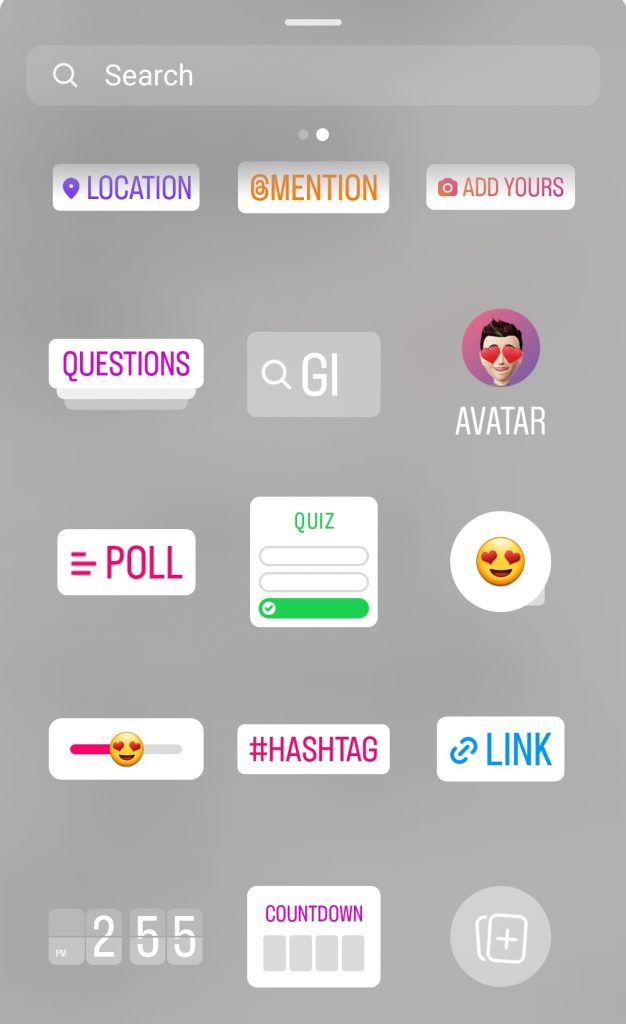
Many times, users complain about why they don’t have the music sticker on their Instagram Stories.
Here are several tips on how to tackle this problem to be able to see the music icon and add music to your Instagram stories.
Make sure the Instagram app is up to date
Sometimes you need to update your Instagram app to see the music sticker when you want to use the Instagram stories camera.
Switch to personal/professional account
You might face this problem when using your personal account. Try to switch to your business Instagram account to see if the music sticker is there. Many users have reported this problem, so it’s highly likely that you can fix it by switching between your accounts.
Exit out of the Instagram app and log in again
This is really straightforward. When you can’t add music to the Instagram story using the sticker icon, you just need to log out and log in again. This trick has been helpful many times, so it’s worth trying.
Remove the Instagram app and download it again
Last but not least, you have to reinstall the app to see if you can add music to an Instagram story on the newly installed version.
How to Add Music to an Instagram Story from Spotify

Another big question is how to add music from streaming apps and not from the Instagram music library.
Spotify is a favorite music streaming app that lets you play music and enjoy it anywhere. Many Instagram users like to add music from this source to their Instagram stories. Fortunately, there is a chance to use the Spotify app on an Instagram story.
You can easily add music to your Instagram stories from the Spotify app and even other apps like the SoundCloud app rather than Instagram’s music library.
Here is how to add music to your Instagram story from the Spotify app:
Using the Instagram app
When you capture Instagram stories, you can also capture sounds from your phone’s microphone. This is the best way to put music on Instagram stories and also the simplest one. Let’s go through the procedure step by step:
Step 1: Open the Spotify Music app, select a song you want to use as a soundtrack for your Instagram story, and cue it up.
Step 2: After that, you’ll need to tap on the song you want to add to your tale. Select the section of the song you want to add using the time bar. Finally, stop the music.
Step 3: Next, open the Instagram app and log in to your account.
Step 4: Afterwards, tap the Camera button in the upper left corner of Instagram to open the Story camera, and then play the desired song on Spotify. Instagram will automatically add the song to your Story if you are able to record a video while listening to it. You’ve finished your task.
Using third-party tools
Fortunately, there are a bunch of useful tools that allow you to convert Spotify songs and add music to your Instagram.
Here are the 5 best Spotify to MP3 converters and downloaders:
-
TuneFab Spotify Music Converter

Spotify Free and Premium users may convert Spotify music to the highest quality with TuneFab Spotify Music Converter, a versatile desktop application. It can convert music from Spotify to MP3, M4A, FLAC, or WAV formats, whereas DRM from Spotify is bypassed.
-
HitPaw Spotify Music Converter

Users may convert Spotify to MP3 and other 300+ audio formats, including WAV, OGG, Flac, AAC, and more, with HitPaw Video Converter – a Spotify Music to MP3 Converter. While preserving the audio’s original ID3 tags and without lowering sound quality, the Spotify converter allows you to transcode audio.
-
MuConvert Spotify Music Converter

Music conversion to MP3, M4A, FLAC, or WAV audio with no quality loss is possible using MuConvert Spotify Music Converter, a great music converter focused on high-quality music conversion.
-
Allavsoft

With just two simple steps, Allavsoft can convert Spotify to MP3. To get the Spotify track in MP3 format by default, you simply copy and paste the music you want to be converted, then click the download button. In addition to AC3, WAV, WMA, and others, you can transform the audio into different formats.
- Sidify Music Converter

Another program that uses the same approach to convert Spotify tracks to MP3 is Sidify, which is available for download. With Sidify, you may transform your favorite tune in three clicks at a pace that is five times quicker than most standard conversion methods.
FAQ
Here are some common questions about adding music to an Instagram story.
How to add music to your Instagram stories without the sticker?
You can use Spotify and other third-party apps to do so. Also, you can update your Instagram or switch to your business account to see the music sticker.
Is it possible to add music to an Instagram story after posting?
The good news is that you may alter certain tiny things, but the bad news is that unless you delete the Story and recreate it from scratch, you cannot drastically alter it. Tap the More button and choose Story Settings to make any change to the Story you want.
How to add music to an Instagram post?
First, take a picture or add one from your library. Then, click Next to choose your caption, tags, and hashtags. Here, you can see the option “Add music.”
Tap it and choose the song and select the portion of the song you want to be added.
How to add music to an Instagram story with multiple photos?
To do this, tap the Sticker icon > choose the Music sticker > find your desired song and add it to Instagram Story > move the slider to choose the portion of the song in the first picture> tap Done.

Emi Daniel
Buy an Established Instagram Account
Skip starting from zero. Browse Instagram/TikTok accounts with audiences across many niches.
See Available AccountsRelated articles
-

How to Clear Instagram Cache on iPhone, Android & Desktop
Instagram can quietly build up a lot of temporary files while you scroll through Reels, watch Stories, save posts, and upload your own content. You may not…
12 min readEmi Daniel
-

How to See Who Reposted Your Instagram Post (2026 Guide)
Someone reposted your Instagram post, but you have no idea who it was. You check notifications, search through your profile, and still cannot find a clear answer. …
18 min read -

How to Reset Instagram Algorithm in 2026
Instagram can start showing too much of the same type of content. Your Explore page may no longer match your interests, Reels may feel repetitive, or suggested…
12 min read