

With more than one billion monthly users, Instagram is one of the best platforms for selling products online; where you can sell your products by providing quality photos of products and sharing them on Instagram. That’s why many businesses in different categories try to have an Instagram account.
But there are other ways to help you sell your products using the Instagram app, one of the best of them is called WooCommerce, through which you can connect your online store directly to Instagram and display your products to Instagram users.
In this article, we will talk about the Instagram WooCommerce store, how to use it, and its benefits.
Buy an Established Instagram Account
Skip starting from zero. Browse Instagram/TikTok accounts with audiences across many niches.
See Available AccountsWhat is WooCommerce?
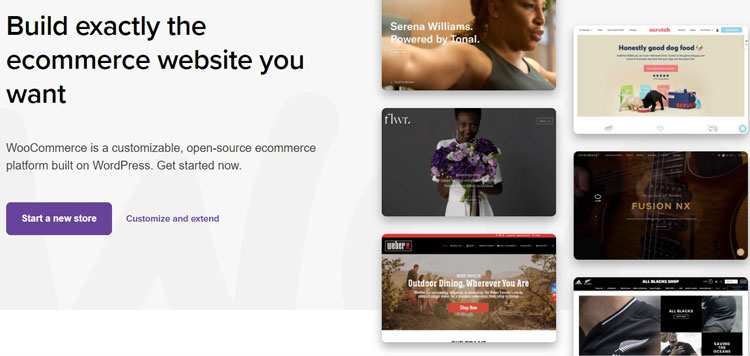
WooCommerce is one of the most popular open-source software solutions specific to WordPress-based websites and is mainly used to create online e-commerce stores.
This software allows business owners to turn their websites into online stores and sell their products.
Using and building online stores through WooCommerce store is easy to use, showing that you don’t need to be an IT expert.
You can also connect your store to Instagram with the help of this software and share your products in the form of a post or story so that more people can buy from you.
In fact, WooCommerce allows you to connect your store directly to Instagram and share high-quality photos of your products, using relevant hashtags so that you can attract more people to your store and sell more. you have.
Key features of WooCommerce
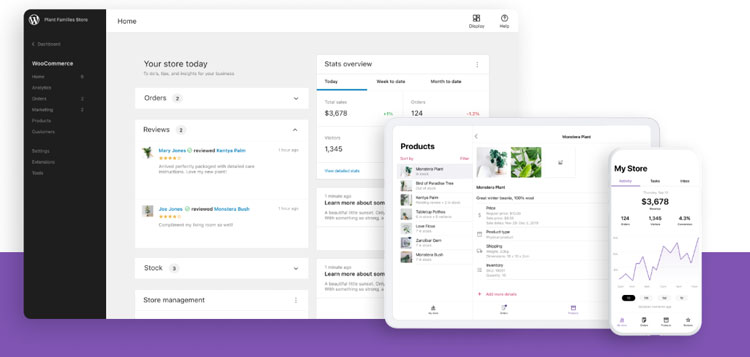
To better understand what exactly WooCommerce is used for, it is better to know some of its key features, which include:
Purchase rules
WooCommerce provides rules for customers’ buying process, which helps make their buying process easier. This feature is helpful from the time of starting the purchase to paying and finalizing the order.
Product management
As a business manager, it may be difficult for you to control your service marketplace and manage the inventory of products on the website. Still, with the help of this feature, you can easily control the inventory of products and such.
Sales report
WooCommerce is provided with in-app sales reports, which are about the number of product sales and other details, and users can help develop their business using these detailed reports.
Different payment methods
WooCommerce offers customers different payment methods, such as COD, digital payments, etc., which is an advantage.
Order management
This feature allows users to monitor and monitor the orders registered through the website.
Why should you use WooCommerce Instagram?
In order to make sure whether you need to use WooCommerce store or not, first of all, you should pay attention to what kind of website you want to create, that is, what kind of content management system (CMS) you want to use because As mentioned, WooCommerce is used to build e-commerce sites based on WordPress, so you must use CMS.
Therefore, if you want to build an online store on WordPress, you must use WooCommerce, which is both easy to use and has many advantages.
Also, if you want to progress in your business and show your products with better quality to more people in order to get good feedback about your products, be sure to use Instagram WooCommerce, that is, connect your online store directly to Instagram so that You can take advantage of WooCommerce and Instagram shopping features at the same time.
Some of the reasons why you should use Instagram WooCommerce are as follows:
- Brings Brand Awareness
- Attracts more customers and increases sales
- You can present your products with better quality
- You can use WooCommerce features to improve your business
- You can better manage the sale of your products
How to use WooCommerce Instagram
Now that you are familiar with WooCommerce and the benefits of connecting your store to Instagram, you should know how to integrate and use Instagram WooCommerce store, which we will explain step by step below:
Step 1) Set up WooCommerce
In the first step, you need to set up WooCommerce. To do this, you need to go to your WordPress website, enter the admin section and enter your username and password.
Then select the Plugins and then tap on “Add New”
Now upload the new plugin, click “Install Now,” and activate the extension.
After completing these steps to activate WooCommerce, you have the plugin installed on your website, and it is ready to use.
Step 2) Create a Facebook account and create a Facebook page for your business
If you don’t have a Facebook account yet, go to Facebook and create an account and create a Facebook business page.
Don’t forget to choose the business or brand option when you set up your Facebook account and put a suitable photo for your profile.
Also, pay attention to the username you choose, it should be related to your business and products.
Finally, select the public page option; now, you have a public business page on Facebook and are ready to move to the next step.
Step 3) Create a Business Manager
Business Manager is the Facebook user account through which you can manage the business Facebook page and the people who work on it in one place.
To create a business manager, visit the Facebook.com/overview website and follow the steps to create it.
Step 4) Create a Commerce account
In order to easily share your product catalog on Facebook, Instagram, and Business Manager, you must create a commerce account that allows you to use features such as Facebook stores and Instagram shopping.
- To create a commerce account, go to Facebook.com/Commerce-Manager.com
- Click on the Get Started option and then select “Create Catalog”
- After that, select e-commerce
- Then you will be directed to the “upload method” section, and under it, there is an option called Connect E-Commerce Platform; click on it.
- Now select WooCommerce from the side menu
- Finally, download the desired plugin, install and activate it in the Facebook “Pixel Extension” section, and click “Continue” to complete the steps.
By doing all these steps, the WooCommerce site will be connected to your Facebook page, and you can easily connect to Instagram.
Step 5) Link your Facebook account to your Instagram:
To do this,
Open the Instagram app, go to the “Settings” section, and click “Account Center.”
By going through the steps in this section, which is done on Facebook, you will connect the Facebook account to Instagram.
Note that to do this, you must have changed your Instagram account to Business to use its features.
Step 6) Sign up for the Instagram Shopping option:
Instagram shoppable posts are among the best features that help increase your sales.
To do this on your Instagram posts,
- Open Instagram and enter “Settings” from your profile section
- Click on the “Business” option and then select “Shopping setup”
- Then select the “Add shop to your profile” option and tap on “Get Started”
- Select the catalog you want to connect to your account
- Tap “Done” to finish the process
Step 7) Create a new Instagram post and tag your products:
At this stage, you should prepare the photos of the products you want to post on Instagram and then click the “Products tag.”
Click on the part of the photo where the desired product is, search for it in your catalog, and tag the photo.
That’s it! You have just connected your WooCommerce products to your Instagram feed.
Note that you should not tag too many products on one photo because it will lose its effect, and it’s hard for users to navigate each product.
Conclusion
As we said earlier, Instagram is one of the largest social media platforms, with over one billion monthly users, so selling your products on Instagram stories and posts is a great advantage.
In this article, we explained what WooCommerce is, how it is used, and how you can connect your store’s products to an Instagram business account and take advantage of its benefits.
We hope that with the help of this article, you can easily connect your store products to Instagram and show your products to more people, having more customers and sales. Remember that you have to create shoppable posts to showcase your products and increase your sales.

Emi Daniel
Buy an Established Instagram Account
Skip starting from zero. Browse Instagram/TikTok accounts with audiences across many niches.
See Available AccountsRelated articles
-

How to Go Live on Instagram: A Step-by-Step Guide
Going live can feel more stressful than posting a Reel. You cannot remove a pause, rewrite a sentence, or start over after an awkward moment. But that…
17 min readEmi Daniel
-

Instagram Instants Feature: What It Is, How It Works, and How to Turn It Off
The first time I opened Instagram Instants, I almost backed out. I had taken a normal photo. Nothing worth editing. Nothing worth posting. Nothing that needed an…
11 min read -

How to Clear Instagram Cache on iPhone, Android & Desktop
Instagram can quietly build up a lot of temporary files while you scroll through Reels, watch Stories, save posts, and upload your own content. You may not…
12 min read