

As we all know, Instagram, with more than one billion monthly active users, is one of the most important and popular social media platforms, which is the best place to share visual content in various forms, such as posts and stories. That’s why many people and businesses try to create an IG account or get one from Social Tradia.
With constant updates and new features, Instagram allows users to have a better experience using this application.
Features on the Instagram app are designed for users to see engaging visual content and be entertained at the same time.
Sometimes you may want to archive multiple posts so that you can always access them or even hide them from others, the good news is that Instagram has such a feature, and in this article, we will comprehensively explain the IG archive feature, how it works, how you can use it to mass archive Instagram posts. So, keep reading!
What is the Instagram archive feature?
One of the attractive features of Instagram is the ability to archive posts and stories. With the help of this option, you can archive the stories or posts that you have deleted so that only you can access them and your followers and other people cannot see them. In other words, you hide your posts without deleting them.
When you archive a post, all its information, like the number of likes and comments are saved, so don’t worry about losing the engagement of your archived post.
But how long does Instagram allow your posts to be archived? The answer is simple! Until you delete that post from your profile, that post with complete information will remain in the archive section.
How to archive Instagram posts?
Content that can be archived on Instagram includes stories, posts, and live streams. Instagram stories are archived automatically, and you don’t need to do anything to archive them but to archive posts, you need to go through the steps that we will explain below.
Step 1) Open the Instagram app and tap on the “profile” icon at the bottom right of the screen
Step 2) Select the post you want to archive
Step 3) Then, tap on the “three dots” icon of the post on the right side of the screen
Step 4) Now, a menu appears. You need to choose the “archive” option to archive the post successfully
After finishing these easy steps, the post you chose will move to the archive section, which means it will no longer be shown on your profile, and none of your followers will be able to see that.
How to see archive posts on Instagram?
As mentioned in the previous section, the archiving option includes Instagram posts, stories, and live streams. In the following, we will explain the steps of archiving Instagram posts:
Step 1) Open the Instagram application and tap on the “profile” icon in the bottom right of the home page
Step 2) Tap on the “three-line” icon in the top right of the screen
Step 3) From the menu, choose the “archive” option
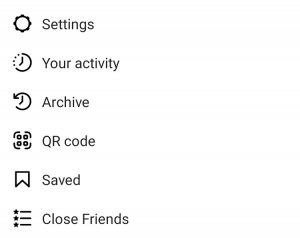
Step 4) Tap on the “post archive.” Note that when you tap on this option, you will see three options: stories archive, posts archive, and live archive. You can access each section by choosing what you want, and you will see the archived IG posts.
By following these simple steps, you can easily access any content you share on Instagram, and you can ensure that only you have access to them unless you delete or unarchive them, which we will explain how to do later on.
Different ways to archive Instagram posts
There are different ways and reasons to use the IG archive feature; below are some creative ways to use this option, which, in addition to helping you keep your content as long as you want, will increase your page’s engagement.
Highlight your stories
Your profile automatically archives Instagram stories, and you can access them anytime. One of the interesting ways to use this feature is to highlight stories that are interesting to you and your audience or have unique content.
By doing this, in addition to archiving the content of your story, you can display it on your profile for a longer time (until you delete it).

Repost your favorite or least engaged content on your story
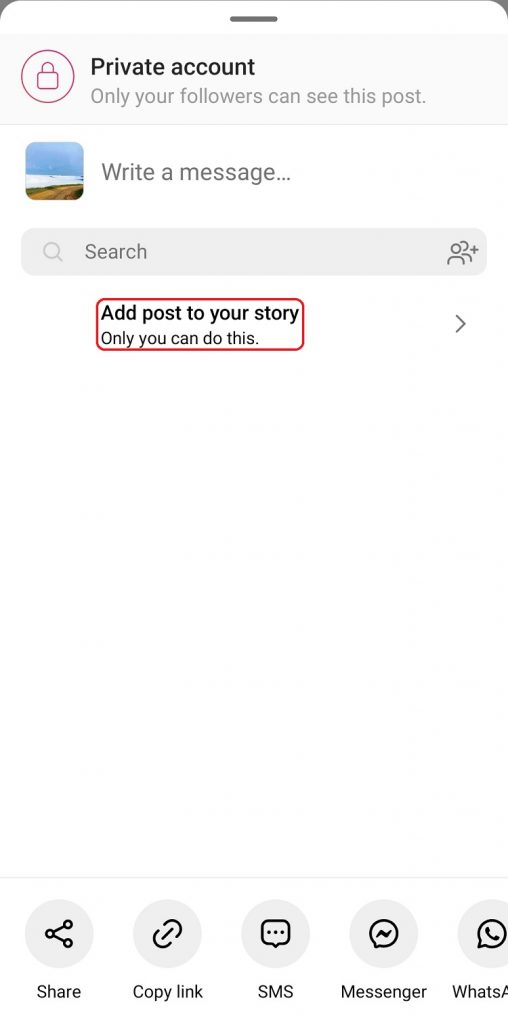
The archive option provides many possibilities; for example, you can repost your posts that are archived to remind you of your good memories.
In this way, you can also increase the engagement of your posts; this is especially useful when you find new followers.
For this purpose, check which post of yours has less engagement through the post insight section and repost it in your story from the archive section.
Share your memories to stories
It might be interesting to know that Instagram remembers the publication date of all your posts and stories and shows you that post again under the title of “memories” every year on the same day and date.
These reminders have a sharing option, and if you click on it, they will be automatically added to your story while showing the publish date, for example, “on this day X years ago.”
In this way, in addition to browsing the engagement memories, you can increase the engagement of the post or story.
Reuse the shared content
Obviously, to increase followers on Instagram, we must continuously produce engaging content to be seen, but sometimes we may need the necessary conditions to create new content; this is where archived posts and stories help us.
In such a situation, you can reuse the posts with a high engagement or even share the posts that did not have high likes and comments. By doing this, you have been active on Instagram and have increased your posts’ engagement.
The mentioned cases were creative solutions that, with the help of the archive feature, you can increase their engagement in addition to keeping or hiding your content.
But be creative! And whenever and however you think that using archived posts will help your page grow, use them.
How to unarchive your Instagram post?
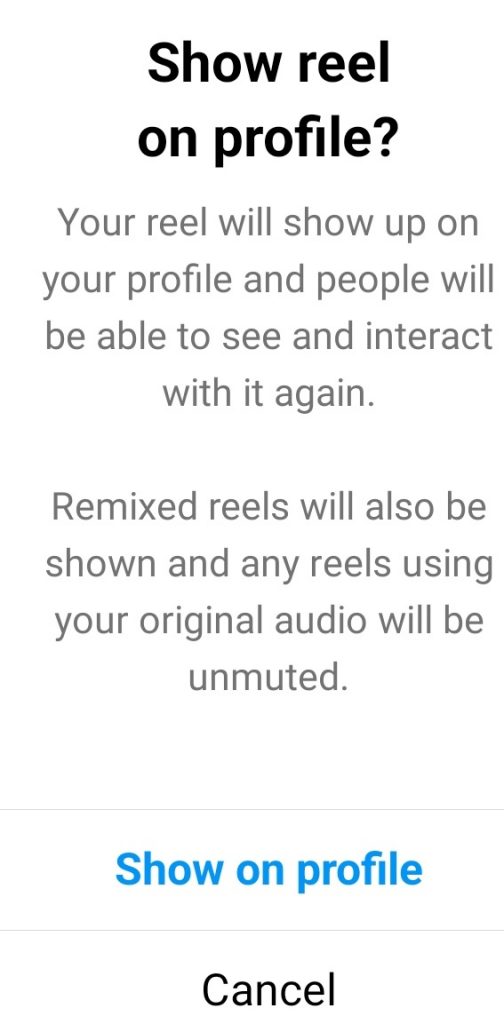
As we mentioned in the previous sections, when you archive a post on Instagram, that post will enter the archive section and will be hidden from your profile, but all its details, such as the number of likes and comments, will be saved.
You can easily remove the archived post from the archive section whenever you want, and that post will be shown again in your profile. To do this, follow these steps:
Step 1) Open the Instagram mobile app and go to your profile
Step 2) Tap on the “three lines” icon on the top right side of the profile screen
Step 3) Choose the “archive” option from the menu
Step 4) Now, you will see the archived posts; select the post you want to unarchive
Step 5) Tap on the “three dots” icon of the post
Step 6) Choose the “show on profile” option
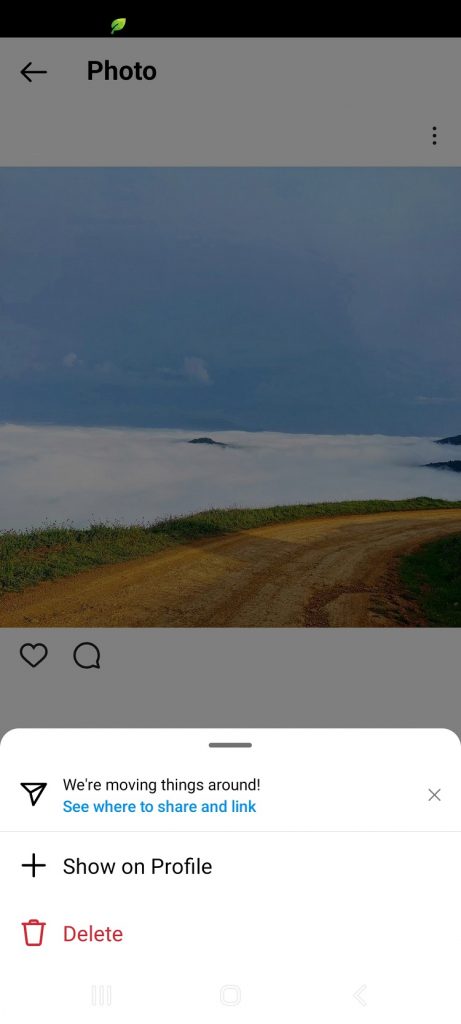
By following the mentioned steps, you can easily restore your archived posts. Note that in any case, if you want to delete the archived post instead of restoring that, you can choose the delete option, and the post will be deleted from your profile.
Conclusion
You must have noticed by now what features the Instagram archive feature has and how it helps your Instagram page and maintains your content, so if you have a post on your profile that you want to keep. Still, if you don’t want others to see it, go archive it with the help of the content mentioned in this article and restore it whenever you want.
In this article, we tried to fully explain all the details of this attractive feature, including full explanations about it, how to archive and restore posts, how to use the archive option, and how to access them so that you can easily Use this feature and take advantage of its benefits.
