


Twitter is a great platform for people who like to share their moments with friends and followers; however, sometimes users realize that their tweets don’t get the usual interactions, and fewer people reach their accounts.
You may wonder what the reason is. Well, the most common one is Shadowban, which is a subtle restriction by Twitter that reduces your content visibility.
Determining the exact percentage of how many Twitter users experience a shadowban is difficult; however, a study that analyzed over 2.5 million users showed that almost 2.5% of those accounts had been shadowbanned!
Buy an Established Instagram Account
Skip starting from zero. Browse Instagram/TikTok accounts with audiences across many niches.
See Available AccountsThe question is what exactly a Twitter shadowban is? How to see if your account is shadowbanned? How to avoid and fix it?
Today is your lucky day! In this guide, you will get answers to all your questions about Twitter shadowban and more.
What Is Twitter Shadowban?
A Twitter shadowban summarizes in limiting your account’s reach and visibility without any formal warning from Twitter. It usually happens due to inappropriate and flagged behavior that feels like violating Twitter’s guidelines and rules.
Unlike the full ban on Twitter, you can still share tweets, likes, comments, and interact with other users, but your content won’t be shown to people like before, and users may not be able to access your content and account easily.
The good news is that when you get shadowbanned by Twitter, there is still hope, and you can fix it by following simple steps, which we will discuss in the following sections.
Different Types of Shadowbans

Depending on how the platform restricts your account, there are different shadowbans on Twitter. Let’s see each of them.
Search ban
As the name suggests, your tweets and account will be excluded from the search results section. This can be a nightmare for all users because even if someone searches for your exact username, your account or tweets won’t show up.
Hidden replies
It doesn’t matter how hard you try to reply to comments and interact with other users; as long as you are shadowbanned, your replies to tweets become hidden or less visible, which decreases your account’s engagement and limits your interactions.
Search suggestion ban
People may find it difficult to find your account or tweets because your account won’t appear in Twitter’s search suggestions, not even if they type your exact username. This type of ban negatively affects your visibility on the platform.
Ghost ban
It’s like you are a ghost on the platform! In other words, your interactions won’t appear to anyone.
Why Twitter Shadowban Accounts
Twitter shadowbans account for various reasons; however, there are common ones, which are listed below.
Spammy behavior
If you are among those users who constantly post the same message, use the same hashtags, follow/unfollow too many accounts at the same time, and engage with specific accounts, Twitter considers it as spammy behavior, which is a common reason it will shadowban your account.
Frequently policy violations
Twitter shadowbans accounts with a long history of getting warnings about ignoring the platform’s policies and rules. So, if you want to stay out of trouble, follow its guidelines and rules.
Overusing hashtags
Hashtags are a great way to enhance your visibility on the platform; however, if you overuse them, Twitter considers it as bot behavior and may ban your account.
Using restricted hashtags

Using too many hashtags on your posts is harmful, now imagine what would happen if you use restricted hashtags! Remember that using hashtags that have been flagged by other users increases the risk of using restricted ones.
Suspicious activities
Any activity that seems like there is a bot behind your account is considered suspicious activity and could be the reason your account gets banned. Note that Twitter uses specific algorithms to track suspicious behaviors across the platform.
How to Check if Your Twitter Account Is Shadowbanned (Quick Tests)
Here is a list of quick methods that help you determine if your account on X has been banned.
Use shadowban checker tools
There are different third-party tools that you can use to see if your Twitter account is banned. To use such tools, you need to enter your username to check if your account is affected by any type of shadowban.
Check for shadowban notifications from X

The platform does not directly send you notifications about banning your account; however, there might be signs! Some users reported something called “soft shadowban,” which you can discover by checking your comments on other’s tweets.
If your account is shadowbanned, you will find your comments flagged by “the Show more replies?” or “Show additional replies, including those that may contain offensive content” link.
If you notice such a thing, it means Twitter has banned your account.
Ask your friends to search for your account

You can also ask your followers, friends, or someone you know to search for your username. If they easily find your account, everything is good, but if they can’t find it, you are probably banned.
Log out of your account
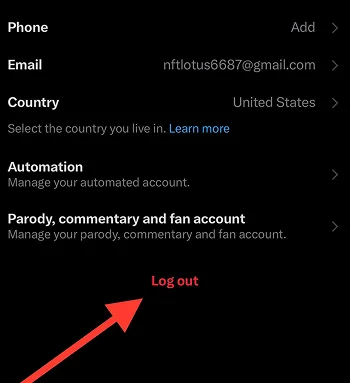
log out of your account and then search for your username to see if you can find it. If you enter your exact Twitter handle and still can’t find your account, it means you are shadowbanned by Twitter.
Send a message to someone and see if they receive a notification
This method is very easy! All you need to do is send a message to someone and ask them if they received a notification. If they don’t get notified about your message, it’s like you have to figure out how to fix your shadowbanned account!
How Long Does Twitter Shadowban Take

The duration of a shadowban on the X platform varies based on the type of shadowban and how long it takes for you to fix the issue. If your account is a search suggestion ban, it may take a few days to weeks.
On the other hand, if your account got search banned, it can last for several days to weeks, and if it’s banned for replies, it may last between three and five days.
Factors that influence the shadowban duration
- The type of content you posted
- Whether you continue the spammy or violation behavior
- How often do you post on Twitter
- The reason your account was banned
- If you have violated the platform’s rules before
- Type of violation
- Your account’s age
- Your activity during the ban period
- Region or policy changes
- The quality of your tweets over time
- When you contact Twitter support to fix the issue
How to Avoid Twitter Shadowban
Are you worried about your Twitter account getting banned? You don’t have to! There are easy ways to avoid the Twitter shadowban. Check them out in this section!
Follow Twitter guidelines
The first thing you need to ensure you always do is follow the platform’s guidelines and rules to stay out of any trouble! Every platform has its specific guidelines; if users violate them, they will restrict their accounts and limit their interactions.
Authentically engage on the platform
Remember to authentically engage and interact with other accounts on the platform to avoid any suspicious activities. For example, don’t use the same hashtags for too long, avoid following/unfollowing too many accounts in a short time, don’t comment the same words on every post, etc.
Avoid spamming
Try to avoid spammy behaviors, such as posting similar content across various accounts, constantly sending DMs, posting duplicate tweets on one account, and any other suspicious activities.
Don’t over-Tweet
It is normal to want to grow your account and increase discoverability by constantly posting on the platform; however, Twitter considers such behavior as violation and may ban your account for that.
To avoid oversharing, prepare a reasonable schedule, which will help you better manage and grow your account.
Avoid using too many hashtags

Hashtags can help you enhance your visibility across the platform. However, you should be careful with using them and avoid using too many hashtags in one post.
To get the best results, it is better to use a few relevant hashtags for each tweet to attract your target audience.
Be polite while engaging
It is better to watch your language and tone while engaging with other accounts, especially when commenting on others’ posts and answering/sending DMs to them.
The reason to do so is that users can report your account for impolite behavior, which is a common reason for Twitter to ban your account.
Optimize your account settings
Never underestimate the power of completing your profile on X! Consider setting a proper profile picture, relevant bio, location, and contact options to make your account look more authentic.
Respond to Twitter’s warnings
Another effective way is to pay attention to Twitter’s warnings when it flags your account for unusual activities.
To do so, make sure to complete and provide any information it asks you to verify your account.
How to Fix Twitter Shadowban

If your Twitter account is shadowbanned or you are wondering how to fix this issue if you ever got banned, these methods are for you.
Identify the cause of the ban
The first thing you need to do to ensure you can easily fix the issue is to identify the reason you are banned. To do so, follow the methods we mentioned in this article to check how and why your account got banned by X.
Stop doing suspicious activities
The most common reason that Twitter bans accounts is suspicious activities across the platforms. Therefore, to fix the issue, you need to stop doing spammy and suspicious activities.
Delete problematic Tweets
If some of your tweets are flagged problematic, you must delete them no matter how engaging they are! If you ignore Twitter’s warnings, it might take you longer to resolve the problem.
Take a break from your account
If your account is banned, trying to be active on the app and checking your account every minute won’t help you! Instead, it is better to take a break from Twitter and let it check and unban your account.
Contact Twitter support

Never forget to contact Twitter’s support to explain your problem and ask them for help. Look for “Contact us,” “Help center,” or any other options that link you to Twitter’s support team.
Be patient
Last but not least, be patient! Remember that Twitter banned your account for a specific reason and it may take some time for them to ensure your account is worth getting back to normal.
How Twitter Shadowban Affects Users

When big platforms like X limit user’s interactions, it affects their experience and may discourage them to continue using the app! Let’s see some of the impacts of Twitter shadowban on users.
- Decreased engagement
- Less follower growth
- Lack of transparency
- Reduced visibility
- You may have challenges to verify your account
- Emotional effects
- Poor account performance
- Stops business growth
- Damages your account’s reputation
- It has negative impact on collaborations
- Reduces your access to Twitter’s analytics
Actions You Didn’t Know Lead to a Shadowban on Twitter

There are simple actions that I bet you didn’t know may lead to a shadowban on Twitter. Check them out to avoid them in the future.
- Overusing the same hashtags
- Tagging too many accounts in your Tweets
- Sharing inappropriate content
- Deleting your Tweets in a short time
- Keep interacting with Shadowban accounts
Make sure you won’t do such activities and if you are doing them, stop now to save your account from being banned!
Conclusion
Facing any kind of restriction on Twitter and any other platform is an unpleasant experience for everyone, especially if you don’t know the reason or how to avoid and fix the issue.
Before learning how to fix a shadowban on Twitter, it is better to know why the platform would ban and limit your account, which we fully explained in the previous sections.
Once you know the common reasons, you have to ensure to avoid any suspicious or spammy behavior that can lead to shadowban!
In this complete guide, we discussed every detail you need to know about Twitter shadowban, including how to check if your account is banned, how to avoid and fix it, and more.
I hope you find this article helpful and enjoy reading it!
FAQs
Can shadowban happen accidentally?
Yes, sometimes your account may get banned accidentally due to a systematic glitch or platform’s algorithms or automated moderation system.
How do I check if I am shadowbanned on Twitter?
There are various ways to try: Search for your account, use a shadowban checker tool, ask your friends to search your username, check your tweets visibility, etc.
How to skip shadowban?
Take a break from your account, review Twitter’s guidelines, avoid suspicious behavior, contact Twitter’s support, and act authentically.
How do I verify shadowban?
Check hashtags visibility, search your exact Twitter handle, analyze your account’s engagement, and look for warning signs from Twitter.
How to avoid shadowban on Twitter?
Avoid any spammy behavior, make sure you follow platform’s guidelines, complete your profile information, authentically engage with others, and post naturally.
Are Twitter shadowbans publicly disclosed?
No, users are not notified, which is why it’s hard to confirm a shadowban.
How to get unshadowbanned?
Stop doing repetitive activities, don’t use too many hashtags in your tweets, stop tweeting and engaging with others for a few days, and contact Twitter’s support.

Emi Daniel
Buy an Established Instagram Account
Skip starting from zero. Browse Instagram/TikTok accounts with audiences across many niches.
See Available AccountsRelated articles
-

How to Go Viral on Instagram: A Practical Guide
A viral Instagram post can begin with something very simple, like a clear idea, a familiar feeling, or a moment that makes someone think, ‘I need to…
25 min readEmi Daniel
-

Meta Ad Library: How to Find and Analyze Competitor Ads
Some ads are easy to ignore until you notice the same brand appearing in your feed again and again. You may start wondering what they are saying,…
18 min read -

Best Influencer Marketing Software in 2026: Top Platforms to Grow Your Brand
Influencer marketing used to feel optional, something you tried after you’d “done” everything else. Now it’s often the first place customers hear about a brand. The problem…
18 min read