


TikTok app is one of the biggest and most popular social media platforms that has many users from all over the world.
Users share their videos on different topics on this platform and collect followers this way. Besides, people with many followers whose posts get high engagement earn money through this platform.
But one of the most important reasons for TikTok’s popularity is its features and updates that allow users to have a better experience using this application.
Buy an Established Instagram Account
Skip starting from zero. Browse Instagram/TikTok accounts with audiences across many niches.
See Available AccountsThese features help all users with any physical condition, especially those who are visually impaired, to use this application like others and have fun or learn something new.
One of these attractive features is called Text to Speech. In this article, we will discuss text to speech in detail and provide you with the details you need to use. So, let’s dive in.
What is the TikTok Text To Speech Feature?
You may have seen videos with text on them while scrolling the TikTok feed, and a voice reads that text; this is exactly the text to speech feature on TikTok app that we explain in this full section.
TikTok began rolling out a new text-to-speech feature in December 2020. With the text to speech enabled, this feature automatically converts text to speech voice when a user watches a video.
Popular social media platforms include new options for accessibility feature for visually impaired users, and people are more likely to use these kinds of apps incorporating voice technology, and TikTok is no exception.
TikTok Text-to-Speech is an accessibility that allows TikTok creators and users to add automated text to speech voice to read written text aloud. Not only can visually impaired users enjoy this feature, but it can add a new twist to your video content and attract more attention, increasing your account’s engagement and posts.
The introductory text at the beginning of the video is entered into the caption and read aloud by one of the language options, meaning you can select the language and your desired voice type.
Moreover, when you turn on the text to speech option, there is no extra dialogue; only the written text will be read, and a song can be played over the film as a background song. It makes the actual TikTok video content stand out more while providing some explanation and details about the video.
Generally speaking, Text-to-Speech allows TikTok video content creators to transcribe text to be overlaid on their videos with Siri Sounds (which can be a male or female sound). This means the text you type will be read to you like a robot, so you no longer have to speak.
Overall, text to speech is a great way to describe your TikTok video, add context, explain what’s happening, or serve any purpose. In the following sections, we will dig into more details about text to speech .
How to Use TikTok Text To Speech
In this section, we will explain step by step and in full detail how you can use text to speech of TikTok and take advantage of its benefits.
Step 1: Open the TikTok application and tap on the “plus” sign at the button on the home page.
Step 2: You will see an option to upload your video; enter your video to go to the next step.
Step 3: You are on the editing screen now and have the editing options; choose the “text” icon (showing as Aa) in the top right corner of the screen.
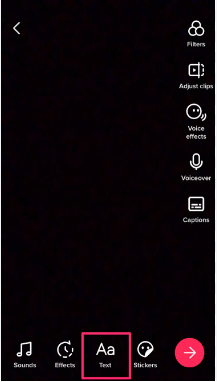
Step 4: Type the text you want to add to your video, then tap “Done.”
Step 5: Tap on the third option from the left, which looks like a person talking head.
Step 6: To change the type of voice of text to speech, tap on your text again and select “Change voice.”
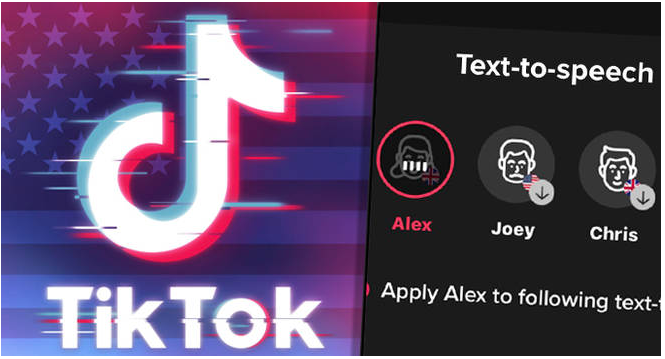
Step 7: Now, you are seeing a variety of popular voices. Tap on each one to hear how your text will be heard in different voices.
Step 8: When selecting your favorite voice, tap “Done” in the top right corner to finish the process.
Tip: If you like a sound effect, you can save the audio clip to use the sound later.
By doing these simple steps, you can easily add text to speech related to your TikTok videos to your videos to make them more attractive, and people with visual disabilities can easily understand the topic of your video.
Advantages of Using TikTok Text To Speech
Now that you know about the text to speech on TikTok and how to use it, it is good to know more about its benefits on your videos.
Make Your Videos More Enjoyable And Understandable.
- As mentioned before, using text to speech helps people with visual impairments understand your videos better and enjoy your videos like others.
- Using text to speech helps your video be more attractive and attract more attention, increasing engagement.
- Some people may watch your video in a public environment and don’t have headphones; if you have used text to speech, users can see your video and understand it.
- Text to speech is also suitable for foreign people who follow you because they may understand the text better than speech.
- One of the things that you should pay attention to is that the most important thing that makes TikTok videos go viral is the use of music or anything trending in the videos. Note that text to speech is now one of TikTok’s trends, so if you want your video to be more attractive and seen more, use Text to Speech.
Advertise Your Products Or Services.
- If you have a business account on TikTok or as an influencer, you promote products on TikTok and collaborate with brands, you can use text to speech to share more details about the product or service in your videos. This additional information and details can include launch date information or when the products will be available.
Attract More Attention And Increase Engagement.
- When you use text-to-speech , the text you put on the video attracts the first thing that attracts users’ attention and persuades them to watch the rest of your video. Using this feature helps your video get more views and increases engagement.
- If the content of your video is educational and helps users learn something new, using text to speech can have a good effect on your video’s visibility. You can use the text that explains the content of your video to attract attention.
- In addition, if your video has a specific audience and you want to address them, this feature will help you find your target audience and increase your video’s engagement.
Add Context to Your Videos.
- Another benefit of using text-to-speech features is when you want to share a video that includes a recipe or step-by-step tutorial. Using this feature in such videos makes your audience understand the video’s details better and its essential points in order to use it properly.
Conclusion
As mentioned earlier, Tik Tok is one of the largest social media platforms, whose attractive features, such as text-to-speech, have increased the number of active users daily and are a fierce competitor to other platforms.
In this article, we have fully discussed the text-to-speech feature, explained how to use it, and, most importantly, provided you with its benefits so that you can use it on your videos if you wish. and take advantage of its benefits to be seen more.

Emi Daniel
Buy an Established Instagram Account
Skip starting from zero. Browse Instagram/TikTok accounts with audiences across many niches.
See Available AccountsRelated articles
-

Best Influencer Marketing Software in 2026: Top Platforms to Grow Your Brand
Influencer marketing used to feel optional, something you tried after you’d “done” everything else. Now it’s often the first place customers hear about a brand. The problem…
18 min readEmi Daniel
-

The Ultimate Digital and Social Media Marketing Playbook: From Basic to Advanced Tactics
Are you tired of trying different methods and realizing your brand doesn’t get the attention it deserves? If so, you need to come up with the right…
23 min read -
Social Media Competitor Analysis: Tools, Benchmarks, and Strategy Guide
Are you getting fewer likes lately? You’re not alone. On Instagram, the average engagement dropped to about 0.45% in 2025, down 24% from last year. Still, the…
26 min read