

Back in the days when Instagram was launched, all it allowed you to do is create a profile and upload photos onto your feed. Whether you wanted to use this platform as a brand or an individual, the features were the same for everyone. There were no bells and whistles about the same.
In 2016, however, Instagram introduced business profiles for brands — and exciting things quickly took off from there. Initially, brands were quite wary whether they should switch to a business profile or not. But soon, every brand started realizing its wide range of benefits.
Shortly after the Instagram business account started, contact buttons were included, and shopping at Instagram became more manageable for the customers. Not just this, Instagram also started its own analytics. From influencers to start-ups, today many different brands have switched their regular accounts to a business profile.
Are you interested in doing the same? Here’s how to change your Instagram to a Business Account.
Step 1: Click on Instagram settings
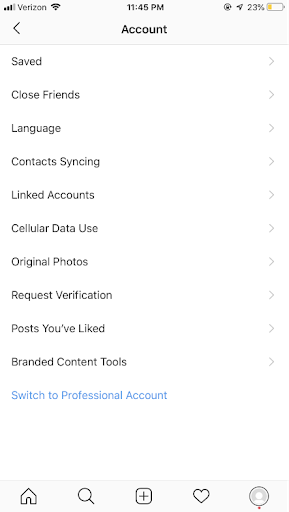
On your profile, you will see the settings option on the right corner. Tap on that. After that, you need to tap on the Account option to begin switching to a business account.
Step 2: Switch to an Instagram business account
On the setting option towards the bottom, you will see a blue highlighted option that says switch to a professional account. Check the image to understand the process quickly.
Step 3: Choose a business account
Once you switch to a business account, you will be able to reach out to your target audience in a more efficient and streamlined way. You will also be able to schedule your content ahead of time. By using third-party tools such as Sprout Social, you will be able to schedule the content you want.
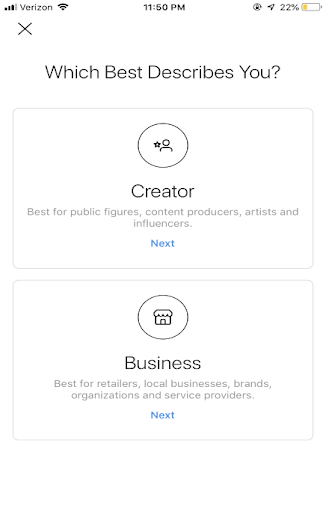
You will see that Instagram has rolled out a unique business account dedicated to a public figure, influencers, and others. If you have products and services to sell, then a business account will be the right choice for you.
Step 4: Connect your Instagram business account to your Facebook page
After you’re done switching your account to a business account, the next thing to do is connect your Instagram account to your Facebook page. To take this action, you must have admin access. Once you’re done confirming the Facebook page, which you will be connecting, your business profile is ready to get launched.
However, if you are a creator, then you need to switch to a creator profile. Along with that, you will also have to select the right category. Check the image below to understand better.
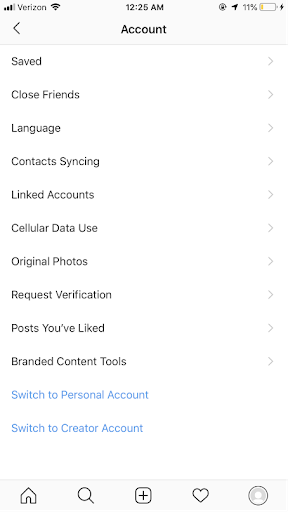
These are the simple steps to follow to switch to an Instagram business profile. If you feel like switching back to your personal account at any given point, you can switch to a personal account easily.
To do that, go to the settings option. From the menu, move your mouse to the bottom to locate the Switch to Personal account or Switch to Creator Account.
