


Instagram is one of the largest and most popular social media platforms for sharing visual content, with over a billion monthly active users.
Many Instagram users spend a lot of time creating content and editing their videos and photos to attract more followers by sharing them, and their posts get a lot of views.
But sometimes, they may accidentally delete their posts or regret deleting them and look for a way to recover deleted posts. Instagram app has a feature called “recently deleted” that many people are unaware of.
Buy an Established Instagram Account
Skip starting from zero. Browse Instagram/TikTok accounts with audiences across many niches.
See Available AccountsThis feature allows users to restore deleted Instagram photos and posts under certain conditions.
Moreover, some other methods help you to recover your Instagram posts after deleting them, which we will cover later.
This article will explain restoring deleted Instagram posts and their important tips. So, keep reading!
What Is Instagram’s Recently Deleted Feature?
As mentioned, Instagram’s recently deleted feature allows users to review and recover deleted Instagram posts.
You may think that when you delete a post on the Instagram app, that post is gone forever. Still, the fact is that deleted Instagram photos and posts remain in the recently deleted section for 30 days, and if you don’t touch them or want them back, they will be removed permanently.
The content placed in the recently deleted folder includes posts, IGTV, reels, and stories. But you should pay attention that stories, unlike posts, stay in the recently deleted folder for only 24 hours, and then they are automatically deleted forever.
This feature also protects your account from hackers; as you know, if hackers gain access to an Instagram account, they can easily delete photos and videos from that account.
But this feature prevents this because when you want to use the recently deleted section and recover deleted Instagram photos and videos, you must confirm that you are the account owner through email or phone number, so hackers cannot access and control your account.
How To Access the Recently Deleted Section?
So far, we have discussed the interesting features of the recently deleted section; now it’s time to see how you can access the recently deleted folder. Follow the steps below to access this section:
Step 1- Open the Instagram app and go to your profile by tapping the profile icon at the bottom right of the screen
Step 2- Click on the “three lines” icon in the top right corner and go to the “settings”
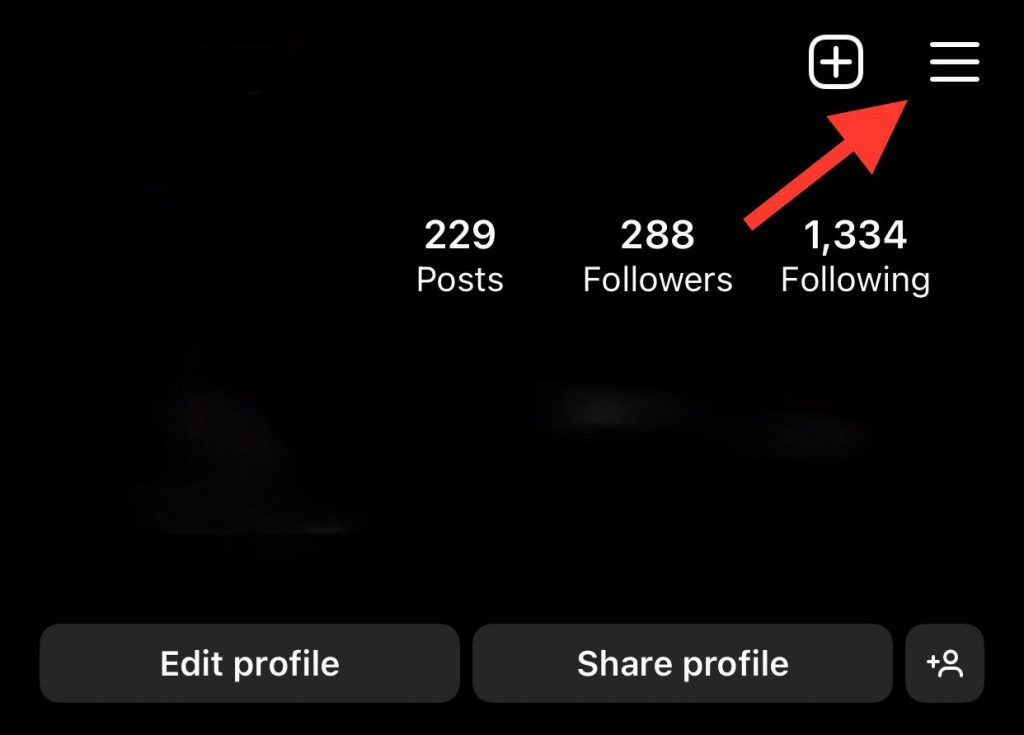
Step 3- Choose “account” and scroll down to find “recently deleted”

Step 4- Now, you can select the photos, videos, reels, or stories you want to restore or delete permanently.

Following these simple steps, you can access the recently deleted folder, select the desired content, and restore or delete it.
Note that if you haven’t recently deleted any content, you won’t see any deleted photos or videos in that section.
Other Ways to Recover Instagram Deleted Posts
As mentioned, apart from using the recently deleted folder, there are other ways with which you can view deleted content on Instagram.
In the following, we have listed some of the most important and easiest ones for you and explained them fully.
- Use Instagram Archive to restore deleted posts
This feature is for restoring deleted stories. Every story you share will be saved forever in the archive section after 24 hours, allowing you to access and restore them if needed.
Follow the steps below to restore old stories from the archive section:
Step 1- Open the Instagram app and go to your profile
Step 2- Then, tap on the three dashes icon and go to the settings menu
Step 3- You need to select “archive” from the options of the settings

Step 4- Now, tap on the “stories archive” drop-down, and a menu will appear that has 3 options: Stories archive, posts archive, and live archive.
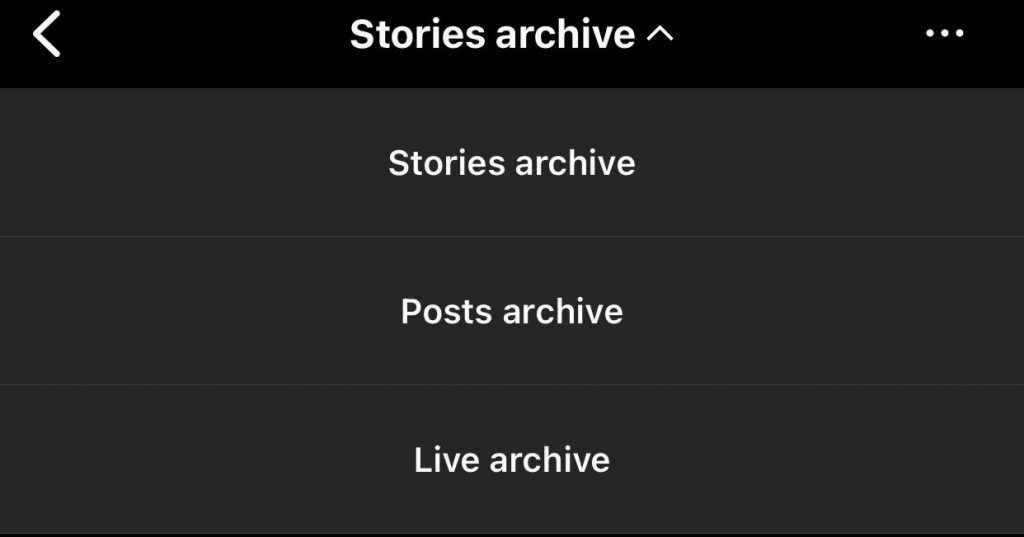
Step 5- Choose the archive you want, and you will see the content of each section which you can restore easily.
Remember that you can see archived posts if you have already archived them; otherwise, you will not see any posts in that section.
To archive the posts, select the desired post, click on the three dots option in the right corner, and then select “Archive” from the options to complete the steps.
- Check your mobile gallery (Android and iOS)
One of the best ways to recover deleted Instagram posts is to check your gallery and mobile memory. This section explains how Android and iOS users can recover deleted Instagram photos and videos through phone galleries.
- Android users:
Step 1- Open “My Files” or “File Manager”
Step 2- Then tap on “Internal storage” to see the list of your files
Step 3- Choose “Pictures” and then scroll down to find Instagram
Step 4- Now, you can see the deleted Instagram posts
Tip 1: You can only find the Instagram album among the files if you enabled the specific feature on Instagram to save your posts
Tip 2: In this file, you will find the photos or videos you took with the Instagram camera, not all the content.
- iOS users:
Step 1-Open the “Photo”
Step 2- Select the “album” symbol at the bottom of the screen next to the “search” icon
Step 3- Choose the “Instagram album,” and you will see all the photos and videos taken by the Instagram camera.
- Check the Facebook gallery for Instagram deleted posts
Some Instagram accounts are also connected to Facebook accounts, which is often helpful.
Suppose your Instagram account is linked to Facebook. In that case, the auto-repost feature is activated automatically, with the help of which you can find deleted Instagram posts in the Facebook gallery.
If auto-repost is not turned on, you can click on the black option on Facebook when you post content to use its features later.
Final Thoughts
As mentioned, restoring deleted Instagram posts and stories is possible under certain conditions. The first method to restore deleted Instagram content is to refer to the recently deleted section, which we explained comprehensively with all its features.
But this article differs because we have introduced some simple but important solutions to help you effortlessly find and reuse deleted Instagram photos, videos, stories, and reels.
Note that if you have yet to delete the Instagram posts yourself, they may have been reported or broken the rules of Instagram, and they have been deleted, in which case it will be a little difficult to recover them.
Follow what we have done, and you can hope without any worries that you can recover any content under certain conditions.

Emi Daniel
Buy an Established Instagram Account
Skip starting from zero. Browse Instagram/TikTok accounts with audiences across many niches.
See Available AccountsRelated articles
-

How to Use Instagram: The Creator’s Guide to Building an Audience
Instagram in 2026 is no longer just a place to collect followers. The creators who grow consistently are the ones who understand how to earn attention, turn…
17 min readEmi Daniel
-

How to Go Live on Instagram: A Step-by-Step Guide
Going live can feel more stressful than posting a Reel. You cannot remove a pause, rewrite a sentence, or start over after an awkward moment. But that…
17 min read -

Instagram Instants Feature: What It Is, How It Works, and How to Turn It Off
The first time I opened Instagram Instants, I almost backed out. I had taken a normal photo. Nothing worth editing. Nothing worth posting. Nothing that needed an…
11 min read