


Do you use Instagram Quiet Mode?
Instagram is undoubtedly one of the most popular social media platforms. Millions of people spend a large part of their time daily using this program to have fun, shop, or even become famous and earn money.
One of the most critical features of the Instagram app is its successive updates, such as parental supervision tools and quiet mode. These updates make it popular and, of course, make the work of its users easier.
Buy an Established Instagram Account
Skip starting from zero. Browse Instagram/TikTok accounts with audiences across many niches.
See Available AccountsThe most recent and loudest update was the Quiet Mode feature that was added to it. But what does this mean, and why is it so popular?
Keep reading if you want to know more about this fantastic new feature and how to enable quiet mode on your Instagram account!
What is Instagram Quiet Mode?
Apart from updated parental supervision tools, the latest update of Instagram, called Quiet Mode, is like a do not disturb sign!
This feature means that you can spend time without constant Instagram notifications.
You can use this option for a specific time you want, for example, from tonight to the following day or as you wish!
When you enable this feature, all notifications will be stopped. But not everything ends here! More interestingly, your profile also changes and shows the quiet mode, which makes people know that you are not available now.
But does this feature cause you not to receive any messages? Does that mean others will not be able to message you?
No! Here is an interesting point. When you enable this mode, others can still send you direct messages, but the platform will not notify you.
They will automatically receive a reply that says this user has enabled “Quite Mode,” which is like you have an assistant to let others know you are unavailable while you are away!

So far, this feature sounds great, which it is. But don’t worry about missing notifications at all. This feature does not mean you will never receive notifications that came to you when this mode was active.
When you disable it, Instagram will show you a quick summary, and you can easily follow them all and not miss anything.
How to Enable Quite Mode on Instagram
You need to go through a few steps to turn quiet mode on your Instagram. But before anything, ensure your Instagram is updated to the latest version because your current version may not support this option.
Take the steps below to enable quiet mode:
Step 1
Open Instagram and click on the “Profile” icon at the bottom right corner.
Step 2
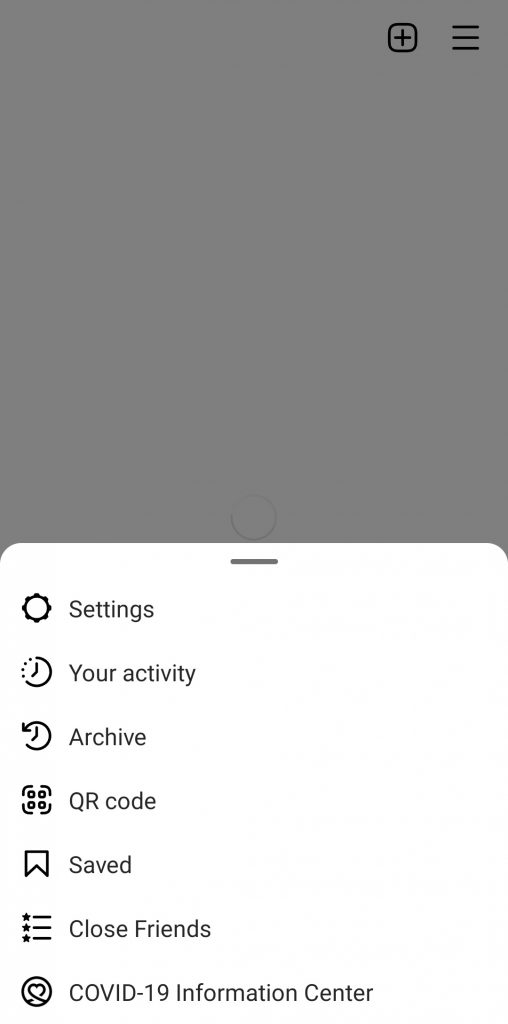
Click on the “Three-dash” or “Hamburger” menu at the top right corner.
Step 3
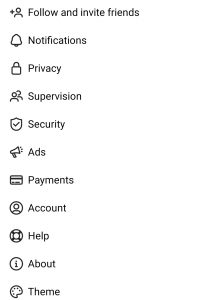
Then choose “Settings” and then select “Notifications.”
Step 4
Now you can see an option named “Pause All” tap on it to enable the option. The toggle will turn blue.

Step 5
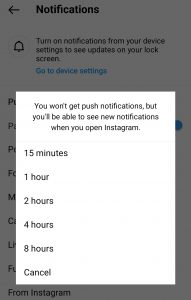
After that, you will get a section with several minutes or periods you can choose.
They vary from 15 minutes to 8 hours; choose one as you wish!
By following these few simple steps, you can easily enable Quiet Mode on Instagram, and you will not receive any notifications at the time you have specified.
How Does this Feature Help the User?
As we mentioned earlier, Instagram’s goal of subsequent updates is to provide better services to its users and help them to use Instagram easier.
The purpose of adding this new feature to the latest update is precisely the same.
In this part, we will find out how this new feature helps Instagram users to have a better experience using Instagram.
No more annoying notification
This feature makes you get rid of constant and annoying notifications. You don’t have to endure the notification sound every moment!
Time managing
By activating quiet mode, you can save the time you spend online and also your energy. You don’t need to check the message. After you disable this mode, you can see a summary of notifications and check the most important ones. So you can manage your time.
Define boundaries
This feature allows you to set certain boundaries with your friends or followers. You don’t have to be active constantly, and they expect you to answer them. Therefore, they understand they should not send you messages whenever they want.
Limit usage reminder
This feature allows you to limit the time you use the Instagram application. You can get away from social media and get to other things by activating this feature.
Because once you enable quiet mode, you will no longer receive any messages, limiting your time on this app.
Customize Quiet Mode
You can easily customize your quiet mode hours to fit your schedule. So, if you want to study or are in a meeting and don’t want any disturbance, you can select the time of your quiet mode based on your schedule. It’s all up to you!
How to Turn Off the Quiet Mode on Instagram
As we said in the previous parts, by activating this option, you can stop Instagram notifications for a while and then disable them again and receive and check them.
Disabling this option is as easy as enabling it, and you can disable it by following a few simple steps.
Step 1
Open Instagram and choose the “Profile” icon
Step 2
Choose the “Three-dash” icon
Step 3
Go to the “Settings” tab
Step 4
Click on “Notifications”
Step 5
Tap on “Pause All,” and the toggle will turn gray, and the Quiet Mode will be disabled.
You can simply disable this mode and receive all the notifications you got while you activated the feature.
Conclusion
As mentioned earlier, Instagram is one of the most popular and famous social media platforms, with many users worldwide. Therefore, it is natural for this platform to release continual updates, so the users have a better experience using the application. So try to always keep your Instagram updated and be aware of the new features of this unique application and use it. For now, if you are tired of constant notifications, getting help from this blog, activating the “Quiet Mode” feature, having more peace for a few hours, and staying away from social media. Other updates on Instagram, such as parental updates that offer more control over younger users, are also worth seeing. You can follow Social Tradia’s blog to keep updated in this regard.

Emi Daniel
Buy an Established Instagram Account
Skip starting from zero. Browse Instagram/TikTok accounts with audiences across many niches.
See Available AccountsRelated articles
-

How to Use Instagram: The Creator’s Guide to Building an Audience
Instagram in 2026 is no longer just a place to collect followers. The creators who grow consistently are the ones who understand how to earn attention, turn…
17 min readEmi Daniel
-

How to Go Live on Instagram: A Step-by-Step Guide
Going live can feel more stressful than posting a Reel. You cannot remove a pause, rewrite a sentence, or start over after an awkward moment. But that…
17 min read -

Instagram Instants Feature: What It Is, How It Works, and How to Turn It Off
The first time I opened Instagram Instants, I almost backed out. I had taken a normal photo. Nothing worth editing. Nothing worth posting. Nothing that needed an…
11 min read