
Ever wondered who’s viewing your Facebook profile? With Facebook’s Featured Collections, you can now get a glimpse into who’s paying attention. Similar to Instagram Highlights, this feature lets you showcase select photos, but it also reveals a list of “Featured Viewers.”
When you access your featured images on Facebook, you will see a list of “featured “viewers and “others,” which shows who has checked your Facebook profile.
If you are trying to figure out what these two terms mean, you are in the right place. In simple words, when you have a publicly featured collection on Facebook, those who view your profile are called “featured viewers,” and those who are not your friends are “others.”
In this article, we will explore the concept of featured viewers on Facebook, discuss the steps to access your featured viewers, and provide additional valuable insights.
Who Is A Featured Viewer On Facebook?
When you create a featured collection on Facebook, a set of selected photos or highlights, this collection becomes visible to both your friends and, depending on your privacy settings, non-friends. People who view your featured collection are recorded in a list called “viewers.”
Featured viewers are your Facebook friends who have looked at your publicly shared featured collections. They are different from “other viewers,” who are not your friends but may still see your collection if it’s public.
Knowing who your featured viewers are can help you understand who is actively engaging with your content, giving you insights into which friends are most interested in your posts and highlights.
Why Does the Featured Viewer Matter?
The concept of Facebook featured viewers is important as it gives you information about who is accessing your content.
Here’s why this feature is important:
- Track Engagement: The featured viewers show you which of your friends are viewing your posts and highlights. It can help you understand which friends your posts and highlights appeal to.
Knowing who interacts with your featured collections is just one way to boost engagement, and combining it with strategies like interactive Facebook posts can help you get even more attention from friends.
- Build Stronger Connections: Since you would be aware of the list of people who visit your highlighted collections, it would be easier for you to identify your friends who take a genuine interest in your updates.
- Make Yourself More Visible on the Platform: Having active feature viewers means that your work is going to be seen and shared in the community. Knowing how your highlights are being engaged with is an excellent way of maximizing your posts to have increased interaction.
- Monitor Privacy and Activity: The “Featured Viewers” offer a subtle means to track audience views without invading privacy. You can see which friends are viewing your collections and adjust your privacy settings if needed.
While not a complete record of all profile visitors, featured viewers give actionable insights into who is interacting with your publicly shared content, helping you manage engagement, privacy, and your social presence effectively.
How Facebook Tracks Who Views Your Profile and Interacts With You
Many users are wondering whether the Facebook platform allows them to view the people who visit their profile pages.
The Facebook platform does not offer users a list of all the people who visit their profile pages. However, it offers ways to track engagement, and this helps users understand the visitors to their pages.
Here is how it works:
Featured Collections and Story Views
When you upload a featured collection or share a story on Facebook, you can see who has viewed your content.
For featured collections, the viewers are referred to as “featured viewers.” You will be able to view the total number of people who have viewed your stories, and based on privacy settings, who they are.
Post Interactions
Likes, comments, shares, and reactions can be tracked and viewed. These actions show you which people are interacting with your posts. Although it’s not possible to see people viewing your profiles, it can show you which of your friends are paying attention.
Page and Group Analysis (for creators and businesses)
Facebook Pages and Groups give you information about engagement rates, views, and other activities, in addition to information for the administrators.
Limitations
- Not all people visiting your profile can be viewed.
- The third-party apps that claim to provide information about who visited people’s profiles are not trustworthy and can be a privacy risk.
- Only interactions with public shared content, such as featured collections, stories, or posts are monitored.
Facebook tracks engagement and interactions rather than complete profile views. By focusing on featured viewers, story viewers, and post interactions, you can get a clear sense of who is engaging with your content while respecting privacy rules.
Finally, beyond featured viewers, engaging directly with your audience through tools like Facebook Live can help you track who interacts with your content in real time and boost overall engagement.
How to Access Facebook Featured Viewers in 2026?
If you are wondering whether you can see the featured viewers on Facebook, the answer is yes, and you can check the steps in the section below.
Access Facebook Featured Viewers on Mobile (iOS/Android)
Step 1- Open the Facebook app and log in.
Step 2- Tap your profile picture to go to your personal profile.
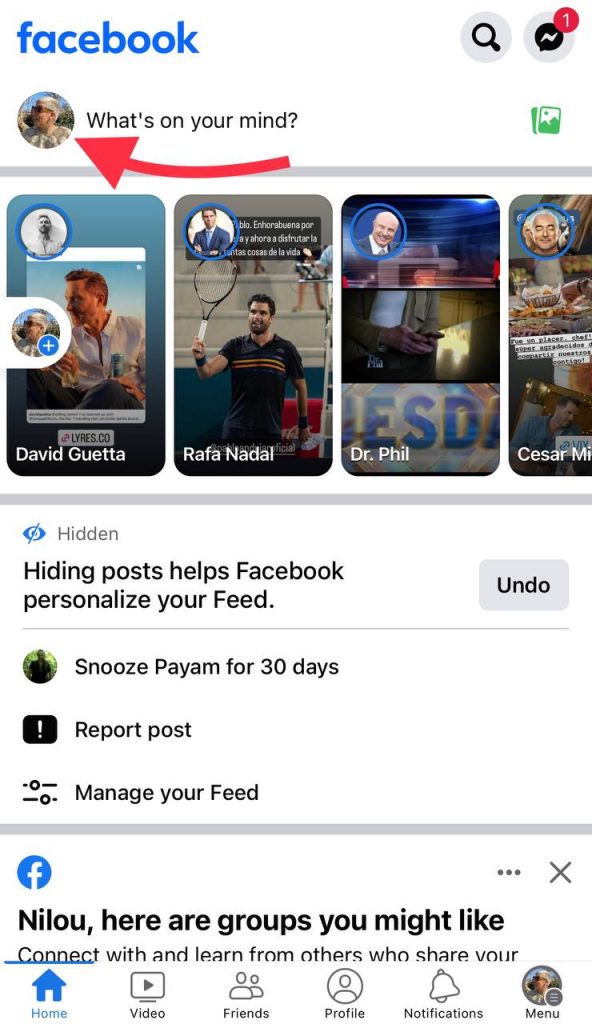
Step 3- Scroll down to the Featured section (the horizontal section of highlighted photos/videos).
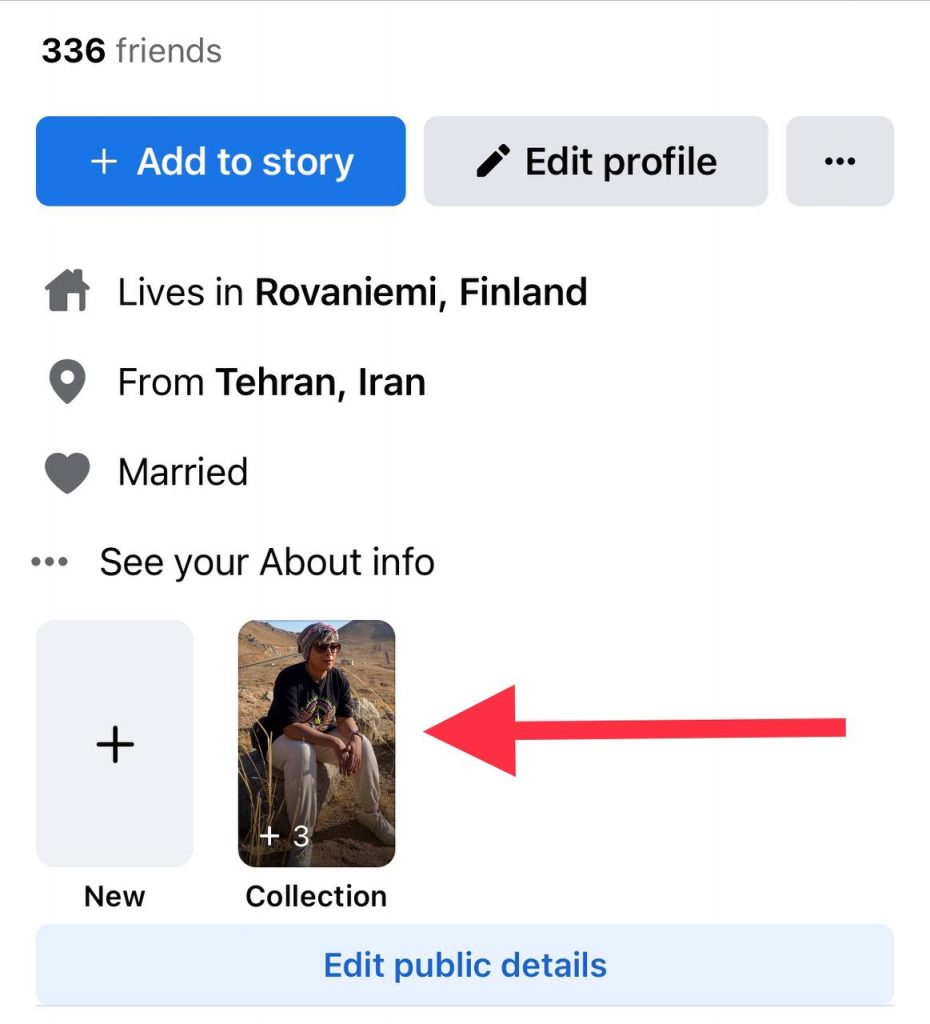
Step 4- Tap the specific Featured collection you want to inspect.
Step 5- Look for a view count (e.g., “12 views”) in the bottom corner.
Step 6- Tap the view count or arrow icon; a panel will pop up showing:
- A list of friends who viewed it, with their names and profile photos.
- A count of “Others” (non‑friends) when applicable, but you will not see their names.
Access Facebook Featured Viewers on Desktop (Browser)
Step 1- Go to facebook.com and sign in.
Step 2- Click your profile.
Step 3- Find the Featured box on your profile page.
Step 4- Click a featured item.
Step 5- Click or hover the viewer count (or arrow) to view the list of viewers (friends only). Non‑friends appear only in the total count (“Others”).
Following these simple steps will help you manage to see all the people who have checked your Facebook stories and featured collections.
Featured Viewers vs. Other Viewers: What’s the Difference?

As mentioned, featured viewers are your Facebook friends who have checked your profile and featured collection.
Other viewers are not on your Facebook friend list but have visited your profile because they are interested in your featured photos.
Note that you may see this group under “people you may know,” which means they are not your friends but have simply viewed your photos.
Who Counts as “Other Viewers” on Facebook?
Other viewers are people who have looked at your publicly shared featured collections or stories, but are not on your Facebook friends list.
- They can include followers, mutual friends who aren’t added as friends, or random users who have access to your public content.
- Unlike featured viewers, you cannot see detailed information about these users beyond the total count.
- Their presence can help you understand the reach of your public posts and who outside your friends list is engaging with your content.
Can You See Other Viewers On A Facebook Story?

On Facebook, you cannot see detailed information about other viewers on your story if they are not your friends. You will only see the total number of people who have viewed your story, but individual names are only visible for friends.
If your story’s privacy setting is set to public, anyone can view it, but you won’t be able to identify non-friends individually. Adjusting your privacy settings to limit story visibility to friends or custom lists gives you more control over who can see your content.
In short, while you can track engagement from friends on your stories, other viewers remain anonymous, and the total count is the only insight Facebook provides.
What Are the Benefits of Being A Featured Viewer On Facebook?

If you think being a featured viewer on Facebook has no benefits, you are mistaken because it can help you in different ways, which we will explain in this section.
Being a featured viewer can increase your engagement because your name will be displayed on the profile of the users you follow, which makes you more noticeable.
Besides, it can help you better interact with others, as it enables you to share your thoughts more easily and build better connections with others on Facebook.
Finally, being a featured viewer can improve your trust among others because you will be recognized as an active and engaged member.
How to Add Photos to Facebook’s Featured Section?
If you want to share your recent pictures with your friends on Facebook to make a featured collection, just follow the simple steps outlined below.
Step 1- Open Facebook on your device and log in to your account.
Step 2- Tap on the profile picture at the top of the screen.
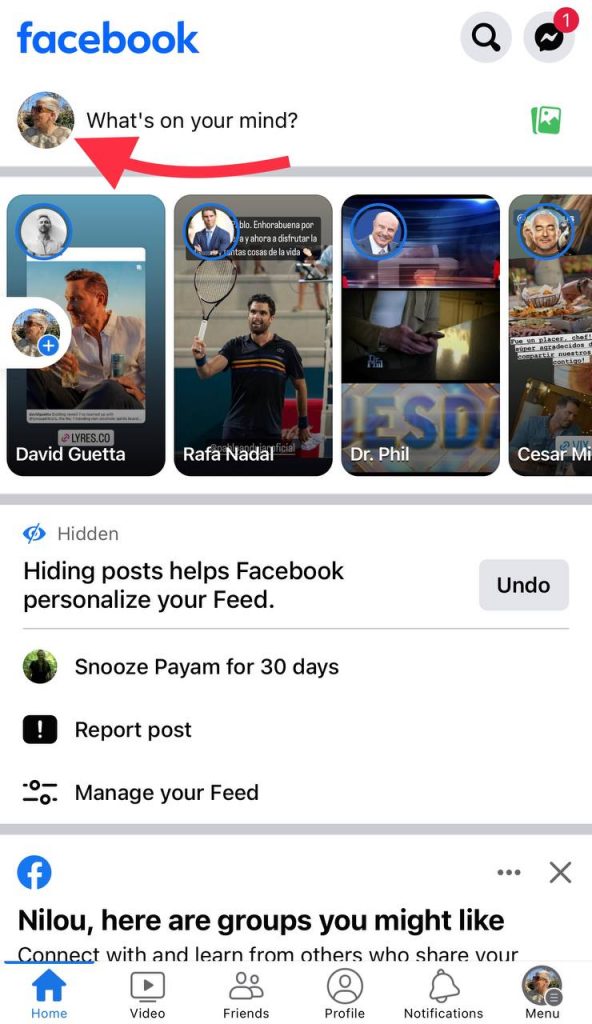
Step 3- Scroll to the “Featured” section and select a collection.
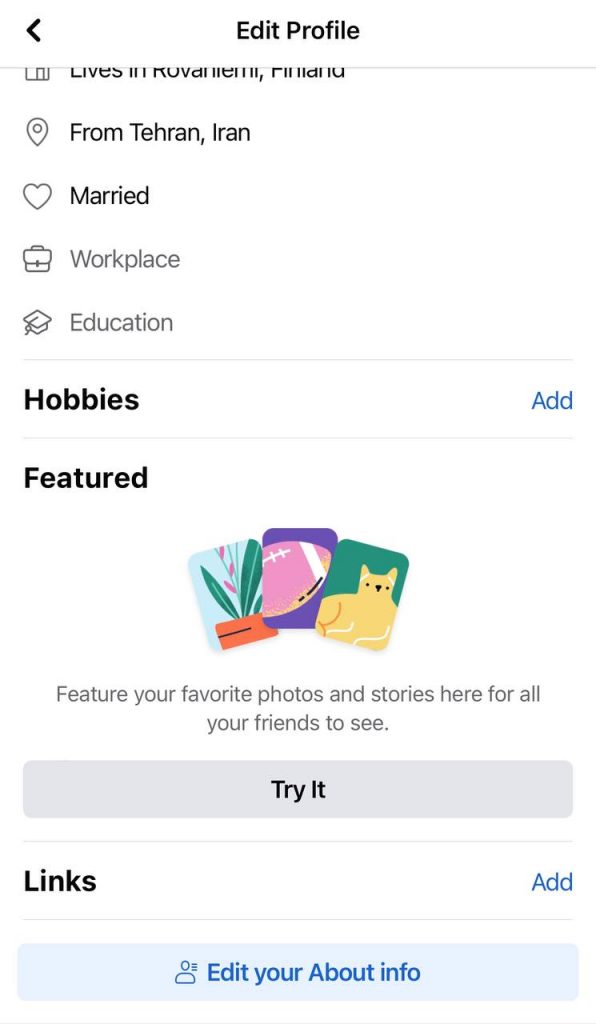
Step 4- Now, click “add new” and then select the image you want to add from your profile.
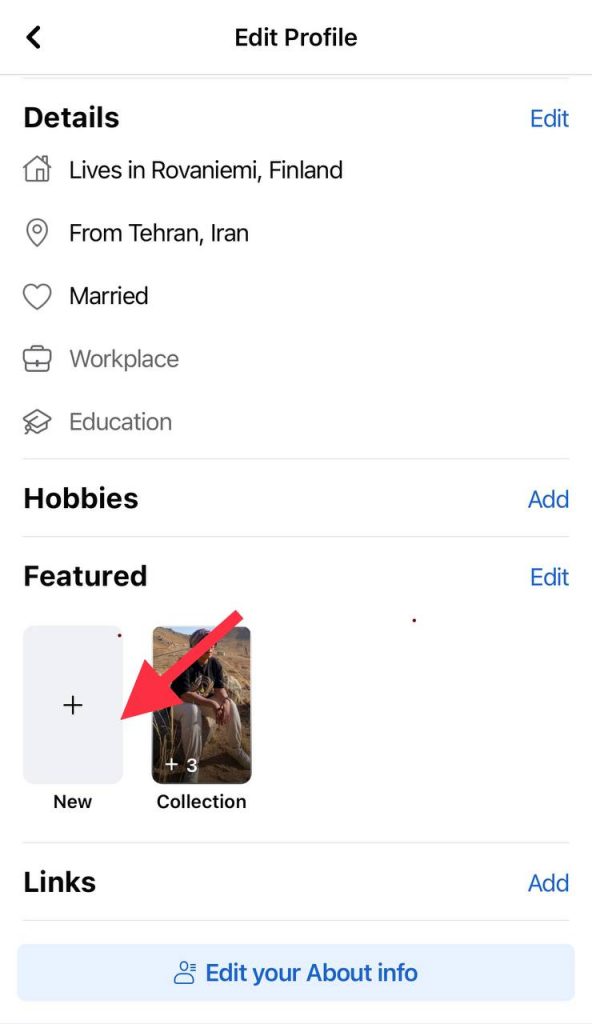
Step 5- Tap on “next” to edit the cover of the photo for the featured section.
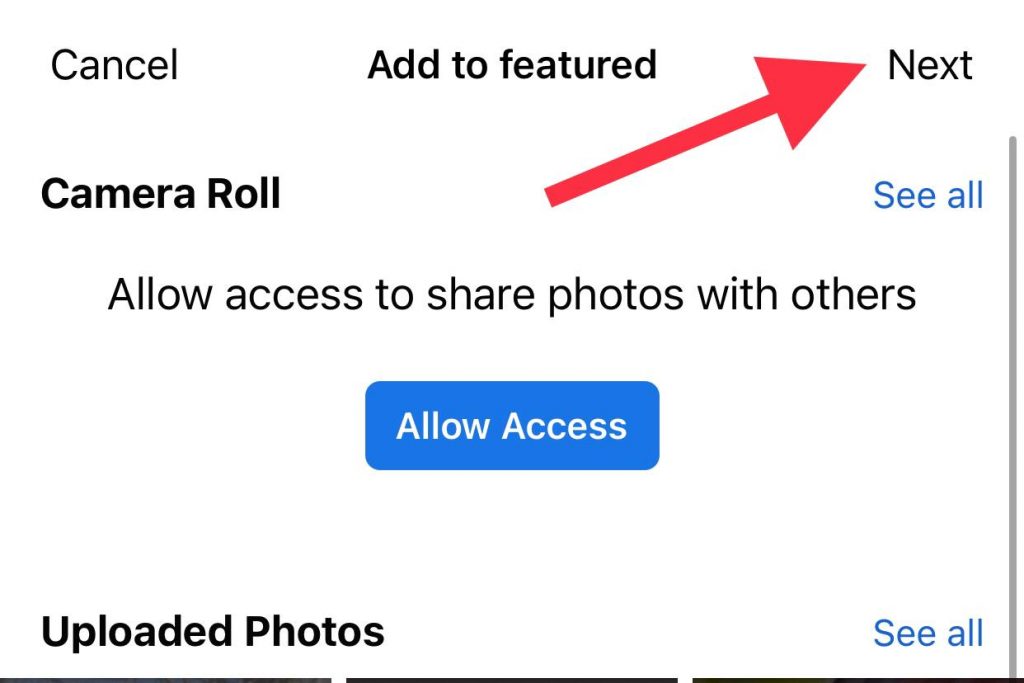
Step 6- When you select all the images, click save to finish the process.
*Note that if you want to upload more than one picture, you can click on “upload photos.”
Facebook Privacy Tips: Manage Your Profile Visibility
Managing your Facebook profile visibility is essential for protecting your personal information and controlling who can see your content. Here are key tips:
- Review your privacy settings regularly to control who can see your profile, posts, and featured collections.
- Customize story visibility to limit who can view your Facebook stories.
- Adjust post audience so only friends, selected friends, or the public can see your updates.
- Limit interaction permissions by controlling who can comment on your posts or tag you in content.
- Manage older content to ensure past posts are visible only to the people you choose.
By following these steps, you can maintain control over your Facebook presence, keep your content private, and still allow friends to engage with your featured collections.
If you want more control over who sees your profile content, you can adjust settings like turning off Professional Mode on Facebook.
Conclusion
If you have a featured collection on Facebook, you are most likely to come across your viewers’ list to see who has checked your photos.
Understanding who your story’s viewers are can provide valuable insights into who is more interested in your profile or just curious about what is going on in your life.
Featured Viewers give a subtle hint about who’s checking out your content on Facebook. Whether you’re looking to boost engagement, track interest, or just stay informed, this feature provides some light insights.
This comprehensive guide completely explained what is a featured viewer on Facebook, told you the difference between “featured viewers” and “others,” discussed how to view your featured viewers list, and more.
We hope you find this article useful, and it helps you better understand what a featured viewer is on Facebook.
FAQs
What is the meaning of “other” viewers on Facebook?
The “other viewers” are people who have viewed your stories on Facebook but are not on your friends list. For example, if the message says 20 people viewed your story, it means those 20 users who are not your friends on Facebook have checked your story.
Can someone know I viewed their featured photos on Facebook?
No, unless you’re their Facebook friend and your name appears under their “Featured Viewers” list.
Why do I see other viewers on my Facebook stories?
The “other viewers” can be your followers or random people who have checked your Facebook profile. If the privacy settings of your story are public, you will see other viewers on your stories.
Can I see how many times someone has viewed my Facebook profile?
No, Facebook does not tell you how often your profile has been checked or how many times you have seen others.
Can I remove myself from someone’s featured viewers?
No, once you view a featured collection, it’s logged. To avoid this, view it while logged out or from a different account.
