


Did you know that Threads got more than 100 million people to sign up in just five days after it started? Even though it grew so fast in 2023, not everyone wants to make or keep another social media account.
If you feel worried about your privacy, want to spend less time on your phone, or think that Threads is not a good fit for you, this guide will help you. It will show you what you have to do to delete your Threads account. You can find all the information you need right here.
It is important to know how Threads and Instagram are linked before you delete anything. If you remove Threads, it can change your linked Instagram. There are also some things you need to think about to keep your data.
Buy an Established Instagram Account
Skip starting from zero. Browse Instagram/TikTok accounts with audiences across many niches.
See Available AccountsIn this post, we will discuss deleting your Threads account and share with you some other options. This will help you make a good choice about using Threads.
Understanding Threads and Account Management Basics

Before exploring account management, it’s important to understand what Threads is and how it differs from Instagram.
What Is Threads and How It Differs from Instagram
Threads is a text-focused place from Meta. It is built to compete with Twitter, which is now called X. People use Threads to talk with others in public. Instagram is used more for sharing photos and videos. Threads stands out because it is about text and helps people have open talks.
The main thing that sets these apart is how the platforms talk to each other. Threads works with Instagram as a partner app. You use your Instagram login to get into Threads.
Unlike Instagram, which is where people share photos and videos that look perfect, Threads is about talking to one another. Here, text posts are what you see the most. You can make messages that have up to 500 characters on Threads. This helps people put their thoughts out there. It also lets them be part of talks in a simple and easy way.
Threads lets you share photos and videos. But, the main thing that people do on this platform is talk to others using text. That is where the name comes from.
When you sign up, Threads uses your Instagram details. Your username, who you follow, and the blue mark for being verified will come right from Instagram. So, your Threads page will look a lot like your Instagram. These things are all linked, and this can change how you use your account on both apps.
Why People Choose to Delete Their Threads Accounts
Many people delete their Threads accounts for more than just wanting to spend less time on social media. A lot of them want to keep their privacy safe. Some people learn about how much data the app collects after they have already joined. Others feel that too many notifications get to be a lot. Some users also say the app makes it tough for them to work well or feel good in their minds.
Some people feel there is too much to do when they use both Instagram and Threads together. The app can have problems with how well it works. There is not as much you can do on it as you get on other apps. It can also be hard to link it with Instagram. All of this can make people want to delete the app.
Also, people who want to keep their work and home lives on the internet apart often find it hard to do this with Threads. The app is closely linked to Instagram, so it can be tough for them to manage their brand or keep their privacy.
Temporary Deactivation vs. Permanent Deletion: Key Differences
It is important to know that deactivation and deletion are not the same before you do anything to your Threads account. When you decide to deactivate for a short time, this will hide your profile, posts, likes, and comments from other people. But all your account data will still be safe on Meta’s servers. If you want to get back on your account, you just have to log in again. This way, you can take a break and still keep everything you have.
When you choose to delete your Threads account for good, the app will start taking out all your details, posts, and info from your profile after 30 days. After this waiting period is over, you will not be able to get your account back.
The most important thing to know about Threads is how it links with Instagram. Right now, you can’t delete Threads by itself. This is because it goes together with Instagram. To take Threads off, you have two choices. You can delete your whole Instagram, or you can try a different way that we will talk about in this guide.
Before You Delete: Important Considerations to Remember
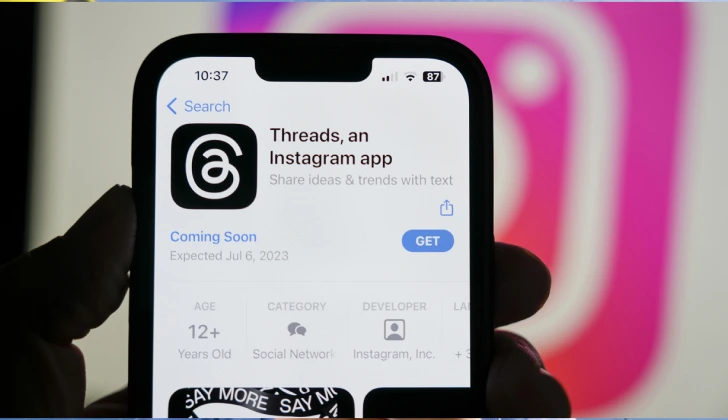
Before you delete your Threads account, it’s essential to understand how the deletion may impact your connected Instagram profile.
How Account Deletion Affects Your Instagram Profile
The close link between Threads and Instagram is something you should think about before you delete your Threads account. If you go through the usual steps to remove your Threads, your Instagram will still be up. The photos, stories, followers, and messages that you have on Instagram will not go away. Still, if you posted the same thing on both places, you might notice some change in the likes or comments on those posts.
The details you put in your Threads profile, like your bio or the people who follow you, will not be there if you delete your account. If you have a lot of followers on Threads who are not the same as your Instagram followers, this difference will stay.
Meta’s privacy policy says that the company can hold on to your data for reasons like fixing problems or following the law, even after you remove it. But, this information is not connected to you or your account anymore, and they cannot use it to find out who you are.
What Happens to Your Content After Deletion
When you delete your Threads account, other people can’t see your page right away. But your posts, comments, and information do not leave Meta’s servers right then. Meta’s data policy says your stuff, like posts and comments, is not seen by the public after this. Your things still stay on the company’s servers for 30 days. You have time during these days to get your account back if you want.
After these 30 days, Meta will begin to remove your content forever. But some details might need to stay longer if they are needed for tech, law, or business reasons. If you have sent messages or shared things with people, they can still see those even after you delete your account.
Also, when you use the platform, the data about how you use it may still be kept in Meta’s analytics databases even after they take out your name and other details that are just about you.
Backing Up Your Threads Data: A Step-by-Step Guide
Before proceeding with deletion, preserving your Threads content is recommended, especially if you’ve shared important conversations or built a significant presence. Start by requesting your data download through the Threads app:
1. Open the Threads app and navigate to your profile
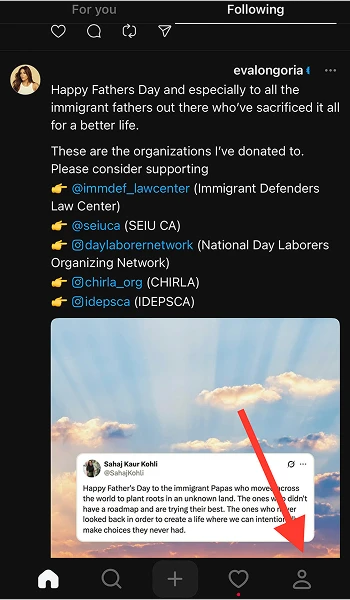
2. Tap the two lines in the upper right corner
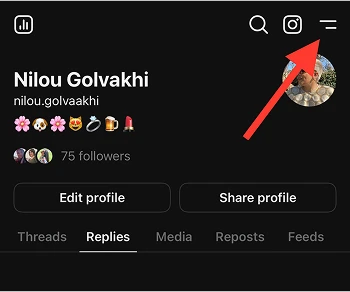
3. Select “Settings”
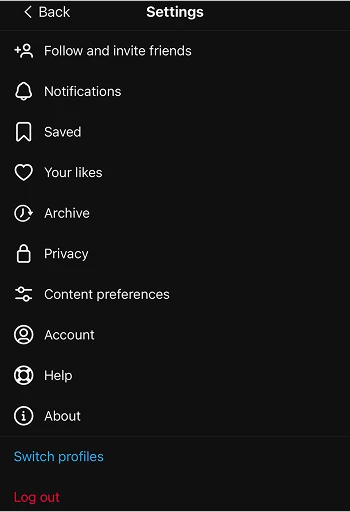
4. Choose “Account”
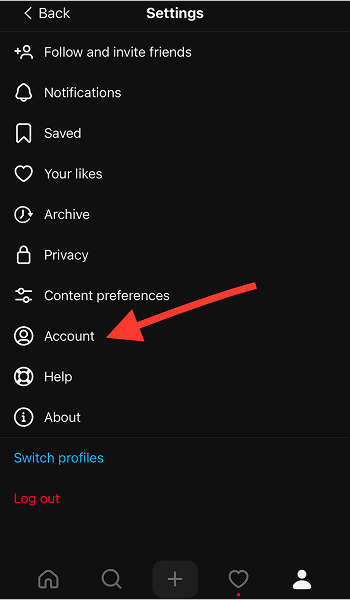
5. Tap “Download your information”
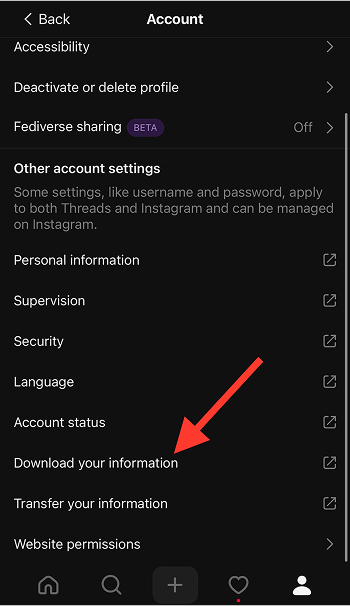
6. Follow the prompts to request your data
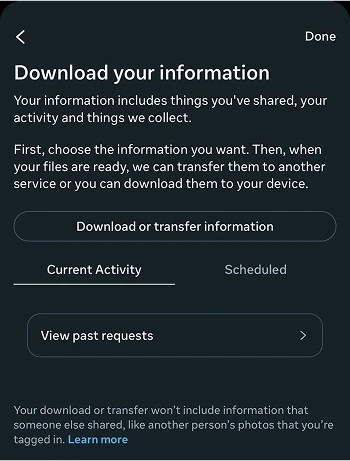
Your download will include your posts, comments, profile information, and activity history. The request processing typically takes several days, and you’ll receive a notification when your data is ready. The export comes as a downloadable ZIP file containing HTML and JSON formats of your content history. For posts with images, take screenshots of particularly important content as a secondary backup method before initiating deletion.
Step-by-Step Process to Delete Your Threads Account

To begin deleting your Threads account, first access the account deletion options directly through the app’s settings menu.
Accessing Account Deletion Options Through the App
To delete your Threads account, first go to the app’s settings. A lot of people don’t find this spot right away. Open the Threads app on your phone. Make sure you are signed in with the account you want to delete. Tap the profile icon at the bottom of the screen to go to your page.
Go to your page and look for the hamburger menu icon. These are the two lines you see in the top right corner. Tap it to open up the main menu. Pick “Settings” from the list you see there. This will take you to the place where you can handle your profile.
In Settings, tap on “Account” to find where you manage your info. Here you will see more ways for you to use Threads. You can also see choices to turn off or remove your Threads here. We will talk more about these in the next part.
5 Essential Steps to Permanently Delete Threads
To permanently delete your Threads account while keeping your Instagram account active, follow these specific steps:
- Open the Threads app and navigate to your profile
- Tap the two lines in the upper right corner and select “Settings”
- Choose “Account,” then “Deactivate or delete profile”

- Select “Delete profile” (not “Delete account”)

- Review the information about what will be deleted, then confirm by tapping “Delete Threads profile”
This method deletes only your Threads profile while preserving your Instagram account. The platform will confirm your decision and inform you about the 30-day recovery period. During this time, your profile becomes invisible to others, but you can log back in to cancel the deletion process. After 30 days, your Threads profile and its contents are permanently removed from the platform.
Common Error Messages and How to Resolve Them
When you try to delete your Threads account, you might run into some error messages. A message that many people get says, “We’re sorry, but we’re having trouble processing your request right now.” This can mean the server is busy or there is a problem with your connection.
To fix this, you need to check your internet connection. Try to switch to Wi-Fi if you are using mobile data. If you are already on Wi-Fi, try using mobile data. You can also try again to delete it when there are not lots of people online. This can help make things work better.
Another message you might see is, “Your account can’t be deleted at this time because of active subscriptions or purchases.” This comes up if you still have some subscriptions or purchases going with Instagram. You will need to cancel these subscriptions first with Instagram. After you do that, wait for about 24 to 48 hours. Then, you can try to delete Threads again.
If you see “Account verification required,” this means you need to give more proof about who you are. You should follow the steps you see on your screen. These steps might ask you to look at your email, use your phone number, or send ID papers. You need to use Instagram’s own system for this. Once you finish, you can try to delete your account again.
Alternative Options to Consider Before Deleting Your Threads Account

If you’re not ready to delete your Threads account permanently, there are alternative options like temporarily deactivating it to consider.
How to Temporarily Deactivate Your Threads Account
If you’re unsure about permanent deletion, temporary deactivation offers a middle-ground solution. To deactivate your Threads account:
- Open the Threads app and go to your profile
- Tap the hamburger menu (two lines) in the top right
- Select “Settings” then “Account”
- Tap “Deactivate profile”

- Choose your reason for deactivation and confirm
During deactivation, your profile becomes invisible to other users, and your content won’t appear in searches or feeds. Your username remains reserved, and all your data stays intact on Meta’s servers. You can reactivate anytime by simply logging back into the app with your credentials.
This option provides a cooling-off period without the permanence of deletion, making it ideal if you’re experiencing temporary platform fatigue or need a social media break.
Adjusting Privacy Settings to Limit Your Visibility
Before you think about deleting your profile, try changing your privacy settings first. This way, you can have a better time on Threads. Start by deciding who can mention you. Go to Settings, then Privacy, and tap Mentions. Pick “People you follow” instead of “Everyone.” You can also choose who can reply to your posts. Go to Settings, then Privacy, and tap Replies. There, you can pick “Profiles you follow” or “Mentioned only.” This helps make it feel safer and only lets the people you know join in.
To stop seeing talks you don’t want, turn on the Hidden Words setting. You can do this by going to Settings, then Privacy, and then choosing Hidden Words. With this tool, the platform hides comments that may upset you. If someone’s posts or stories are not good for you, you can mute them. Go to their page, press the three dots, and choose Mute. Now you get to choose what you see. It helps you feel better while using the platform and you do not have to leave it.
Managing Notifications to Reduce Threads Engagement
Notification overload makes people want to delete the app. But if you change a few settings, your time on it can feel much better. Open Threads and go to Settings. Then tap Notifications. You will see many ways that you can manage the alerts you get. Try turning “Following and followers” notifications off. This can help cut down on alerts about new followers or when someone you follow joins Threads.
To help you be more focused, you can turn off notifications for “Likes,” “Replies,” and “Mentions.” With this, you will only get alerts for direct messages. The “Pause all” button lets you stop all notifications right away, but it will not change your other settings.
You can use your device’s settings to set times when you will not get notifications. Set up Focus or Do Not Disturb modes to keep Threads away while you work or have your own time. Doing this can make using the app feel easier. It will also help you feel less overwhelmed.
Troubleshooting Common Deletion Problems

If you encounter issues with deleting your account, understanding what to do when deletion options are unavailable can help you resolve common problems.
What to Do When Deletion Options Are Unavailable
If the delete button in your Threads settings is faded or missing, there could be a few reasons for this. First, check if you have the latest app. If you are still using an old version, it may not work right. Some features, like the delete button, may not show up. Go to your phone’s app store. Update the app and try it again.
If you do not follow all the rules for your account, or if there are any limits set on it, you may not be able to delete things right now. When you break the community rules or your account gets some limits, you can lose the right to delete things for some time. These limits can stop you from deleting anything on your account.
Wait 24 to 48 hours for the short-term blocks to go away. You can also fix any problems by using the Help Center. If you still have trouble, try using Threads by going to the site in a web browser instead of the app. Sometimes the website lets you do more things with your account.
How to Contact Threads Support for Deletion Issues
When standard deletion methods fail, contacting Threads support directly becomes necessary. Start by submitting a help request through the app by navigating to Settings > Help > Report a Problem. Clearly state that you’re unable to delete your account and include any error messages you’ve encountered. Be specific about the steps you’ve already attempted.
For more direct assistance, visit help.instagram.com (as Threads support is integrated with Instagram) and select “Privacy and Security” then “Managing Your Account.” Choose the option related to account deletion problems.
If these methods don’t produce results within 3-5 business days, escalate your request through Meta’s privacy form at facebook.com/help/contact/540977946302970, explicitly stating your desire to delete your Threads profile and the technical issues preventing it.
Verifying Your Account Has Been Successfully Deleted
After initiating deletion, confirming that the process completed successfully provides peace of mind. The most straightforward verification method is attempting to log into your Threads account after the 30-day grace period. If deletion was successful, you’ll receive a “User not found” or “Account does not exist” message.
For additional confirmation, ask a friend to search for your username or check if your posts are still visible. All traces of your content should be removed from public view.
If you’re concerned about data retention, submit a follow-up request to Meta’s privacy team through their Data & Privacy form to confirm complete deletion of your information from their servers. Keep the confirmation email you received when initiating deletion as evidence of your request in case you need to reference it later.
After Deletion: What You Should Know
Once you delete your account, it’s helpful to know the timeline for when your data will be fully removed from the servers.
Timeline for Complete Data Removal from Servers
Once you delete your Threads account, here’s how the process unfolds:
- First 30 Days: Your account is deactivated, meaning it’s hidden from other users, but your data is still stored. You can change your mind and recover everything just by logging back in.
- After 30 Days: Meta begins permanently deleting your data. Most personal info is removed within 90 days after the deactivation period ends.
- Up to 180 Days: Some technical data, like server logs or anonymized analytics, may stick around longer. Backups can also hold on to limited data for up to six months.
So while your profile disappears quickly, full deletion, including behind-the-scenes data, takes about 3 to 6 months from the day you hit delete.
Can You Recover a Deleted Account?
Account recovery options vary depending on where you are in the deletion timeline. During the initial 30-day grace period, recovery is straightforward; simply log back into the Threads app using your credentials. The system will automatically halt the deletion process and restore your profile, posts, and connections exactly as they were.
After this 30-day window closes, recovery becomes impossible through standard methods. Meta considers the deletion permanent, and your data enters irreversible removal processes.
If exceptional circumstances exist (such as unauthorized deletion or legal requirements), you can attempt to contact Meta’s support team directly, but such recoveries are rare and typically unsuccessful. The definitive nature of post-grace-period deletion underscores the importance of certainty before initiating the process.
How to Create a New Account After a Previous Deletion
If you decide to return to Threads after deletion, creating a new account requires specific steps due to the platform’s connection with Instagram. First, ensure the 30-day deletion period for your previous account has fully elapsed to avoid conflicts in Meta’s systems. To create a new Threads profile, you’ll need to use either a different Instagram account or recreate your previous Instagram account if you deleted that as well.
When establishing your new presence, you’ll start fresh without your previous followers, posts, or engagement history. To minimize confusion for previous connections, consider adding a brief note in your bio indicating this is a new account.
Be aware that Meta’s systems may recognize your device, email, or phone number from your previous account, potentially affecting algorithmic recommendations or suggested connections in your new profile.
Frequently Asked Questions About Threads Deletion
What happens if I delete my Threads account?
Deleting your Threads account removes your profile and all posts from the app permanently. However, your Instagram and other Meta accounts will remain active and unchanged.
How do I delete my Threads account?
Open the Threads app, go to Settings > Account, then select “Delete profile.” Follow the on-screen instructions to confirm and complete the deletion process.
What does deleting a thread mean?
Deleting a thread means permanently erasing your Threads profile along with all your posts and interactions within the app.
How do I delete a Threads account from my Instagram bio?
To remove your Threads account link from your Instagram bio, go to your Instagram profile, tap “Edit Profile,” then delete any Threads URLs or mentions before saving the changes.
Can I turn off Threads on Instagram?
You can’t fully disable Threads through Instagram, but you can choose to deactivate or delete your Threads account separately to stop using the app.
Will My Followers Know I’ve Deleted My Account?
No direct notifications are sent. Your profile just becomes unreachable, and your username disappears from follower lists. Regular followers may notice, but casual ones might not immediately realize.
Final Thoughts
Deleting your Threads account doesn’t have to be complicated when you understand the process and considerations involved.
By following the step-by-step instructions provided in this guide, you can make an informed decision about managing your digital presence on Meta’s platforms.
Remember that the integration between Threads and Instagram creates unique considerations that differ from other social media deletions.
Choosing permanent deletion, temporary deactivation, or simply adjusting your settings for a more controlled experience lets you take charge of your social media footprint, an important part of digital wellbeing.
As social platforms continue evolving, regularly reassessing which ones serve your personal and professional needs remains a valuable practice.

Emi Daniel
Buy an Established Instagram Account
Skip starting from zero. Browse Instagram/TikTok accounts with audiences across many niches.
See Available AccountsRelated articles
-

How to Go Viral on Instagram: A Practical Guide
A viral Instagram post can begin with something very simple, like a clear idea, a familiar feeling, or a moment that makes someone think, ‘I need to…
25 min readEmi Daniel
-

Meta Ad Library: How to Find and Analyze Competitor Ads
Some ads are easy to ignore until you notice the same brand appearing in your feed again and again. You may start wondering what they are saying,…
18 min read -

Best Influencer Marketing Software in 2026: Top Platforms to Grow Your Brand
Influencer marketing used to feel optional, something you tried after you’d “done” everything else. Now it’s often the first place customers hear about a brand. The problem…
18 min read