

What is your Instagram username? How well did you think while choosing it? Most of us use our first and last names as usernames on social media platforms.
But what about Instagram? Well, platforms like Instagram and TikTok allow us to be more creative in choosing our usernames, so you don’t have to just add your first and last name as your identification.
Instagram enables users to be creative, so they can have unique usernames for their accounts. You can use your real name, a nickname, numbers, and symbols in your Instagram ID.
Buy an Established Instagram Account
Skip starting from zero. Browse Instagram/TikTok accounts with audiences across many niches.
See Available AccountsHowever, it is better to choose your username wisely so you don’t have to change it occasionally because you may lose your followers, and it will be difficult for your friends to find you on Instagram.
It is good to know that some social platforms limit the number of times you can change your username, but it is not the same for Instagram; you can change your username as many times as you want.
If you are wondering how to change or update your Instagram username, you are in the right place. We are going to discuss all the essential information you need to know about Instagram usernames and how to change them.
What Is an Instagram Username?
Instagram username, also known as Instagram handle, is a unique name that helps others to find your account on Instagram.
Your username can include up to 30 characters of letters, symbols, and numbers, so you can customize your username as you wish.
Instagram usernames start with the “@” symbol. For example, @Sarah_123 can be an Instagram username that includes letters, symbols, and numbers.
Note that while choosing an Instagram username might seem easy, picking the right one might be a bit challenging. You need to choose the best username that establishes your identity and discoverability.
How Often Can You Change Your Instagram Username?
As mentioned before, Instagram allows you to change your username as many times as you want, which means you can change the spellings, numbers, and symbols in your username whenever you want.
Therefore, there is no limit to changing your Instagram username as long as it’s not taken by other users and meets all requirements.
However, remember that changing your username too often may confuse your followers, and you may lose followers.
What Is a Good Username for Instagram?
Always keep in mind that a good Instagram username is simple, short, memorable, and usually the same as your ID on other social media platforms.
Therefore, to choose a good username for your Instagram account, you need to consider several characteristics, which we will explain in the following section:
Be creative
One of the features of a catchy Instagram username is that it is not dull. Therefore, it is better to be creative while choosing your username, so others can easily remember it; in other words, your username should be memorable.
To be creative and choose a memorable username, you can play with words in your name to create something unique yet easy to understand and memorize.
Stay consistent on all platforms
Another thing you need to pay attention to before choosing your username is that you should check other social media platforms to ensure you can use it on those applications.
If you want others to find you easily on all platforms, selecting a username that is also available on other platforms is better so you can have the same name on apps like Instagram, TikTok, Snapchat, etc.
Keep it simple
As mentioned earlier, you can use letters, numbers, and symbols in your Instagram username; however, you should note that it is better not to use all of them in your ID because it will make it difficult to read, which means others won’t find you easily.
Remember that the easier your username is to spell, the more accessible others will find your account, and you can attract more followers.
Choose your brand’s username directly
We all know that there are thousands of business accounts on Instagram, yet you can take your shot and introduce your brand to the world using Instagram.
However, you need to choose your brand’s username wisely and directly so people can easily find your account on Instagram.
To do so, it is better to just use your brand’s name and avoid using extra numbers, symbols, dashes, etc.
That’s it! As you can see, choosing an Instagram username might seem simple, but there are small details that you better comply with to choose the best name for your Instagram account.
How to Change or Update Instagram Username
Changing and updating your Instagram username is easier than you think. The following section will examine this process step-by-step.
Step 1- Open the Instagram application on your device.
Step 2- Go to your profile by tapping your avatar icon in the bottom right corner.
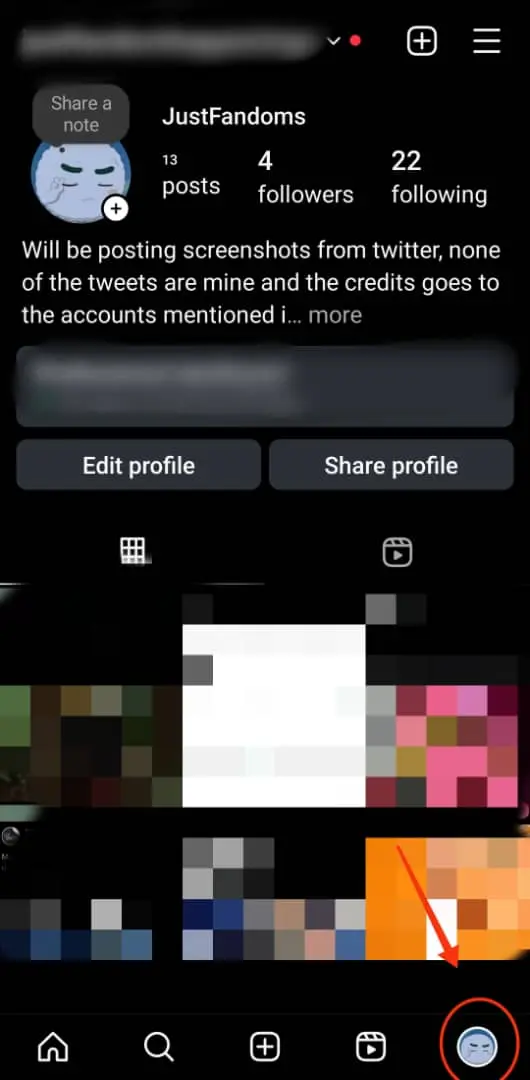
Step 3- Tap “Edit Profile” under the bio section.
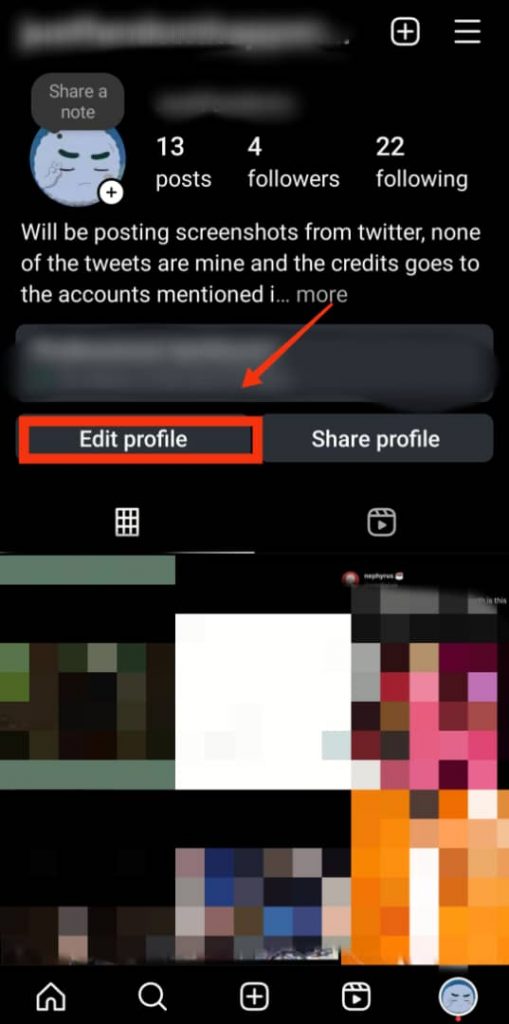
Step 4- Now, tap the username field and type your new username.

Step 5- To finish the process, select the blue checkmark icon in the top right corner.
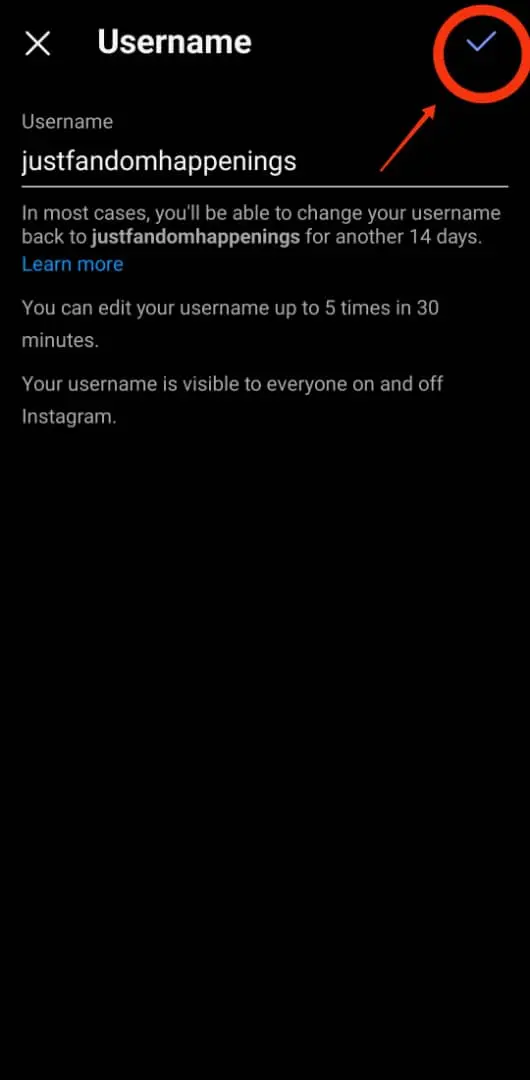
That’s how easily you can change or update your username on Instagram in less than a minute.
What to Do If Your Desired Username Is Taken on Instagram
Sometimes, you want to select a username already taken on Instagram, which makes you feel disappointed.
In such a situation, there are small tips that, when known, can help you choose a username similar to the one you desire.
Let’s see what those tips are:
1- Add the word “official” at the end of the username
If you want to create a public account that you are sure you will gain a considerable number of followers, you can add the word “official” to your username.
Doing so helps others understand this is your main account and allows you to choose your desired username if it’s taken.
2- Add a dash or period to your name
The first thing you can do is add a dash or a dot at the beginning, middle, or end of your username.
For example, you wanted this username: @imaginarylife, but it’s taken. You can add a dash to it, like @imaginary_life, and it will be eligible to use.
3- Add your location
If you are an owner of a place in a specific location and your favorite username is taken by someone who is not in your region, you can add your location to your username.
Doing so will help others in your local area find you easily, and you will have your desired username on your Instagram account.
4- Add a short description of your account
Another practical thing you can do to choose a username that is already taken is to add a little description of your account at the end of your username.
Suppose you are a home designer, but your desired username is taken by someone who is not even a designer. In such situations, you can add words like designs, designer, designing, etc., to your username to make it more specific.
Conclusion
Sometimes, all you need to do to have a fresh start on Instagram is change or update your username. This is a very simple task, yet you need to consider small details to choose the best username for your account.
As mentioned earlier, Instagram usernames are your identity on this platform so you need to choose them wisely and avoid changing them too often.
In this comprehensive article, we explained the features of a good Instagram username, discussed how to change or update your Instagram username, and provided useful tips to help you have your desired ID on Instagram.
FAQs
Is it better to create a new account or change the username?
It all depends on your purpose and how you want to use your account. If you want to have a private account, you can keep your current username or change it. But if you have a private account with an acceptable number of followers, you can change your username and inform your followers about the changes to your account.
How many times can I change my username on Instagram in a day?
Note that you can only change your username twice before waiting 14 days to change it again. However, if you mistakenly change your username, you can change it to the previous one (if it has not been taken) without waiting for two weeks.
Can I change my Instagram username to one I’ve used before?
Yes, as long as no one has taken your old username, you can change it to the previous one.

Emi Daniel
Buy an Established Instagram Account
Skip starting from zero. Browse Instagram/TikTok accounts with audiences across many niches.
See Available AccountsRelated articles
-

How to Clear Instagram Cache on iPhone, Android & Desktop
Instagram can quietly build up a lot of temporary files while you scroll through Reels, watch Stories, save posts, and upload your own content. You may not…
12 min readEmi Daniel
-

How to See Who Reposted Your Instagram Post (2026 Guide)
Someone reposted your Instagram post, but you have no idea who it was. You check notifications, search through your profile, and still cannot find a clear answer. …
18 min read -

How to Reset Instagram Algorithm in 2026
Instagram can start showing too much of the same type of content. Your Explore page may no longer match your interests, Reels may feel repetitive, or suggested…
12 min read