


Did you know that over 25 million businesses use Instagram to connect with their customers and grow their brands?
It has been said that over 80% of Instagram users follow multiple business accounts, which means a great opportunity for businesses to attract potential customers and clients.
However, not all business owners are successful at this. And the reason is that they don’t know how to effectively use ‘Instagram Business Chat.’
Buy an Established Instagram Account
Skip starting from zero. Browse Instagram/TikTok accounts with audiences across many niches.
See Available AccountsUsing this feature is not difficult but learning a few tips and strategies helps you to grow your brand faster while keeping your customers engaged with your account.
If you are here, you want to get the most out of using business chat on Instagram.
Good news! I will tell you all the important details you need to know about this amazing feature from A to Z.
Features of An Instagram Business Account
An Instagram business account offers features that can’t be found on a regular account. Here are some of them:
Insights and analytics
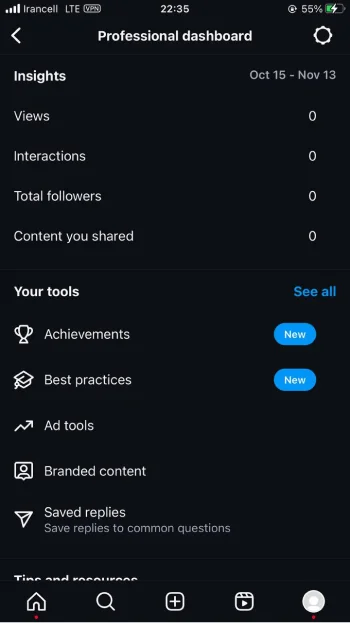
The main feature of a business Instagram account is that it allows users to access insights and analytics to help them track the account’s performance.
It also provides valuable information, such as engagement rates, post performance, and follower demographics.
Call-to-action buttons
The primary goal of having a business account is to better engage with customers and make the shopping process easier for them.
An Instagram business account offers CTA buttons, such as Get Tickets, Learn More, and Book Now.
Instagram Business Direct Message
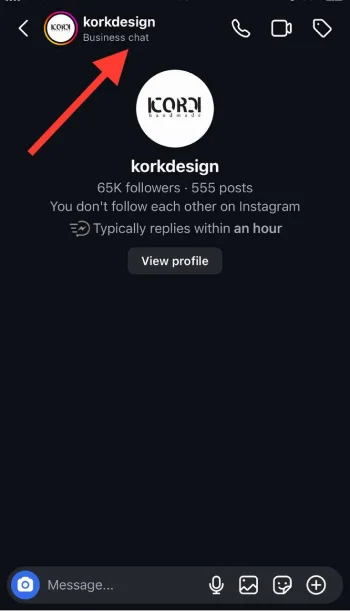
You can send and receive direct messages on business and regular accounts; however, a business account offers features to help business owners engage with their customers.
These features include quick replies, automatic replies, message labels, response insights, Integration with Instagram Shopping, and more.
Contact information
Instagram allows business owners to add contact options to their profiles, such as email addresses, phone numbers, WhatsApp numbers, and physical addresses.
Professional dashboard
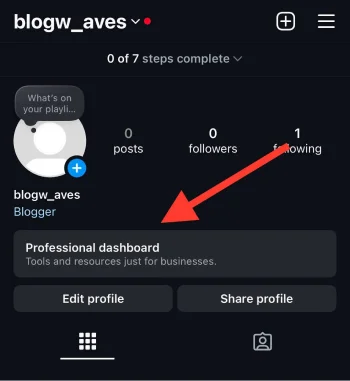
The professional dashboard feature is a whole new world of exact data and information on the account’s performance.
This section helps you see how many accounts reached and engaged with your content, check your follower’s demographics and activities, and more.
Promoting posts
This feature allows business account owners to create and run promoting ads through Instagram.
It offers different ad formats, such as story ads, video, photo, and carouse, so you can choose the one that best fits your business goals and needs.
You can find other features on a business account on Instagram, but these are the most useful ones.
What Is Business Chat on Instagram?

Business chat on Instagram is a more professional messaging feature that enables business and brand owners to better communicate and engage with their followers and customers.
Let’s see what are the features of a business chat on Instagram.
Quick replies (Answering FAQs)
You can prepare replies for common questions you get in your DMs, such as product information, shipping, sizing, prices, return procedures, etc.
To enable this feature, follow the steps below:
Step 1- Open Instagram and tap on your profile icon.

Step 2- Tap on the three horizontal icon in the top right corner.

Step 3- Choose the “Business tools and controls” option from the menu.
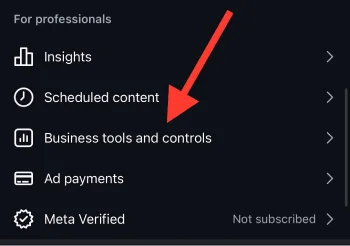
Step 4- Select “Frequently Asked Questions.”

Step 5- Tap “Add question.”
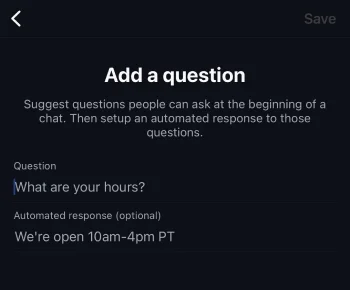
Step 6- Write the question and an answer, then tap “Save.”
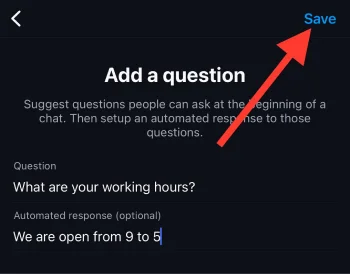
You can easily add, change, and remove any questions and answers you want to better communicate with your followers.
Message category
On Instagram business chat, your DMs can be categorized into four categories: All, Primary, General, and Requests.
The first and last ones are easy to understand. You can categorize your direct messages into primary and general to better manage your conversations.
Automatic responses
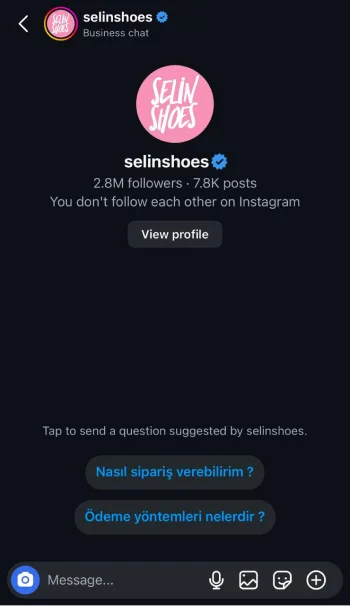
Using this feature allows you to turn your followers into potential customers because automatic responses can be sent to followers at any time, even if you are offline.
For example, you can set up an automated greeting response to warmly welcome the person who texted you.
Message labels
You can categorize your messages using this feature, which helps you to track conversations.
These labels include Flag, Booked, Lead, Ordered, Paid, and Shipped. Note that only you and the people who manage your account can view or change the labels.
To label a direct message, open the chat, tap on the label icon in the top right corner, choose the desired label, and tap save to finish the process.
Direct Message Ads
Last but not least, you can easily redirect your Meta Ad campaigns into your business chat to better communicate with your customers and clients.
How to Set Up a Business Chat on Instagram
First, you should have a business account on Instagram. If you want to switch to a professional account or create one, follow the steps below.
Creating a business account on Instagram
Step 1- Download and install the IG application from your device’s App Store or Google Play Store.
Step 2- Tap “Sign Up” and register with your email address or phone number.
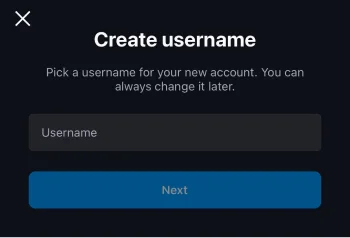
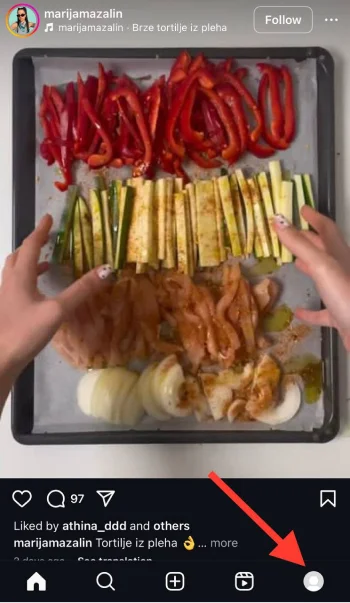
Step 3- Once you set up your profile information, tap on your profile icon in the bottom right of the screen.
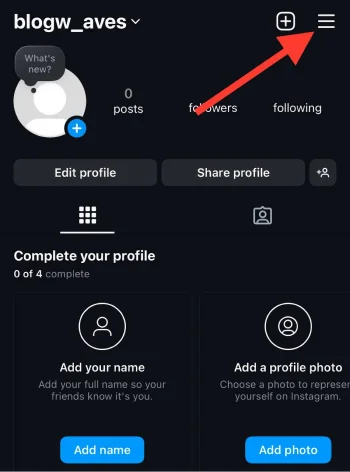
Step 4- Tap on the hamburger icon and choose “Account” from the menu.
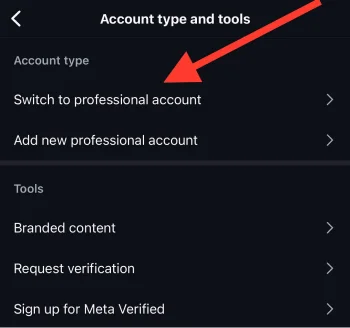
Step 5- Select “Switch to professional account” to finish the process.
Switching to a business account on Instagram
Step 1- Open Instagram and go to your profile.
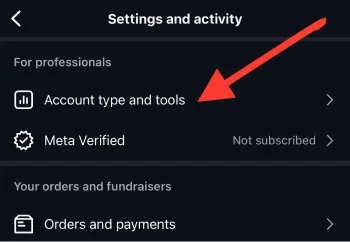
Step 2- Tap the three horizontal (hamburger) icons, scroll through the menu, and choose “Account type and tool.”
Step 3- Tap on the “Switch to professional account” option.
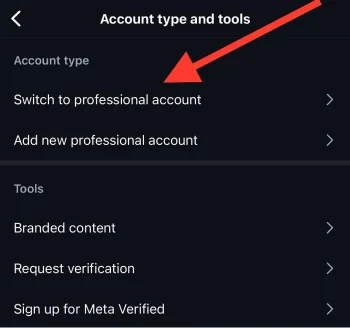
Step 4- Tap “Continue” until you reach the “What best describes you” section.

Step 5- Select your desired category and tap “Done.”
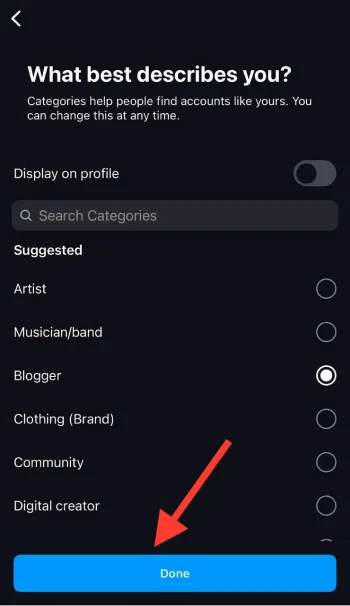
Step 6- Confirm the action, and you are all set up.
Once you have a business account, your business direct message is automatically enabled; however, you should ensure you can receive messages from everyone; otherwise, your messages will appear in the ‘Request’ box.
Welcome to Instagram business chat! You can customize and categorize your DMs, create automatic replies and responses, and enjoy professional conversations with your customers and followers.
Differences Between Instagram Personal and Business Chat

To perfectly use Instagram, understanding the differences between personal and business accounts (chat) is essential.
Account type
Personal account: A personal Instagram account is designed for individual use and allows users to better connect with their friends and family.
Business account: It’s suitable for brands and businesses to attract their target customers by using its exclusive tools.
Response management

Personal chat: There are no specific tools for personal accounts to respond to their DMs, which may lead to missed inquiries.
Business chat: Brands and businesses have exclusive features to reply to messages, such as prioritizing important messages and organizing chats.
Automated messaging
Personal chat: You can’t create automatic replies and responses in a personal chat on Instagram.
Business chat: You can prepare automated messages that will be sent to your customers even if you are offline.
Promotional opportunities

Personal chat: There are no specific tools for marketing or promotion goals; it is designed only for personal communication.
Business chat: It allows you to promote products and services directly through DMs. Brand and business owners can use such features to share exclusive offers, product information, etc.
Analytics and insights
Personal chat: In personal chats, users don’t have access to analytics and insights of messages; they can only interact with messages.
Business chat: Businesses can access valuable insights into messaging performance, such as response time and the number of messages received and sent.
Benefits of Using Instagram Business Chat for Brands

Brands and businesses can benefit from Instagram business chat in various ways; the most important ones are listed below.
More engagement
Using Instagram business chat encourages users to engage with your content and keeps customers interested in the brand.
Brand loyalty

When customers feel heard and valued while you chat with them in a business chat and use its features, they are more likely to remain loyal to your brand and products.
Valuable customer insight
Engaging with customers through business chat helps you get valuable insights into their preferences.
You can analyze their insights to identify the latest trends, gather feedback, and notice their interests so that you can adjust your strategies accordingly.
Enhances customer service

Instagram business chat offers various features, such as quick replies and automated messages, that enhance customer service. As a result, you will have more satisfied customers than ever.
Easier sales process
Using Instagram business chat allows you to prepare a more straightforward sales process for your customers.
You can assist them in placing orders, choosing the best item, guiding them through payment methods and shipping fees, and more.
How to Engage With Customers Using Business Chat

As you know, Instagram business chat is a great way to keep your followers and customers engaged with your account.
Here are some helpful tips that enable you to engage with your customers effectively.
Send multimedia content
You can share images, videos, digital catalogs, brochures, or GIFs of your products to help your customers better understand your products or services.
This also shows that you care about your customers’ needs and want to help them make the best purchase.
Help with purchases

Buying something online may not be easy for everyone; if you want to keep your customers engaged, it is better to help them purchase more easily.
You can do this by quickly answering their messages and sending them pictures, videos, or other product information.
Use chatbots for initial conversation
Business owners can greatly benefit from using a chatbot. You can use a chatbot to start customer conversations, especially during peak hours.
Custom recommendations
No one knows your products and services better than you! So, to connect with your customers and grow your brand, you should understand their needs and preferences to help them choose the best product or service.
Share updates and news

Want to keep your customers loyal? Let them feel they are the first ones you share important news and updates with!
You can share updates and news about upcoming events, product launch dates, promotions, community activities, and more.
Follow up after purchases
Don’t let your customers feel you abandon them after they purchase from you. Always ensure you will have follow-up communication with them to show you care about their satisfaction.
Tips to Use Business Chat to Grow Your Brand

If you are looking to grow your brand using IG business chat, the tips below help you do it in the shortest possible time.
Answer DMs quickly
Always try to answer your direct messages as quickly as possible. This shows that you value your customers and are committed to providing them with the best services.
Create a FAQ section

If you want your followers and customers to get answers to the most common questions even when you are offline, create a FAQ section, which I explained in the previous section how to do so.
This can also reduce the number of repetitive messages in your DMs.
Promote special offers
You can use business chat to offer exclusive offers and discounts to your customers; doing do will increase sales and encourage people to purchase.
Keep them engaged in chats
If you want to turn every follower into a loyal customer while growing your brand, never simply answer their questions.
Instead, ask open-ended questions to keep them engaged in chats and encourage them to continue the conversation.
Personalize your interactions

If you want people to talk about your brand nicely, try to make more close relationships with them. For example, call their name (referring to their IG username) when you want to reply to their messages.
Follow up
Always follow up with customers after you resolve their issue or inquiry to ensure they are satisfied with your responses and outcomes.
Strategies for Community Building Using Instagram Business Chat

Respond to every message
Always listen to your customers! It’s one of the most important aspects of community building on Instagram.
To do so, answer your DMs as quickly as possible, ideally within 24 hours. If you can’t be online in specific hours, use Instagram’s automated messages that will be sent to your customers even if you are offline.
However, sending personalized messages to each customer is better to make them feel like a community. You can use their names or add unique details relevant to the conversation.
Create a private group chat
Create a private group for your VIP customers and use Instagram’s business chat tools to offer exclusive content or discounts to people who engage with your content, mainly through DMs.
You can also share BTS videos or any other private content with VIP customers; it helps them feel they are part of an exclusive community.
Offer proactive customer support
Let your customers know you are always there for them and will kindly answer their DMs as soon as possible.
If you want a loyal community on Instagram, you should make them feel connected to you, and you don’t see them as just a customer!
Answer their questions regardless of what they are about and ask for their feedback to offer better services in the future.
Use Instagram’s ‘Close Friend’ feature
To build a unique community on Instagram, use the close friend feature; the results will surprise you.
Do you remember last April when Billie Eilish added all her 111 million followers to her close friend list? We all felt special!
Doing so, she got over seven million followers in a day!
It doesn’t matter how many followers you have; use this feature and add all or part of your followers to your close friend list; share unique content, and you will see how your community grows!
Conclusion
Establishing a solid presence on social media may be challenging for some users; however, using Instagram’s business chat features can unlock new opportunities for business owners and creators.
The important point here is to know how to effectively use this feature to keep your followers engaged while growing your brand.
Having an Instagram business account gives you exact insights into your followers’ behaviors and interests. If you are smart enough, you can use this data to better communicate with them and turn them into loyal customers!
I hope you find this article helpful and that you will start using business chat on Instagram more effectively.
FAQs
Do I need a Facebook page to create a business account on Instagram?
No, but having one allows you to access additional features, such as Instagram Ads.
Is there a limit to posts and stories I can share on a business account on IG?
No, there are no limits for sharing posts and stories on IG business accounts; however, you can only add up to 100 stories for each highlight.
Can I switch back to a personal account after creating a business profile?
Yes, but you will lose access to the business account features.
Can I change themes on Instagram business chat?
Yes, you can change themes on all business DMs on your account to better connect with your customers.
What does it mean when an IG chat shows Business Chat?
It means that the conversation is taking place with a business account.

Emi Daniel
Buy an Established Instagram Account
Skip starting from zero. Browse Instagram/TikTok accounts with audiences across many niches.
See Available AccountsRelated articles
-

How to Go Viral on Instagram: A Practical Guide
A viral Instagram post can begin with something very simple, like a clear idea, a familiar feeling, or a moment that makes someone think, ‘I need to…
25 min readEmi Daniel
-
Instagram Hashtags That Actually Work in 2025: Strategy, Research & Reels
Instagram posts with hashtags see 70% higher engagement rates and 12.6% more reach than those without. Yet most Instagram users struggle with hashtag strategy in its complex…
25 min read -
Top 30 Black Instagram Models to Follow in 2025
Black models are among the most followed in the industry on Instagram. A great example is “Naomi Campbell,” who has over 15 million followers. The main reason…
22 min read