

Are you tired of being scared to try new ways to create Reels on Instagram? I really think it’s exhausting to constantly worry about what might happen if you post a video that your followers won’t like!
So, what should we do? Should we stick to a specific style to keep our followers satisfied, or should we take advantage of Instagram’s new feature and try new ways to make videos?
I’m on your side! Using Instagram’s Trial Reels allows you to share a new type of video with people who aren’t your followers.
Buy an Established Instagram Account
Skip starting from zero. Browse Instagram/TikTok accounts with audiences across many niches.
See Available AccountsRemember that if you use this feature, your video won’t be shown to your current followers; it will only be visible in the Reels section to new people who aren’t following you.
Here, you will learn how this feature works and everything you need to know about it.
What Are Instagram Trial Reels?
One of the latest features of Instagram is called “Trial Reels,” which I can’t tell you how impressive this feature is!
It allows users to share Reels that are not shown to their followers but are shown to new people on the Reel tab based on their interests and interactions; how cool is that!
This opens up new doors for content creators and anyone who is looking to grow their Instagram account.
Instagram also said that some of your followers may see the Reel if it’s sent to them by someone who sees it or if they view your profile and click on your Reel tab.
How Does Trial Reel Feature Work on Instagram?
Once you share your content as a Trial Reel, your followers can’t watch the Reel, and it will only be shown to new people in the Reel tab.
You may wonder how this feature works and even ask yourself, what if I change my mind and want to share the video with all my followers?
Well, no worries! Instagram allows you to share the Trial Reels with everyone.
Once you upload a Trial Reel, you can see its performance, and if you feel your video is performing well, you can share it with all of your followers!
To do so, you have to tap on the “View Trial Insight” button in the Reels viewer and choose the “Share to everyone” option.
See? Instagram always thinks about its users’ desires!
How to Create a Trial Reel on Instagram
Creating an Instagram Trial Reel has the same process as making a regular Reel, but let’s review the steps, shall we?
Step 1- Open Instagram and tap on the + icon to add or record your Reel.
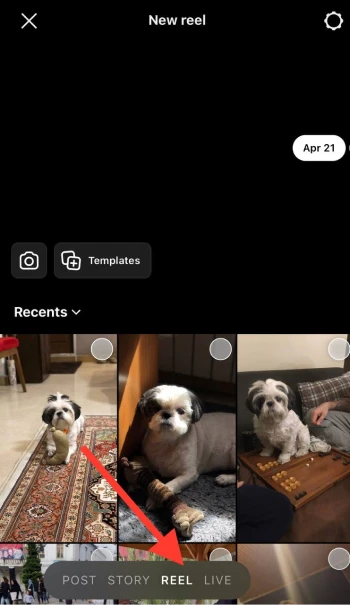
Step 2- Adjust all the necessary edits and changes.
Step 3- Tap “Next” until it’s time to upload your video.
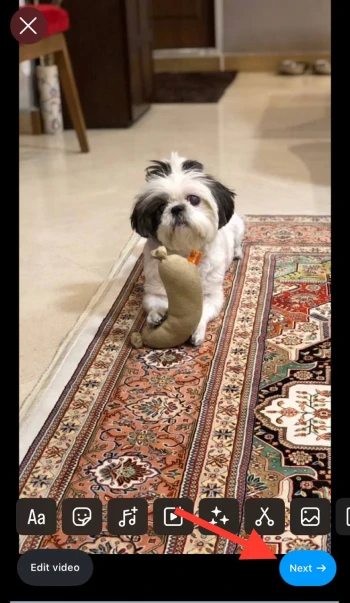
Step 4- Before clicking “Share,” tap the toggle to turn on Trial.

Step 5- Now, share your video and see how it performs on Instagram.
If you can’t find the Trial option, don’t panic! Instagram is still experimenting with this feature and shows it to some users for now; just wait until it is accessible to everyone.
Who Can Use Instagram Trial Reel Feature?
Good question! this feature is now available for some users; however, Instagram promised it would be available for all content creators, marketers, influencers, and general users.
Instagram Trial Reel is a great opportunity for influencers, business owners, and content creators to test different Reel styles and ideas to find the best way to grow their presence on the platform.
If you are a business owner or marketer, use this feature to try new campaign teasers and dynamic advertisements to see which one is the most effective before launching the main content.
How to Share Trial Reels on Instagram?
Easy! This process is also the same as sharing a normal Reel; however, you should choose to upload it as a Trial video.
Don’t know how? Follow the steps below.
Step 1- Once your new Reel video is ready to publish, tap on the Trial Settings before sharing the video.
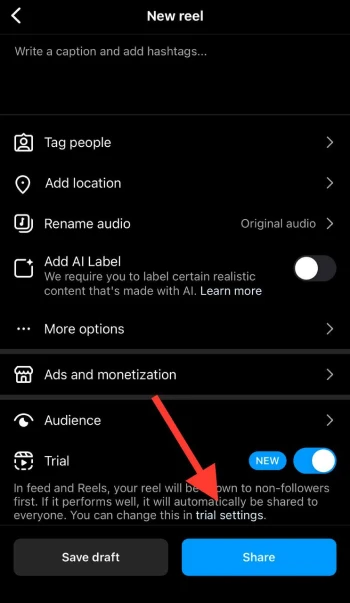
Step 2- In the Trial Settings, you have the option called: “Share to everyone automatically.”
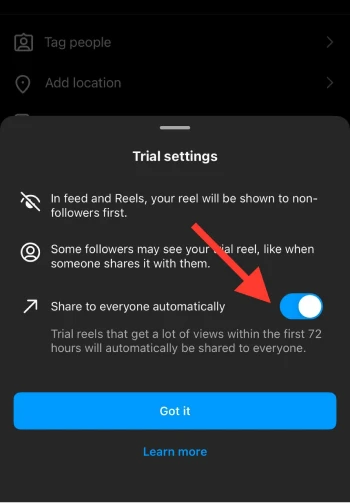
Step 3- Tap on the “Got it” button and select “Share.”
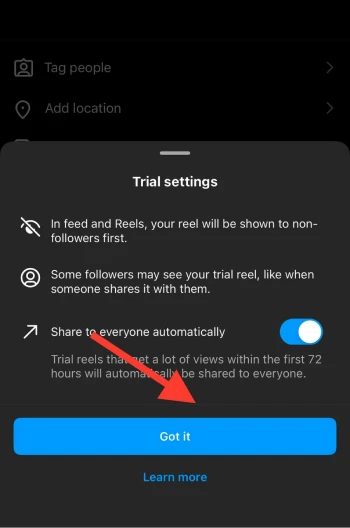
The video will be shared as a Trial Reel and will be shown to everyone after 48 hours.
Interesting! Now you know how to automatically share a Trial Reel with everyone!
Benefits of Using Instagram Trial Reels

The main benefit of using this feature is that it helps users test new ideas and styles of creating videos without worrying about how their current followers will interact with and engage with their content.
Some other benefits include:
- More visibility on the platform.
- Higher chances of attracting new audiences.
- It helps to understand your followers’ interests and preferences better.
- Allows you to establish your brand identity more creatively.
- You can freely participate in different trends and challenges.
- It increases the chances of fitting into Instagram’s algorithm.
Using Trial Reels to Test Content and Reach New Audiences
In simple words, the Instagram Trial Reel feature is a great way to test if your video has the potential to go viral or attract your target audience’s attention.
Let me make it more clear with an example.
Imagine 90% of your current followers are interested in your content related to fashion and style tips; now, all of a sudden, you want to share Reels about painting!
What would happen? The artistic Reel will get less engagement than usual because your current followers are not interested in that topic and want to see more videos about style tips and fashion!
Therefore, you can use this feature to hide your new video from your followers while Instagram shows it to more new people who are actually interested in your new type of videos and will engage with them.
Note that it doesn’t matter how good your painting videos are; if the majority of your followers are not interested, the videos won’t get the desired attention.
Another effective way of using the Trial Reel feature is that it helps you try new styles and ideas of content creation without the pressure of how your followers interact with your videos!
Conclusion
How much did you like this new feature on Instagram, so far? I think it’s a great opportunity to attract your target audience and gain more visibility on the platform.
Instagram is testing this feature, so you might not have access to it yet. Don’t worry, because soon all users will be able to use it.
Want me to reveal a secret? If you want to be seen on Instagram, stay consistent and create unique content!
I hope you enjoyed reading this article and that you’ll know how to use this feature when it becomes available to you!
FAQs
Can I use my audio in Trial Reels?
Yes, as you can use your voice or recorded audio in regular Reels, you can also use your audio in Trial Reels to make them even more engaging.
Is it possible to edit a Trial Reel after posting?
No, once you share your Reel / Trial Reel on Instagram, you can’t change the video; however, you can still edit captions, tags, comments, etc.
Can I get insights into Instagram Trial Reels?
Yes, you can see your video performance by simply tapping on the “View insight” icon on the video.
How long can Trial Reels be?
Regular Reels and Trial Reels can be between 15 and 90 seconds; however, experts say that short Reels perform better on the platform!

Emi Daniel
Buy an Established Instagram Account
Skip starting from zero. Browse Instagram/TikTok accounts with audiences across many niches.
See Available AccountsRelated articles
-

How to Go Live on Instagram: A Step-by-Step Guide
Going live can feel more stressful than posting a Reel. You cannot remove a pause, rewrite a sentence, or start over after an awkward moment. But that…
17 min readEmi Daniel
-

Instagram Instants Feature: What It Is, How It Works, and How to Turn It Off
The first time I opened Instagram Instants, I almost backed out. I had taken a normal photo. Nothing worth editing. Nothing worth posting. Nothing that needed an…
11 min read -

How to Clear Instagram Cache on iPhone, Android & Desktop
Instagram can quietly build up a lot of temporary files while you scroll through Reels, watch Stories, save posts, and upload your own content. You may not…
12 min read