

Instagram now allows users to comment on stories directly. How great is that! We all know how Meta seeks new methods to help users boost their visibility on the platform, and this feature can be a game changer.
What is better than directly commenting on someone’s story without messaging through DMs? I love this feature, and if you think it’s not worth it, I suggest reading this article to the end; trust me! It will change your mind!
For quite a long time, people have been waiting for Instagram to launch something catchy and engaging, and all of a sudden, the platform revealed story comments.
Buy an Established Instagram Account
Skip starting from zero. Browse Instagram/TikTok accounts with audiences across many niches.
See Available AccountsYou can now comment on anyone’s story, which allows commenting; however, there are things you should know to use this feature better.
If you want to know more about Instagram story comments, don’t go anywhere else, since I’ve got all the information you need to know from A to Z!
What Are Instagram Story Comments?

Instagram story comment is another useful feature that keeps your followers engaged with your content. They are responses from your followers to your stories.
When you upload a new story, your followers can leave a comment by tapping on the speech bubble icon in the bottom left corner of the screen.
Want me to reveal a secret? Well, note that each comment is linked to that specific story and can not be seen in the next or previous story. How fascinating!
Moreover, the story comments are only visible to the story creator, the person who commented, and everyone who follows the account.
How to Comment on Instagram Stories?
Using Instagram and commenting on a story has never been easier. However, I think it’s better to review the following steps to better understand the whole process.
Step 1- Open Instagram and go to the story you want to leave a comment on. (Make sure the comments are allowed on that story).
Step 2- Tap on the little speech bubble icon next to the “send message” button.

Step 3- Now, you can see a message bar appear: “Add a comment for (name of the account).”
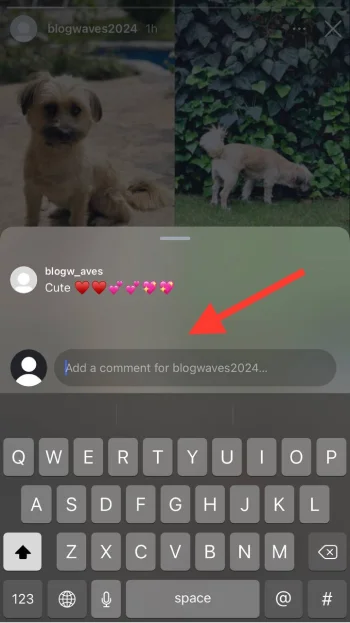
Step 4- Write your comment and tap on the blue arrow icon to finish the process.
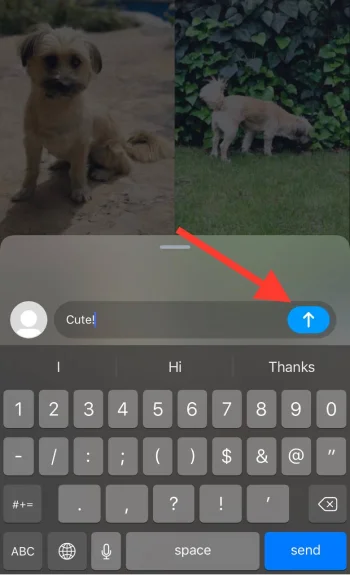
See? That’s how easily you can comment on Instagram stories and better engage with your favorite accounts.
How to Turn Off Story Comments?
Now, you may wonder if it’s possible to disable or turn off story comments on Instagram! Follow the steps below and you are all set!
Step 1- Open Instagram and drag the screen to the right to upload a new story.
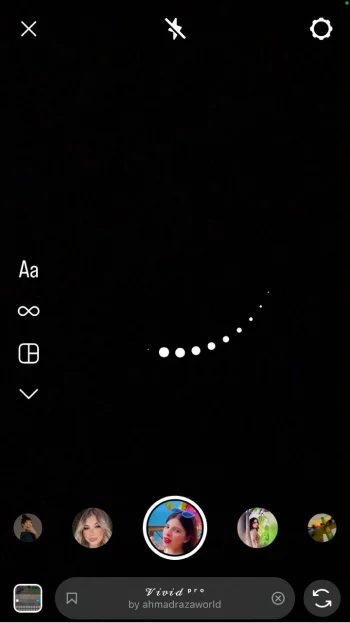
Step 2- Tap on the gear icon in the top right corner of the screen.
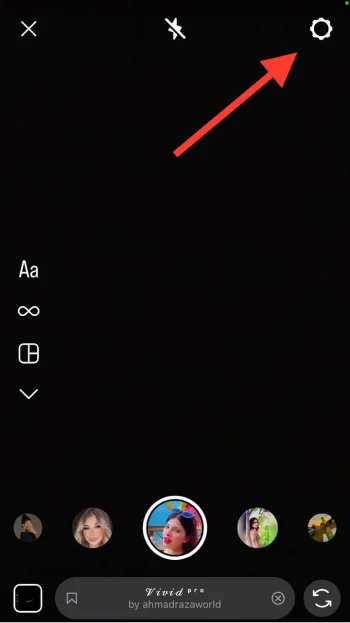
Step 3- Choose “Story” from the menu.
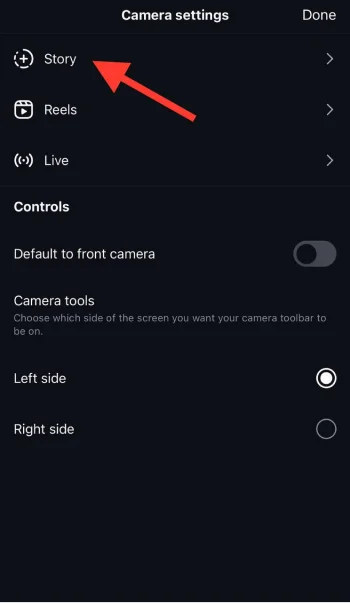
Step 4- Here, you can see a section called “Commenting.” Tap on the “Allow comments” option under it.
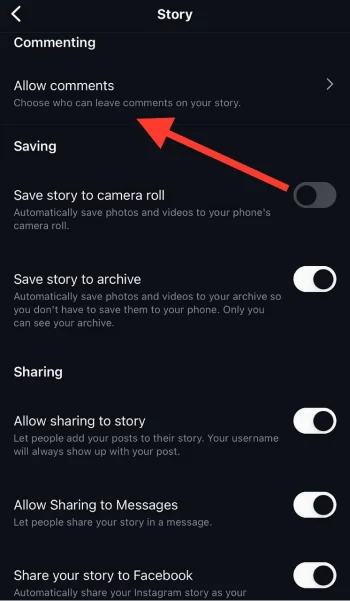
Step 5- Now, you can adjust your Instagram story comment settings. You can manage who can comment on your stories to disable this feature.
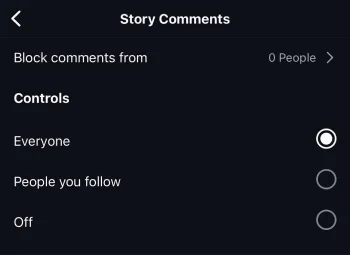
Step 6- To turn off story commenting, tap “Off.”
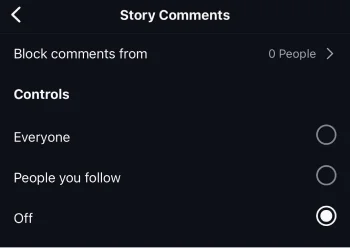
Reasons to Disable Instagram Story Comments

There are various reasons that someone may want to disable the story comment feature on Instagram. I gathered a list of the most common reasons; check them out!
- Less negativity! The first reason to turn off Instagram story comments is to avoid getting negative comments that may affect your confidence or ruin your mood.
- Control your privacy. If your story contains personal information, you can disable story comments to protect your privacy.
- To manage interactions. A great way to manage who can interact with your content is to turn off this feature.
- Protect your mental health. If you want to protect your mental being from getting negative and offensive comments, you should disable story comments.
These are some reasons to turn this feature off; however, your choice of whether to have it on or off entirely depends on it.
Who Can Comment on Your Instagram Stories?

This completely depends on your Instagram story settings because you can manage who can comment on your stories. Let’s see a more clear answer here!
If your account is public, anyone can comment on your stories, even users you don’t follow back.
If your account is private, you can allow your followers, those you follow back, or anyone who sees your stories to comment on them.
If you share a story with your close friends list, only those specific users can leave a comment on your story.
Who Can See My Instagram Story’s Comment?

To make a long story short, I have to say that anyone who can see your Instagram story can see the comments.
Unlike story replies and emoji interactions, which are shown in your direct messages and can only be seen by you, story comments are visible to everyone who views your story.
We have to wait and see if Instagram decides to surprise us with a feature that limits or hides story comments from specific users!
How to Delete A Comment on an Instagram Story?
Great question, actually! Although Instagram doesn’t currently allow us to restrict story comments, we can delete any comment we don’t like. You might be wondering how? Let’s check it out!
Step 1- Open Instagram and tap on your profile picture at the bottom right corner of the screen.

Step 2- Tap on your profile picture again to view your stories, and select the story from which you want to delete a comment.
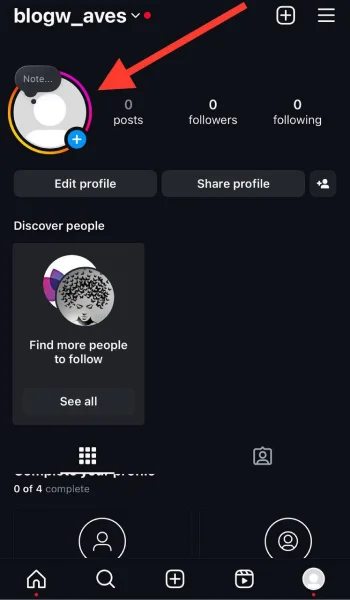
Step 3- Now, swipe up from the bottom of the screen to see all the interactions, including comments.
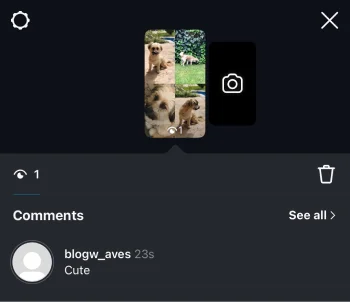
Step 4- Scroll through the comment list to find the comment you want to delete.
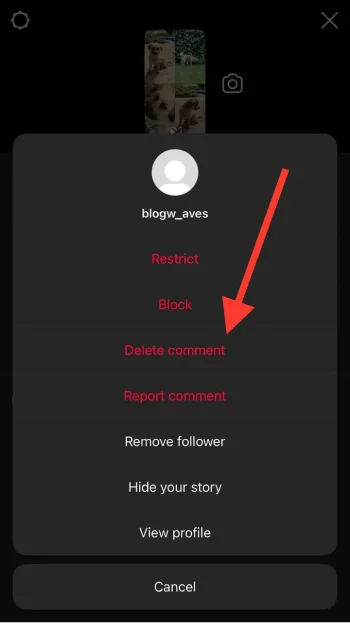
Step 5- Tap on the three dots icon next to the comment.
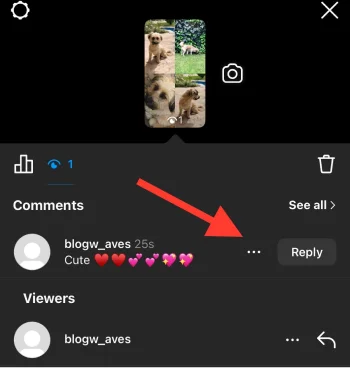
Step 6- Here, a menu will pop up; select the “Delete” option to finish the process.
Can You Reply to Instagram Story Comments?
That’s actually a great question, my friend! Well, yes! You can reply to any comments on Instagram stories. Just follow the below steps.
Step 1- Open the Instagram app on your mobile.
Step 2- Tap on your profile picture in the top left corner of the screen to open your current story.
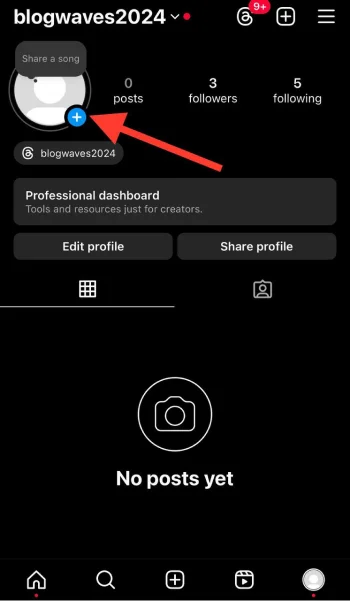
Step 3- Now, choose the story you want to reply to a comment.
Step 4- Swipe up the screen from the bottom to see the comments of your story.
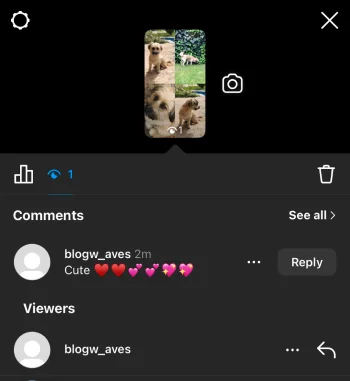
Step 5- Here, you can see all the comments and reactions to your story.
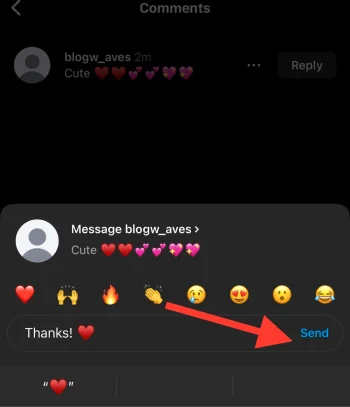
Step 6- To reply to someone’s comment, tap “Reply” next to the comment.
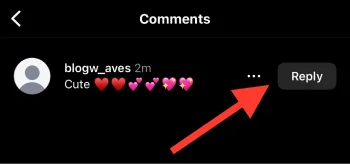
Step 7- Enter your response in the text input box.
Step 8- Once added your message, tap “Send” on the right side to finish the process.
How Long Comments Appear on Instagram Stories?
As you may know, Instagram stories disappear after 24 hours, right? Saying so, all the story comments will also disappear after 24 hours.
The good news is that if you want to keep your stories for longer, you can highlight them on your profile.
However, you should note that the story comments won’t be visible once you highlight stories.
Does the Story Creator Access Comments After It Expires?

Instagram allows story creators to access all the story comments and reaction after it expires; only for a short time.
The story itself will disappear after 24 hours, but the insights will be visible to the account owner for a limited time.
Note that after that period, even the story creator won’t be able to access story insights and analytics.
Conclusion
Finally, if you are looking to boost your presence on Instagram and enhance your social media engagement, you should know how to effectively use Instagram’s story comments feature. Believe me! you will thank me later!
Reading this article helps you understand every detail you need to know about this handy feature; from how to comment on a story to how to disable it and more.
Note that mastering this feature helps you better connect with your followers, have more meaningful conversations, and boost your online presence.
I hope you enjoy reading this article and start using this cool feature today!
FAQs
How can I view my Instagram story comments?
Simply swipe up the story you want to see its comments, and you can see all the reactions and comments.
Are Instagram story comments visible to everyone?
Anyone viewing your stories can see comments, unless you decide to restrict some individuals or change your story settings.
Can I restrict Instagram story comments?
Yes, you can adjust your preferred settings by visiting the story settings in your profile.

Emi Daniel
Buy an Established Instagram Account
Skip starting from zero. Browse Instagram/TikTok accounts with audiences across many niches.
See Available AccountsRelated articles
-
Instagram Hashtags That Actually Work in 2025: Strategy, Research & Reels
Instagram posts with hashtags see 70% higher engagement rates and 12.6% more reach than those without. Yet most Instagram users struggle with hashtag strategy in its complex…
25 min readEmi Daniel
-
Top 30 Black Instagram Models to Follow in 2025
Black models are among the most followed in the industry on Instagram. A great example is “Naomi Campbell,” who has over 15 million followers. The main reason…
22 min read -

Good Times to Post on IG: Maximize Engagement and Reach in 2025
Your Instagram posts are getting lost in the noise. Since 2020, engagement rates have dropped by 30% across the platform. This means timing your posts has never…
27 min read