


Instagram is one of the most popular social media platforms with over one billion monthly active users.
There are many reasons for the popularity of this app, including the fact that Instagram is one of the best platforms for sharing and watching video content, and some people also use it as a messenger. That’s why many people are looking for buying an Instagram account from Social Tradia.
The Instagram app provides special facilities to its users and offers various items in the settings section, which involves Instagram’s advanced settings, each of which helps Instagram users to customize and personalize their accounts according to their needs.
Buy an Established Instagram Account
Skip starting from zero. Browse Instagram/TikTok accounts with audiences across many niches.
See Available AccountsThere is a section called Instagram advanced settings; in this article, we will explain all the parts and related information.
What Are Different Instagram Advanced Settings?
Like other apps, Instagram has a section called settings that allow users to adjust their Instagram account settings according to their needs through its items.
Some options in the general Instagram settings section are available to all users, such as setting the type of account to be private or public, how to create an avatar, specifying close friends, etc.
But there is a section called advanced settings that provide more unique features to Instagram users, and they will have a better experience posting content.
This section of Instagram settings is mainly used by influencers, creators, etc. because these people need their accounts to be seen by more people, and for that, they need to use special settings, all of which are available in the advanced settings menu on Instagram.
In the rest of this article, we will explain the use of advanced settings on Instagram and its advantages.
But first, let’s see where we can find these Instagram setting
How To Find Advanced Settings on Instagram
Finding advanced settings on the Instagram app can be difficult because there is no particular section called advanced settings on Instagram.
These settings are in the section where you want to post the Instagram photo or video, so you should go to that section.
In the following, we will teach you how to find advanced settings on an Instagram app in a few simple steps.
Step 1) Open the Instagram app and tap on the “profile” icon in the lower right corner
Step 2) Then you need to tap on the “plus” icon if you want to share a new post

Step 3) Select what you want to post and tap on the “arrow” icon in the top right corner of the screen
Step 4) Now you need to tap on “next” in the right corner of the screen
Step 5) You are now able to see and access the “advanced settings” Click on it to use the items and customize your post
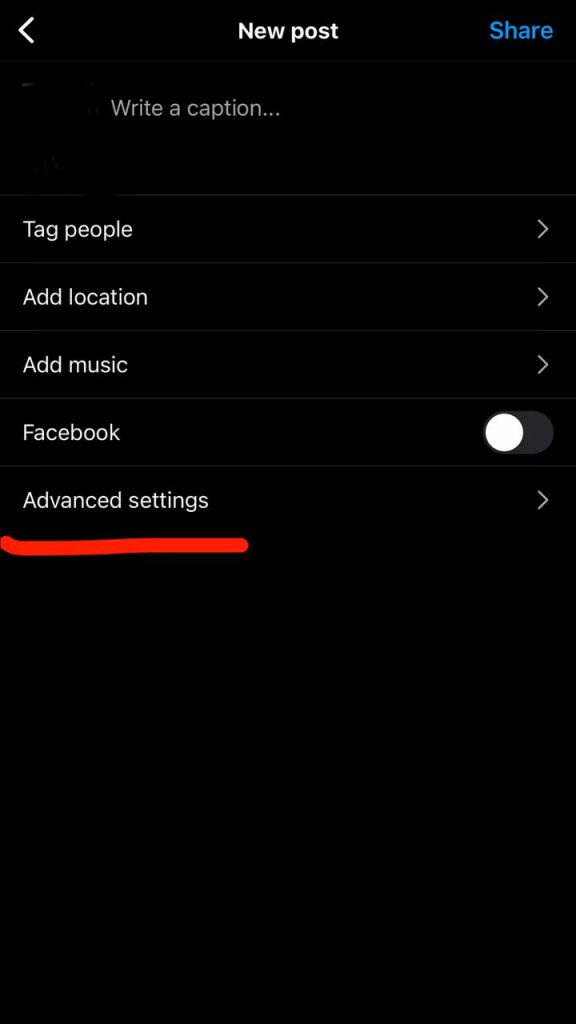
You can easily find the advanced settings section on the Instagram app and use them by following a few simple steps.
Use of Advanced Settings on Instagram
Now that you are familiar with the advanced settings of Instagram, let’s see what these settings are useful for and what you can do using them.
Hide the Number of Likes and Views
One of the uses of these advanced settings is to hide likes and view numbers of the desired post. It means that only you can see the number of likes and views, and others do not have this possibility.
To do this, follow these steps:
– Refer to the desired post
– Click on the “three dots” icon
– From among the options, click on “hide like count” to hide the number of likes of your post.

Turn Off Commenting
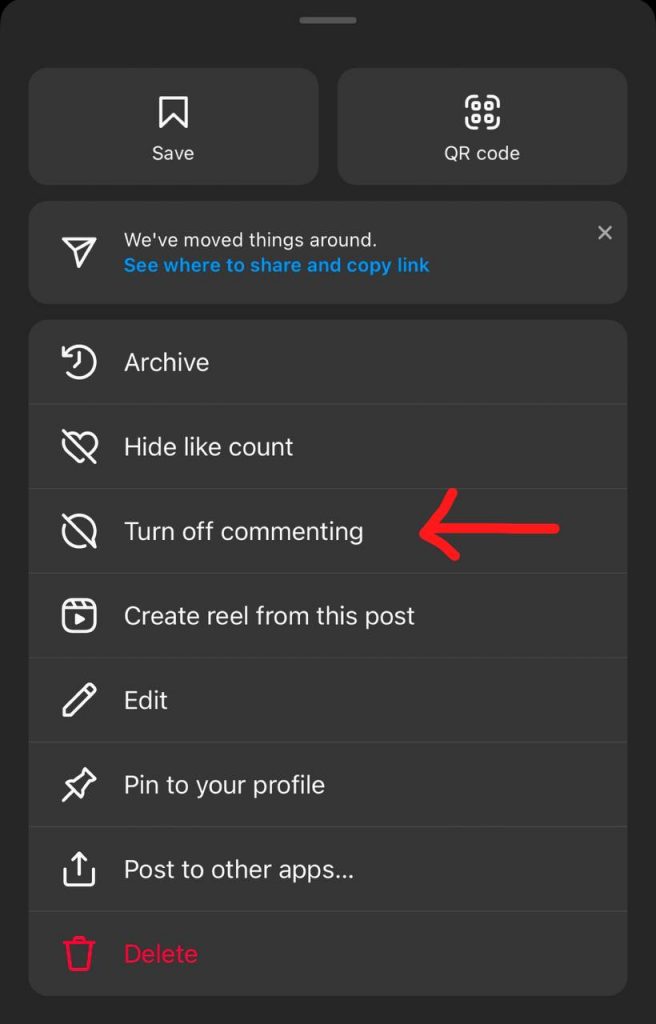
The next feature that many Instagram users apply is to close comments; this way no one can comment on the post you specified.
To do this, you can activate the “turn-off commenting” option in the advanced settings section so that no one can comment on the post you intend to upload.
You can also select the desired post from your profile, click on the three dots icon, and select turn off commenting from the options.
Note that if you have uploaded a post and people have already left comments for you, you can still turn off the comments, and if you want the comments back, you can quickly go to the three-dot section of the post and select the “turn on commenting,” and all the comments of the post will be shown again.
Accessibility
This option, also called alt text, determines who can see your post and read its caption.
This option allows Instagram users to write a caption for the visually impaired and explain the content of their posts to them.
To do this, follow the steps below:
– Select the post for which you want to write an alt-text caption
– Select the edit option from the three-point menu
– The alt-text option appears in the lower right corner of the photo; click on it
– Write the desired text and finally click on the arrow symbol to complete the steps.
Using this option will help visually impaired people understand the topic of your post more easily.
High-quality Content
Undoubtedly, one of the best items of advanced Instagram settings is this option because it helps you share your Instagram photos and videos with the highest quality.
When this option is off, the Instagram app automatically adapts the quality of your content to the state of your internet connection, and the quality of your photo or video may decrease.
But if you turn on this option when you want to upload a post, you can be sure that the quality of your content will be maintained and uploaded with the highest quality.
Note that this option may take longer to upload your post, but it will be worth it.
Share the Content on Facebook
If your Instagram account is synced with your Facebook account, you can easily share your Instagram content on your Facebook accounts using advanced settings.
This is done automatically through advanced settings; you don’t need to go through many steps.
Branded Content
This option is suitable for accounts of influencers, creators, artists, etc. Because these people cooperate with different brands and in this way, they can tag the desired brand and give credit to it.
These people advertise on the Instagram app or collaborate with other brands, and as it was said, they need more special facilities to make their accounts seen by more people, and branded content is one of them.
Benefits of Using Instagram’s Advanced Settings
As you noticed, the advanced settings of Instagram provide you with more special features that are more useful than the primary and general settings items.
With the help of advanced settings, you can easily share higher-quality content and manage its settings.
For example, the turn-off commenting option for when you don’t want someone to comment on the topic of your post is a great advantage that cannot be ignored.
The use of advanced settings options depends on your needs; you decide whether you want others to see the number of likes of your posts or not. Therefore, it is up to you to use the settings in this section.
In the following, we briefly review some of the advantages of these settings.
- You will be able to share the same content on another platform
- You can hide the number of likes and views from other accounts
- You can tag your business partners
- You can turn off the comments on each post you want.
With all these descriptions, we say again that using these settings depends on you and your needs, but the benefits of using these settings are undeniable and worth trying.
Conclusion
In this article, we examined the advanced settings of the Instagram app from different aspects; at first, we explained what these settings are, how you can find them on Instagram, what they are used for, and what their benefits are.
Finally, you as the user decide whether to use advanced settings options or not. We hope that the contents of this article can help you in this decision to have a better experience using Instagram.

Emi Daniel
Buy an Established Instagram Account
Skip starting from zero. Browse Instagram/TikTok accounts with audiences across many niches.
See Available AccountsRelated articles
-

How to Clear Instagram Cache on iPhone, Android & Desktop
Instagram can quietly build up a lot of temporary files while you scroll through Reels, watch Stories, save posts, and upload your own content. You may not…
12 min readEmi Daniel
-
How to See Who Reposted Your Instagram Post (2026 Guide)
Someone reposted your Instagram post, but you have no idea who it was. You check notifications, search through your profile, and still cannot find a clear answer. …
18 min read -
How to Reset Instagram Algorithm in 2026
Instagram can start showing too much of the same type of content. Your Explore page may no longer match your interests, Reels may feel repetitive, or suggested…
12 min read