


Are you tired of Instagram kicking you out of your account all the time? If so, you are looking for a solution to finally realize what causes these bugs and put an end to them. Well, You will be surprised to hear you are not the only one!
Instagram is one of the most popular platforms. But it could be annoying when it logs you out of your account. Especially when it doesn’t look like you did anything wrong.
Don’t be upset about this temporary ban. Even if you are concerned that these logouts may eventually delete your account, I assure you by following some elementary steps, everything will be back to normal.
Buy an Established Instagram Account
Skip starting from zero. Browse Instagram/TikTok accounts with audiences across many niches.
See Available AccountsIn this article, we will show you the possible reasons why Instagram logs you out and offer some solutions to eliminate these problems.
Top 5 Common Reasons Instagram Logs You Out And How To Fix It

1. Instagram Bugs
You might believe a severe issue caused Instagram to log you out. However, it is essential to remember that even a popular platform like Instagram could have bugs, too.
But don’t worry. There’s no need to get too technical when it comes to bugs. Usually, by following a straightforward structure, you can solve your problem in the blink of an eye.
Check If Instagram Is Down
Go to Downdetector.com and check if Instagram is down or not working correctly. You could see whether other users are facing the same issues or it is just you.
Make Sure You’re Using The Latest Version
Keep up with the latest updates. Once Instagram upgrades this platform, the old version will be out of reach.
Restart Your Device
Restarting your device would boost performance speed and fix bugs.
2. Password Change

If you change your password, Instagram automatically logs you from other devices. Make sure you update the password on all of your devices.
The solution is quite simple. You just have to enter your current password and log in to your account.
If you have forgotten your password, click the “forgotten password?” button and recover your password.
3. Verify You Are Human

Sometimes, platforms like Instagram detect unusual activity from your account. If they notice suspicious activity, they immediately log you out of your account. That’s when you should confirm you are human.
Follow these steps to return your account:
- Step One: check the “I’m not a robot” box. It usually gives you pictures and asks you to select images containing specific details, like bicycles, stairs, etc.
- Step Two: Once it is confirmed you are human, Instagram will ask for your pieces of information like your phone number or your email address.
- Step Three: Tap the “send confirmation” button and wait for Instagram to send you a code.
- Step Four: Submit the code and have access to your account.
4. Multiple Accounts
If you are constantly switching between your different accounts, Instagram needs clarification. Therefore, it logs you out to prevent more confusion.
However, by managing your accounts on different devices and clearing your Instagram cache, you can fix this as soon as possible.
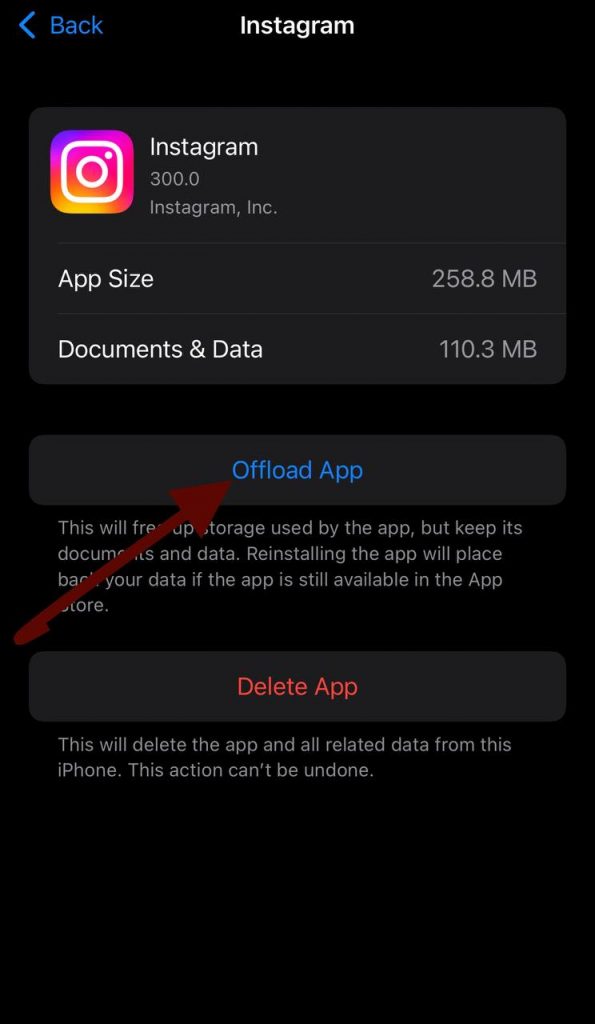
Clear cache on ios:
- Step 1: Go to Settings> General > iPhone storage
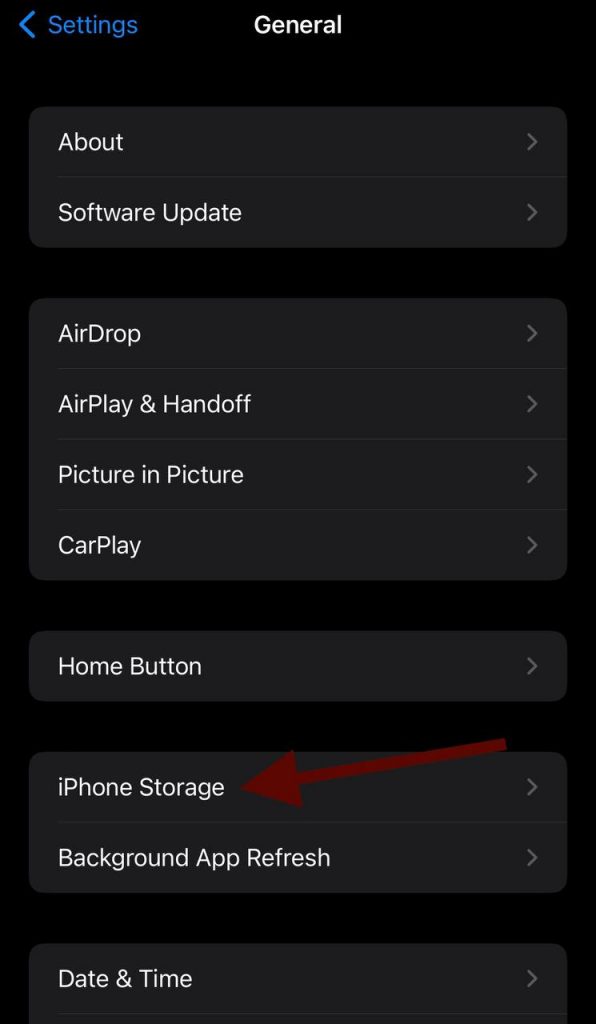
- Step 2: Tap on Instagram

- Step 3: Tap on offload app. (Remember this will only clear your saved data and not your App.)
Clear cache on Android:
- Step 1: go to settings> Apps & notifications
- Step 2: Tap on Instagram
- Step 3: Click on storage and clear your cache
5. API Limit

“API” Stands for “Application Programming Interface”. They are basically a set of protocols that allow two software to communicate.
If you use Instagram’s API for your business, be aware of its capacity. The API rate limit for Instagram is 200 requests per hour. If your API crosses the boundaries, Instagram may log you out.
The easiest solution is to wait for at least 30 minutes. But if it didn’t work, try changing your password and restarting Instagram.
What To Do If None Of The Solutions Work?
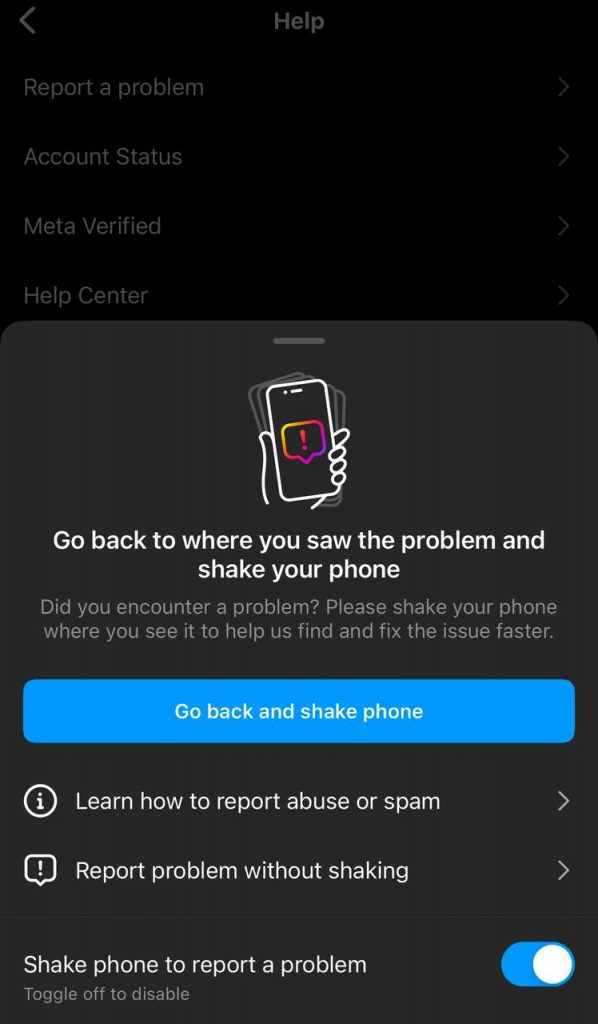
If none of the solutions worked, you should contact Instagram and report the issue.
Go to Instagram> Settings> Help> Report a problem
How Should I Describe My Issues?
Be specific. Write about the details of your issues and tell them about what you believe caused the problem. Tell them whether you are using the latest version or not. Also, providing additional information about your device could be helpful.
FAQs
What Is Suspicious Activity On Instagram?
According to Instagram, user’s security always comes first. So if Instagram notices unusual access patterns, file changes, offensive behavior, copyright infringement, and basically any unusual activity that violates Instagram’s terms and conditions, it notifies you with warnings.
Instagram may even block you from doing the specific task you’ve been warned about.
How Many Devices Is My Instagram Logged Into?
Your account can be logged into 5 devices. Usually, Instagram notifies you when your account is logged into another device.
However, if you want to check whether there has been an anonymous login or not, go to Instagram settings> Security> Login Activity
How Do I Log Out Of Other Devices On Instagram?
On your Login activity page, you can choose devices you would like to unlink. Then simply tap “Log Out,” and your account is no longer linked to those devices.
What Are Third-party Apps?
Imagine the weather app on your phone. It communicates with your system and gives you information about the weather. API enables these two software to communicate with each other.
For instance, Instagram API allows you to access Instagram accounts, share stories, and speak to others.
Conclusion
Instagram constantly works to keep your account safe and secure. If you ever find yourself logged out of your account, remember that it is probably for your own good.
As frustrating as it may seem, sometimes it is necessary to go through these challenges. This way, you can notice if something is wrong.
However, sometimes it is just the bugs. But whether it is the bugs or the security issues, you have nothing to fear. By following a few steps or even contacting Instagram help, you can quickly fix the problem.

Emi Daniel
Buy an Established Instagram Account
Skip starting from zero. Browse Instagram/TikTok accounts with audiences across many niches.
See Available AccountsRelated articles
-

How to Use Instagram: The Creator’s Guide to Building an Audience
Instagram in 2026 is no longer just a place to collect followers. The creators who grow consistently are the ones who understand how to earn attention, turn…
17 min readEmi Daniel
-

How to Go Live on Instagram: A Step-by-Step Guide
Going live can feel more stressful than posting a Reel. You cannot remove a pause, rewrite a sentence, or start over after an awkward moment. But that…
17 min read -

Instagram Instants Feature: What It Is, How It Works, and How to Turn It Off
The first time I opened Instagram Instants, I almost backed out. I had taken a normal photo. Nothing worth editing. Nothing worth posting. Nothing that needed an…
11 min read