

Did you know that Instagram Reels created with photos generate 22% more engagement than standard Reels?
Many users think that Reels require trending audio, effects, or complex video edits. However, you can make Reels with photos directly from your phone’s gallery.
This method is ideal for influencers, content creators, and business owners who want to showcase travel experiences, products, or services without recording videos or spending so much time on editing.
Buy an Established Instagram Account
Skip starting from zero. Browse Instagram/TikTok accounts with audiences across many niches.
See Available AccountsBy learning how to create photo-based Instagram Reels, you can produce engaging content, increase audience interaction, and maintain an active social media presence.
Whether your goal is to promote a brand, highlight personal content, or grow your social media following, knowing how to create engaging Reels from pictures provides a practical, time-efficient strategy, and here, you will learn everything you need to reach this goal.
How to Create Instagram Reels with Multiple Photos?
Creating Instagram Reels with photos is similar to making Reels with videos, meaning it has a simple process. Let’s learn step by step.
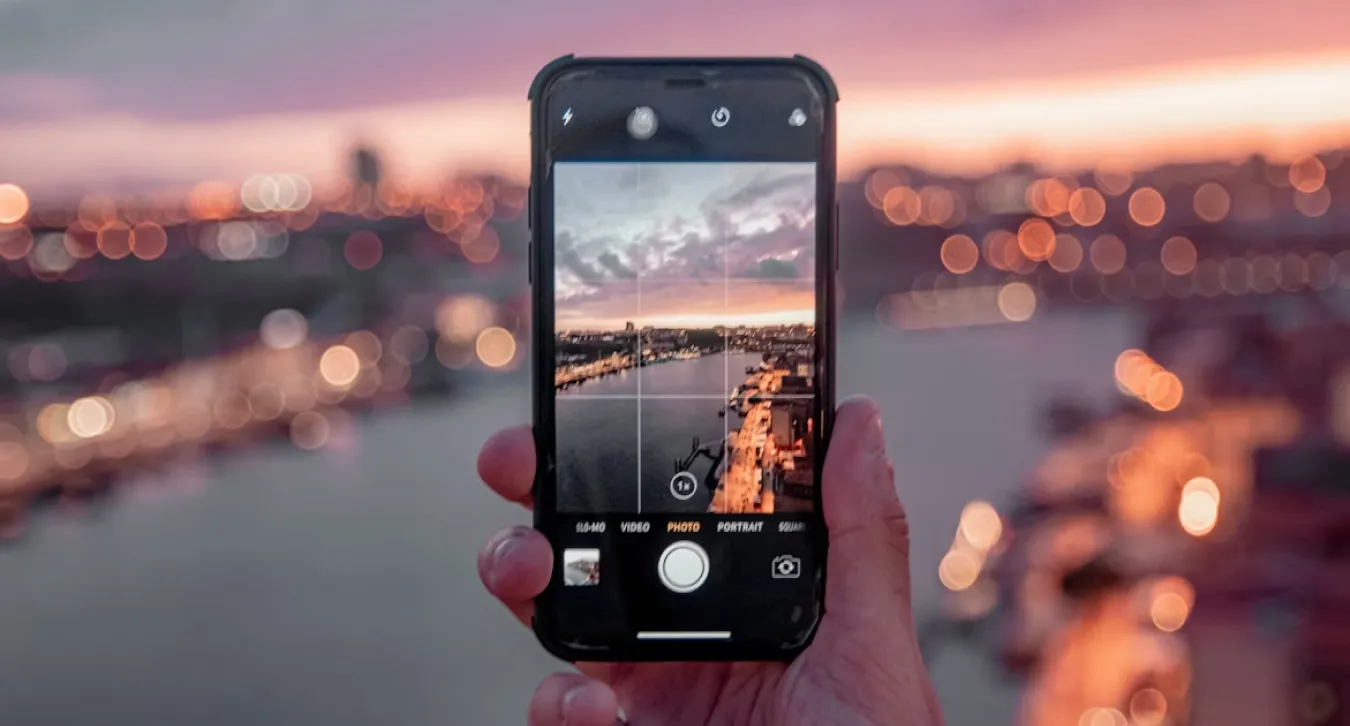
Step 1- Prepare your photos; you can create an album to speed up the process.
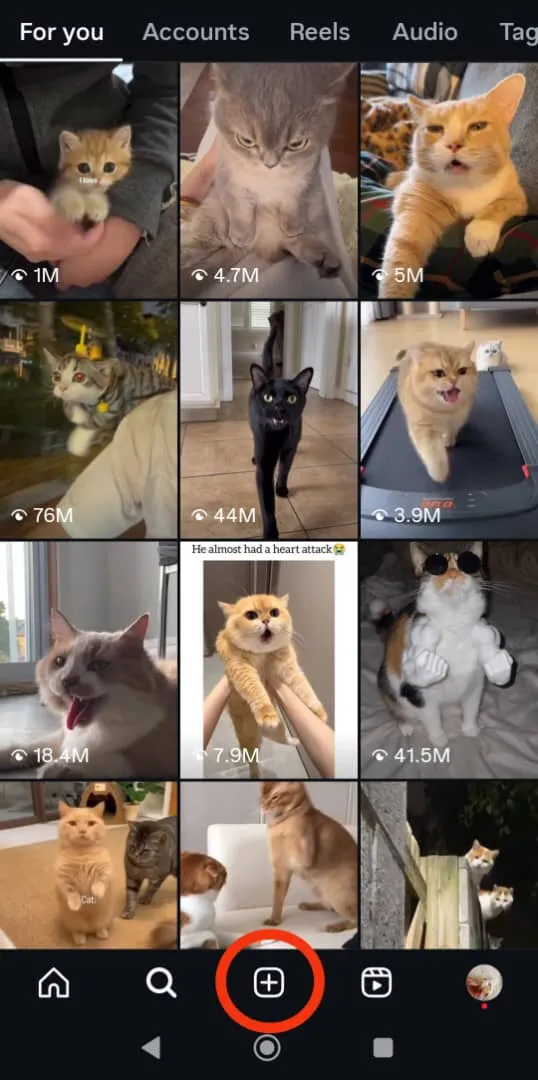
Step 2- Open Instagram, tap the + icon, and choose “Reel.”
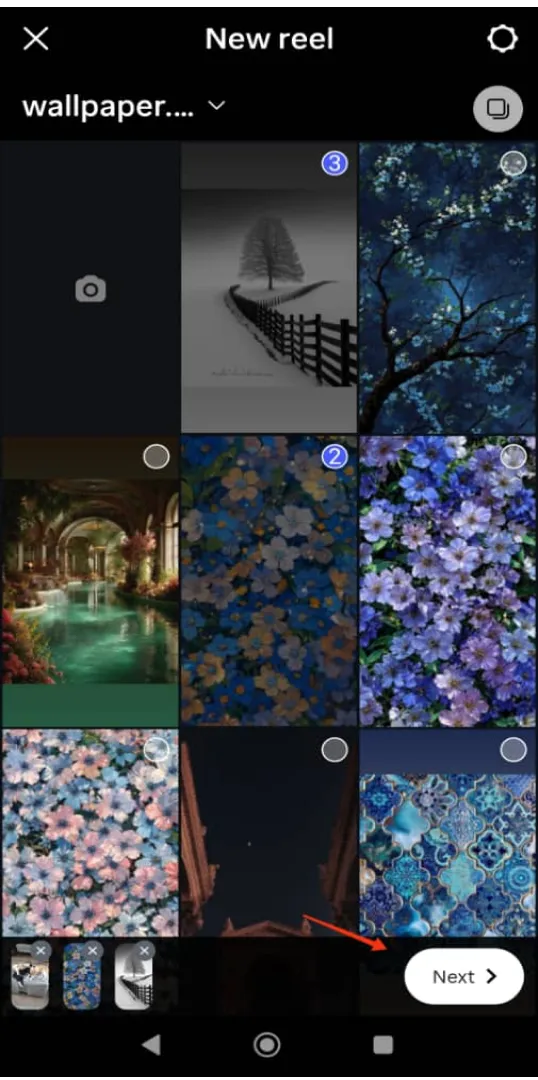
Step 3- Choose your photos and tap “Next.”
Step 4- Swipe up the screen or tap “Edit video.”
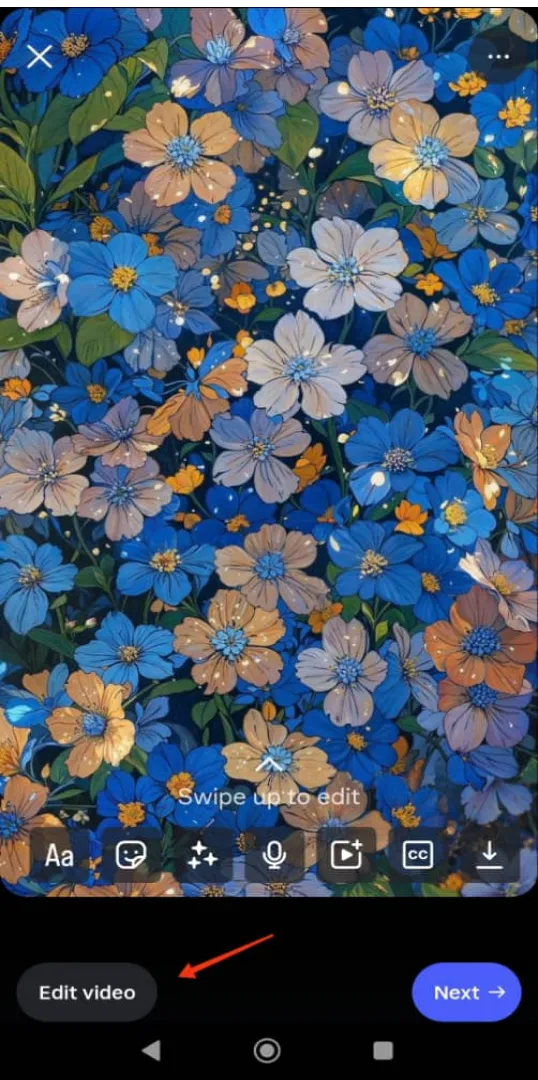
Step 5- Customize your Reels by setting the duration for each photo, cropping the photos, replacing or reordering them, and adding audio or text.
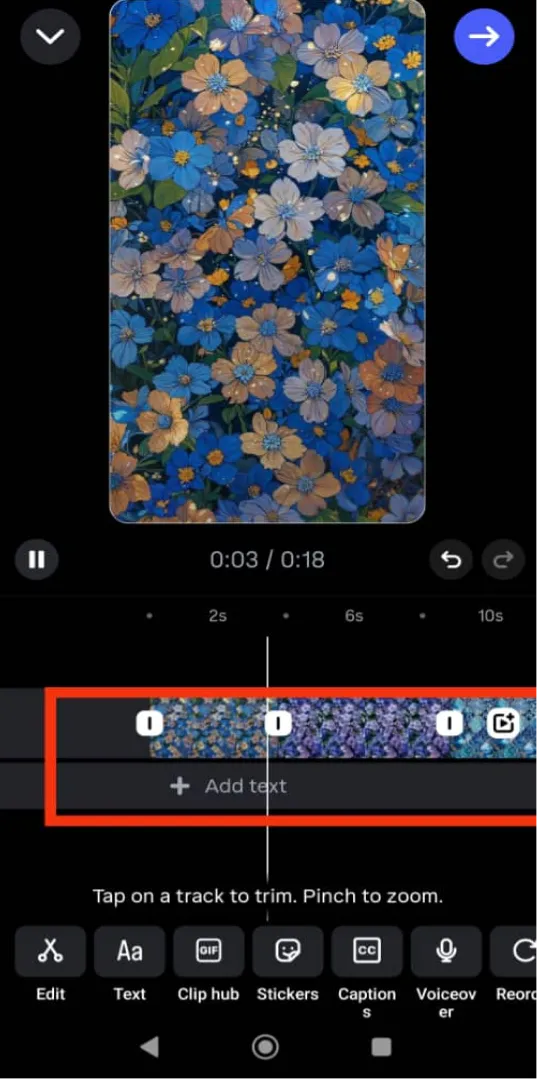
Note that each photo’s duration is 4 seconds by default. If you want to add more than five photos, it is better to decrease the duration of each image to make it more engaging for your audience.
Experimenting with different styles, like Instagram Trial Reels, can help you discover creative ways to make Reels with photos more engaging.
Is It Possible to Create an Instagram Reel with One Image?
Yes, it’s entirely possible to make Reels with photos, even if you only have a single image.
Instagram allows you to add one photo to a Reel and enhance it with effects, text, music, and animations to create movement and capture attention.
By combining features like zoom, pan, and transitions, a single image can feel dynamic and engaging. Adding stickers, captions, or trending audio can also boost interaction, making your Reel more appealing to viewers.
While multiple photos give more flexibility, a single image can still be effective if you focus on timing, storytelling, and visual enhancements.
How to Make Reels with a Single Photo in Simple Steps
Step 1- Open Instagram, tap the “+” icon, and select “Reel.”
Step 2- Upload your single photo from your phone’s gallery.
Step 3- Set how long the photo will appear on the screen and add motion effects like zoom or pan to make it dynamic.
Step 4- Add music, trending audio, or a voiceover to enhance engagement.
Step 5- Preview your Reel, make any necessary edits, and then publish it to your feed.
Pro tip: Using the right tools for Instagram Reels download can save time and make it easier to repurpose your photo-based Reels for multiple platforms.
Reasons to Make Reels with Photos
Here are the common reasons to create Reels with photos instead of videos.
Easy to create
Making Reels with images is usually faster and easier as it doesn’t require recording videos. Besides, it’s a great opportunity for beginners and those uncomfortable being recorded while talking in front of a camera.
Ideal for storytelling
Do you have a story to tell and a collection of images? Then, you should start creating reels with pictures to tell a story about an event’s progression. This will help your followers better engage with your content and feel part of the journey.
High-quality visual
Creating Instagram Reels with high-quality pictures lets you show small details of your products or services, making it a better choice for content creators and business owners.
They are customizable
Instagram offers the same editing options for both videos and pictures; however, if you use other editing tools, you have more options to edit and customize Reels with pictures.
Ideal for showing products
If you sell things on Instagram, try creating Reels with pictures to better represent the details of your products.
Taking high-quality pictures of your products helps you to show your products and services in an attractive and organized way.
Are Instagram Reels with Photos Engaging?
Although Reels often focus on videos, photo-based Instagram Reels can be highly engaging when used strategically.
Understanding the Instagram Reels algorithm can help you make Reels with photos that reach more viewers and boost engagement.
Here’s how to make them work:
- Make sure you add photos from different angles and mix them with short videos to keep them visually attractive.
- Add transitions or effects to your photos to encourage the audience to watch the video.
- Be creative in using photos. You can add text, overlays, sound effects, or animation.
- Choose photos that resonate with your audience, encouraging them to interact with your content.
- Include trends and challenges in your Reels. Suppose you want to share a before-and-after transformation. Adding a trending song or challenge makes it more engaging.
Following these simple tips helps you create more engaging Reels with photos that bring more target followers.
Pros and Cons of Using Photos in Reels
Pros:
- Creating Reels with photos is a unique way to stand out among your competitors.
- Reels with photos allow you to share more details about your products or services.
- Photos are perfect for storytelling and attracting attention.
- Using high-quality pictures creates a strong emotional connection.
- You can prepare it quickly and save more time.
- Reels with photos encourage users to interact and engage with your content.
- You don’t have to show your face in front of the camera.
- It’s easier to create content like art or photography.
Cons:
- Reels with photos may be less engaging than Reels with video.
- It may be less shareable.
- You may miss the opportunity to include specific challenges in your video.
- It may be difficult to edit a Reel with photos.
Easy Ways to Create Instagram Reels with Photos
1- Choose your photos: Select high-quality pictures and ensure they fit together to attract attention and encourage users to watch your Reel.
2- Upload photos as a Reel: Open Instagram and select the images you want to make into a video. You can choose multiple photos.
3- Apply necessary edits: Start by setting the duration for each image. Choosing one second for each picture is better, especially if you want to add multiple photos.
4- Add music: Add trending audio to your Reel to make it more engaging and increase its chance of going viral. Make sure to use audio that syncs the photos to the beat.
5- Use effects and filters: Use Instagram’s effects and filters to make photos look consistent. If you don’t like Instagram’s filters or want more options, you can use third-party applications, like CapCut, to access more effects.
6- Create a collage: Turning your pictures into a collage makes your Reel more interactive. You can use Instagram’s collage feature or third-party apps.
7- Add text: Adding text to your Reels with photos encourages your audiences to interact with your content. It’s a great strategy for helping others understand the context of your video. If you are short on ideas, you can add a quote or CTA (Call to Action) to your video.
8- Write an engaging caption: Be creative and write a caption encouraging readers to interact with your Reel. Don’t you know what an engaging caption is? You can include a question like this: “Which one do you prefer?”
9- Add relevant hashtags: Adding relevant hashtags to your Reel can increase engagement and attract target followers.
10- Post your Reel and enjoy more people discovering your account!
Tips to Make Reels with Photos More Engaging in 2025
By applying these strategies, you can make Reels with photos more dynamic, engaging, and likely to capture your audience’s attention.
Use transitions
Transitions and effects are not about moving from one photo to another! It’s about creating smooth shifts that attract attention. To get better results, it is recommended to use transitions like zoom-ins, zoom-outs, and swipe effects.
Use split-screen or collage
Using split-screen or collage adds dimension to your Reel and allows you to show multiple pictures at once. This strategy is great for creating before-and-after and comparison videos.
Use motion graphics
A subtle motion or an animated text adds more vibe and energy to your video, making it more engaging. You can use third-party apps or Instagram’s in-app features like stickers or GIFs.
Use AI tools for custom effects
Using such tools allows you to generate custom effects or backgrounds; this method helps you save more time and energy while trying different themes on your Reels.
Use trending audio and songs
Using trending songs on Instagram Reels with photos is a great way to increase engagement, as music continues to be the heartbeat of viral Reels in 2025!
Posting at the best times to post Reels ensures your Instagram Reels with photos reach the largest possible audience and maximize engagement.
Common Mistakes to Avoid When Making Reels with Photos
Avoiding common pitfalls can help you make Reels with photos that are polished, engaging, and effective.
Mistake: Using too many photos.
Solution: Instead of choosing too many pictures, keep it simple and use a few high-quality and relevant images.
Mistake: Using too many transitions and effects.
Solution: Use purposeful transitions to attract your audience’s attention to the video’s concept and keep them engaged.
Mistake: Using poor-quality photos.
Solution: Ensure your images are well-edited and sharp; otherwise, it makes your video look unprofessional.
Mistake: No straightforward story.
Solution: Select images that help you tell a story. It doesn’t matter what your video is about; tell a story, keep your audience engaged, and encourage them to watch the video until the end.
Mistake: Ignoring the audio sync.
Solution: Pay attention to the music’s beat and ensure each photo is synced to the song.
Conclusion
Do you agree that Instagram Reels was a revolution? They changed how users interact with accounts and kept them on the Explore page more than usual!
Creating engaging Reels is easier than ever, and Instagram makes them go viral faster. The only thing you need to remember is to use trending songs, high-quality pictures or videos, and interact with similar accounts to attract your target followers.
Never underestimate the power of sharing a well-edited Reel with photos! They can be a game-changer and increase your account’s engagement more than you expect!
You will get great results if you follow the tips we mentioned in this article. If you want to create engaging content to enhance your presence on social media, visit our website for more relevant content!
FAQs
How do you make engaging Reels with pictures?
To encourage users to engage with your content, use high-quality pictures, relevant edits, and transitions, tell a story, and make your Reel feel more personal.
How do I increase engagement on my reels?
Engage with your followers, write engaging captions, use relevant hashtags, add your Reels to your story, and use Instagram’s latest features.
How to make a reel with 50 photos?
It doesn’t matter how many pictures you want to use to create a Reel—it’s the same process! Just tap the Reel button, select your pictures, edit them, add trending audio, and publish them!

Emi Daniel
Buy an Established Instagram Account
Skip starting from zero. Browse Instagram/TikTok accounts with audiences across many niches.
See Available AccountsRelated articles
-

How to Clear Instagram Cache on iPhone, Android & Desktop
Instagram can quietly build up a lot of temporary files while you scroll through Reels, watch Stories, save posts, and upload your own content. You may not…
12 min readEmi Daniel
-

How to See Who Reposted Your Instagram Post (2026 Guide)
Someone reposted your Instagram post, but you have no idea who it was. You check notifications, search through your profile, and still cannot find a clear answer. …
18 min read -

How to Reset Instagram Algorithm in 2026
Instagram can start showing too much of the same type of content. Your Explore page may no longer match your interests, Reels may feel repetitive, or suggested…
12 min read