


Instagram is a popular social media platform where people share their experiences and special moments with their friends and followers.
Instagram stories are one of the most used features of this application and are a great way to increase engagement or sales and reach new followers.
However, many users have difficulty turning off sound on Instagram stories, which is because of a bug that hasn’t been fixed yet.
Buy an Established Instagram Account
Skip starting from zero. Browse Instagram/TikTok accounts with audiences across many niches.
See Available AccountsIn this article, we are going to discuss how you can turn off sound on Instagram stories with just a few clicks.
What Is Instagram Story

Instagram stories, which are photos or videos that will disappear from your profile after 24 hours, are among its most useful features.
These stories are not showing on your Instagram home feed and are separated from your traditional home feed.
You can use Instagram stories as a slideshow to upload different photos or videos while describing something or sharing special moments of your life.
The important thing to know is that when you upload a photo to a story, it will present for almost 10 seconds; however, videos can last up to one minute.
When you upload a story, a purple and orange circle appears around your profile, which lets your followers know you have added new content.
How to Create an Instagram Story
Creating Instagram stories is an easy task, you can follow the steps below to create your own stories:
Step 1- Open the Instagram application on your device, then tap on the “plus” icon in the upper left corner of your home screen.

Step 2- Tap “Story” at the bottom of the screen.

Step 3- Take a photo or video by pressing the white circle icon at the bottom of the display; you can also choose a photo or video from your camera roll.
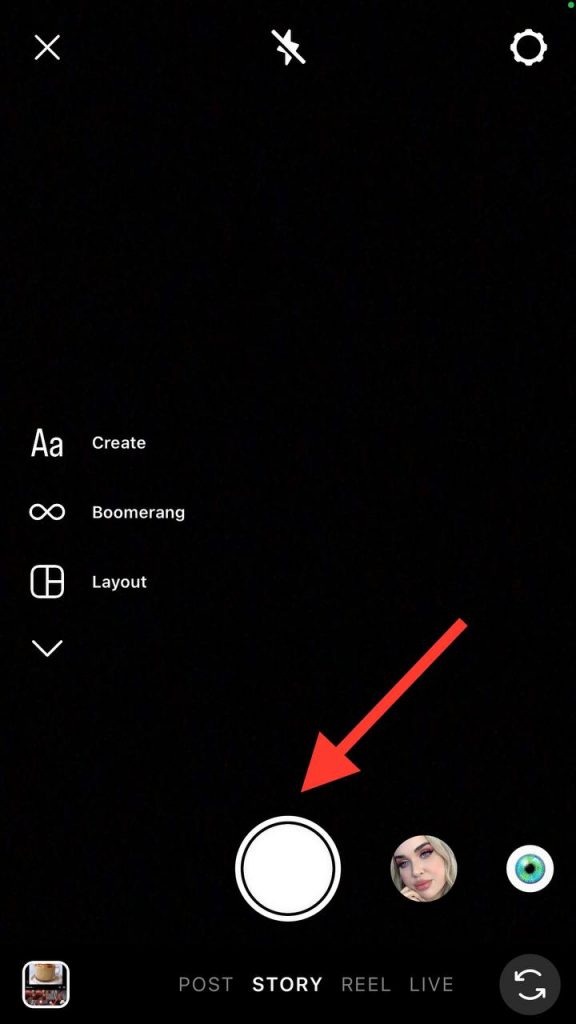
Step 4- When you choose your content, you can add filters, text, stickers, emojis, etc.
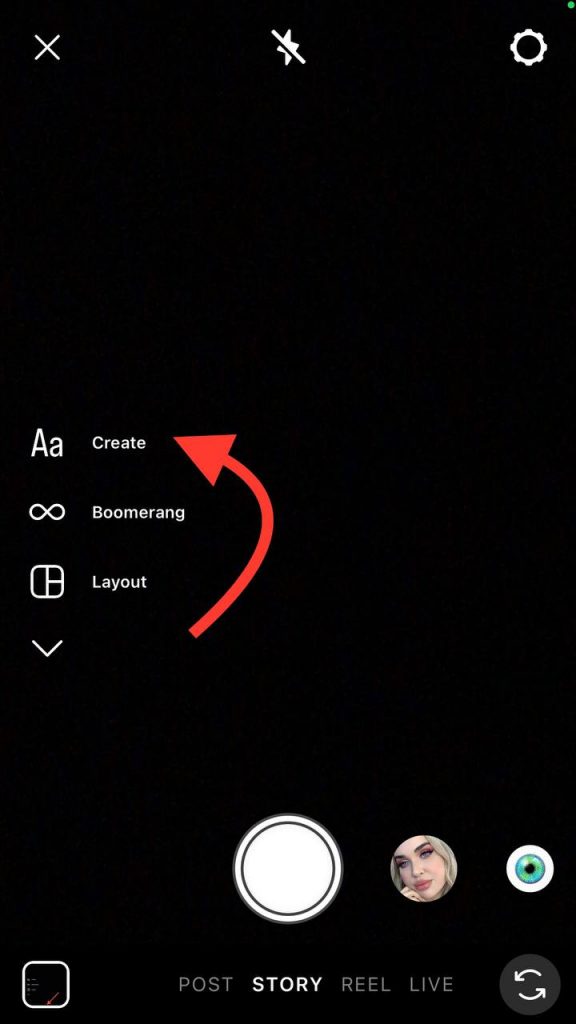
Step 5- Now, if you think you are ready to share the story, you can tap “Your story” at the bottom left of the screen to finish the process.
How to Turn Off Sound When Creating an Instagram Story
When you are making an Instagram story, unwanted sounds are always captured by your device’s sensitive microphone, but you can turn off these sounds while creating a story because Instagram is aware of this issue and added a great feature that helps you mute all unwanted sounds on your stories.
1- Open Instagram and tap on the plus symbol (the new content icon).

2- Swipe right to the “Story” icon.
3- Start recording a new video or upload a saved one.
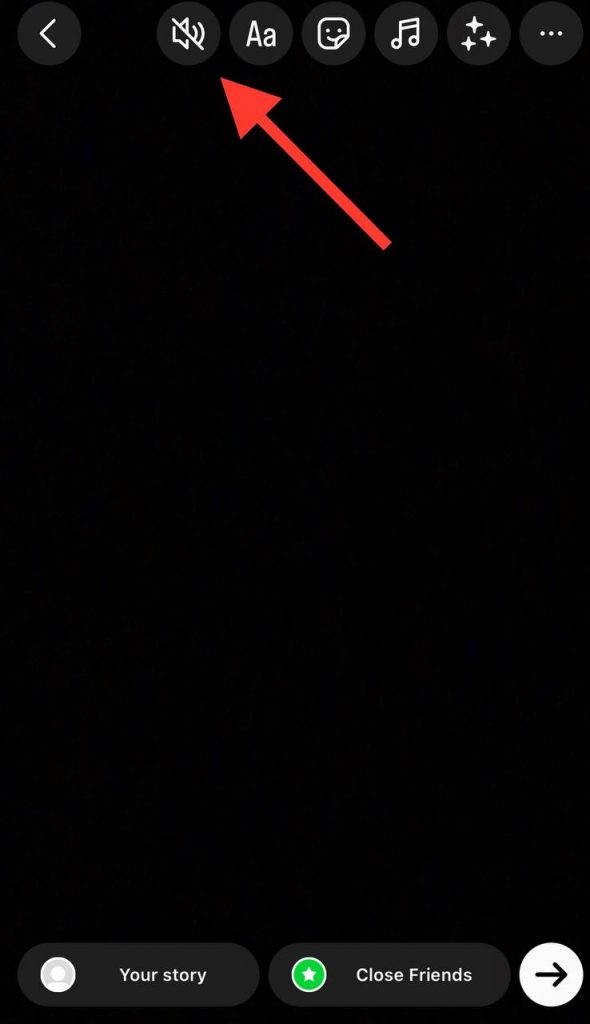
4- Tap on the “speaker” icon located at the top of the screen to mute the video right away.
How to Turn Off Sound While Watching Instagram Stories

You may have seen a mute feature in the bottom right corner of Instagram Reels, which lets you mute a reel, but this option is unavailable on Instagram stories. However, you can easily turn off the sound of a story while you are watching it.
The only thing you need to do is keep the volume down button on your device until you no longer hear the sound.
Note that if you put your mobile phone on silent mode, all stories will be played muted by default.
Benefits of Turning Instagram Stories’ Sound

To have a better experience watching Instagram stories, it is better to play them with sound; however, muting Instagram stories has benefits, which we gathered below:
- If you care about data conservation, muting Instagram stories is a great way to conserve and manage your data usage.
- By turning off sound on Instagram stories while you are in a public place, you will value others’ public space and won’t annoy people around you.
- You can better focus on the stories’ content with subtitles or explanations.
FAQs
1- How can I mute a Reel sound on Instagram stories?
You can turn off the sound of an Instagram reel by tapping on the music icon from the tools section at the top of the screen.
2- Can I repost an Instagram story without sound?
There is no specific way to repost an Instagram story without a sound; however, you can tap on the speaker or music icon on your story section to turn off the sound.
3- Can I edit an Instagram story after posting?
Unfortunately, Instagram stories are not like posts, so once you upload them, there is no way you can apply any changes.
Conclusion
As you can see, muting Instagram stories is an easy task; however, if you update the application but still can’t mute sounds on stories, it may be because the latest version of Instagram hasn’t reached your area yet.
Note that you can clear your Instagram cache to remove old settings so you can turn off sounds on your stories.
We hope the methods mentioned in this article help you have a better experience using Instagram!

Emi Daniel
Buy an Established Instagram Account
Skip starting from zero. Browse Instagram/TikTok accounts with audiences across many niches.
See Available AccountsRelated articles
-

How to Use Instagram: The Creator’s Guide to Building an Audience
Instagram in 2026 is no longer just a place to collect followers. The creators who grow consistently are the ones who understand how to earn attention, turn…
17 min readEmi Daniel
-

How to Go Live on Instagram: A Step-by-Step Guide
Going live can feel more stressful than posting a Reel. You cannot remove a pause, rewrite a sentence, or start over after an awkward moment. But that…
17 min read -

Instagram Instants Feature: What It Is, How It Works, and How to Turn It Off
The first time I opened Instagram Instants, I almost backed out. I had taken a normal photo. Nothing worth editing. Nothing worth posting. Nothing that needed an…
11 min read