


Nowadays, almost every social media platform has an option that shows the last time users were online and used the application, and Instagram is no exception.
The last seen option is known as the “Active Status” on this platform, which shows when a person was online or if they are using it now.
This feature enables users to see which one of their followers or friends is now online on Instagram, so they can start a conversation with them. It also allows you to guess whether you can expect an immediate answer from the user, or have to wait until they check your message and respond to you.
Buy an Established Instagram Account
Skip starting from zero. Browse Instagram/TikTok accounts with audiences across many niches.
See Available AccountsHowever, most users prefer to keep their privacy, so they don’t want others to understand their activities and last seen on Instagram.
Suppose you are among the users who want to keep their privacy and are not interested in knowing who is online on Instagram; what can you do to reach this goal?
Well, the answer is simple, since Instagram allows you to turn off the active status on the application!
In this article, we will review how to turn off this feature so you can better use this application while no one notices your activity.
What Is Active Status on Instagram

Before we jump to the main section of this article, it is better to explain what Instagram’s active status is.
As the name suggests, this feature allows you to see when your friends and followers are online, which means if you have this feature on your account, others can also check your activity.
When someone has the active status on their account, you will see a small green dot next to their profile pictures or a note that says “Active Now.”
You may know that when you turn off your last seen or online status on social media platforms, you can’t see others’ last seen. It’s the same on Instagram, so if you turn off this feature, no one can see when you are online and you can’t check who is using Instagram or when was the last time they were online.
Note that turning off the active status on Instagram does not mean you won’t receive messages, notifications, or read receipts; it just means that you can’t see who is active on the app right now!
How to See Who Is Online on Instagram

If you are curious to see who is online on Instagram, you can do it easily by checking their usernames. We will explain in more detail in the following section:
Check their online status
A simple way to check which one of your followers is online is to see if you can find a small green dot next to their username. If you see this icon, it means they are currently using the application, so you can start a chat with them and expect a quick reply.
Their activity status
If you want to message someone and are unsure when they were last online, just open the direct message section and search for their name.
You will see notes like “Active Now,” “Active X time ago,” “Seen just now,” etc. These notes allow you to determine when they were using the app.
Who Can See You Are Online on Instagram
If you think that everyone on Instagram, including your followers or non-followers, can see your online status and want to turn it off immediately, you are wrong because not everyone is able to check your last seen on Instagram.
Note that only your followers and those you have interacted with can see your online status when they visit your profile or want to DM you.
However, if you turn this feature off, no one can see your last seen or activity, which means you have a more private space to spend your time.
Turning Off Active Status on Instagram
Now that you know what the active status is on Instagram and who can see you are online on the platform, you may want to disable this feature; let’s learn how to do it in simple steps:
Step 1- Open the Instagram application on your device.
Step 2- Tap on your profile picture in the bottom right corner of the screen.

Step 3- Tap on the three-line icon in the top right corner of your profile.
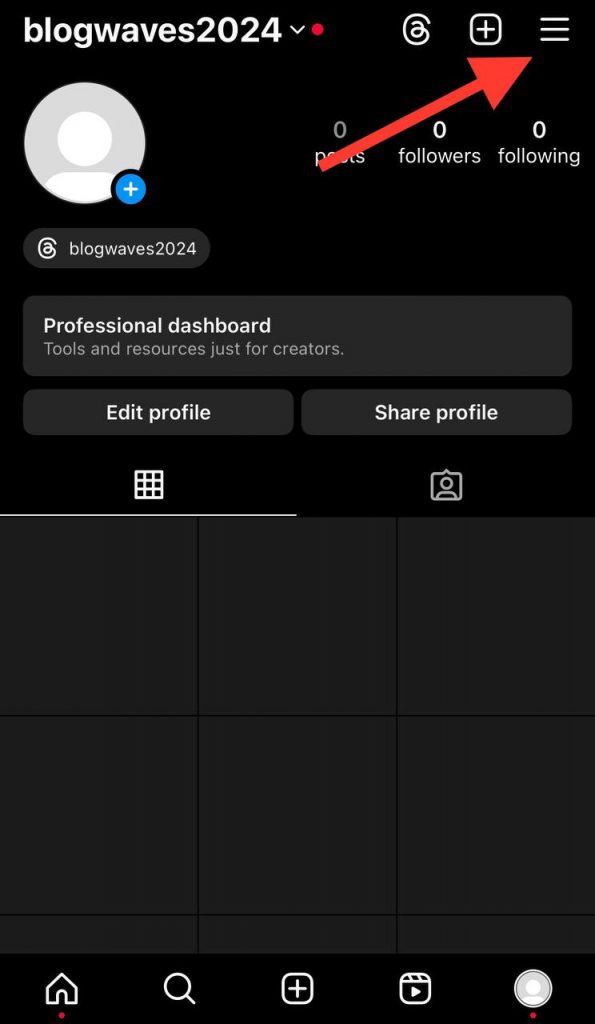
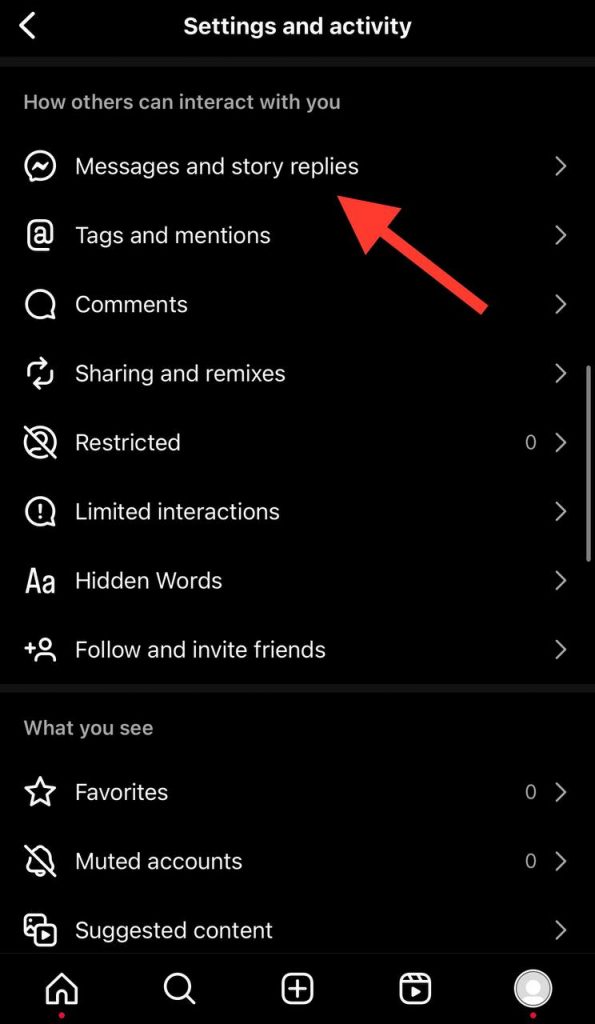
Step 4- Scroll down the menu and select “Messages and story replies.”
Step 5- Choose the “Show activity” status.

Step 6- Tap on the toggle next to it to turn off your activity status.
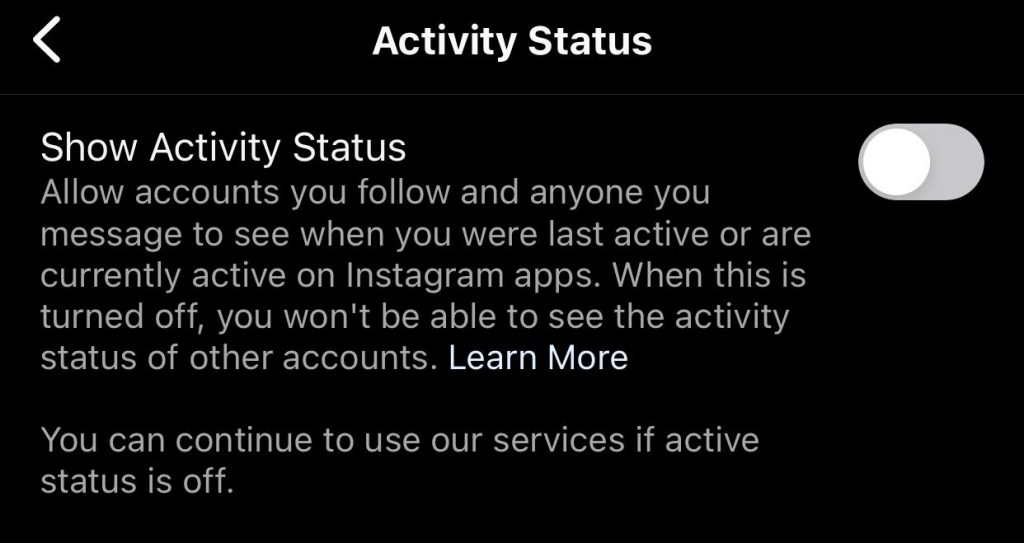
That’s it! You just turned off this feature on your account, and you are no longer able to see others’ online status across the platform, and others can’t see yours.
Ultimately, note that this process is the same on both iOS and Android devices.
How to Hide Instagram Online Status On Web Version
If you are using the web version of Instagram or don’t access your mobile and want to turn off your activity status, you should know it is a simple process and the previous section.
To do so, follow the steps below:
Step 1- Open Instagram on your preferred browser (Chrome, Firefox, Edge, etc.)
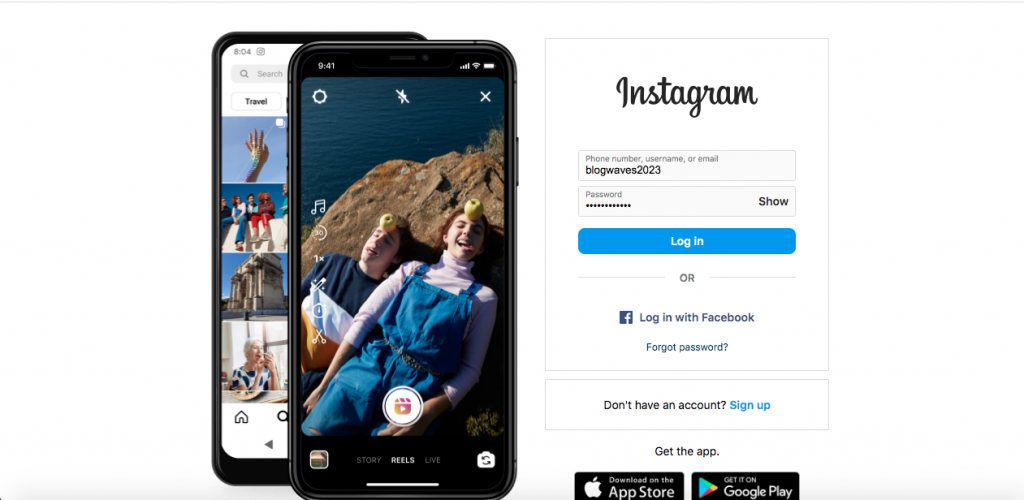
Step 2- Log in to your account if you are not already. Note that you must enter your username and password to log in to your account.
Step 3- Now, you can see an option called “More” at the bottom of the screen. Tap on it.

Step 4- Click on the “Messages and story replies.”
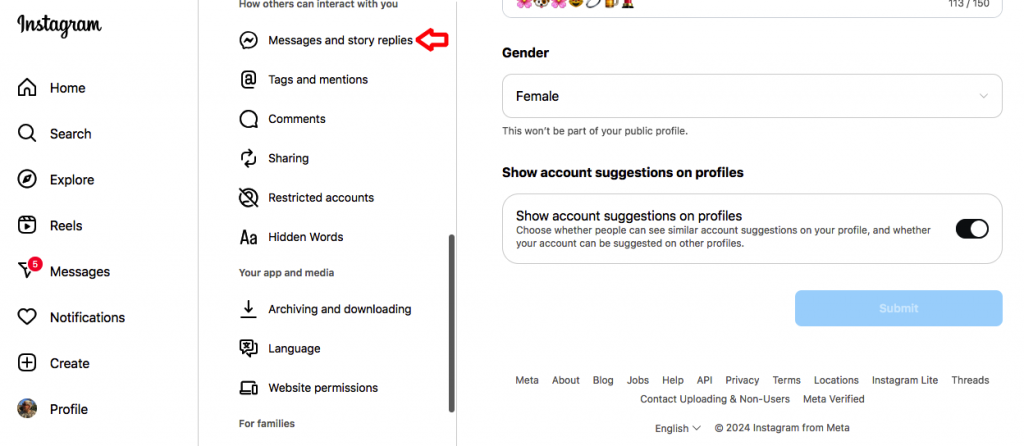
Step 5- Finally, switch off the slider next to the “Show activity status” option.

As you can see, the process is very simple, and you can finish it in just a few seconds; however, it is better to ensure you are using the updated web version of the app so you can follow each step without a problem.
What Happens When You Turn Off Active Status on Instagram

In this section, you will learn what changes you’ll face on Instagram when you turn your activity status off.
- The first thing that happens is that you can no longer understand when your friends and followers were last online on the platform.
- You are no longer allowed to see which one of your followers are active or online from the DM section.
- Others won’t be able to see if you are now using the application or when you see their message on the chat screen.
As you can see, these changes may not seem like a big deal; however, they can influence your account’s engagement because others may find it difficult to communicate with you or engage with your account, causing your engagement to decrease.
However, it all depends on your followers and your account type (public or private), which means you may never feel that your engagement has decreased.
Yes! It seems challenging to strike a balance between privacy and engagement!
Conclusion
The activity status on Instagram is a helpful feature for most users, while others may find it useless or annoying and want to disable it.
Keep in mind that you can use this feature based on your personal or business goals. This means that if you care about your privacy and want to take control over it, you can turn it off, but if you think this feature helps you communicate better with your followers, keep it on and enjoy the benefits.
In this article, we explained all the essential aspects of the activity status feature on Instagram, and now it is up to you whether to disable or keep it enabled on your account.
FAQs
1- Why Can’t I see others last online on Instagram anymore?
If you are no longer able to see others’ activity status, it’s because they have turned off this feature on their account.
2- Does Instagram show your last seen on the application?
Yes, when your activity status is on, your friends, followers, and anyone you have interacted with through direct messaging will be able to see your last seen on Instagram.
3- Is Instagram’s activity status accurate?
If you use the latest version of the app and make sure the app is running effectively on your device, you can ensure that Instagram’s activity status is accurate and shows the correct information for each user.

Emi Daniel
Buy an Established Instagram Account
Skip starting from zero. Browse Instagram/TikTok accounts with audiences across many niches.
See Available AccountsRelated articles
-

How to Use Instagram: The Creator’s Guide to Building an Audience
Instagram in 2026 is no longer just a place to collect followers. The creators who grow consistently are the ones who understand how to earn attention, turn…
17 min readEmi Daniel
-

How to Go Live on Instagram: A Step-by-Step Guide
Going live can feel more stressful than posting a Reel. You cannot remove a pause, rewrite a sentence, or start over after an awkward moment. But that…
17 min read -

Instagram Instants Feature: What It Is, How It Works, and How to Turn It Off
The first time I opened Instagram Instants, I almost backed out. I had taken a normal photo. Nothing worth editing. Nothing worth posting. Nothing that needed an…
11 min read