You liked a Reel, a product post, or a useful tutorial on Instagram, and now you want to find it again. The problem is that once it disappears from your feed, tracking it down can feel almost impossible.
The good news is that Instagram keeps a record of your recent likes in one place, so you can revisit posts and Reels without searching through your feed, trying to remember the creator’s username, or scrolling through Explore for hours.
In this guide, you will learn how to find liked posts and Reels, filter your activity, remove old likes, and save the content you want to revisit later.
Buy an Established Instagram Account
Skip starting from zero. Browse Instagram/TikTok accounts with audiences across many niches.
Open Instagram and tap your profile picture in the bottom-right corner.
Tap the three-line menu in the top-right corner.
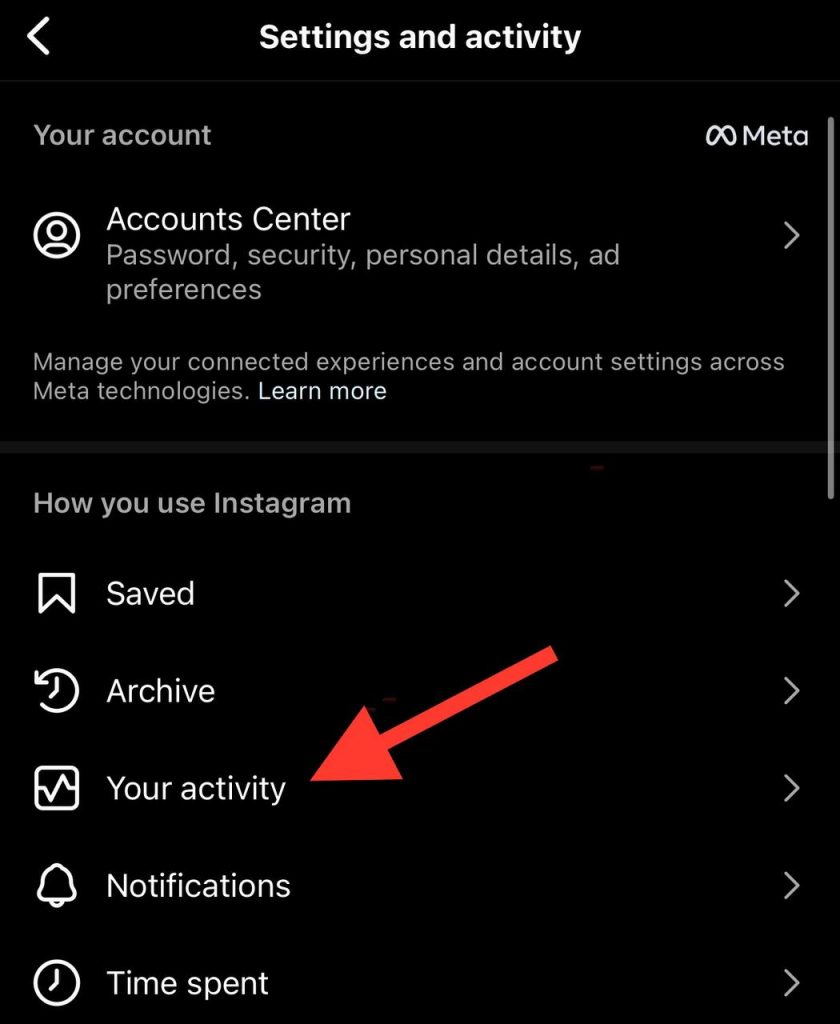
Select Your activity.
Tap Interactions.
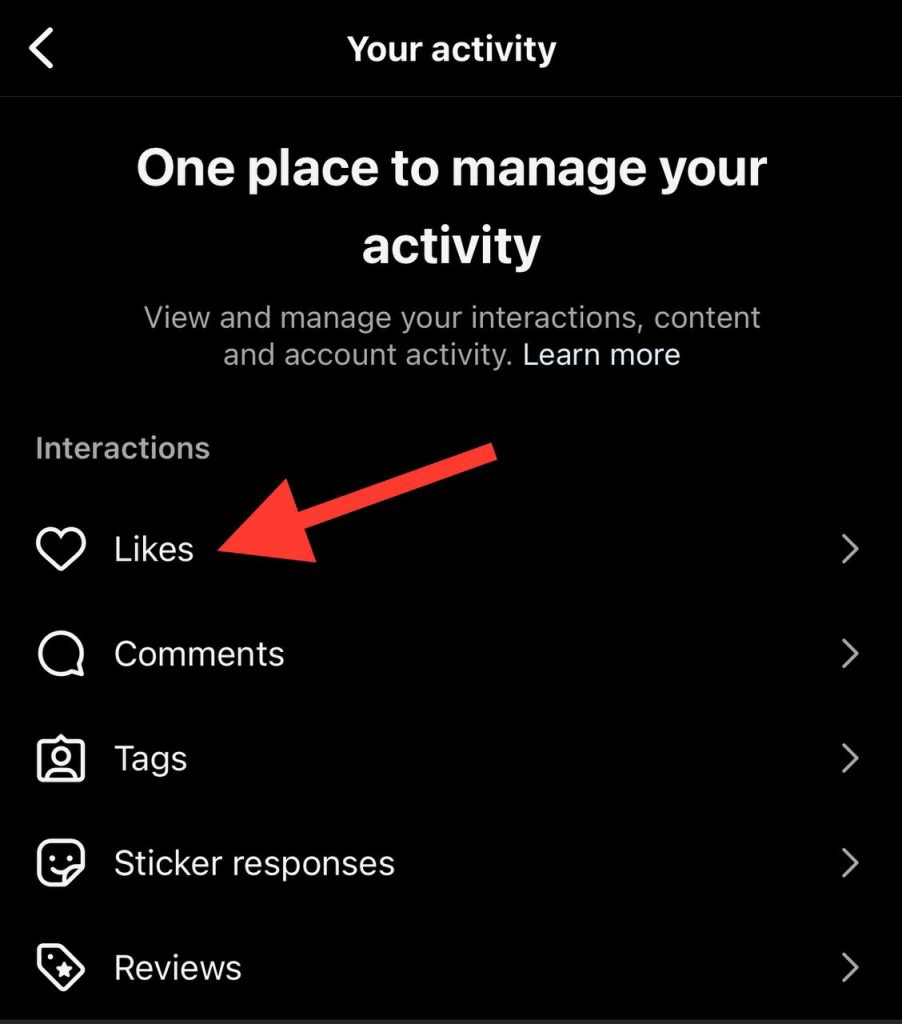
Select Likes.
You will see your liked posts and Reels, normally with the newest activity first. From this page, you can filter results, open a post again, or remove one or more likes.
How to See Your Liked Posts
Instagram keeps your like history inside the Your activity section. This is useful when you want to revisit a Reel, find a product you saw earlier, return to a tutorial, or remove likes from old posts.
Step 1: Open Your Instagram Profile
Open the Instagram app on your iPhone or Android device.
Tap your profile icon in the bottom-right corner of the screen.
Step 2: Tap the Menu Icon
On your profile page, tap the three horizontal lines in the top-right corner.
This opens the main account menu.
Step 3: Select Your Activity
Tap Your activity.
This area includes different types of account activity, such as interactions, content you have shared, account history, searches, links you have visited, and time spent in the app.
Step 4: Open Interactions
Inside Your activity, select Interactions.
This is where Instagram groups activity such as likes, comments, story replies, and reviews.
Step 5: Tap Likes
Tap Likes to open your liked-post history.
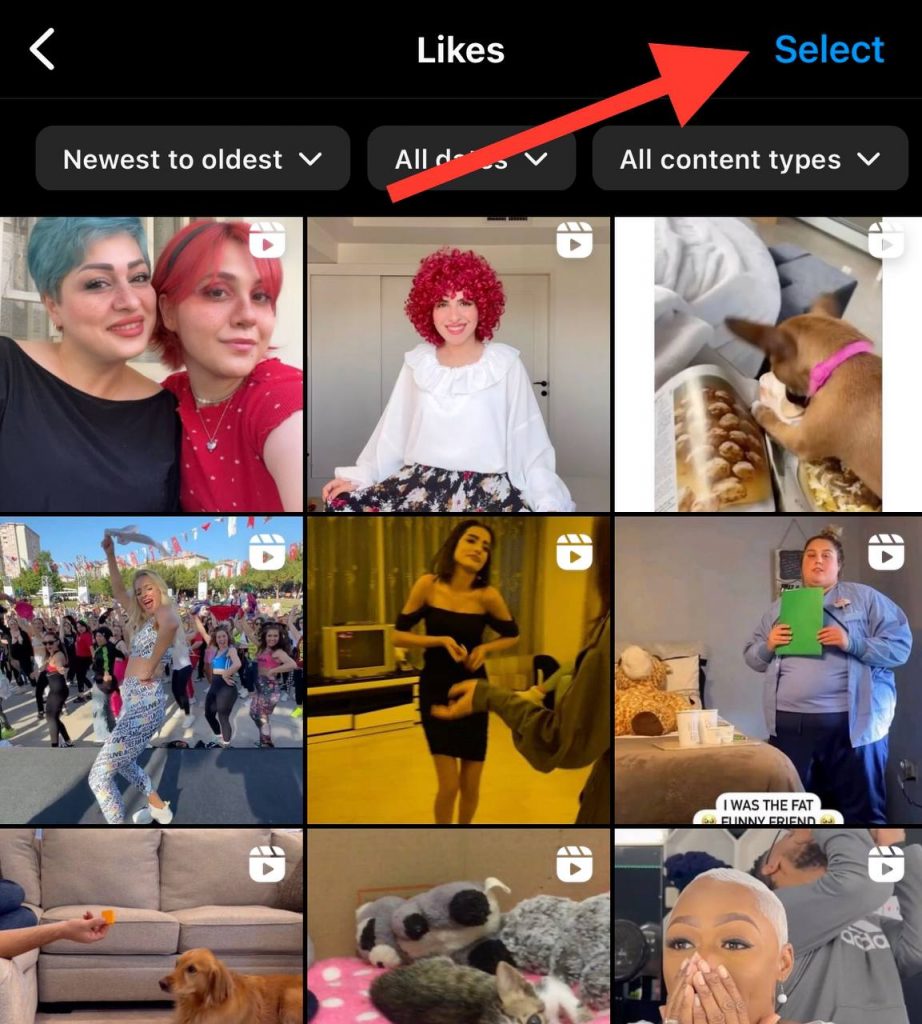
You can now scroll through posts and Reels you have liked. To revisit a piece of content, tap it. To remove your like, open the post and tap the heart icon again, or use the bulk unlike option explained below.
How to Sort and Filter Liked Posts
Finding an older post by scrolling can take time, especially when you like content regularly. Instagram’s filters can make the process much faster.
From the Likes page, look for the sorting or filtering options near the top of the screen. Depending on your app version, you may be able to narrow the results by date, content type, or account.
Filter Likes by Date
Choose a date range when you remember roughly when you liked the post.
For example, if you liked a restaurant Reel during a trip in May, set a custom date range around that period instead of scrolling through months of recent activity.
Sort Likes by Date
Instagram normally displays liked content from newest to oldest. In some versions of the app, you can change the order to find older likes more easily.
Try sorting from oldest to newest when you are looking for a post you liked a long time ago.
Filter by Content Type
You may be able to filter your activity to focus on specific content types, such as posts or Reels.
This can be helpful when you remember that you liked a video but do not remember the creator’s name or the caption.
Find Posts From a Specific Account
Some versions of Instagram allow you to filter liked content by author or account.
This is particularly useful when you want to find a post from a favourite creator, a brand, a photographer, or an account you follow.
How to Unlike Multiple Instagram Posts
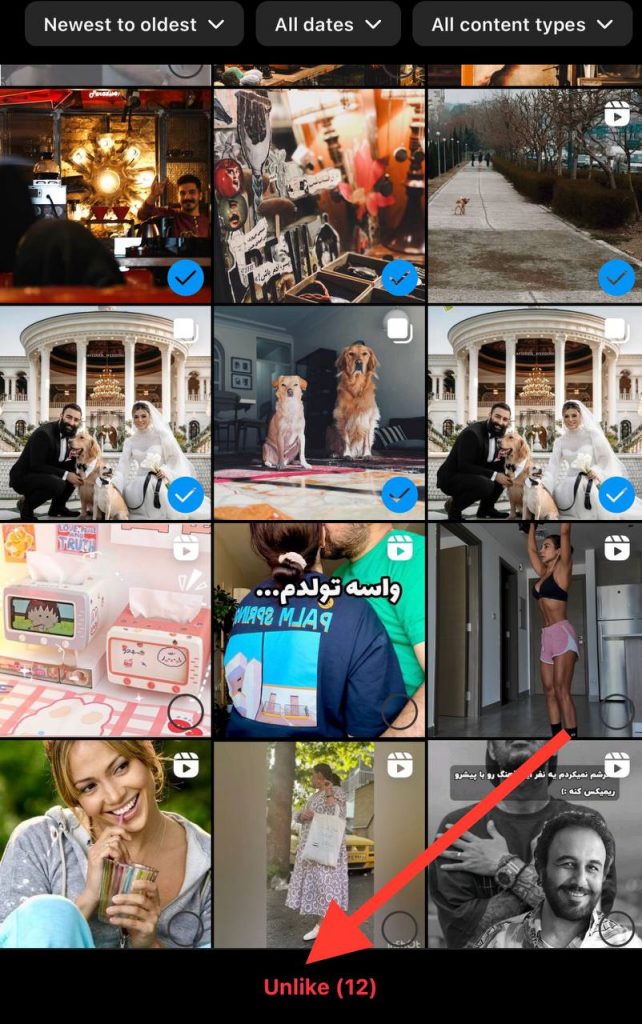
You can remove several likes at once from the Likes section. This is useful for clearing old activity, removing accidental likes, or reviewing content you no longer want connected to your account activity.
Go to Profile → Menu → Your activity → Interactions → Likes.
Tap Select in the top-right corner.
Choose one or more posts or Reels.
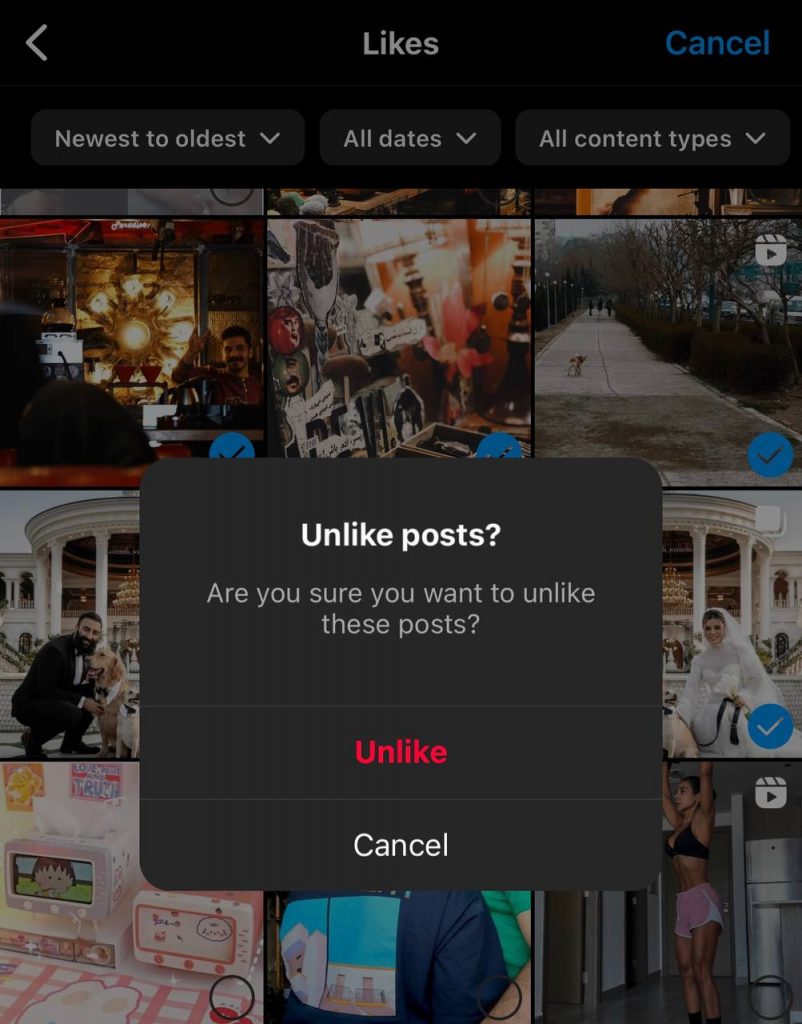
Tap Unlike.
Tap Unlike again to confirm. Removing a like is not the same as deleting the post. It only removes your interaction with that content, while creators who want to track engagement can also see who shared their Instagram post.
Can’t Find a Post You Liked? Try These Ways to Recover It
Instagram’s Likes section is the fastest place to look for posts and Reels you have recently liked. However, it may not include everything you have interacted with in the past.
If the post is not showing up in your like history, do not assume it has disappeared permanently. You may still be able to find it through your search history, saved posts, direct messages, browser history, or Instagram’s account-data download.
Check Your Instagram Search History
If you searched for the creator, a product, a location, a song, or a hashtag before finding the post, your search history may help you retrace your steps.
Open Instagram and tap the search icon.
Tap the search bar.
Review the accounts, hashtags, places, and recent searches shown below the bar.
Open relevant accounts or repeat a keyword search to look for the post again.
This works particularly well when you remember part of the creator’s username, the name of a product, a destination, or a phrase from the caption.
Look Through Saved Posts and Collections
You may have saved the post without remembering it.
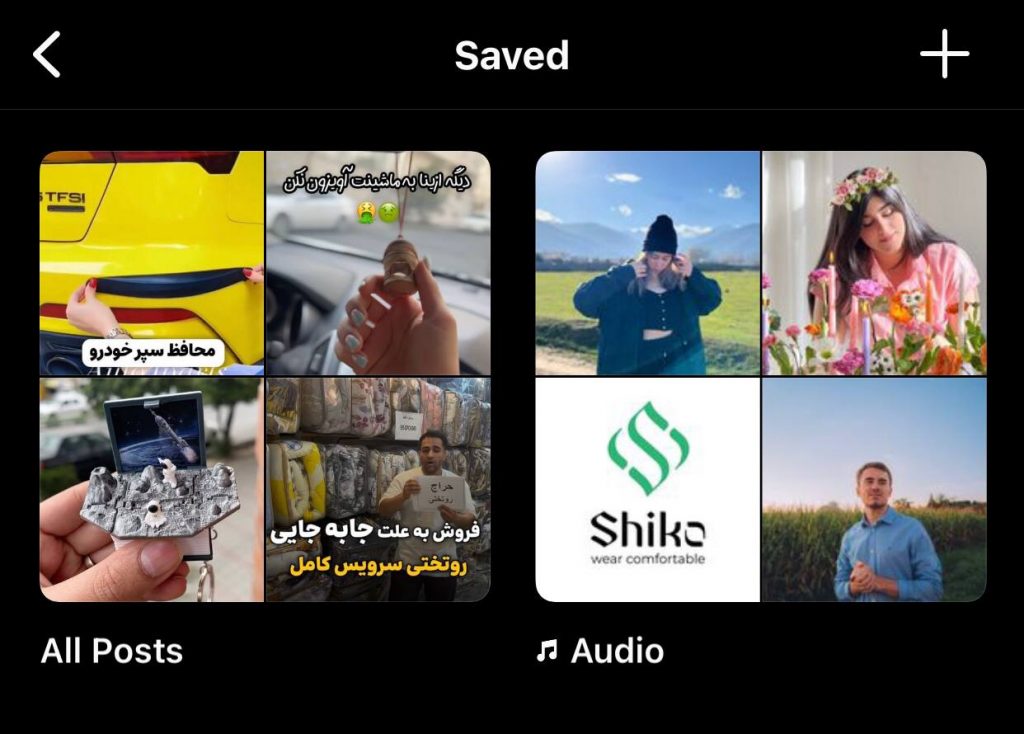
Go to Profile → Menu → Saved and check your All Posts folder and any collections you have created. If you regularly save useful content, review the most relevant collection first, for example, Recipes, Travel, Fashion, Business Ideas, or Reels.
For content you want to find again later, saving it is usually more reliable than relying only on your Like history.
Check Messages and Shared Posts
Think about whether you sent the post to someone, received it in a direct message, or added it to a group chat.
Open your Instagram inbox and search through recent conversations. Posts and Reels shared in DMs often remain easier to find than content buried in a long feed.
If you remember who you shared it with, open that chat first. You may be able to locate the post by scrolling through the media and links you exchanged.
Review Your Browser History
This method can help when you opened an Instagram post from Google, a link in a message, a creator’s bio, or Instagram’s web version.
Search your browser history for:
“instagram.com”
The creator’s name
A product name
A hashtag
Words you remember from the post caption
It will not work for every post viewed inside the app, but it can be useful when you opened the content in Safari, Chrome, or another browser.
Search by Audio, Hashtag, Location, or Caption Keyword
For a Reel, try searching for the audio title, a spoken phrase, a hashtag, a location, or a word from the caption.
For example, imagine that you liked a Reel about a café in Amsterdam but do not remember the account name. Search the café’s name, the neighbourhood, relevant location tags, or keywords such as “Amsterdam coffee guide.” If the Reel used a popular audio track, opening that audio page may also help you find similar content.
Check Whether the Original Post Is Still Available
Sometimes the problem is not your Like history. The creator may have deleted the post, changed their username, made their account private, blocked your account, or had their content removed by Instagram. In those situations, the original post may no longer be available to open.
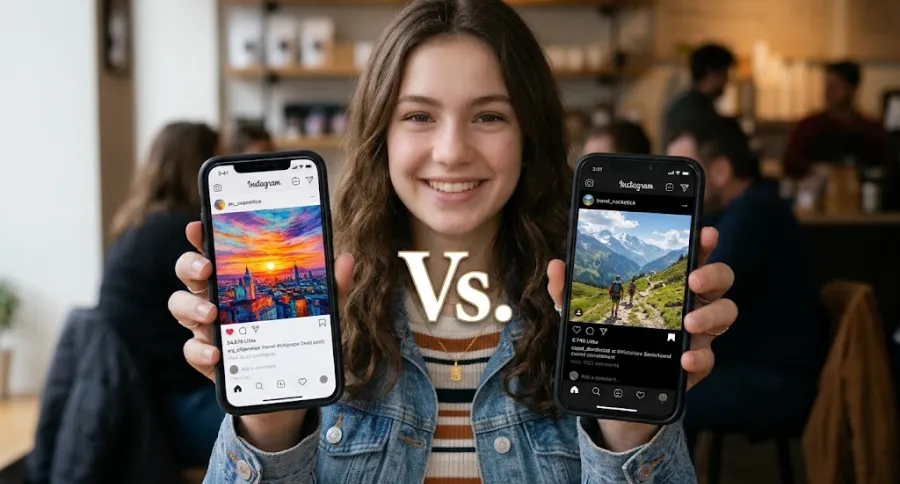
Liked Posts vs. Saved Posts
Liking and saving are different actions on Instagram. Knowing the difference can make it easier to keep track of content you want to revisit.
Feature
Liked posts
Saved posts
Main purpose
Shows that you engaged with a post or Reel
Lets you bookmark content for later
Where to find it
Your activity → Interactions → Likes
Profile → Menu → Saved
Best for
Quick reactions and casual engagement
Content you want to organise or return to
Organisation options
Limited filtering and sorting
Collections can be created for different topics
Privacy
Your full like history is private to your account
Your saved posts and collections are private to your account
If you want to keep a useful tutorial, recipe, travel location, product idea, or social-media reference, save it as well as liking it. Saved collections are usually easier to organise than your like history.
Likes are also a signal of engagement on Instagram, so creators and businesses looking to build early visibility often explore options such as free Instagram likes alongside consistently posting content their audience wants to engage with.
Why Can’t I See My Liked Posts?
If you cannot find your liked posts, work through these checks before assuming your history has disappeared.
You Are Looking in the Wrong Menu
The Likes page is not directly inside the general settings screen.
Use this path:
Profile → Menu → Your activity → Interactions → Likes.
Your Instagram App Is Out of Date
Instagram occasionally changes menu names, button placement, and account settings.
Update the Instagram app through the App Store or Google Play, then reopen it and check the Your activity section again.
You Are Logged Into a Different Account
Many people switch between a personal account, business account, creator account, or secondary profile.
Make sure you are logged into the account that originally liked the content. Like histories are connected to the specific account that performed the interaction.
The Post Has Been Deleted or Is No Longer Available
A post may disappear from your activity if the creator deleted it, deactivated their account, changed the content’s availability, or Instagram removed it.
In that case, there may be no way to open the original post again.
Instagram Is Experiencing a Temporary Glitch
If the menu loads incorrectly or your liked posts are not appearing:
Force-close Instagram and reopen it
Log out and log back in
Restart your phone
Clear the app cache on Android where available
Reinstall the app if the problem continues
Your Older Likes Are Not Showing
Instagram lets you view up to 300 of your most recent liked posts and videos. If you cannot find an older post, it may no longer appear in your visible Like history, especially after you have liked more than 300 other posts or Reels.
Can You See Liked Reels on Instagram?
Yes. Reels you have liked can appear in the same activity area as regular posts.
Go to:
Profile → Menu → Your activity → Interactions → Likes
Then use the content-type filter, when available, to narrow the list and find liked Reels more quickly.
Can You See Liked Posts on Instagram Desktop?
The most reliable way to access your liked-post history is through the Instagram mobile app.
Instagram’s web experience can differ by browser, account type, and interface update. On some versions, activity controls may be available after opening your profile and account menu, but the mobile app is generally the easiest place to find the full Your activity → Interactions → Likes path.
If you cannot see a Likes option on Instagram’s desktop website, open the Instagram app on your phone instead.
Can Other People See Your Liked Posts?
Other people cannot open a complete list of everything you have liked on Instagram.
Your personal like history in Your activity is visible only to you when you are logged into your account. However, people may still see that you liked an individual post, depending on the post’s settings and whether the creator has chosen to hide likes on Instagram.
For content you want to keep fully private, use Instagram’s Save feature instead of relying only on likes.
How To Save Instagram Posts Without Liking Them
Did you know that you can save Instagram posts to access them anytime without liking them? You only have to save the posts to review them whenever possible.
To do so, follow the steps below:
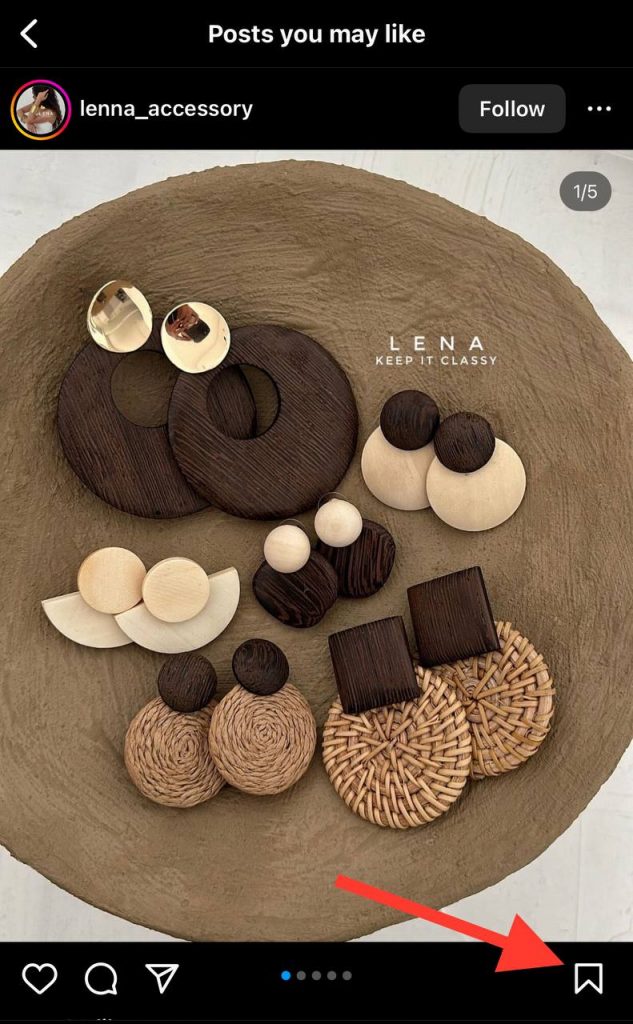
Step 1- Open the post or Reel.
Step 2- Tap the bookmark icon below the post or near the caption area.
Step 3- Tap Save.
Step 4- Choose an existing collection or create a new collection.
To view your saved content later, go to Profile → Menu → Saved.
You can create collections for topics such as recipes, travel ideas, fashion, fitness, home décor, marketing inspiration, business ideas, or favourite Reels.
Saving is the better option for content you know you will want to find again. Your saved content is organised separately from your public engagement activity, and collections make it easier to group posts by purpose.
Final Thoughts
To find content you have liked on Instagram, go to Profile → Menu → Your activity → Interactions → Likes. You can review your recent likes, use filters to narrow the results, and remove old likes in a few taps.
For anything you may want to revisit later, such as a recipe, tutorial, product, travel destination, or useful Reel, save it to a collection as well. Your liked-post history is useful for recent activity, but saved posts give you a more organised way to keep important content.
FAQs
How do I see all the posts I have liked on Instagram?
Open Instagram and go to Profile → Menu → Your activity → Interactions → Likes. This is where you can review your recent liked posts and Reels. Instagram may limit the list to your 300 most recent likes, so older activity may not be available.
Can I filter my liked posts on Instagram?
Yes. In the Likes section, Instagram may let you filter or sort your activity by date, content type, or account. Available filters can vary slightly depending on your app version.
Can I see posts I liked on Instagram years ago?
You can view up to 300 of your most recent liked posts and videos. If you liked a post years ago and have liked more than 300 items since then, it may no longer appear in your Like history.
Can I unlike multiple posts at once on Instagram?
Yes. Go to Your activity → Interactions → Likes, tap Select, choose the posts or Reels you want to remove, and tap Unlike.
Why can’t I see a post that I liked before?
The post may be older than the visible like-history limit, or it may have been deleted, removed, made unavailable, or posted by an account that is no longer accessible to you.
Can I see Instagram Stories I liked?
Instagram does not provide a general, separate history page for Stories you have liked. The Likes section is primarily for liked posts and Reels.
What is the difference between liking and saving a post on Instagram?
Liking is a visible engagement action on a post, while saving is a private bookmark for content you want to revisit. Saved posts can be organised into collections, making them better for content you want to keep long term.
About the author
Emi Daniel
Emi Daniel is a content writer at Social Tradia, where he writes clear, useful content that helps readers find what they need. Outside of work, he enjoys gaming and coding.






Emi Daniel

