

The Instagram reposting story feature is one of the best opportunities for accounts to keep their audience engaged, increase sales, gain credibility, and attract a larger target audience.
It doesn’t matter what kind of story you want to reshare on your story, as it can be an image of you and your friend, a quote you find attractive, or a video from a strange account that you want to share with your followers.
However, reposting an Instagram story is not always as easy as it seems because you are not going to share only stories you have been tagged in; sometimes, you want to repost an Instagram story that you are not tagged in or that is from a private account.
Buy an Established Instagram Account
Skip starting from zero. Browse Instagram/TikTok accounts with audiences across many niches.
See Available AccountsThen, what should you do in such a situation? How will you reshare an Instagram story you are not tagged in?
If you are aiming to find the answer to those questions, you are in the right place. In this article, we will explain all the details of sharing an Instagram story you are not tagged in, so you can repost any story you see on Instagram.
Benefits of Reposting Instagram Posts and Stories

As you know, Instagram is now a great place for businesses and influencers to boost brand awareness, show their products and services, and reach new target audiences.
The Instagram story feature is up on all other features, which means you should use it with the right strategy to get the best results. Reposting stories is one strategy that can help you reach your goals.
In the section below, we will examine the benefits of reposting Instagram stories and posts on your account to better understand why you should repost them on this platform.
Improved brand awareness
Instagram stories allow users to show more detail about their products and services to attract more customers and new followers.
Reposting relevant stories and posts on Instagram helps you build better relationships with your competitors and gives you an opportunity to showcase your products to a larger audience.
Better relationships with your followers

When you reshare an Instagram story on your account, you may sometimes want to share something funny, helpful, or cute with your followers. This shows them how you feel close to them and leads to establishing more solid relationships with them.
Moreover, when you share an Instagram story on your profile, your followers are more likely to reply and engage with it, which enables you to better connect with them.
Increased sales
Instagram stories are a great way to directly show your products and services to your audience and attract potential customers.
When you reshare an Instagram post or story, you can better introduce your products to your followers and convince them to buy them.
Besides, Instagram stories allow you to add your website link, which makes it easier for your followers to interact with your products and buy them, leading to more sales.
Keeping your audience updated

When you share a story on Instagram or repost it from another account to your profile, you share real-time content, allowing you to keep your followers updated about your latest products or services.
By doing so, your followers are more likely to become loyal customers who trust your brand, support your business, and bring more credit to your Instagram account.
Allowing you to receive instant feedback
Did you know you can announce your new product launch by reposting a story from your business partner’s Instagram story and getting instant feedback?
Yes, that is another advantage of reposting an Instagram story that lets you engage your audience with your content while getting instant and honest feedback on your products, new launches, services, etc.
How to Repost Instagram Stories
Before we go any further, it’s good to learn how to repost an Instagram story you are tagged in. Note that when someone mentions you in their stories, you will get a notification, and you can see the mentioned stories both in the notification section and your direct messages (DMs).
To do so, follow the steps below:
Step 1- Open Instagram and go to your direct messages to open the user who has tagged you in their story.
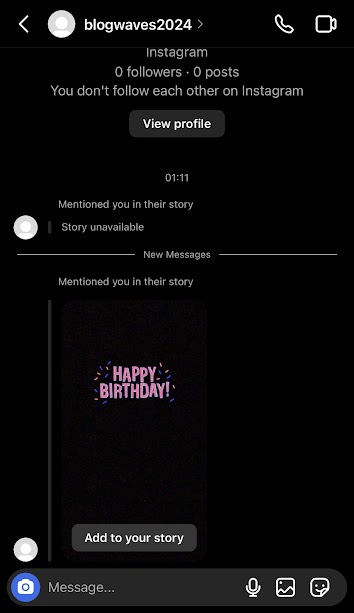
Step 2- Tap on the story.
Step 3- Click on the “Add to your story” button.

Step 4- Now, tap on “Your story” or “Close Friends” to reshare the story with your followers.
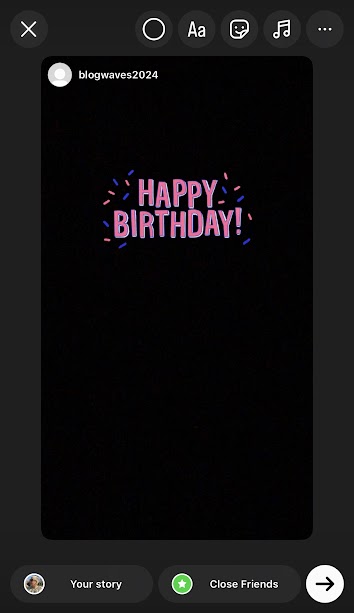
Keep in mind that once Instagram opens your story editor, you can resize the picture, add stickers and text to it, and fully edit it before sharing it.
How to Repost an Instagram Story You’re Not Tagged In

As mentioned earlier, reposting an Instagram story is not always as easy as it seems because sometimes you want to reshare a story you are not tagged in.
However, there are ways to repost any Instagram story to your profile, which you will learn in the section below.
If you want to repost a story of a picture you are not tagged in, you can take a screenshot of the photo and then add it to your story.
Additionally, if you want to repost a video story, you should use your mobile’s screen recorder feature to record the video and then upload it as your Instagram story.
Note that to repost an Instagram story you are not tagged in, there are points that you need to consider before sharing them on your profile; let’s see what you need to consider:
The first thing is getting permission from the story owner to allow you to reshare their content to your account; doing so shows that you respect their ownership over the content and prevents possible copyright issues.
Moreover, you need to ensure that your mobile phone’s screen recorder feature is enabled so you can record and share the desired content.
Once the content is recorded on your device, you should open the Instagram story section and upload the photo or video to your story. To personalize the story, you can add GIFs, filters, text, stickers, polls, etc.
Finally, it is better to mention the content owner in your story; it doesn’t matter if you have asked their permission; it is suggested that you tag them in your story.
That’s how you can easily repost any Instagram story you are not mentioned in!
How to Repost an Old Instagram Story
Now that you know how to repost Instagram stories, whether you are tagged or not, you may wonder how to repost your old stories on your feed.
The good news is that the process of reposting old stories is simple; to do so, follow the steps below:
Step 1- Open the Instagram application and navigate to your profile.
Step 2- Tap on the three-line icon in the top right corner.
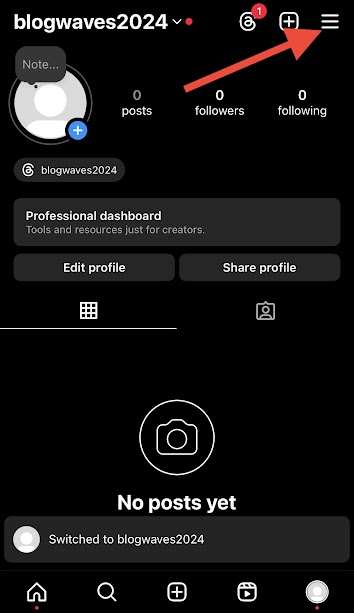
Step 3- Click on the “Archive” option from the menu.
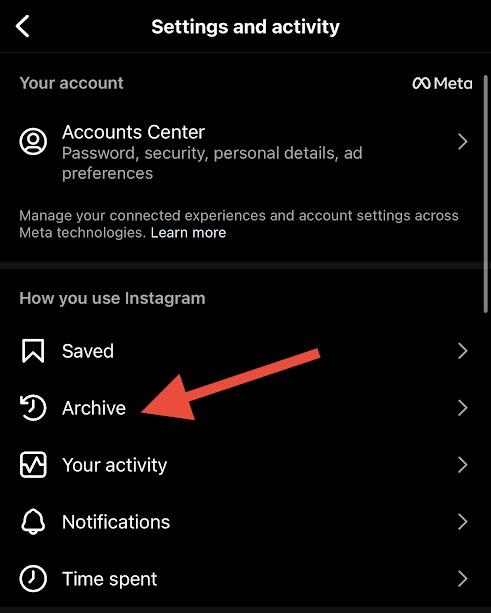
Step 4- Select the desired story from the “Stories archive” section.
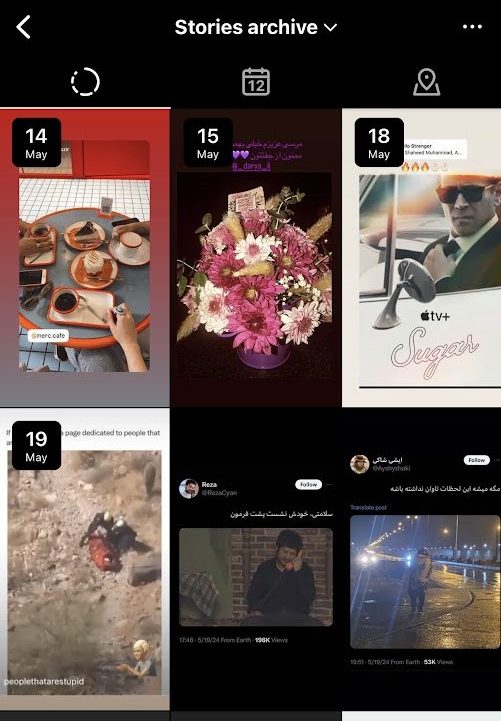
Step 5- Tap on the “Share” button.

Step 6- Now, you can see the content on the story page, edit it if necessary, and then repost it.
It is good to know that you can repost your old stories as a new post to your Instagram profile.
To do so, follow the mentioned steps above, and instead of tapping on the “Share” button, tap on “More” and select the “Share as post” option to finish the process.
How to Re-share an Instagram Post to Your Stories
As you may know, you can share any Instagram post to your story only if it’s from a public account.
Follow the steps below to reshare Instagram posts to your stories:
Step 1- Select the post you want to share on your story.
Step 2- Click on the paper letter icon under the post.

Step 3- Tap “Add to story.”
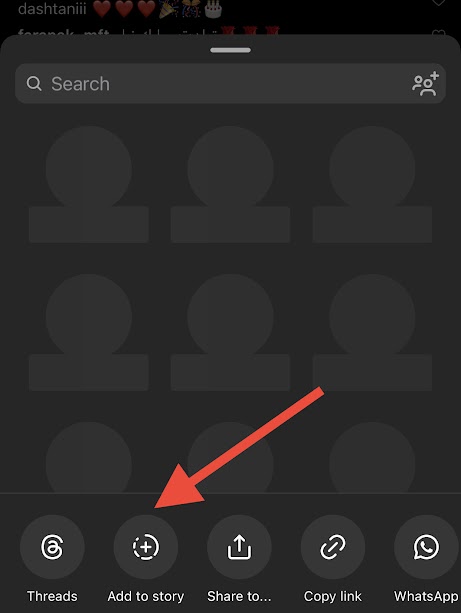
Step 4- Now, you can see the post in your Instagram stories. Here, you can apply any changes you want, such as adding text, emojis, GIFs, etc.

Step 5- Tap “Your story” to share it with your followers.
How to Re-share an Instagram Reel to Your Stories
It is good to know that it doesn’t matter whether you want to repost an Instagram post or reel; the process is the same.
Step 1- Choose the reel you want to share as your story.
Step 2- Tap on the video to review it in full view.
Step 3- Now, tap the paper airplane icon to add the video to your story.
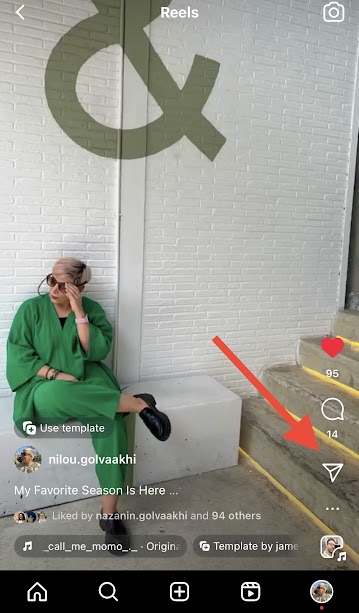
Step 4- Once finished editing the post, share the reel.
Tips to Increase Engagement on Your Story Reposts

As mentioned earlier, the Instagram story is a great feature for boosting engagement and reaching new target audiences.
In this section, we will review important tips that help you increase your account’s engagement through your stories.
Add relevant text
As you know, Instagram offers various types of fonts you can use to write more details about your stories and attract more attention.
Note that when you write something about the content in your story, your followers are more likely to reply to it, boosting your engagement.
Use targeted hashtags

You are probably familiar with hashtag usage and how they show your content to more target audiences. You can use targeted hashtags in your stories to attract more people in your niche.
Use related GIFs
Instagram allows users to leverage funny and helpful animated icons to represent their content better and describe their moods to attract more attention to their stories.
Therefore, if you want to boost engagement in your stories, you can search for related GIFs and add them to your stories to make them more eye-catching.
Use stickers

You have various options to add stickers to your original stories or repost stories to make them more engaging.
From question boxes and polls to quiz stickers, you have endless options for better communicating with your followers and generating more meaningful conversations with them.
Mention the original creator
The last and most important thing you should do is mention the content owner to give credit and allow others to understand where the original content comes from.
That’s it! By taking a few extra minutes to make your story reposts look better, you can attract more attention, reach your target audience, and increase your account’s engagement.
Conclusion
Being able to use Instagram’s different features, such as stories, enables you to build better relationships with your followers and attract your target audiences more easily.
Reposing an Instagram story that you are not tagged in is another way to leverage this feature, which we completely explained in this article, so you can reshare any story you see on Instagram.
However, to get the best results, it is recommended that you choose wisely the story you want to repost on your account. This will ensure that it is based on your followers’ tastes, attract their attention, and generate conversations.
Ultimately, always remember to ask permission from the content creator when you want to reshare their stories and mention them in your story to give them credit.
In this comprehensive article, we mentioned helpful tips for reposting stories on your account, whether you are tagged or not.
By incorporating these tips and personalizing the reshared stories, you can increase your engagement, communicate with your followers, increase sales, and reach your goal faster.
FAQs
1- Why can’t I share someone’s story to my story?
You can share another person’s story on your account if they’ve tagged you and their account is public. If their account is private, anyone who doesn’t follow the original content owner cannot view the story.
2- How do you give credit to the original content creator when reposting their story?
The best way to give credit to the account where you are reposting their content is by mentioning them in your story, so others can access their account.
3- What should I do if the content owner asks me to remove their story from my profile?
If the original poster asks you to remove their content from your account, you should respect their request and delete your story.

Emi Daniel
Buy an Established Instagram Account
Skip starting from zero. Browse Instagram/TikTok accounts with audiences across many niches.
See Available AccountsRelated articles
-

How to Clear Instagram Cache on iPhone, Android & Desktop
Instagram can quietly build up a lot of temporary files while you scroll through Reels, watch Stories, save posts, and upload your own content. You may not…
12 min readEmi Daniel
-

How to See Who Reposted Your Instagram Post (2026 Guide)
Someone reposted your Instagram post, but you have no idea who it was. You check notifications, search through your profile, and still cannot find a clear answer. …
18 min read -

How to Reset Instagram Algorithm in 2026
Instagram can start showing too much of the same type of content. Your Explore page may no longer match your interests, Reels may feel repetitive, or suggested…
12 min read