


TikTok is one of the most popular social media platforms these days. More than 1 billion people have accounts on this platform because most users enjoy sharing their content with other people and connecting with them.
One of the problems with using TikTok is that when you download a video from it, the TikTok watermark can be seen on the video. This issue is not ideal for many people because some social media platforms, such as Instagram, downgrade reels with a watermark on them. Because of that, your videos won’t show up or suggest to other people.
The TikTok watermark is a TikTok logo with a username to be added to a TikTok video. The main reason for adding a watermark to videos is for copyright and marketing, so it is clear that the creator of that video receives the credit, and other users won’t be able to post it without acknowledging it. In addition, the TikTok watermark moves around the video while the video is playing, so removing it will be more difficult.
Buy an Established Instagram Account
Skip starting from zero. Browse Instagram/TikTok accounts with audiences across many niches.
See Available AccountsTherefore, if you want to use your TikTok video on your other social media platforms, you should remove the TikTok watermark. Luckily, there are some methods that you can use to remove the TikTok watermark. This article will discuss the best methods and tools for removing the TikTok watermark.
Best methods for removing the TikTok watermark
There are different ways to remove the watermark; some might work better for you than others. You can use these methods, whether you are using an iOS or Android phone, to remove the TikTok watermark.
Zoom In and Crop the Video
Cropping the video is the easiest method for removing the TikTok watermark. But this method will change your video’s quality and aspect ratio. Moreover, cropping the video doesn’t work for all videos because, in some cases, your head is not shown anymore after the cropping. If this happens, you need to try other methods.
Whether you are using an Android or iPhone device, there are some built-in apps that you can use to crop the video. Moreover, you can also download third-party apps and do the same thing; it depends on you which way to go. By following the below instructions on an Android or iPhone device, you can crop the video and remove the TikTok watermark:
- Go to the Photos app, choose the downloaded video, and click Edit.
- Tap on the crop icon and choose the right corners to crop to remove the watermark.

- Square, 16:9, or 3:2 are the best options for cropping the video.
- For the last step, choose “Done” and save your video.
Add a border
You can add a border or frame around your video to cover the watermark by using any editing tools or app on your mobile phone or computer. However, adding a border around your video is not ideal such as cropping it, because it doesn’t look desirable, and a large part of your video will be covered, which doesn’t look very professional.
Blur the TikTok Watermark
You can blur the watermark by adding a logo or text with different apps on your mobile phone or computer. You only need to download any editing app, choose a logo, drag it on the TikTok watermark, and cover it. You also need to set the time when you want the logo to stay on the watermark.
You can use a different application to add a blur effect on the watermark. However, adding multiple blur effects to cover the watermark in other places is better because it moves around the video.
Use a remover app for TikTok Watermark
Many apps can remove the TikTok watermark from your video. Before using these apps, you must download the TikTok video, save them, and import them into the watermark remover app. Using these tools will retain the quality of your videos, which will look more professional.
Some of these apps are free, and you must pay for others. In addition, the quality of videos after removing the watermark differs, depending on the tool. Therefore, you must check these details before using the app.
Using a video editing tool
Video editing tools are the most expensive and complex method for removing TikTok watermarks. If you know how to work with editing tools, you can use any app to remove the watermark. Unfortunately, most of these tools are not free, and you must pay for them to use their features.
Save TikTok posts without watermarks
The last method might sound like the best option because you can save TikTok videos in the first place without the watermark. The next section of the article will explain how to download TikTok clips without a watermark on different devices.
How to Download a TikTok Without Watermark on PC?
You can download TikTok clips without a watermark and don’t even need to use the App Store or Google Play. Different websites offer a TikTok video downloader with no watermark. Some of these websites are MusicalDown.com or MusicalDown.XYZ, SnapTik, TikFast, and TikMate work similarly.
You can also find a TikTok video downloader on App Store or Google Play if you simply search “TikTok video download” or “download video TikTok”. But, if you need more room for other apps on your phone, a website is the best option.
These websites are not related or have a partnership with TikTok at all, which means if TikTok makes any changes to its app, all of them might stop working altogether.
To use these websites to remove the TikTok video watermark, follow the below steps:
- Choose the video you want to save from TikTok on your phone or computer.
- Choose the “Share” button.
- Choose “Copy Link.”
- Go to the website that you chose
- Paste the link into the search bar.

- Tap on “Download.”
- The video will be downloaded to your device with no watermark.
How to Download a TikTok Without the Watermark on iPhone?
TikTok doesn’t provide a built-in tool or feature for downloading watermark-free TikToks. But many third-party tools and websites can help you save videos from TikTok posts. Most of these tools are very easy to use, making downloading fast and straightforward.
TinyWow is a free tool that will help you to download TikTok videos without a watermark on your iPhone. First, you need the link to the video, and then you can have the video by just following some simple steps.
- Open the TikTok app.
- Find the video want to download.
- Click on the share button in the down-right corner
- Choose Copy link.
- Go to the TinyWow page in your browser.
- Choose Paste

- Tap on the downloaded video.
- Select Share Video.
- Choose Save Video.
- The video will be saved in your gallery with no watermark.
How to Download a TikTok Without the Watermark on Android?
You can use the SnapTik website to download TikTok videos on your Android device. You don’t need to download any apps. You must find the link to the TikTok video you want to download. Following the steps below, you can download TikTok video clips on your Android device with no watermark.
- Open the TikTok app.
- Find the video you want to download.
- Click on the share button at the down-right of the screen.
- Choose Copy link option.
- Go to the SnapTik app or website.
- Tap on the Paste button next to the text box

- Choose Download video.
- After the video is processed, a Play option will be displayed.
- There is no watermark on the downloaded video when you click the button.
- All videos you save will be listed under the Download tab.
Best apps for removing the TikTok watermark
TikTok algorithms don’t allow reposting videos that have no watermark. However, many apps can help you remove the watermark from a TikTo video.
Some of these apps may not work well and disappoint you. Nevertheless, we list the ten best apps for removing watermarks on TikTok videos for iPhone and Android devices.
To remove a watermark from a TikTok video on any device, follow the below steps:
- Download one of the TikTok watermark remover apps on your phone.
- Open the application and import the video from which you want to remove the watermark.
- Choose the watermark remover tool and make a line around the watermark.
- After the app processes the changes, the watermark will be removed from your video.
- Save the TikTok video to your phone gallery in HD quality.
SnapTik + Video Saver Pro

With this app, you can download videos from TikTok with no watermark. SnapTik + is a user-friendly app with many high-quality features. You can use these features without opening an account; the app is free. Unfortunately, many ads appear on the app, and you have to get along with them. But you can pay a small amount and try the app without any advertisements.
Pros
- User-friendly
- Include video analysis and text extraction
- Involve an analytics tab
Cons
- Sometimes Audio has delays
SaveTik: Save & Repost Video

This app can remove the TikTok watermarks, and it has other features as well. For example, you can save the video as an MP3 file, select your accounts, and pin them as favorites. Another SaveTik feature is that you will receive suggestions regarding trending videos. Finally, you can use SaveTik and easily remove the watermark from any TikTok videos you want.
Pros
- Easy function for removing watermark
- Exporting video as MP3 File
- Suggesting trending videos
Cons
- Some bugs exist while reposting a content
TokRepost – Remove Watermark
If you want to remove the watermark from TikTok videos and receive a high-quality video file, TokRepost is an excellent option for you. Besides saving the video after the watermark is removed, you can also edit the video. Moreover, you can use other features such as blurring the watermark or changing the background with different colors, changing the size of the video and cropping the video.
Pros
- Many features, such as resizing and cropping the video
- Editing the video in real-time
- Changing the video background
Cons
- It doesn’t have a free trial version
TokVideo – Watermark Remover
You can save and repost TikTok videos using this app, besides removing the TikTok video watermark. Using Tokvideo is straightforward. Besides saving the video, you can check the video analytics as well.
Pros
- Useful editing features for videos
- Download videos easily
- Provide video analytics
Cons
- If you want to remove TikTok watermark, it usually ruins the video sound
SaveTok
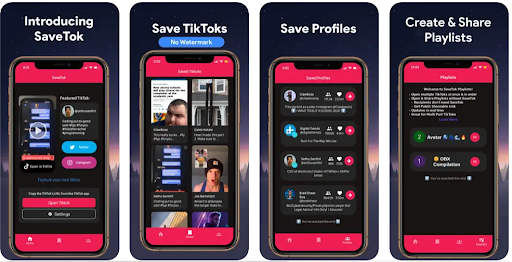
Removing watermarks from TikTok videos is very convenient with this app. SaveTok has many other features; for instance, you can pin your favorite videos and share them to your profile. You have to copy the Tiktok video link and paste it into the link box of the app, and then you can download any TikTok clips without the watermark. Another SaveTok feature is that you can use slow-motion effects on your videos.
Pros
- Bookmark videos
- Slow motion effect for all videos
- Free app
Cons
- Sometimes random crashes happen within the app
Remove & Add Watermark
This app is one of the most popular ones among users for removing watermarks from TikTok videos. In addition, you have various options among the tools available on the app, such as customization.
You can remove watermarks from videos and photos by using Remove & Add Watermark app. This app is just for Android devices; you can download it at Google PlayStore. This app is free, but there are some extra features that you need to pay for to use them. Some of these features are unique fonts and effects, which you must pay $3,50 to use.
Pros
- Simple user interface
- It is a free app
- Top-ranking customer support
- It can remove alpha-blend watermarks
Cons
- Only for Android devices
SnapTok

This app is a video editing tool that removes watermarks from TikTok videos. So you can download HD videos with the same quality. You can also watch videos and clips even when you are offline. Another SnapTok feature is that you can save TikTok live wallpapers and thumbnails.
Before downloading, you can also choose a TikTok video size, resolution, and format. In addition, SnapTok can remove the watermark from TikTok videos and won’t crop the videos. This app is free, but there are multiple in-app purchases for developing its performance.
Pros:
- Effective and fast
- Download reposted videos simply
- Sharing content easily
Cons:
- Only for Android devices
- Too many ads
TikPro

This app can download TikTo videos and remove the watermark from them. TikPro has many other features as well. For instance, you can convert TikTok videos to awesome GIFs.
This app is not a pattern with TikTok, and users are responsible for reposting uncertified videos or violating rights. This app is free, but there are multiple in-app purchases that you get to get access to more features.
Pros
- User-friendly user interface
- Create GIFs
- In-app video editing options
Cons
- Sometimes crashes when retrieving the content
- Too many advertisements
Remove Logo From Video
This app is built by Klapp’s groups, and you can remove watermarks from TikTok videos easily by using it. You can download this app from Google Play Store, which is only compatible with Android devices.
Using the Remove Logo From Video app is very easy and fast, which is why many users believe this is the best Tiktok watermark remover app. This app is free but has some in-app purchases, allowing you to access more tools and features.
Pros
- Advanced UI
- High-speed performance
- Removes watermarks without reducing video quality
Cons
- To many advertisements
- Only for Android devices.
Kapwing
This app is one of the best TikTok watermark removers and has many other features. You have to download the TikTok video and import it to the app, and you will receive the video without the watermark in a few seconds.
Moreover, you don’t need to be a professional in video editing to use this feature. You can remove or cover the watermark with a logo, sign, or mark. To do that, upload an image or sign you want to use to cover the watermark, and you are good to go.
Pros
- High-speed functioning
- Easy-to-use
- Excellent for editing videos, making memes, gifs
- Let you share videos on social media platforms
Cons
- It doesn’t have many advanced features
- You can’t export the videos with 4K UHD quality
Final thoughts
You might want to download TikTok videos and save them to your gallery for no reason, or you might want to use them in other apps and get more views. Many helpful apps and tools are available to help you remove watermarks from TikTok videos.
Remember that these tools are not linked or related to TikTok, and they might start working at any time if TikTok makes any changes or updates to its app.
The best watermark remover app or tool is the one which can work best for you based on your needs and preferences. For example, a TikTok video downloader will help you download TikTok videos with no watermark are the best option to save TikTok videos because you can keep the quality of your videos.
Video editing tools will add a blurred effect over the watermark, which can be distracting. And cropping the video will change the aspect ratio and may crop out essential parts of the video.
Many apps and websites allow you to bypass the watermark, and clean TikTok videos saved. However, most apps will require you to pay if you want to export or post your new video, whereas the websites are free.
Many apps and tools can help you to remove the watermark and preserve the quality of your video, but they are not primarily free, and you have to pay for them to get the video without the watermark. On the other hand, many websites will do that for free. Before choosing one, read about the details, prices, and features of different apps. Now, it’s on you to choose the best TikTok watermark remover app from the list.
This article offers a comprehensive guide for people who want to remove the TikTok watermark from videos. It introduces methods for removing the watermark from TikTok videos on iPhone, Android, and PC. It also discusses different free websites which will remove the watermark and many other free and paid professional apps which will do the job. It will also offer some other basic methods to remove the watermark manually. Readers have many options and they can choose the method for removing the watermark that best suits them.

Emi Daniel
Buy an Established Instagram Account
Skip starting from zero. Browse Instagram/TikTok accounts with audiences across many niches.
See Available AccountsRelated articles
-

From 1,000 to 1 Million Followers: How Much TikTok Pays at Every Level
In my research, I have seen TikTok help ordinary people earn from short videos. Some creators now work on TikTok full time. Many started with a phone…
14 min readEmi Daniel
-

TikTok Creator Rewards Program (Formerly Creator Fund): Everything You Need to Know in 2026
Gone are the days when TikTok was just an app for funny videos and quick trends. Today, it is also a serious income stream for creators. Some…
18 min read -

TikTok Creative Center: Complete 2026 Guide to Trends, Ads & Analytics
Mastering TikTok Creative Center is quickly becoming the secret advantage behind top-performing ads, viral videos, and fast-growing brands in 2026. Whether you’re a creator, marketer, or eCommerce…
22 min readLina Stewart