


Instagram offers a variety of features to market your products and increase your brand awareness.
Video marketing features are particularly appealing to both individuals and businesses. The time users spend watching video content on Instagram has increased by 80% compared to 2020.
Normal posts, Stories, Live videos, IGTV, and Reels on Instagram make a perfect set for video marketing you can’t find anywhere else.
Buy an Established Instagram Account
Skip starting from zero. Browse Instagram/TikTok accounts with audiences across many niches.
See Available AccountsIf you want a real boost in your sales, you must build a strong video marketing strategy on Instagram. Although many other social media platforms have video-sharing features, Instagram is something else in terms of engagement rates and the audience demographic.
So you have to appear more professionally on this platform, using it to its full potential. Although the platform has many tools and filters for taking and editing videos, sometimes you need to use some third-party apps to add extra effects.
In this article, we’ll introduce the best Instagram Reels apps to show you how you can create reels outside the platform.
What is Instagram Reels?
Instagram Reels is the platform’s most recent feature, and as some say, this is a rival for TikTok, a platform for sharing short videos.
Reels are actually entertaining, fun video clips that allow users to express their feeling in a short time.
At the moment, Instagram Reels provides you with a maximum duration of 90 seconds. Back in 2019, users could only upload Reels that were up to 15 seconds long when Instagram launched the platform.
This is one of the most engaging features across all the social media platforms you see out there. For instance, its average engagement rate is more than 1.95%, which is way higher than that of other Instagram video features. That’s why 70% of marketers want to boost their video strategy through Instagram Reels.
So, it’s important to learn and use this feature to the full to be able to help your marketing strategy.
How to create your own reels on Instagram
First, you need to know how to create reels using the platform. Actually, it’s really straightforward.
- Go to your Instagram account.
- Swipe the Instagram screen to the right.
- At the bottom of the page, choose REEL next to STORY.
On the left side of your screen, you’ll find several artistic editing tools. You can use them as follows:
Audio
To edit the audio of the Instagram reel, you can search for your favorite song from the platform’s music library.
You can also use the original audio when recording the reel. In this case, your audio will be linked to you, and for public accounts, other users are allowed to make reels with your audio by tapping “Use Audio” on your reel page.
AR Effects
A fantastic feature on Instagram Reels is that you can add AR effects from the effect gallery or your camera tray to your reel.
This feature makes your reels more interactive, just similar to Instagram Stories. Remember that the name of an AR effect is displayed when you view a reel with it.
Speed
You can also change the speed of the video or any part of it. It’s best for creating slow-motion clips.
Align
By tapping the “Align” icon on the left side of the reels screen, you can add an overlay of your previous reels on top of the current one. Then you can use this to align your current reel exactly with the previous one.
Top Instagram Reels Apps
Apart from Instagram itself, you can also create and edit videos using third-party apps and use them as reels.
This way, you can use many useful features and make your videos stand out among competitors.
iMovie
This versatile video editing tool for Instagram reels can be used to create and edit videos. With a few taps, you can create beautiful Hollywood-style videos and use them on Instagram Reels.
There are many different soundtracks available in the built-in collection, and you may even record your own voiceover. Instagram reels can be simply edited by changing the titles or backdrop to make them more appealing.
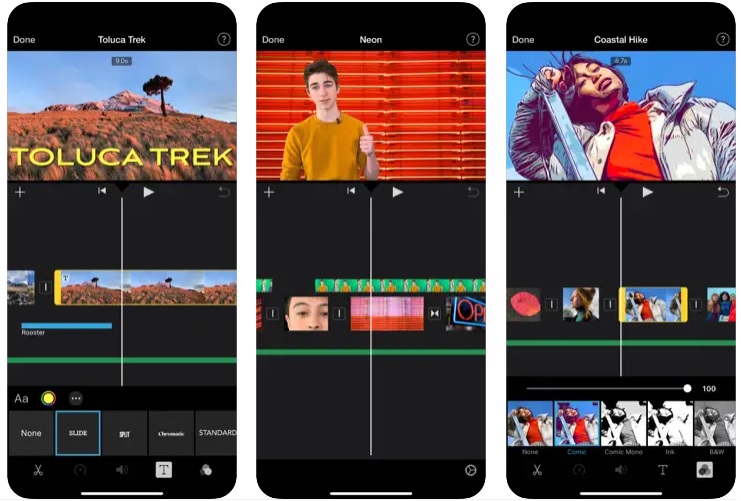
The most important features of iMovie
- The most attractive video templates you can find out there
- Integrated recorder and editor in a single platform
- Multiple themes for videos
- Eye-catching animated titles
- Green screen effects
Wondershare FilmoraGo
FilmoraGo is also one of the greatest video editing apps and is perfect for creating and editing reels.
You can be sure about its easy-to-use interface and simultaneously effectiveness of its features.
Users can create their own Instagram reels using their voiceovers, gorgeous filters, or special effects.
Source: filmora.wondershare.net
The most important features of FilmoraGo
- Providing pic-in-pic effect.
- Editing tools like rotate, trim, and split videos.
- Having royalty-free music.
- Speed features like slow-motion or speed-up.
- Animated stickers and texts.
- Text overlays
WeVideo
Another outstanding tool on the list of top video editing programs for Instagram Reels is WeVideo. It is simple to use and accessible online using any device and platform, such as Windows, iOS, macOS, and Android.
Instagram reels may be created and uploaded to cloud storage. Instagram reels may be edited wherever and anytime needed using several devices that are linked.
It is a fantastic Instagram reels video editor for making wonderful short films to enhance the appeal of your profile.
The most important features of WeVideo
- Providing cloud storage
- Having green effects on the screen
- Lots of stock pics, vids, and music
- Motion titles
- Supporting 4K resolution
KineMaster
Both beginners and experts love KineMaster because it’s an easy-to-use platform for making and editing Instagram reels.
Users of this multi-track editing app are allowed to combine different layers and examine up to 9 previous recordings at once to produce eye-catching effects.
You can also make dynamic movies using a perfect keyframe animation feature available on the app.
Moreover, using the picture-in-picture effect of the tool, you can create incredibly immersive and distinctive videos for Instagram Reels.

Source: kinemaster.com
The most important features of KineMaster
- Lots of animated stickers
- Chroma key composition technique
- Providing high-quality export
- Multitrack editing feature
- Voice changing ability
- Keyframe for animations
- Blending videos
- Reversing videos and adjusting their speed
- Incredible sound effects
- Eye-catching filters
- Ducking audio and voiceover
Splice
This one is also a great app allowing you to create appealing and catchy Instagram reels for free.
With Splice’s simple-to-use professional editing features, you can quickly and accurately edit videos for Instagram reels.
One swipe on this app lets you add Hollywood-style effects and easily improve or produce captivating videos to share with your loved ones.
Unfortunately, it can only be used with an iPhone or iPad, but this is one of the best available apps.
The most important features of Splice
- Customizing the background
- Adding outro
- Having dynamic transition styles
- Providing pan & zoom effect
- Lots of trendy filters
- A big music library
- Mixing audio
- Adding narration
- Customizing the speed of playback
Videoshop
The problem with many professional apps is that they’re not easy to use enough to be used by everyone. This issue has been completely solved in Videoshop, which is one of the best Instagram Reels apps.
It has many fantastic features, such as attractive animated stickers and texts. Using these features, you’ll be able to make highly engaging videos, especially for teens. If you want to compete with TikTok videos, you’ve to the right place.
Also, it allows you to edit your Instagram reels by adding visual effects to make your videos more professional. Last but not least, you can add your favorite music or even different sound effects to the reel, making it more exciting.

Source: videoshop.net
The most important features of Videoshop
- Having animated titles
- Rotating, tilt-shifting, and resizing reels
- Providing multiple layered videos
- Lip synchronization
- Adding different video effects
- Adding and customizing sound effects
Inshot
Inshot is another great Instagram Reels app that provides a professional and simultaneously user-friend editing dashboard.
It offers all the basic and professional editing features, from color trimming to multi-layered video tools.
Using this app, you can add exciting visual effects and sound filters to your Instagram reels. Also, it allows you to add interesting animated stickers and texts.
The most important features of Inshot
- Trimming, splitting, and merging reels
- Lots of trendy filters and visual effects
- Lots of animated stickers
- Adding your own track or voiceover
- Having an intuitive user interface
Adobe Premiere Rush
The last versatile Instagram reel editor on our list is Adobe Premiere Rush, a highly professional tool for creating and editing engaging content.
It has a handful of fantastic editing features to make your reels stand out and win the competition.
It allows you to add a pan or zoom effect to your videos and make them more professional. Also, its auto-reframe feature is available to enhance the quality of your video.
Adobe Premiere Rush provides great color presets along with interesting reel templates to help you with creativity when making Instagram reels.
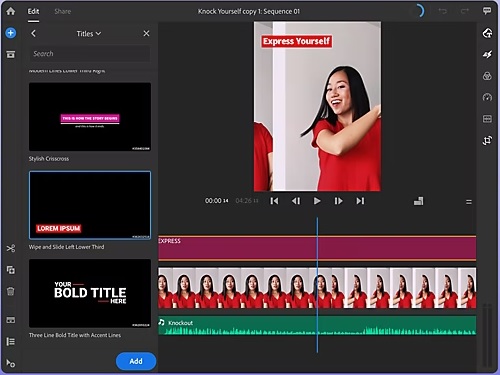
Source: adobe.com
The most important features of Adobe Premiere Rush
- Creative motion graphics
- Customizing titles
- One-of-a-kind built-in templates
- Adding audio and voiceovers
- Correcting and trimming colors
- Animated titles
Final thoughts
Instagram Reels is one of the newest and most engaging social media features and a great opportunity for brand awareness. Try to learn how to use it and include it in your marketing strategy. Don’t forget about the third-party apps to make your Instagram reels more professional and attractive.

Emi Daniel
Buy an Established Instagram Account
Skip starting from zero. Browse Instagram/TikTok accounts with audiences across many niches.
See Available AccountsRelated articles
-
How to Use Instagram: The Creator’s Guide to Building an Audience
Instagram in 2026 is no longer just a place to collect followers. The creators who grow consistently are the ones who understand how to earn attention, turn…
17 min readEmi Daniel
-
How to Go Live on Instagram: A Step-by-Step Guide
Going live can feel more stressful than posting a Reel. You cannot remove a pause, rewrite a sentence, or start over after an awkward moment. But that…
17 min read -
Instagram Instants Feature: What It Is, How It Works, and How to Turn It Off
The first time I opened Instagram Instants, I almost backed out. I had taken a normal photo. Nothing worth editing. Nothing worth posting. Nothing that needed an…
11 min read