


If you are an Instagram user, you must have gotten annoyed at least once for adding enter and line breaks to your captions, bio, and comments.
We all know that adding emojis helps us to spice up our Instagram profile or photo descriptions; however, you may not be able to write a perfect caption if you don’t know how to add a line break.
Instagram doesn’t make the line break option obvious, which is why some captions or bios are very difficult to read.
Buy an Established Instagram Account
Skip starting from zero. Browse Instagram/TikTok accounts with audiences across many niches.
See Available AccountsInstagram line breaks help you to write clear and easy-to-read captions for your posts, which has many benefits for your account that we will discuss later.
In this article, we share valuable information about Instagram line breaks and show you different ways to insert line breaks for your photo captions, bios, and comments.
What Is an Instagram Line Break?
An Instagram line break is a space you enter between two sentences or lines in your Instagram captions, bios, or comments.
These line breaks enable you to separate your text into lines on Instagram, which helps your audience read your captions or comments much more easily.
As mentioned earlier, Instagram doesn’t show this key on your keyboard while you are writing captions for your posts, which is why you need to learn how to add line breaks on Instagram.
Where Do You Need to Use Instagram Line Breaks?

The most common place you need to use Instagram line breaks is the captions when you want to add descriptions to your posts.
You should use these line breaks in your bios to create a better profile. Moreover, you need to know that line breaks in bios work a little differently, which means they are limited.
To properly use line breaks in Instagram bios, you need to add a character in your line break, or it will not appear when you finish publishing your bio.
Finally, you can use line breaks when you want to leave a comment on a post, so others can easily read your comment easily.
Why Should You Use Line Breaks?

One of the most important reasons for using Instagram line breaks is that it helps people to read and recognize details more easily, which generates more engagement in your posts.
As you may know, Instagram captions draw users’ attention to your profile, so if you don’t use appealing, easy-to-read, and simple captions, you will lose your followers or won’t get any new followers.
Social media platforms such as Instagram are designed to keep users entertained and engaged as long as possible.Now, imagine you write messy descriptions for your posts or bio that are hard to read; doing so will decrease your engagement.
How to Create an Instagram Line Break?

There are different ways to help you create clean white space for all of your Instagram posts. In the following, we will examine six different ways to help you pick the best option.
1- Use a line break generator application
There are different applications that you can search for and download on your device; however, “Space” and “Caption Writer” are among the most popular ones.
Using these applications is very easy, you just have to download them on your device and follow the mentioned instructions to add line breaks to your Instagram posts or bio.
2- Use a line break generator website
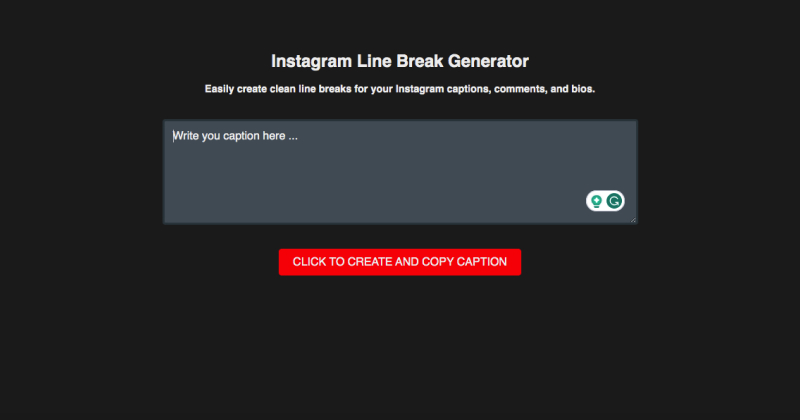
There are some websites that are specifically designed to generate Instagram line breaks for your captions.
The important point to consider is that you must choose the right website that does all the tricks and delivers a clean, simple caption to you.
3- Use a keyboard shortcut on your phone
This method is very easy and enables you to generate many line breaks in just a blink. When you use this method, you use a keyboard shortcut that automatically adds the spaces when you are typing.
To do so, you must use a code that is between two brackets and add it as a space in your captions whenever you want to add a line break.
4- Use the notes application on your mobile

Another easy way to add a line break in your Instagram bio, comment, or caption is to use the notes on your mobile.
To do so, you need to open the notes on your device, write the text you want to share, and then copy and paste it to Instagram.
This is the easiest way you can add line breaks to Instagram, and it will be visible to anyone who visits your profile or reads your captions.
5- Use the “123” key on your iPhone keyboard
If you use an iPhone, you probably notice that the “return” key on your iOS keyboard is missing, and it shows the “#” key instead.
So, when you want to write a caption and start a new sentence after a line break, you can tap on the “123” key on the bottom left of your phone’s keyboard to unveil the return key, which helps you to add a line break.
6- Use a third-party keyboard
Finally, you can use a third-party keyboard on your mobile and switch to it whenever you want to write a caption for your posts.
How Many Instagram Line Breaks Is Possible to Use?

If you are wondering how many line breaks you can use in your captions or comments, you need to know that there aren’t any limits to adding line breaks to Instagram. However, there are some caveats that you should know.
You will see character limits
As you may know, Instagram captions are limited to 2200 characters, which means it doesn’t matter how many line breaks you want to use; you will be capped at 2200 characters.
Line breaks are not the same as characters:
The important point to remember is that a line break with a period, emoji, or other punctuation is considered a character.
You are not able to have more than one line break without a character:
It is interesting to know that Instagram doesn’t support multiple line breaks without characters because it will hurt the structure of your captions.Therefore, when you write the caption and add more than one line break without a character, Instagram automatically removes the space before allowing you to publish the caption.
Tips to Create a Perfect Line Breaks

No matter which method you choose to generate Instagram line breaks for your posts, there are some tips that knowing them help you create cleaner line breaks.
The number one factor is that you must ensure that there are no hanging spaces at the end of your sentences.
You should check the end of each sentence for extra spaces and remove them if you find any.
This is very important because if you have a hanging space, it won’t recognize it’s a line break, and it will squish the two paragraphs together, making it hard to read the caption.
FAQs
1- Is there a symbol for an Instagram line break?
There is no specific symbol for a line break; however, when you write an Instagram caption, you can add any type of punctuation or emoji instead of leaving it open.
2- How to add an Instagram line break on iPhone?
When you write Instagram captions on iOS, you can’t see the return key on the keyboard; instead, you need to tap on the “123” icon to use the return key.
Conclusion
Always remember that Instagram captions and bios are important parts of your posts that bring engagement to your account.
Therefore, you need to write your captions and bios in the proper format to get more profile visits and followers.
In this article, we explained six easy ways you can add line breaks to your captions to make it easy for your followers to read and understand your descriptions.
We hope you find this article helpful and use it to create better captions and bios!

Emi Daniel
Buy an Established Instagram Account
Skip starting from zero. Browse Instagram/TikTok accounts with audiences across many niches.
See Available AccountsRelated articles
-

How to Use Instagram: The Creator’s Guide to Building an Audience
Instagram in 2026 is no longer just a place to collect followers. The creators who grow consistently are the ones who understand how to earn attention, turn…
17 min readEmi Daniel
-

How to Go Live on Instagram: A Step-by-Step Guide
Going live can feel more stressful than posting a Reel. You cannot remove a pause, rewrite a sentence, or start over after an awkward moment. But that…
17 min read -
Instagram Instants Feature: What It Is, How It Works, and How to Turn It Off
The first time I opened Instagram Instants, I almost backed out. I had taken a normal photo. Nothing worth editing. Nothing worth posting. Nothing that needed an…
11 min read