


If you are among those people who seek more privacy on Instagram, you have probably been looking for ways to learn how to see Instagram content anonymously.
As you know, when you open an Instagram Direct Message (DM) or view a story, the other person can see your name and understand you have read their message or seen their story.
That is why people who prefer more privacy on Instagram want to know how to check their messages without leaving a “seen” or view stories without their names appearing in the viewers’ list.
Buy an Established Instagram Account
Skip starting from zero. Browse Instagram/TikTok accounts with audiences across many niches.
See Available AccountsThe good news is that Instagram allows users to read a direct message without the sender’s knowledge, using a feature known as the “half swipe.”
If you want to learn what half swipe is on Instagram and how it works, you are in the right place.
In this comprehensive article, we are going to explain everything you need to know about the Instagram half swipe feature, so you can use it and have a better experience checking Instagram DMs and stories anonymously.
Definition of Half Swiping on Instagram

Before we go any further, let’s start by explaining the definition of this helpful feature on Instagram.
The half swipe feature allows users to read Instagram direct messages without leaving a mark as “seen,” which means the message’s sender won’t realize if you have read their message or not.
Moreover, you can use it to check Instagram stories without worrying about your name showing up on the viewers’ list.
Therefore, if you want to maintain your privacy on Instagram or need more time to better respond to a direct message, you can use this handy feature.
How to Half Swipe on Instagram Direct Messages
As you know, you can disable Instagram’s read receipts feature, so the other person won’t notice when you have read their message.
However, you may not want to disable this feature for several reasons, and that’s when the half swipe feature can help.
The important point about half-swiping Instagram direct messages is that you must be fast and careful while taking this action; otherwise, you will leave a trace of opening and reading the chat.
Follow the steps below to easily half swipe any Instagram DM:
Step 1- Open the Instagram app on your mobile and go to the direct messages section. To get to your DMs, you can swipe the home screen to the left or tap on the airplane icon in the top right corner of the screen.
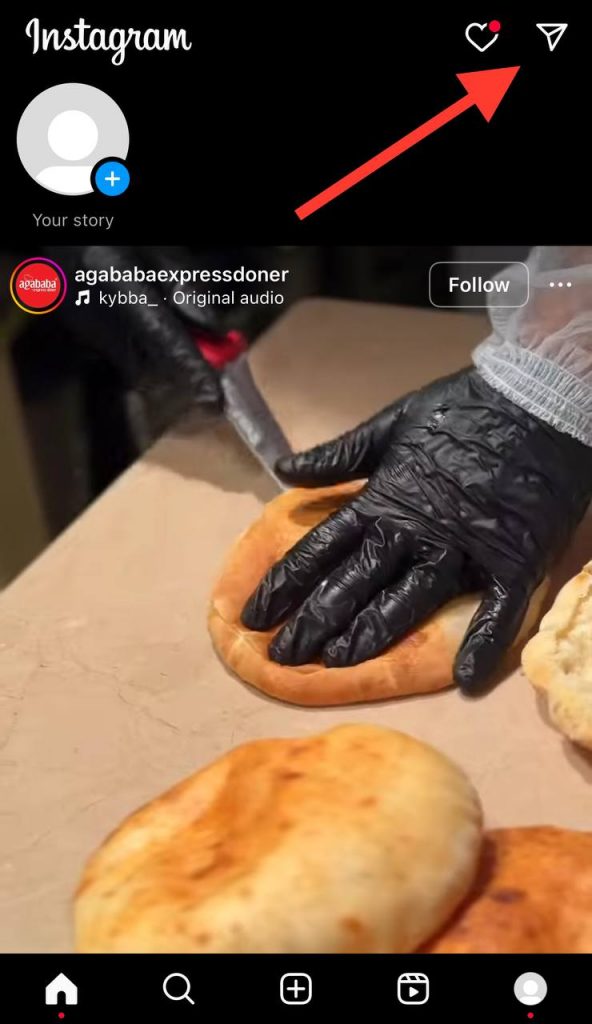
Step 2- Select the chat you want to see anonymously.
Step 3- When you open the inbox, swiftly swipe up on the screen before the chat fully loads. Doing so will prevent the Instagram “seen” feature from being shown on the chat.

Step 4- Now, you have to scroll down the chat without leaving the inbox, preventing the senders from seeing if you have read their messages.
Note that to effectively use this feature, you must be fast and take each step carefully when half-swiping Instagram direct messages.
How to Confirm Half Swiping Works on Instagram Direct Messages?

When using new features of an application like Instagram, it is natural to be worried if they don’t work properly; that is why, in this section, we will explain how you can confirm that the half-swiping feature is working on your Instagram DMs.
Before going any further, there are considerations you better know about this feature:
Note that if multiple unread messages are in a chat, only the last text you read will be marked as “seen” on the screen.
As an example, when you receive a short message, such as a simple “Hi,” which is completely viewable, and when you get a longer message, such as “What are your plans for today?” that is not completely viewable, it will not be marked as read.
Moreover, once you have fully read the whole message on the screen, the other person can see the “seen” under the message, which shows them when you read it.
That is why you must read your DMs as fast as possible without alerting the sender if you want to confirm that you are using this feature correctly.
Finally, to ensure you have half-swept your messages properly, you should return to your direct messages without scrolling to the end of the messages the other person has sent and check for the notification; if it still shows the message as unread, it means you have done the process correctly.
How to Half Swipe on Instagram Stories
Have you ever accidentally opened an Instagram story and wished you could unsee the story? This could be a very bad experience especially if you didn’t want to review a specific story on purpose.
However, using the half swipe feature while checking Instagram stories can prevent opening stories accidentally.
Follow the steps below to half swipe Instagram stories:
Step 1- Open the Instagram app on your iOS or Android device.
Step 2- Select the previous story before the one you want to view.
Step 3- Once the previous story is playing, tap and hold it with your finger.
Step 4- Now, to perform a half swipe, move the story halfway through the screen without lifting your finger.
Step 5- As you half swipe the story, you can see the next story, and the account owner won’t understand you have viewed their story.
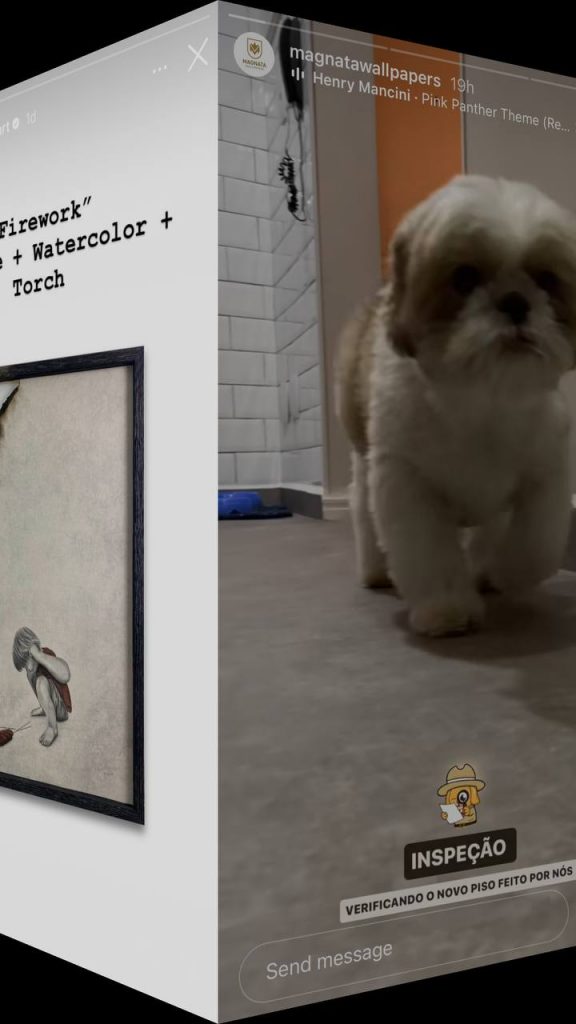
The important point here is that once you half swept the story and checked the content you should swiftly get back to the previous story and skip other stories to ensure that the other person won’t know you viewed their story.
Moreover, it is good to know that if the story you want to half swipe on is a video, you can not watch the video; thus, the half swipe feature on Instagram stories works on images not videos.
Besides, if the user you want to see their stories anonymously has multiple stories, you may not be able to review all their stories.
How to Half Swipe on Instagram Live
As the name suggests, when someone goes live on Instagram, they are showing a moment they are experiencing right now, that is why there is no way you can view an Instagram live anonymously because the host and whoever on the live will notice you have joined to the live.
Saying so, if you are able to swipe half an Instagram live, the other person understands that you have joined their video even for a second.
How to Half Swipe on Instagram Reels
Before learning how to half swipe Instagram Reels, you should note that no one gets notified who visited the reels, so half swiping is not a very useful feature here.
However, you can follow the steps below to half swipe Instagram Reels as direct messages and stories.
Step 1- Open Instagram and select the reel you want to half swipe.
Step 2- Tap on the reel to view it in full format.
Step 3- Slowly scroll down the screen until you can see the next reel. Make sure you won’t scroll way too fast to avoid watching the next reel.

Step 4- Scroll down the video until you can see the next reel, and that is how you can half swipe Instagram Reels.
As mentioned, this feature is not very useful for watching reels if you want to view them anonymously because at the end of the day no one gets notified you have viewed the video.
Tips For More Effective Half Swiping on Instagram

Now that you are familiar with the half swipe feature on Instagram and know how to use it, let’s learn some tips to use it more effectively.
Try in on different content
As said before, to use this feature correctly, you need to balance your speed because sometimes you should move your fingers too fast and sometimes you should do it slowly.
To get the best results using this feature, it is recommended to try it on different contents, such as reels, stories, and direct messages to become a pro.
Stay consistent
If you want to minimize the chances of your name appearing on a viewer’s list of a story or leaving a “seen” on your chats, it is better to keep half swiping Instagram direct messages, reels, and stories until you can do it without any mistakes.
How to Side Swipe on Instagram
Did you know that Instagram has another feature called “side swipe,” which allows you to swipe the Instagram’s homepage to the left and right to access your direct messages and story mode?
If you swipe the homepage to the left, you access your direct messages and can check your new chats and messages or start a new conversation with someone.

However, if you swipe the screen to the right, you can create a new story or share a photo or video with your followers.

Other Ways to Read Instagram Direct Messages Anonymously

If you are still looking for other ways to anonymously check your Instagram direct messages, you can try the below methods:
Enable the airplane mode
When you enable the airplane mode on your mobile, you no longer access the internet, which means you can check your messages offline and the other person won’t notice you have read their messages.
Use third-party applications

There are some third party apps that claim they can help you read Instagram messages secretly, so you can search for these apps and use them; however, it is better to choose tools wisely and be aware of the information you gave them.
Read from the notification bar
Another easy yet helpful way is to read Instagram messages when you receive the notification. Note that you can’t check images, videos, and voice messages from notifications.
Conclusion
Instagram is a great social media platform to share photos and videos to attract attention and build solid relationships with your audiences; however, not everyone wants to view all content on the app, and some people may want to review Instagram stories and direct messages anonymously, so they use the half swipe feature.
Therefore, if you want to maintain more privacy on Instagram or prefer not to be on a viewer’s list of some specific account, this feature is your best option on this app to better use it.
It is good to know that there are other ways to limit your interactions with some accounts, such restricting, unfollowing, or blocking them, but if you don’t want to try other options and just want to secretly view contents, then try using the half swipe feature.
In this comprehensive article, we explained what the half swipe feature is on Instagram, how to use it on direct messages, reels, and stories. We discussed the benefits of using this feature and provided tips to help you better use it on Instagram.
We hope you find this article helpful and try this feature today!
FAQs
Can someone notice you have half swiped their story?
No, Instagram won’t notify the other person you half swiped their stories, and that is the point of using this feature. Therefore, you can use the half swipe feature to open direct messages and view stories without the other person being notified.
Does half swipe work on Instagram chats and stories?
Yes, this feature is still available on Instagram stories and direct messages, which you can use to see content secretly.
Can I half swipe Instagram Lives?
There is no way you can half swipe Instagram lives without the other user understanding, because the host and all other followers will understand your presence on the live video, so you can’t half swipe Instagram lives.
Can I half swipe Instagram posts?
No, this feature does not work on Instagram posts anymore; Instagram used to allow users to leverage this feature to view posts anonymously, but it doesn’t work anymore.

Emi Daniel
Buy an Established Instagram Account
Skip starting from zero. Browse Instagram/TikTok accounts with audiences across many niches.
See Available AccountsRelated articles
-

How to Use Instagram: The Creator’s Guide to Building an Audience
Instagram in 2026 is no longer just a place to collect followers. The creators who grow consistently are the ones who understand how to earn attention, turn…
17 min readEmi Daniel
-

How to Go Live on Instagram: A Step-by-Step Guide
Going live can feel more stressful than posting a Reel. You cannot remove a pause, rewrite a sentence, or start over after an awkward moment. But that…
17 min read -

Instagram Instants Feature: What It Is, How It Works, and How to Turn It Off
The first time I opened Instagram Instants, I almost backed out. I had taken a normal photo. Nothing worth editing. Nothing worth posting. Nothing that needed an…
11 min read