

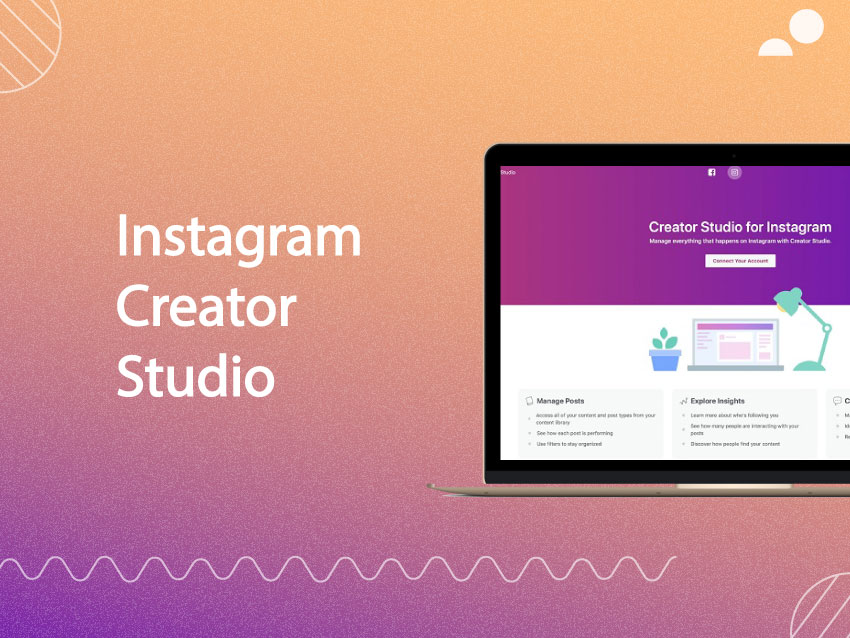
Suppose you are a business or an influencer on Instagram or Facebook. In that case, you need to utilize an effective Instagram management tool and what better tool than the in-house Instagram Creator Studio.
The fact that social media marketing is booming in the digital world is a no-brainer, especially on Instagram, which is the second most populated social media platform.
Moreover, the industry has widely grown since the 2019 global pandemic. E-commerce businesses, brands, and services globally have all started a platform on social media networking platforms making the industry competitive for the businesses and brands. Since this industry has become fierce, connecting to audiences and gaining views, followers, and engagement has become ever more challenging.
Buy an Established Instagram Account
Skip starting from zero. Browse Instagram/TikTok accounts with audiences across many niches.
See Available AccountsHenceforward, as a business or an influencer, if you wish to put your account forward among others in the industry and feel confident about your shared content, you must use the Instagram Creator Studio App.
What’s Facebook And Instagram Creator Studio App?
Well, technically, Instagram Creator Studio was first called the Facebook Creator Studio App because the Facebook Group originally built it for Facebook Pages and users. However, with the popularity of Instagram, the Facebook Group has allowed users to use it for more than their Facebook Page.
Today with the Creator application, you can manage your Facebook Page and your Instagram account both on the app and on your desktop browser.
Facebook Creator Studio is used as a social media marketing tool that helps the Instagram Account or Facebook Page owner to manage their; posts, create publishing schedules, content analysis, Facebook Pages and Instagram accounts monetization and detailed management. All effectively through one user interface and without switching between the two platforms of Instagram and Facebook.
The best part about Facebook and Instagram creator studio is that it has been created by the Facebook Group and is entirely free to be exploited by any Facebook Page and Instagram Account holder.
As long as a user has a business or creator account on Instagram or a Page on Facebook and wishes to boost their social media platform’s presence, they are free to use Facebook and Instagram Creator Studio platforms to create an effective online marketing strategy.
The Advantages of Instagram Creator Studio for Business or Creator Instagram Account Holders
The whole aim of having an Instagram Business or creator account as a brand or an influencer is most probably to generate revenue and create a monetized account.
However, there are a lot of aspects that need to be considered to help your account generate an ROI. Certain elements are controllable and easy to incorporate through Instagram Creator Studio Interface that could give your Instagram account great advantageous, including:
#1. Content Management:
Content Management is primary, and the creator studio will help the user compose, schedule, and upload content all from one place.
#2. Schedule Posts:
The frequency and consistency of posts to your Instagram accounts are vital to monetizing your accounts. So, the creator app’s scheduling feature helps you create post content and publish your post as scheduled without personally being physically behind the device when the scheduled posts are being published.
#3. Update Analysis:
When you use Creator Studio, you will have full access to your engagement, insights, analytics, and audience views on all your pages in one place through the Review updates.
#4. Insight Features:
The Analytics and Insight access features on the Creator Studio is vital to your Instagram account monetization. Insights are analytical tools that give you a detailed understanding of the impact of your posts.
Insights help you recognize your engagements, the amount of time each post is viewed, the number of followers reached, the gender and age of audiences, and the online activity of your audiences. Moreover, Creator Studio will identify the most engaged with times and Instagram content posts that are generating the most engagement based on the data received from the insights.
#5. Audience and Follower Insights:
Instagram Creator Studio gives users access to detailed audience data like your followers and audiences ages, genders, activity times, countries, cities, and likes on your Facebook page or Instagram account.
#6. Monetization Opportunity:
When you use Creator Studio, you’ll benefit from creating post content and knowing when the post is ready to generate monetization for your profile.
#7. Content Protection:
The Creator Studio helps the creators manage their content and hold their post rights regarding their intellectual properties.
#8. Music and Sound Content Library:
The Creator Studio interface provides a content library of royalty-free and copyright-cleared music and sounds that are free to use for the business or creator accounts within their video content posts, Instagram Feed, and IGTV Videos.
#9. Audience / Followers Response:
To manage and monetize your Instagram accounts or Facebook Pages, one needs to be responsive towards its viewers. Hence the crucial benefit to using creator studio to manage your audiences and followers’ questions, responses, direct messages (DMs), and comments on your different accounts and pages. Creator Studio enables the user to directly manage mass automation responses for comments and DMs from the creator studio’s interface.
Instagram Creator Studio And An Effective Social Media Marketing Strategy For Both Your Facebook And Instagram Account
As a content creator who wishes to have an effective Social Media Marketing Strategy on your Instagram account or Facebook Page, you need to use Creator Studio features and tools. Through our help, we’ll teach you how to use these tools and features to their full potential to create the best social networking marketing strategy for your business, brand, or creator profile.
Using Creator Studio Tools, you could create:
- Both Instagram and Facebook content Video, photo, carousel, stories, and IGTV Videos posts that provide account and page depth and essence required to connect with viewers.
- The collection of information from multiple accounts and pages all in Creator Studio. To help the creator better manage their marketing strategy roadmap for different platforms all in one location.
- Using Creator Studio to manage multiple platforms’ online Facebook or Instagram content all in one interface.
As a content creator, by utilizing the features and tools on Creator Studio for the social networking strategies, you could:
#1. Efficiency In Time
If you are a content creator manager, a marketer, a business owner, or an influencer, you would most probably have more than two accounts. May it be under the same name on different platforms on Instagram and Facebook or a couple of profiles under one platform, it is the norm to have a few accounts.
So, it would be understandable that overviewing multiple profiles will be overwhelming to manage. But, with Creator Studio, you can efficiently save time by managing all your pages from one desktop browser or app and without having to go through numerous logins or browsers.
#2. Manage And Publish Your Post Effectively
Post upload is critical, and although every separate post is essential, the overall Instagram Feed is also vital to your engagement insights. The videos, image posts, IGTV Videos, or stories you upload will later define your brand, Instagram Feed, and screen impression to viewers. So seeing posts in one setting helps you manage, identify, and upload content that creates an all-inclusive feed, posts, and brand look.
#3. Scheduling Posts For Frequency And Consistency
Scheduling your Post upload frequency and consistency will be crucial to your page and profile monetization, so having settings that allow you to schedule posts is very beneficial. Use the Creator Studio app to schedule and plan out your posting upload times, schedule the frequency, and consistency based on the schedule of the best times to post. Through scheduled posts, you could maintain your user engagements and brand ROI.
#4. Analytics And Insights Settings For Creators
Using Creator Studio, you could understand the analytics and insights of your networking pages to determine whether you are meeting your objectives and reaching your target audience. We recommend doing constant analytics and insight data checks to stay informed of your platform’s progress with the social networking campaign strategy you have in place. Using Creator Studio insights, your profile analysis is made easy because it’s apparent all on one screen.
#5. A Monetized Platform
Suppose you wish to have a monetized platform. You definitely need to subscribe to Creator Studio because using this application will help you understand your eligibility to become a monetized profile. It will analyze your posts, video content, and ads while helping you maintain your monetary KPIs, Key Performance Indicators.
#6. Free Content Library
Through free access to the content library on Creator Studio, you won’t have the hassle of looking for royalty-free and copyright-cleared music and sounds. Mainly as a brand or a creator page, you should know that using copyright music and sounds could imply legal issues. So using the free library on Creator Studio would be your wisest choice to keep your posts engaging, being in line with Instagram and Facebook’s Terms and Conditions, and spending the least amount of time on post creations.
#7. Content Protection
Using the Creator Studio Application, you could protect the original audio, video, and image content you post from plagiarism and reposting by other creators. You could save your Instagram content from plagiarism by other profiles and pages through the proper settings, features, and functionalities.
Instagram Creator Studio For Your Facebook and Instagram Account And Social Media Marketing Strategy
All in all, if you have a business, brand, or creator Instagram account and you wish to monetize your profile, create an ROI, connect to your target audience, impact your viewers, increase your followers, and drive viewers towards your websites. You must learn to manage your profiles through Instagram Creator Studio for the best chance of having an effective Social Media Marketing Strategy.

Emi Daniel
Buy an Established Instagram Account
Skip starting from zero. Browse Instagram/TikTok accounts with audiences across many niches.
See Available AccountsRelated articles
-
How to Clear Instagram Cache on iPhone, Android & Desktop
Instagram can quietly build up a lot of temporary files while you scroll through Reels, watch Stories, save posts, and upload your own content. You may not…
12 min readEmi Daniel
-
How to See Who Reposted Your Instagram Post (2026 Guide)
Someone reposted your Instagram post, but you have no idea who it was. You check notifications, search through your profile, and still cannot find a clear answer. …
18 min read -
How to Reset Instagram Algorithm in 2026
Instagram can start showing too much of the same type of content. Your Explore page may no longer match your interests, Reels may feel repetitive, or suggested…
12 min read